
几种content-type提交以及$_POST 和php://input
在表单提交数据时,需要告诉服务端自己的content-type,好让服务端处理。
默认表单提交是x-www-form-urlencoded,还有一种常见的 multipart/form-data。那这俩的区别是啥呢?
在postman工具中,很容易看出来二者的区别。
x-www-form-urlencoded:

查看http请求:
POST /hi.php HTTP/1.1

Host: localhost

Content-Type: application/x-www-form-urlencoded

Cache-Control: no-cache

Postman-Token: a1054dd4-5f58-038c--326721c85a7a

id=%2B1&val=
在 x-www-form-urlencoded中,body体中是key=value&key=xx形式,并且是urlencode后的。
multipart/form-data:

查看http请求:
POST /hi.php HTTP/1.1

Host: localhost

Content-Type: multipart/form-data; boundary=----WebKitFormBoundary7MA4YWxkTrZu0gW

Cache-Control: no-cache

Postman-Token: dddb1f15-348b-5e3f-244c-aa0d8680bd3d

------WebKitFormBoundary7MA4YWxkTrZu0gW

Content-Disposition: form-data; name="id"

+

------WebKitFormBoundary7MA4YWxkTrZu0gW

Content-Disposition: form-data; name="val"

------WebKitFormBoundary7MA4YWxkTrZu0gW--
form-data中含有boundary=----***
常见的content-type还有一种json形式:
Content-Type: application/json
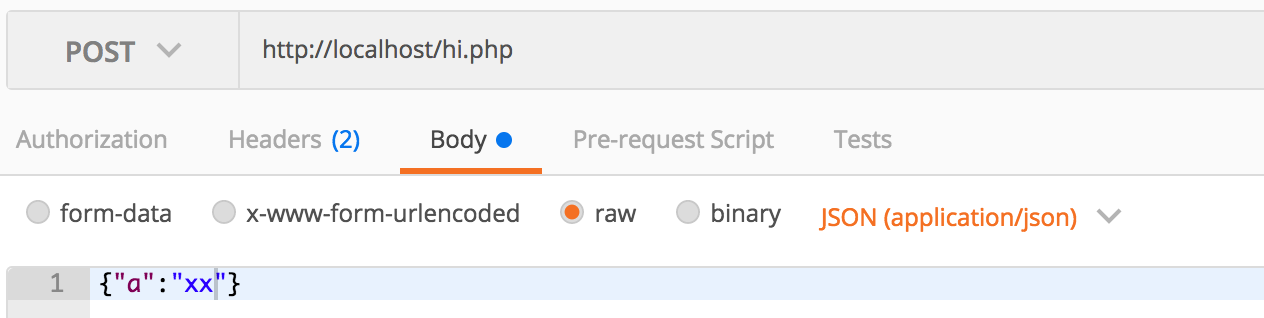
查看http请求:
POST /hi.php HTTP/1.1

Host: localhost

Content-Type: application/json

Cache-Control: no-cache

Postman-Token: 38f8844e-bd9f-a892-5107-a3f4e6b81a41

{"a":"xx"}
再看下$_POST和php://input的区别联系
利用一段测试代码:
<?php

$arr = $_POST;

$raw_post_data = file_get_contents('php://input', 'r');

file_put_contents('hsd.log', "\$_POST\r\n".print_r($arr,true)."\r\n", FILE_APPEND);

file_put_contents('hsd.log', "php://input\r\n".print_r($raw_post_data,true)."\r\n", FILE_APPEND);

file_put_contents('hsd.log', "content_type: ".print_r($_SERVER['HTTP_CONTENT_TYPE'],true)."\r\n", FILE_APPEND);

file_put_contents('hsd.log', print_r("====================",true)."\r\n", FILE_APPEND);
在几种content-type表现如下:(php version 5.5.3)
1. 当是x-www-form-urlencoded时,
$_POST

Array

(

    [id] => 1+1

    [val] => 44753

)

php://input

id=1%2B1&val=44753

content_type: application/x-www-form-urlencoded
php://input中的形式和body体中是一样的,同样是urlencode过的。
2. 当是 multipart/form-data时,
$_POST

Array

(

    [id] => 1+111

    [val] => 44753

)

php://input

content_type: multipart/form-data; boundary=----WebKitFormBoundaryUUacTtaG65hX7g6y
发现$_POST依然可以获取到参数。此时php://input 获取不到值。
(测试在hhvm HipHop VM 3.0.1;baidu version:1.0.6.4 php://input可以获取到multipart/form-data 提交参数)如下:
$_POST

Array

(

    [id] => 1+111

    [val] => 44753

)

php://input

------WebKitFormBoundaryxHArWQUlukzFfZAb

Content-Disposition: form-data; name="id"

1+111

------WebKitFormBoundaryxHArWQUlukzFfZAb

Content-Disposition: form-data; name="val"

44753

------WebKitFormBoundaryxHArWQUlukzFfZAb--

content_type: multipart/form-data; boundary=----WebKitFormBoundaryxHArWQUlukzFfZAb
3. 当是application/json时,
$_POST

Array

(

)

php://input

{"a":"xx"}

content_type: application/json
此时,$_POST获取不到提交参数。php://input 可以获取到。这种json提交数据,php接收参数需要使用 file_get_contents('php://input', 'r')。
总结:
$_POST只能获取到form提交的数据,而php://input获取不到 multipart/form-data提交的数据。
这里顺便提下,如何提交给php获取$_POST的key=>value是数组形式。
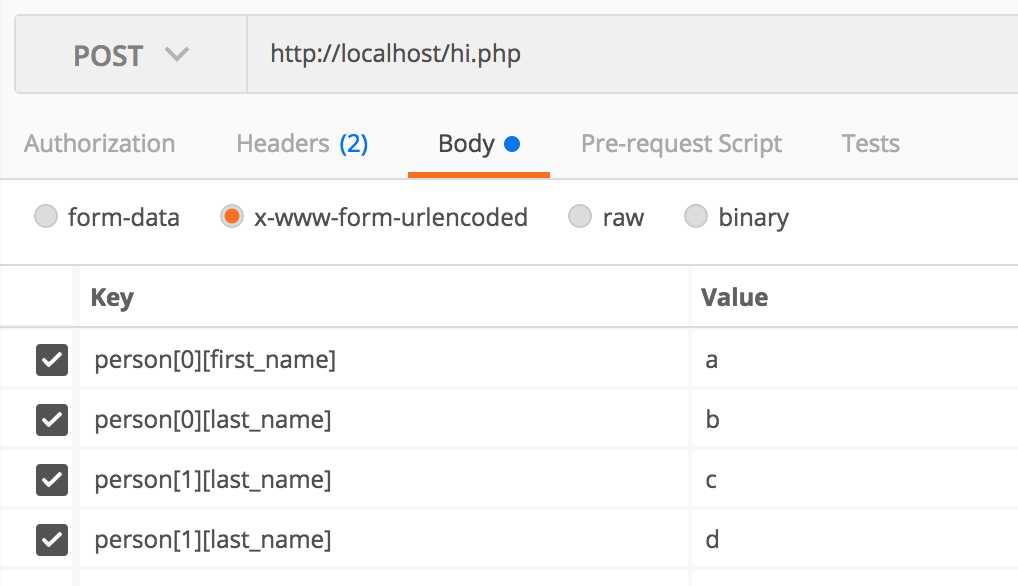
$arrParams = array(

            'person[0][first_name]' => 1,

            'person[0][last_name]' => 1,

            'person[1][first_name]' => 111,

            'person[1][last_name]' => 222,

        );
这样$_POST['person'] 就是个二维数组了。
$_POST

Array

(

    [person] => Array

        (

            [0] => Array

                (

                    [first_name] => a

                    [last_name] => b

                )

            [1] => Array

                (

                    [last_name] => d

                )

        )

)

php://input

person%5B0%5D%5Bfirst_name%5D=a&person%5B0%5D%5Blast_name%5D=b&person%5B1%5D%5Blast_name%5D=c&person%5B1%5D%5Blast_name%5D=d

content_type: application/x-www-form-urlencoded
几种content-type提交以及$_POST 和php://input的更多相关文章
- 转载 SharePoint【Site Definition 系列】– 创建Content Type
转载原地址: http://www.cnblogs.com/wsdj-ITtech/archive/2012/09/01/2470274.html Sharepoint本身就是一个丰富的大容器,里面 ...
- the request doesn't contain a multipart/form-data or multipart/form-data stream, content type header
the request doesn't contain a multipart/form-data or multipart/form-data stream, content type header ...
- php表单提交 图片、音乐、视频、文字,四种类型共同提交到数据库
这个问题一直困扰了我好几天,终于在今天让我给解决了,难以掩饰的激动. 其实在之前没有接触到这种问题,只是表单提交数据而已,再就是图片,四种类型同时提交还真是没遇到过,做了一个系统,其中有一个功能就是提 ...
- 今天在研究jquery用ajax提交form表单中得数据时,学习到了一种新的提交方式
今天在研究jquery用ajax提交form表单中得数据时,学习到了一种新的提交方式 jquery中的serialize() 方法 该方法通过序列化表单值,创建 URL 编码文本字符串 序列化的值可在 ...
- Springs Element 'beans' cannot have character [children], because the type's content type is element-only
Springs Element 'beans' cannot have character [children], because the type's content type is element ...
- .NET获取文件的MIME类型(Content Type)
第一种:这种获取MIME类型(Content Type)的方法需要在.NET 4.5之后才能够支持,但是非常简单. 优点:方便快捷 缺点:只能在.NET 4.5之后使用 public FileResu ...
- org.springframework.web.HttpMediaTypeNotSupportedException: Content type 'application/json;charset=UTF-8' not supported或其他Content type不支持处理
很久没从头到尾搭框架,今天搭的过程中,springmvc controller方法入参用@RequestBody自动绑定参数时一直提示各种 not supported 排查问题有两个解决路径: 1)使 ...
- jmeter报"msg":"Content type 'application/x-www-form-urlencoded;charset=UTF-8' not supported"的解决方法
1.报"msg":"Content type 'application/x-www-form-urlencoded;charset=UTF-8' not supporte ...
- Java之POI读取Excel的Package should contain a content type part [M1.13]] with root cause异常问题解决
Java之POI读取Excel的Package should contain a content type part [M1.13]] with root cause异常问题解决 引言: 在Java中 ...
随机推荐
- Kotlin入门(23)适配器的进阶表达
前面在介绍列表视图和网格视图时,它们的适配器代码都存在视图持有者ViewHolder,因为Android对列表类视图提供了回收机制,如果某些列表项在屏幕上看不到了,则系统会自动回收相应的视图对象.随着 ...
- [转] Vue生命周期
Vue生命周期 这是Vue文档里关于实例生命周期的解释图 那么下面我们来进行测试一下 <section id="app-8"> {{data}} </sectio ...
- python的内置函数time
time 模块 1 >>> import time 2 >>> time.time() 3 1491064723.808669 4 >>> # t ...
- LeetCode题解之Clone Graph
1.题目描述 2.问题分析 要遍历图,然后标记没有被复制的节点. 3.代码 class Solution { private: unordered_map<Node*, Node*> m; ...
- C#编辑EXE使用的appSettings节点的Config文件
/// <summary> /// 保存配置文件的设定 /// </summary> /// <param name="Key"></pa ...
- python爬虫之12306网站--火车票信息查询
python爬虫之12306网站--火车票信息查询 思路: 1.火车票信息查询是基于车站信息查询,先完成车站信息查询,然后根据车站信息查询生成的url地址去查询当前已知出发站和目的站的所有车次车票信息 ...
- 我为什么要写 blog?
从事软件测试工作10余年,也没在网上留下些什么.最近忙着找工作,年龄上又遇到了瓶颈,发现好多工作岗位需要技术博客,正好趁这个机会,梳理一下自己的知识点,记录下来和大家一起学习探讨,共同进步.欢迎加我微 ...
- 20个必不可少的Python库
转载:http://www.python123.org/tutorials/58b41f2a28c8f30100bd41dc 读者们好.今天我将介绍20个属于我常用工具的Python库,我相信你看完之 ...
- C#基础知识之托管代码和非托管代码
什么是托管代码(managed code)? 托管代码(Managed Code)就是中间语言(IL)代码,在公共语言运行库(CLR)中运行.编译器把代码编译成中间语言,当方法被调用时,CLR把具体的 ...
- 【HNOI2013】切糕
[HNOI2013]切糕 Sample Input 2 2 2 1 6 1 6 1 2 6 2 6 Sample Output 6 \(P,Q,R≤40,0≤D≤R\) 参考:https://blog ...