
[转]windows BLE编程 net winform 连接蓝牙4.0
本文转自:https://www.cnblogs.com/webtojs/p/9675956.html
winform 程序调用Windows.Devices.Bluetoot API 实现windows下BLE蓝牙设备自动连接,收发数据功能。不需要使用win10的UWP开发。
先贴图,回头来完善代码
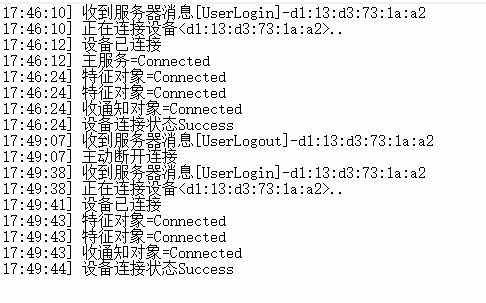

源码如下:

using System;
using System.Collections.Generic;
using System.Linq;
using System.Text;
using System.Threading.Tasks;
using Windows.Devices.Bluetooth;
using Windows.Devices.Bluetooth.GenericAttributeProfile;
using Windows.Devices.Enumeration;
using Windows.Foundation;
using Windows.Security.Cryptography; namespace BLECode
{
public class BluetoothLECode
{
//存储检测的设备MAC。
public string CurrentDeviceMAC { get; set; }
//存储检测到的设备。
public BluetoothLEDevice CurrentDevice { get; set; }
//存储检测到的主服务。
public GattDeviceService CurrentService { get; set; }
//存储检测到的写特征对象。
public GattCharacteristic CurrentWriteCharacteristic { get; set; }
//存储检测到的通知特征对象。
public GattCharacteristic CurrentNotifyCharacteristic { get; set; } public string ServiceGuid { get; set; } public string WriteCharacteristicGuid { get; set; }
public string NotifyCharacteristicGuid { get; set; } private const int CHARACTERISTIC_INDEX = 0;
//特性通知类型通知启用
private const GattClientCharacteristicConfigurationDescriptorValue CHARACTERISTIC_NOTIFICATION_TYPE = GattClientCharacteristicConfigurationDescriptorValue.Notify; private Boolean asyncLock = false; private DeviceWatcher deviceWatcher; //定义一个委托
public delegate void eventRun(MsgType type, string str,byte[] data=null);
//定义一个事件
public event eventRun ValueChanged; public BluetoothLECode(string serviceGuid, string writeCharacteristicGuid, string notifyCharacteristicGuid)
{
ServiceGuid = serviceGuid;
WriteCharacteristicGuid = writeCharacteristicGuid;
NotifyCharacteristicGuid = notifyCharacteristicGuid;
} public void StartBleDeviceWatcher()
{ string[] requestedProperties = { "System.Devices.Aep.DeviceAddress", "System.Devices.Aep.IsConnected", "System.Devices.Aep.Bluetooth.Le.IsConnectable" };
string aqsAllBluetoothLEDevices = "(System.Devices.Aep.ProtocolId:=\"{bb7bb05e-5972-42b5-94fc-76eaa7084d49}\")"; deviceWatcher =
DeviceInformation.CreateWatcher(
aqsAllBluetoothLEDevices,
requestedProperties,
DeviceInformationKind.AssociationEndpoint); // Register event handlers before starting the watcher.
deviceWatcher.Added += DeviceWatcher_Added;
deviceWatcher.Stopped += DeviceWatcher_Stopped;
deviceWatcher.Start();
string msg = "自动发现设备中.."; ValueChanged(MsgType.NotifyTxt, msg);
} private void DeviceWatcher_Stopped(DeviceWatcher sender, object args)
{
string msg = "自动发现设备停止";
ValueChanged(MsgType.NotifyTxt, msg);
} private void DeviceWatcher_Added(DeviceWatcher sender, DeviceInformation args)
{
ValueChanged(MsgType.NotifyTxt, "发现设备:" + args.Id);
if (args.Id.EndsWith(CurrentDeviceMAC))
{
Matching(args.Id);
} } /// <summary>
/// 按MAC地址查找系统中配对设备
/// </summary>
/// <param name="MAC"></param>
public async Task SelectDevice(string MAC)
{
CurrentDeviceMAC = MAC;
CurrentDevice = null;
DeviceInformation.FindAllAsync(BluetoothLEDevice.GetDeviceSelector()).Completed = async (asyncInfo, asyncStatus) =>
{
if (asyncStatus == AsyncStatus.Completed)
{
DeviceInformationCollection deviceInformation = asyncInfo.GetResults();
foreach (DeviceInformation di in deviceInformation)
{
await Matching(di.Id);
}
if (CurrentDevice == null)
{
string msg = "没有发现设备";
ValueChanged(MsgType.NotifyTxt, msg);
StartBleDeviceWatcher();
}
}
};
}
/// <summary>
/// 按MAC地址直接组装设备ID查找设备
/// </summary>
/// <param name="MAC"></param>
/// <returns></returns>
public async Task SelectDeviceFromIdAsync(string MAC)
{
CurrentDeviceMAC = MAC;
CurrentDevice = null;
BluetoothAdapter.GetDefaultAsync().Completed = async (asyncInfo, asyncStatus) =>
{
if (asyncStatus == AsyncStatus.Completed)
{
BluetoothAdapter mBluetoothAdapter = asyncInfo.GetResults();
byte[] _Bytes1 = BitConverter.GetBytes(mBluetoothAdapter.BluetoothAddress);//ulong转换为byte数组
Array.Reverse(_Bytes1);
string macAddress = BitConverter.ToString(_Bytes1, 2, 6).Replace('-', ':').ToLower();
string Id = "BluetoothLE#BluetoothLE" + macAddress + "-" + MAC;
await Matching(Id);
} }; } private async Task Matching(string Id)
{ try
{
BluetoothLEDevice.FromIdAsync(Id).Completed = async (asyncInfo, asyncStatus) =>
{
if (asyncStatus == AsyncStatus.Completed)
{
BluetoothLEDevice bleDevice = asyncInfo.GetResults();
//在当前设备变量中保存检测到的设备。
CurrentDevice = bleDevice;
await Connect(); }
};
}
catch (Exception e)
{
string msg = "没有发现设备" + e.ToString();
ValueChanged(MsgType.NotifyTxt, msg);
StartBleDeviceWatcher();
} } private async Task Connect()
{
string msg = "正在连接设备<" + CurrentDeviceMAC + ">..";
ValueChanged(MsgType.NotifyTxt, msg);
CurrentDevice.ConnectionStatusChanged += CurrentDevice_ConnectionStatusChanged;
await SelectDeviceService(); } /// <summary>
/// 主动断开连接
/// </summary>
/// <returns></returns>
public void Dispose()
{ CurrentDeviceMAC = null;
CurrentService?.Dispose();
CurrentDevice?.Dispose();
CurrentDevice = null;
CurrentService = null;
CurrentWriteCharacteristic = null;
CurrentNotifyCharacteristic = null;
ValueChanged(MsgType.NotifyTxt, "主动断开连接"); } private void CurrentDevice_ConnectionStatusChanged(BluetoothLEDevice sender, object args)
{
if (sender.ConnectionStatus == BluetoothConnectionStatus.Disconnected && CurrentDeviceMAC != null)
{
string msg = "设备已断开,自动重连";
ValueChanged(MsgType.NotifyTxt, msg);
if (!asyncLock)
{
asyncLock = true;
CurrentDevice.Dispose();
CurrentDevice = null;
CurrentService = null;
CurrentWriteCharacteristic = null;
CurrentNotifyCharacteristic = null;
SelectDeviceFromIdAsync(CurrentDeviceMAC);
} }
else
{
string msg = "设备已连接";
ValueChanged(MsgType.NotifyTxt, msg);
}
}
/// <summary>
/// 按GUID 查找主服务
/// </summary>
/// <param name="characteristic">GUID 字符串</param>
/// <returns></returns>
public async Task SelectDeviceService()
{
Guid guid = new Guid(ServiceGuid);
CurrentDevice.GetGattServicesForUuidAsync(guid).Completed = (asyncInfo, asyncStatus) =>
{
if (asyncStatus == AsyncStatus.Completed)
{
try
{
GattDeviceServicesResult result = asyncInfo.GetResults();
string msg = "主服务=" + CurrentDevice.ConnectionStatus;
ValueChanged(MsgType.NotifyTxt, msg);
if (result.Services.Count > 0)
{
CurrentService = result.Services[CHARACTERISTIC_INDEX];
if (CurrentService != null)
{
asyncLock = true;
GetCurrentWriteCharacteristic();
GetCurrentNotifyCharacteristic(); }
}
else
{
msg = "没有发现服务,自动重试中";
ValueChanged(MsgType.NotifyTxt, msg);
SelectDeviceService();
}
}
catch (Exception e)
{
ValueChanged(MsgType.NotifyTxt, "没有发现服务,自动重试中");
SelectDeviceService(); }
}
};
} /// <summary>
/// 设置写特征对象。
/// </summary>
/// <returns></returns>
public async Task GetCurrentWriteCharacteristic()
{ string msg = "";
Guid guid = new Guid(WriteCharacteristicGuid);
CurrentService.GetCharacteristicsForUuidAsync(guid).Completed = async (asyncInfo, asyncStatus) =>
{
if (asyncStatus == AsyncStatus.Completed)
{
GattCharacteristicsResult result = asyncInfo.GetResults();
msg = "特征对象=" + CurrentDevice.ConnectionStatus;
ValueChanged(MsgType.NotifyTxt, msg);
if (result.Characteristics.Count > 0)
{
CurrentWriteCharacteristic = result.Characteristics[CHARACTERISTIC_INDEX];
}
else
{
msg = "没有发现特征对象,自动重试中";
ValueChanged(MsgType.NotifyTxt, msg);
await GetCurrentWriteCharacteristic();
}
}
};
} /// <summary>
/// 发送数据接口
/// </summary>
/// <param name="characteristic"></param>
/// <param name="data"></param>
/// <returns></returns>
public async Task Write(byte[] data)
{
if (CurrentWriteCharacteristic != null)
{
CurrentWriteCharacteristic.WriteValueAsync(CryptographicBuffer.CreateFromByteArray(data), GattWriteOption.WriteWithResponse);
} } /// <summary>
/// 设置通知特征对象。
/// </summary>
/// <returns></returns>
public async Task GetCurrentNotifyCharacteristic()
{
string msg = "";
Guid guid = new Guid(NotifyCharacteristicGuid);
CurrentService.GetCharacteristicsForUuidAsync(guid).Completed = async (asyncInfo, asyncStatus) =>
{
if (asyncStatus == AsyncStatus.Completed)
{
GattCharacteristicsResult result = asyncInfo.GetResults();
msg = "特征对象=" + CurrentDevice.ConnectionStatus;
ValueChanged(MsgType.NotifyTxt, msg);
if (result.Characteristics.Count > 0)
{
CurrentNotifyCharacteristic = result.Characteristics[CHARACTERISTIC_INDEX];
CurrentNotifyCharacteristic.ProtectionLevel = GattProtectionLevel.Plain;
CurrentNotifyCharacteristic.ValueChanged += Characteristic_ValueChanged;
await EnableNotifications(CurrentNotifyCharacteristic); }
else
{
msg = "没有发现特征对象,自动重试中";
ValueChanged(MsgType.NotifyTxt, msg);
await GetCurrentNotifyCharacteristic();
}
}
};
} /// <summary>
/// 设置特征对象为接收通知对象
/// </summary>
/// <param name="characteristic"></param>
/// <returns></returns>
public async Task EnableNotifications(GattCharacteristic characteristic)
{
string msg = "收通知对象=" + CurrentDevice.ConnectionStatus;
ValueChanged(MsgType.NotifyTxt, msg); characteristic.WriteClientCharacteristicConfigurationDescriptorAsync(CHARACTERISTIC_NOTIFICATION_TYPE).Completed = async (asyncInfo, asyncStatus) =>
{
if (asyncStatus == AsyncStatus.Completed)
{
GattCommunicationStatus status = asyncInfo.GetResults();
if (status == GattCommunicationStatus.Unreachable)
{
msg = "设备不可用";
ValueChanged(MsgType.NotifyTxt, msg);
if (CurrentNotifyCharacteristic != null && !asyncLock)
{
await EnableNotifications(CurrentNotifyCharacteristic);
}
}
asyncLock = false;
msg = "设备连接状态" + status;
ValueChanged(MsgType.NotifyTxt, msg);
}
};
} private void Characteristic_ValueChanged(GattCharacteristic sender, GattValueChangedEventArgs args)
{
byte[] data;
CryptographicBuffer.CopyToByteArray(args.CharacteristicValue, out data);
string str = BitConverter.ToString(data);
ValueChanged(MsgType.BLEData,str, data); }
} public enum MsgType
{
NotifyTxt,
BLEData
}
}
调用方式:
           bluetooth = new BluetoothLECode(_serviceGuid, _writeCharacteristicGuid, _notifyCharacteristicGuid);

            bluetooth.ValueChanged += Bluetooth_ValueChanged;
如果你无法编译上面的类库,请直接使用我生成的DLL文件
https://files.cnblogs.com/files/webtojs/BLECode.rar
[转]windows BLE编程 net winform 连接蓝牙4.0的更多相关文章
- windows BLE编程 net winform 连接蓝牙4.0
winform 程序调用Windows.Devices.Bluetoot API 实现windows下BLE蓝牙设备自动连接,收发数据功能.不需要使用win10的UWP开发. 先贴图,回头来完善代码 ...
- Windows 10下怎么远程连接 Ubuntu 16.0.4(方案二)
使用TeamViewer实现远程桌面连接 背景: 有些朋友反映,借助Ubuntu自带的桌面共享工具desktop sharing会有不再同一网端下出现连接不稳定或者掉线的问题,那么现在我们就可以借助第 ...
- Windows 10下怎么远程连接 Ubuntu 16.0.4(小白级教程)
前言: 公司因为用Ruby做开发,所有适用了Ubuntu系统,但是自己笔记本是W10,又不想装双系统,搭建开发环境,便想到倒不如自己远程操控公司电脑,这样在家的时候也可以处理一些问题.故此便有了下面的 ...
- 蓝牙4.0(包含BLE)简介
1. BLE (低功耗蓝牙)简介 国际蓝牙联盟( BT-SIG,TI 是 企业成员之一)通过的一个标准蓝牙无线协议. 主要的新特性是在蓝牙标准版本上添加了4.0 蓝牙规范 (2010 年6 月 ...
- iOS蓝牙BLE4.0通信功能
概述 iOS蓝牙BLE4.0通信功能,最近刚学的苹果,为了实现蓝牙门锁的项目,找了一天学习了下蓝牙的原理,亲手测试了一次蓝牙的通信功能,结果成功了,那么就把我学习的东西分享一下. 详细 代码下载:ht ...
- 基于蓝牙4.0(Bluetooth Low Energy)胎压监测方案设计
基于一种新的蓝牙技术——蓝牙4.0(Bluetooth Low Energy)新型的胎压监测系统(TPMS)的设计方案.鉴于蓝牙4.0(Bluetooth Low Energy)的低成本.低功耗.高稳 ...
- Android项目实战(三十四):蓝牙4.0 BLE 多设备连接
最近项目有个需求,手机设备连接多个蓝牙4.0 设备 并获取这些设备的数据. 查询了很多资料终于实现,现进行总结. ------------------------------------------- ...
- android4.3 蓝牙BLE编程
一.蓝牙4.0简介 蓝牙4.0标准包含两个蓝牙标准,准确的说,是一个双模的标准,它包含传统蓝牙部分(也有称之为经典蓝牙Classic Bluetooth)和低功耗蓝牙部分(Bluetooth Low ...
- Android5.0(Lollipop) BLE蓝牙4.0+浅析demo连接(三)
作者:Bgwan链接:https://zhuanlan.zhihu.com/p/23363591来源:知乎著作权归作者所有.商业转载请联系作者获得授权,非商业转载请注明出处. Android5.0(L ...
随机推荐
- android-基础编程-Notification
Notification 的创建主要涉及到 Notification.Builder . Notification . NotificationManager . Notification.Buile ...
- H3C 路由策略(人为打环)
拓扑如上 任务1:去除环路双ospf 引入 造成路由环路一边是 1 一边是10关掉任意lo口都会生成新的路由表 但是路由表指向不对 变成了一个圆 我们可以采用引入路由打上tag ...
- 原生AJAX(包括Fetch)
一.INTRO AJAX即“Asynchronous Javascript And XML” 一.Ajax的原生初级 1.1 Ajax对象创建:var xhr= new XMLHttpRequest( ...
- jwt vs session 以rails 为例 (翻译部分)
原文地址:https://pragmaticstudio.com/tutorials/rails-session-cookies-for-api-authentication 普通方式: 令牌为基础的 ...
- #227 Generate Random Whole Numbers within a Range
我们之前生成的随机数是在0到某个数之间,现在我们要生成的随机数是在两个指定的数之间. 我们需要定义一个最小值和一个最大值. 下面是我们将要使用的方法,仔细看看并尝试理解这行代码到底在干嘛: Math. ...
- [转]kaldi基于GMM做分类问题
转自:http://blog.csdn.net/zjm750617105/article/details/55211992 对于每个类别的GMM有几种思路: 第一是将所有训练数据按类别分开,每类的数据 ...
- 《JavaScript》高级程序设计第21章:Ajax和Comet,jsonp
一.创建XMLHttpRequest对象 二.XHR的用法 五.跨域资源共享 六.其他跨域技术七.安全七.安全 1. 图像Ping 2. JSONP(JSON with padding,填充式JSON ...
- 谈一款MOBA类游戏《码神联盟》的服务端架构设计与实现(更新优化思路)
注:本文仅用于在博客园学习分享,还在随着项目不断更新和完善中,多有不足,暂谢绝各平台或个人的转载和推广,感谢支持. 一.前言 <码神联盟>是一款为技术人做的开源情怀游戏,每一种编程语言都是 ...
- Javascript高级编程学习笔记(50)—— DOM2和DOM3(2)样式
样式 在HTML中定义元素的方式有以下三种: 1.link标签引入外部样式表 2.style标签定义嵌入样式 3.通过JS中对style特性定义元素样式(行内样式) “DOM2级样式”围绕上述样式机制 ...
- 1.ActionBar
ActionBar低版本和高版本用法不同 低版本:1. 引用v7-appcompat2. Activity继承ActionBarActivity3. android:theme="@styl ...