
使用CBrother的CLIB库调用windows的API
使用CBrother的CLIB库调用windows的API
2.1.0版本CBrother加入了CLib库,最新需要写一个工具,根据路径查杀一个Windows进程,研究了一下,CLib库的用法,感觉还是比较灵活的。
首先我要明确每一个API在系统的哪一个dll里面,我一般都是去微软官网查这个API。(https://docs.microsoft.com/zh-cn/windows/win32/api/),
比如我查OpenProcess这个API,查到如下内容
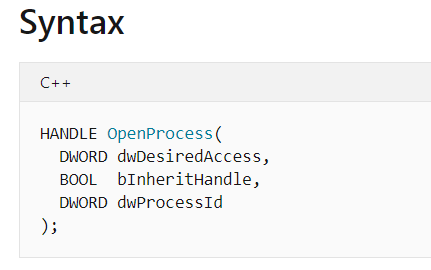

在Kernel32.dll里面,其他用到的API也都是这样获取信息,下面就可以写代码了。
 import CBCLib.code

 var g_kernel32_init = false;                    //kernel32.dll 是否初始化

 var g_kernel32 = null;                          //Kernel32.dll 句柄

 var g_kernel32_OpenProcess = null;              //OpenProcess函数

 var g_kernel32_CloseHandle = null;              //CloseHandle函数

 var g_kernel32_GetModuleFileNameExA = null;     //GetModuleFileNameExA函数

 var g_kernel32_GetLogicalDriveStringsA = null;  //GetLogicalDriveStringsA函数

 var g_kernel32_QueryDosDeviceA = null;          //QueryDosDeviceA函数

 var g_psapi_init = false;                       //psapi.dll 是否初始化

 var g_psapi = null;                             //psapi.dll 句柄

 var g_psapi_GetProcessImageFileNameA = null;    //GetProcessImageFileNameA函数

 const MAX_PATH = 1024;

 //获取kernel32.dll里面的函数

 function initkernel32()

 {

     if (g_kernel32_init)

     {

         return;

     }

     g_kernel32_init = true;

     g_kernel32 = new CLib("kernel32.dll");

     if(!g_kernel32.load())

     {

         print "kernel32.dll load err!";

         return;

     }

     //根据函数原型和CLib库类型对应关系写参数列表

     g_kernel32_OpenProcess = g_kernel32.findFunc("OpenProcess","pointer","int","bool","int");

     g_kernel32_CloseHandle = g_kernel32.findFunc("CloseHandle","bool","int");

     g_kernel32_GetModuleFileNameExA = g_kernel32.findFunc("K32GetModuleFileNameExA","int","pointer","pointer","pointer","int");

     g_kernel32_GetLogicalDriveStringsA = g_kernel32.findFunc("GetLogicalDriveStringsA","int","int","pointer");

     g_kernel32_QueryDosDeviceA = g_kernel32.findFunc("QueryDosDeviceA","int","string","pointer","int");

 }
我还用到了psapi.dll里面的函数
 //Psapi.dll里面的函数

 function initpsapi()

 {

     if (g_psapi_init)

     {

         return;

     }

     g_psapi_init = true;

     g_psapi = new CLib("Psapi.dll");

     if (!g_psapi.load())

     {

         print "Psapi.dll load err!";

         return;

     }

     //根据函数原型和CLib库类型对应关系写参数列表

     g_psapi_GetProcessImageFileNameA = g_psapi.findFunc("GetProcessImageFileNameA","int","pointer","pointer","int");

 }
下面是根据进程pid获取进程路径
 const STANDARD_RIGHTS_REQUIRED = 0x000F0000;

 const SYNCHRONIZE = 0x00100000;

 function GetProcessPath(pid)

 {

     initkernel32();

     //打开目标进程

     var hProcess = g_kernel32_OpenProcess.callFunc(STANDARD_RIGHTS_REQUIRED | SYNCHRONIZE | 0xFFF,false,pid);

     if (hProcess.isNull())

     {

         print "openprocess err! " + pid;

         return;

     }

     //构建一个buffer,GetModuleFileNameExA会把路径写进这个buffer里

     var pathBuff = new CLibPointer();

     pathBuff.malloc(MAX_PATH);

     var res = g_kernel32_GetModuleFileNameExA.callFunc(hProcess,null,pathBuff,MAX_PATH);

     if(res > 0)

     {

         //GetModuleFileNameExA获取成功

         res = pathBuff.readString();

     }

     else

     {

         //有些系统获取不成功,需要使用另外一种方法。32位程序获取64位进程也需要用这种方法。

         res = GetProcessPathByPsapi(hProcess);

     }

     //释放buffer

     pathBuff.free();

     //关闭目标进程句柄

     g_kernel32_CloseHandle.callFunc(hProcess);

     return res;

 }
如果GetModuleFileNameExA获取失败了,需要使用GetProcessImageFileNameA获取dos路径,然后转化成绝对路径
 //使用GetProcessImageFileNameA获取进程路径

 function GetProcessPathByPsapi(hProcess)

 {

     initkernel32();

     initpsapi();

     var newPath = "";

     var tempBuff = new CLibPointer();

     tempBuff.malloc(MAX_PATH);

     var res = g_psapi_GetProcessImageFileNameA.callFunc(hProcess,tempBuff,MAX_PATH);

     if(res > 0)

     {

         var driveStr = new CLibPointer();

         driveStr.malloc(MAX_PATH);

         //获取所有盘符

         if(g_kernel32_GetLogicalDriveStringsA.callFunc(MAX_PATH,driveStr))

         {

             var dospath = tempBuff.readString();

             var driveName = new CLibPointer();

             driveName.malloc(MAX_PATH);

             var copydriveStr = driveStr.copyAddr();

             //遍历盘符,和DOS盘符名称对照

             while (1)

             {

                 var szDrive = copydriveStr.readString();

                 szDrive = strget(szDrive,0,2);

                 if(g_kernel32_QueryDosDeviceA.callFunc(szDrive,driveName,MAX_PATH))

                 {

                     var dname = driveName.readString();

                     var namelen = strlen(dname);

                     if(strnicmp(dname,dospath,namelen) == 0)

                     {

                         //对上了,说明就是这个路径

                         newPath = szDrive;

                         newPath += strget(dospath,namelen);

                         break;

                     }

                     //盘符指针向前加4获取下一个盘符

                     copydriveStr.addAddr(4);

                 }

                 else

                 {

                     break;

                 }

             }

             driveName.free();

         }

         driveStr.free();

     }

     tempBuff.free();

     return newPath;

 }
下面就是在main函数使用
 var g_path = "E:\\111\\test.exe";       //进程路径

 var g_name = "test.exe";                //进程名

 function main(params)

 {

     //这个函数是CBrother提供的,根据进程名获取pid,存到array里

     var pidarr = GetProcessByName(g_name);

     for (var i = 0; i < pidarr.size() ; i++)

     {

         //根据pid获取进程路径

         var path = GetProcessPath(pidarr[i]);

         if (path == g_path)

         {

             //如果路径匹配上了,杀掉。这个函数也是CBrother提供的,根据进程ID查杀进程

             KillProcessByID(pidarr[i]);

         }

     }

 }
用法还是比较容易理解,只要你熟悉windows编程,那么CBrother可以做任意你想做的事情。
上面这个api的用法我已经把代码发给作者了,作者说后续会加入lib库里,后续慢慢扩展成所有的api,这样在windows下使用api的就更方便了。
使用CBrother的CLIB库调用windows的API的更多相关文章
- mfc 调用Windows的API函数实现同步异步串口通信(源码)
在工业控制中,工控机(一般都基于Windows平台)经常需要与智能仪表通过串口进行通信.串口通信方便易行,应用广泛. 一般情况下,工控机和各智能仪表通过RS485总线进行通信.RS485的通信方式是半 ...
- c运行时库,c标准库,Windows系统api的关系
原文地址:http://blog.csdn.net/seastars_sh/article/details/8233324 C运行库和C标准库的关系 C标准库,顾名思义既然是标准,就是由标准组织制定的 ...
- python 中调用windows系统api操作剪贴版
# -*- coding: utf-8 -*- ''' Created on 2013-11-26 @author: Chengshaoling ''' import win32clipboard a ...
- 善于 调用Windows API
前一段时间看见别人做的一个自动填写信息并且点击登录的程序,觉得很有意思. 其实就是在程序中调用Windows的API,那么如何调用,下面就做个简单的介绍. 写的简单粗暴, 不喜轻喷. 0.首先引入名称 ...
- (Delphi) Windows 32 API程序设计目录
这里所有程序均使用Delphi调用Windows 32 API方式实现,并不是使用VCL已经封装好的类实现的! (一)第一个窗口程序 01 创建第一个窗口.
- .NET 6学习笔记(4)——如何在.NET 6的Desktop App中使用Windows Runtime API
Windows Runtime API是当初某软为了区别Win32 API,力挺UWP而创建的另一套Windows 10专用的API集合.后来因为一些原因,UWP没火.为了不埋没很有价值的Window ...
- Golang调用windows下的dll动态库中的函数
Golang调用windows下的dll动态库中的函数 使用syscall调用. package main import ( "fmt" "syscall" & ...
- Golang调用windows下的dll动态库中的函数 Golang 编译成 DLL 文件
Golang调用windows下的dll动态库中的函数 package main import ( "fmt" "syscall" "time&quo ...
- Python调用windows下DLL详解 - ctypes库的使用
在python中某些时候需要C做效率上的补充,在实际应用中,需要做部分数据的交互.使用python中的ctypes模块可以很方便的调用windows的dll(也包括linux下的so等文件),下面将详 ...
随机推荐
- sql 外键 on update cascade 和 on delete cascade 作用区别?
这是数据库外键定义的一个可选项,用来设置当主键表中的被参考列的数据发生变化时,外键表中响应字段的变换规则的.update 则是主键表中被参考字段的值更新,delete是指在主键表中删除一条记录:on ...
- 初识域渗透利器Empire
Empire 是一款类似Metasploit 的渗透测试框架,基于python 编写,Empire是一个纯粹的PowerShell 后开发代理,建立在密码安全通信和灵活的架构上.Empire 实现了无 ...
- Unix 线程共享创建进程打开的文件资源(1)
执行环境:Linux ubuntu 4.4.0-31-generic #50-Ubuntu SMP Wed Jul 13 00:07:12 UTC 2016 x86_64 x86_64 x86_64 ...
- UVA10228 A Star not a Tree?
[返回模拟退火略解] 题目描述 一平面上有 nnn 个点 {Ai}\{A_i\}{Ai},求一个点 XXX 使得σ=∑i=1ndis(Ai,X)\sigma=\sum_{i=1}^{n}{dis(A ...
- Nginx基本属性配置详解
1. Nginx服务的基本配置 1.1 用于调试进程和定位问题的配置项 是否以守护进程的方式运行nginx # 默认on daemon on|off; 是否以master/worker方式工作 # 默 ...
- Libevent::evhttp服务器下载
void http_handler_Get_Download(struct evhttp_request *req, void *arg) { if (req == NULL) { return; } ...
- JetBrains系列软件激活码
T3ACKYHDVF-eyJsaWNlbnNlSWQiOiJUM0FDS1lIRFZGIiwibGljZW5zZWVOYW1lIjoi5bCP6bifIOeoi+W6j+WRmCIsImFzc2lnb ...
- 6. SSH远程管理服务实战
1. SSH基本概念? ssh是一个应用层安全协议 2.SSH主要的功能是? 实现远程登录, 数据传输过程中进行加密. 钉钉(澡堂模式) 远程登录: ssh telnet 3.SSH与Telnet之间 ...
- 推荐一款优秀的WPF开源项目
项目介绍 此项目应用了Prism MVVM框架,项目展示数据来源于其他服务程序,使用的WebAPI通信,如果要正常运行此程序,需要您自己做一个WebAPI程序,由API接口提供数据驱动,其实直接查看代 ...
- StackView在Android的应用
StackView是AdapterViewAnimator的子类,它用于显示Adapter提供的一系列View.StackView将会以“堆叠”的方式来显示多个列表项.为了控制StackView现实的 ...