
thymeleaf入门
controller层添加实体
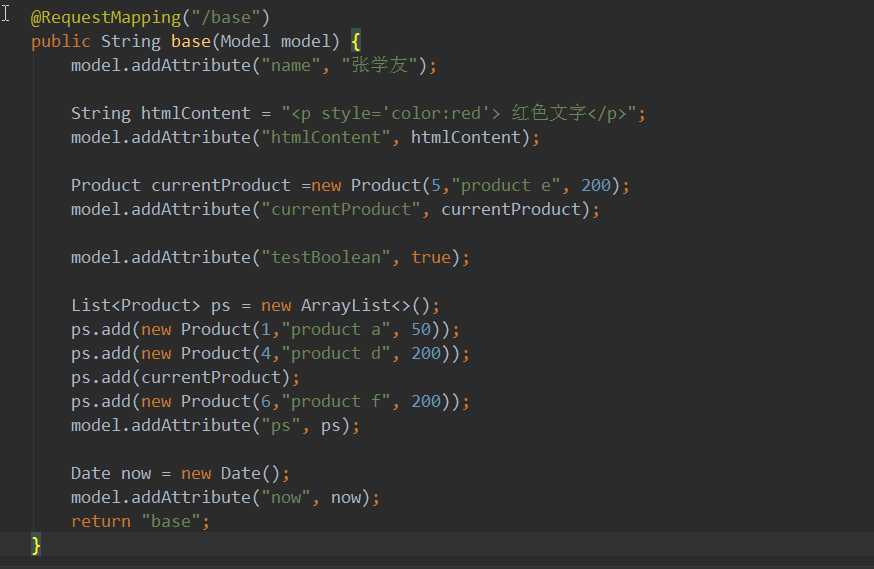
html
<!DOCTYPE html>

<html xmlns:th="http://www.thymeleaf.org">

<head>

    <meta http-equiv="Content-Type" content="text/html; charset=UTF-8"/>

    <title>Thymeleaf快速入门-Hello Thymeleaf</title>

    <link rel="stylesheet" type="text/css" media="all"  th:href="@{/css/style.css}"/>

    <script type="text/javascript" th:src="@{/js/thymeleaf.js}"></script>

    <style>

        h2{

            text-decoration: underline;

            font-size:.9em;

            color:gray;

        }

    </style>

</head>

<body>

<div class="showing">

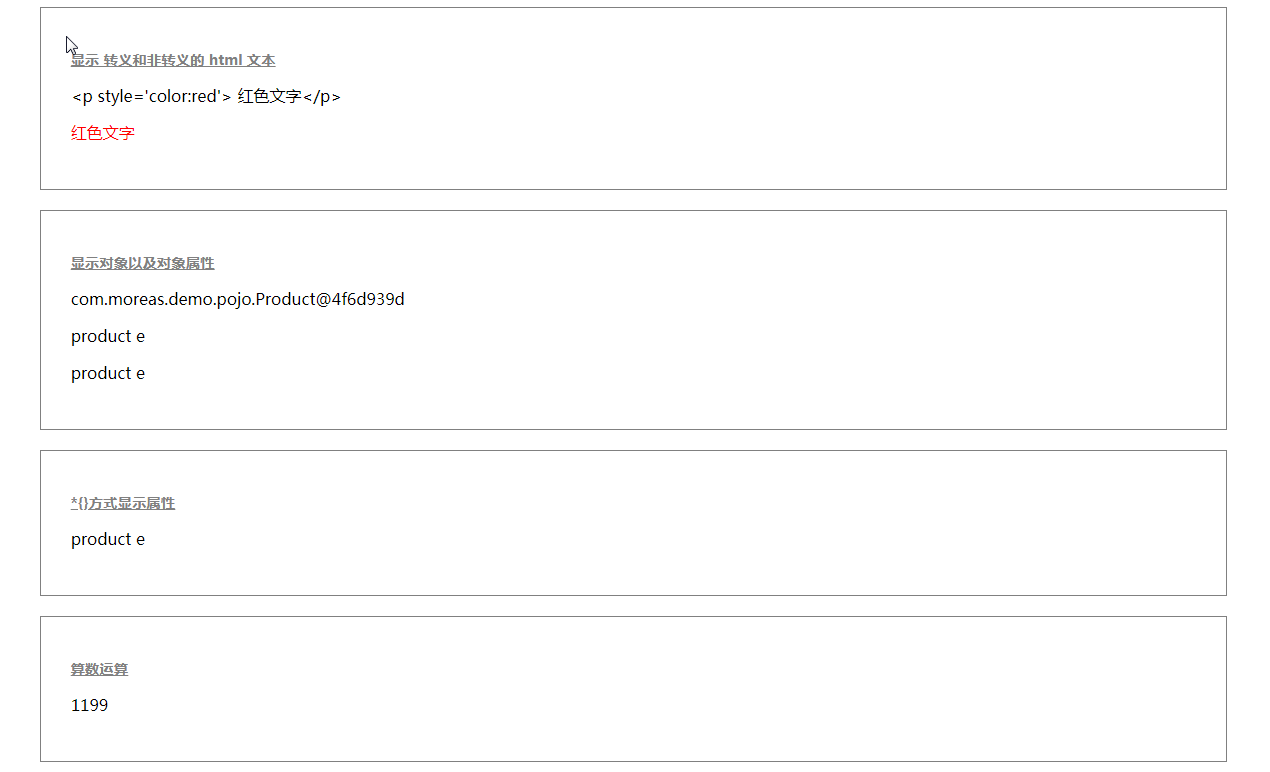
    <h2>显示 转义和非转义的 html 文本</h2>

    <p th:text="${htmlContent}" ></p>

    <p th:utext="${htmlContent}" ></p>

</div>

<div class="showing">

    <h2>显示对象以及对象属性</h2>

    <p th:text="${currentProduct}" ></p>

    <p th:text="${currentProduct.name}" ></p>

    <p th:text="${currentProduct.getName()}" ></p>

</div>

<div class="showing" th:object="${currentProduct}">

    <h2>*{}方式显示属性</h2>

    <p th:text="*{name}" ></p>

</div>

<div class="showing">

    <h2>算数运算</h2>

    <p th:text="${currentProduct.price+999}" ></p>

</div>

<div class="showing">

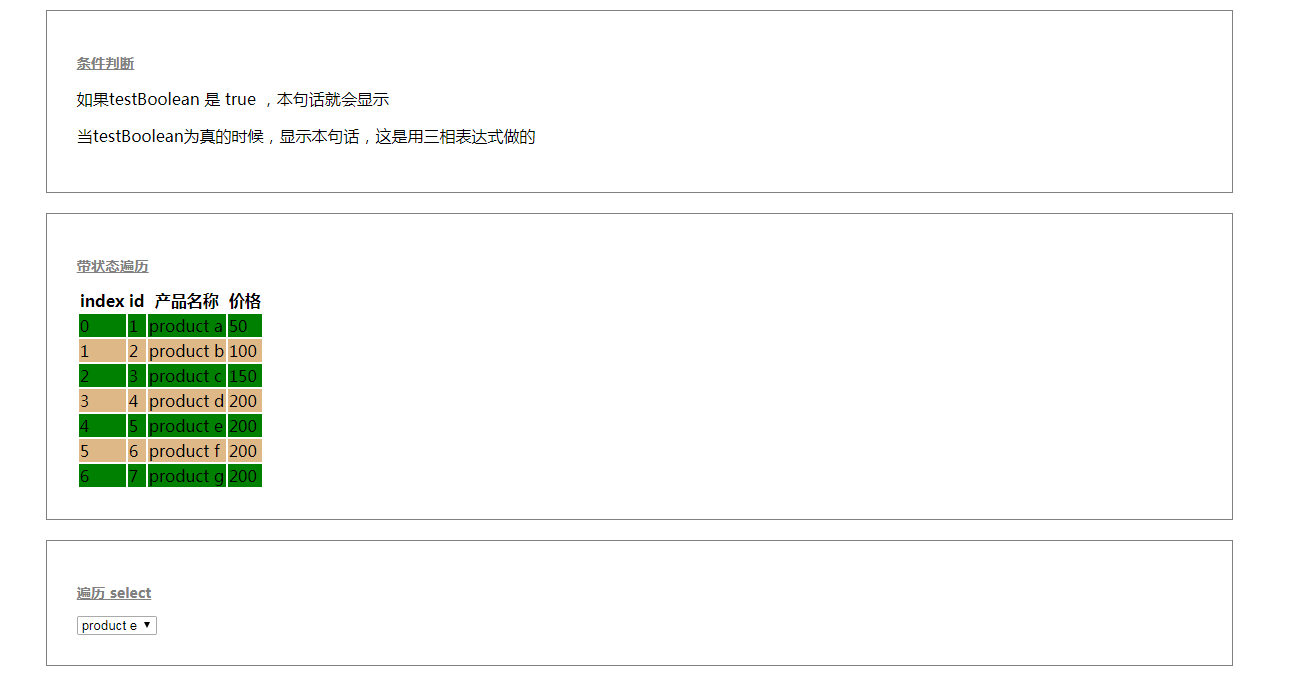
    <h2>条件判断</h2>

    <p th:if="${testBoolean}" >如果testBoolean 是 true ,本句话就会显示</p>

    <p th:if="${not testBoolean}" >取反 ,所以如果testBoolean 是 true ,本句话就不会显示</p>

    <p th:unless="${testBoolean}" >unless 等同于上一句,所以如果testBoolean 是 true ,本句话就不会显示</p>

    <p th:text="${testBoolean}?'当testBoolean为真的时候,显示本句话,这是用三相表达式做的':''" ></p>

</div>

<div class="showing">

    <h2>带状态遍历</h2>

    <table>

        <thead>

        <tr>

            <th>index</th>

            <th>id</th>

            <th>产品名称</th>

            <th>价格</th>

        </tr>

        </thead>

        <tbody>

        <tr th:class="${status.even}?'even':'odd'" th:each="p,status: ${ps}">

            <td  th:text="${status.index}"></td>

            <td th:text="${p.id}"></td>

            <td th:text="${p.name}"></td>

            <td th:text="${p.price}"></td>

        </tr>

        </tbody>

    </table>

</div>

<div class="showing">

    <h2>遍历 select </h2>

    <select  >

        <option th:each="p:${ps}" th:value="${p.id}"     th:selected="${p.id==currentProduct.id}"    th:text="${p.name}" ></option>

    </select>

</div>

<div class="showing">

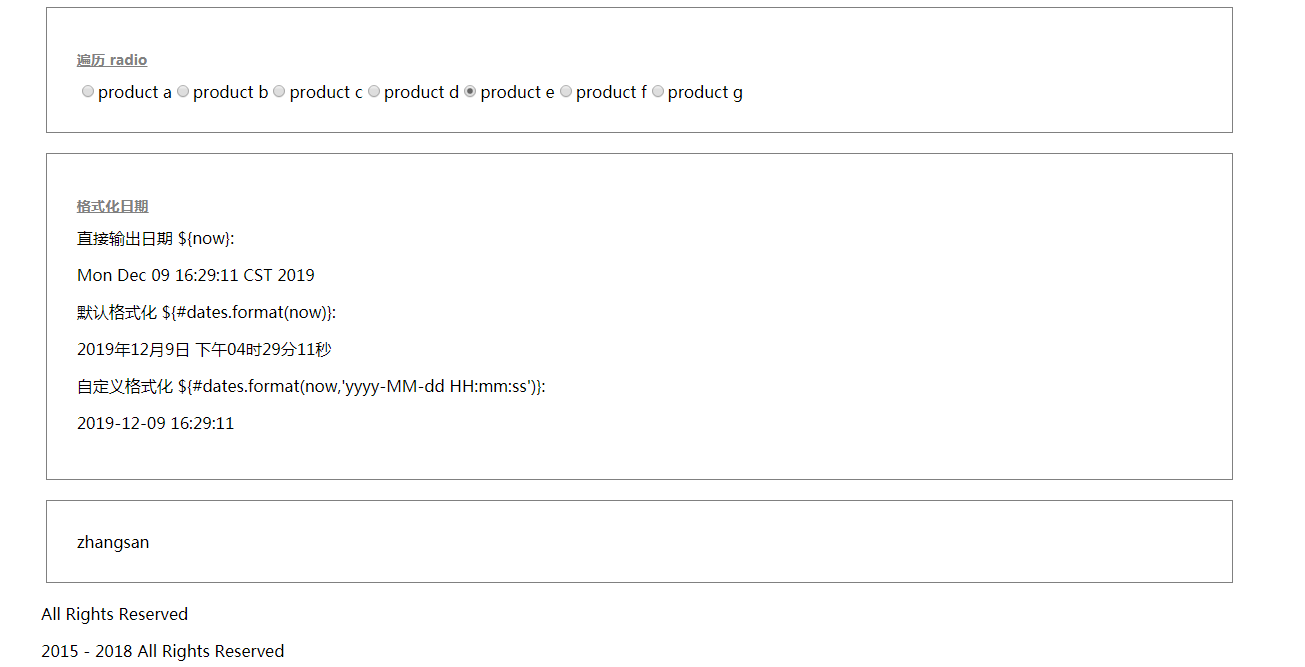
    <h2>遍历 radio </h2>

    <input name="product" type="radio" th:each="p:${ps}" th:value="${p.id}"  th:checked="${p.id==currentProduct.id}"     th:text="${p.name}"  />

</div>

<div class="showing date">

    <h2>格式化日期</h2>

    直接输出日期 ${now}:

    <p th:text="${now}"></p>

    默认格式化 ${#dates.format(now)}:

    <p th:text="${#dates.format(now)}"></p>

    自定义格式化 ${#dates.format(now,'yyyy-MM-dd HH:mm:ss')}:

    <p th:text="${#dates.format(now,'yyyy-MM-dd HH:mm:ss')}"></p>

</div>

<div class="showing date">

<div th:text="${@person.getName()}">...</div>

</div>

<div th:replace="include::footer1"></div>

<div th:replace="include::footer2(2015,2018)"></div>

</body>

</html>
游览器显示
与字符串相关的
判断是不是为空:null:
<span th:if="${name} != null">不为空</span>
<span th:if="${name1} == null">为空</span>
判断是不是为空字符串: “”
<span th:if="${#strings.isEmpty(name1)}">空的</span>
判断是否相同:
<span th:if="${name} eq 'jack'">相同于jack,</span>
<span th:if="${name} eq 'ywj'">相同于ywj,</span>
<span th:if="${name} ne 'jack'">不相同于jack,</span>
不存在设置默认值:
<span th:text="${name2} ?: '默认值'"></span>
是否包含(分大小写):
<span th:if="${#strings.contains(name,'ez')}">包ez</span>
<span th:if="${#strings.contains(name,'y')}">包j</span>
是否包含(不分大小写)
<span th:if="${#strings.containsIgnoreCase(name,'y')}">包j</span>
同理。。。下面的和JAVA的String基本一样。。。。不笔记解释,官网有
${#strings.startsWith(name,'o')}
${#strings.endsWith(name, 'o')}
${#strings.indexOf(name,frag)}// 下标
${#strings.substring(name,3,5)}// 截取
${#strings.substringAfter(name,prefix)}// 从 prefix之后的一位开始截取到最后,比如 (ywj,y) = wj, 如果是(abccdefg,c) = cdefg//里面有2个c,取的是第一个c
${#strings.substringBefore(name,suffix)}// 同上,不过是往前截取
${#strings.replace(name,'las','ler')}// 替换
${#strings.prepend(str,prefix)}// 拼字字符串在str前面
${#strings.append(str,suffix)}// 和上面相反,接在后面
${#strings.toUpperCase(name)}
${#strings.toLowerCase(name)}
${#strings.trim(str)}
${#strings.length(str)}
${#strings.abbreviate(str,10)}// 我的理解是 str截取0-10位,后面的全部用…这个点代替,注意,最小是3位
thymeleaf入门的更多相关文章
- Thymeleaf入门到吃灰
Thymeleaf 官网部分翻译:反正就是各种好 Thymeleaf是用来开发Web和独立环境项目的服务器端的Java模版引擎 Spring官方支持的服务的渲染模板中,并不包含jsp.而是Thymel ...
- Thymeleaf入门入门入门入门入门入门入门入门入门入门入门
Thymeleaf 官网部分翻译:反正就是各种好 Thymeleaf是用来开发Web和独立环境项目的服务器端的Java模版引擎 Spring官方支持的服务的渲染模板中,并不包含jsp.而是Thymel ...
- Thymeleaf入门基础
一.简介 1.thymeleaf优点 ①是一个支持html原型的自然引擎,它在html标签增加额外的属性来达到模板+数据的展示方式,由于浏览器解释html时,忽略未定义的标签属性,因此thymelea ...
- Thymeleaf入门(一)——入门与基本概述
一.概述 1.是什么 简单说, Thymeleaf 是一个跟 Velocity.FreeMarker 类似的模板引擎,它可以完全替代 JSP . 2.feature 1.Thymeleaf 在有网络和 ...
- 学习小片段——thymeleaf入门
1: 概述 thymeleaf是一个跟 Velocity.FreeMarker 类似的模板引擎,和以前学的jsp相近,但性能上无疑是比jsp好. 参考文档官方文档:https://www.thymel ...
- thymeleaf入门和学习
springboot框架不推荐使用jsp,一方面是兼容性的技术问题,一方面也是其前后端整合在一起,很难适合当下大规模的网站开发环境.HTML只是一种标记语言,并不具有获取model中数据的功能,所以视 ...
- Thymeleaf 入门
基本项目结构: Thymeleaf配置: spring.thymeleaf.mode=LEGACYHTML5 spring.thymeleaf.cache=false spring.thymeleaf ...
- Thymeleaf入门与基础语法
1.简介 Thymeleaf是用来开发Web和独立环境项目的现代服务器端Java模板引擎. Thymeleaf的主要目标是为您的开发工作流程带来优雅的自然模板 - HTML.可以在直接浏览器中正确显示 ...
- Thymeleaf入门——入门与基本概述
https://www.cnblogs.com/jiangbei/p/8462294.html 一.概述 1.是什么 简单说, Thymeleaf 是一个跟 Velocity.FreeMarker 类 ...
随机推荐
- 深入理解java中的byte类型
作者 | 进击的石头--GO! 来源 | https://www.cnblogs.com/zl181015/p/9435035.html#4432849 Java也提供了一个byte数据类型,并且是基 ...
- Java开发桌面程序学习(一)——JavaFx+Jfoenix初始以及搭建
Java开发桌面程序学习(一)--JavaFx+Jfoenix初始以及搭建 前言 想做一个Java的桌面程序,但是,使用原生的Swing感觉又十分麻烦,那个布局都是拿代码设置,看着十分的乱,偶然的情况 ...
- C#上手练习6(方法语句1)
方法是将完成同一功能的内容放到一起,方便书写和调用的一种方式,也体现了面向对象语言中封装的特性. 定义方法的语法形式如下. 访问修饰符 修饰符 返回值类型 方法名(参数列表){ ...
- Windows下Python3.7的安装
1.下载Python3官网地址:www.python.org当前最新版本为Python 3.7.3. Windows下有个6个下载链接Windows x86-64 embeddable zip fil ...
- 结对编程(Java实现)
一.Github项目地址:https://github.com/qiannai/CreateArithmetic 二.PSP2.1表格: PSP2.1 Personal Software Proces ...
- Python—端口检测(socket)
基于python检测端口是否在使用 原理:创建一个socket服务,连接对应的 ip:port ,如果能够连接,说明端口被占用:若端口可用,则不可连接. #!/usr/bin/evn python # ...
- SpringBoot+Mybatis多模块项目搭建教程
一.前言 框架为SpringBoot+Mybatis,本篇主要记录了在IDEA中搭建SpringBoot多模块项目的过程. 1.开发工具及系统环境 IDE:IntelliJ IDEA 2018.2 系 ...
- Jupyter notebook and Octave kernel installation
Jupyter notebook 安装 为了更加方便地写 Python 代码,还需要安装 Jupyter notebook. 利用 pip 安装 Jupyter notebook. 为什么要使用 Ju ...
- C++ 标准库 std::remove
参见:https://zh.cppreference.com/w/cpp/algorithm/remove std::remove 不会改变输入vector / string 的长度.其过程,相当于去 ...
- 《anchor-based v.s. anchor-free》
作者:青青子衿链接:https://www.zhihu.com/question/356551927/answer/926659692来源:知乎著作权归作者所有.商业转载请联系作者获得授权,非商业转载 ...