
HTML连载54-网易注册界面实战之信息填写
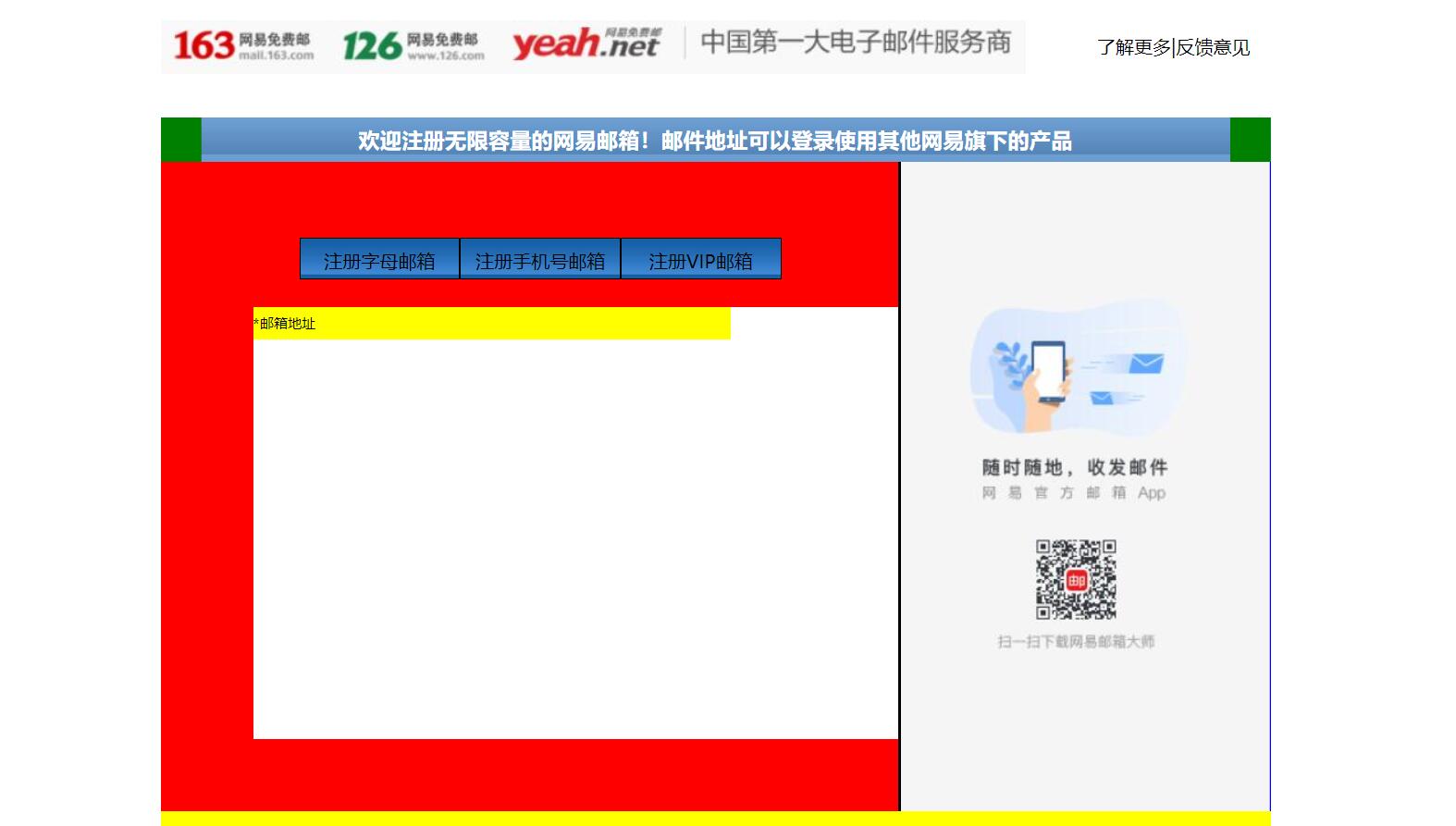
一、完成了内容中的右边的一部分。练习了三点:小盒子在大盒子中的位置,最好用大盒子的内边距完成布局,而不是用小盒子的外边距来进行布局;复习了ul,li的用法。
<!DOCTYPE html>
<html lang="en">
<head>
<meta charset="UTF-8">
<title>D139_FrameworkeOfNeteasyInterface</title>
<style>
.header{
width:960px;
height:80px;
/*background-color: red;*/
margin: 0 auto;
overflow: hidden;
padding-top:14px;
box-sizing: border-box;/*这里我们采用内上边距的办法将logo挤下去达到垂直居中的目的*/
/*同时这个box-sizing的属性就是将这个header固定住,不让他因为内边距而变化大小了*/
}
.content{
width: 960px;
height: 600px;
background-color: blue;
margin: 0 auto;
}
.footer{
width: 960px;
height: 48px;
background-color: yellow;
margin: 0 auto ;
}
.header .logo{
width:748px;
height: 47px;
background:url("image/netEasyLogo.jpg") no-repeat 0 0;/*从图片的坐标(0,0)开始铺,no-repeat就是只铺这一张不要多铺*/
/*margin-top: 12px;*/
float:left;
}
.header .links{
height: 42px;
width: 150px;
/*background-color: red;*/
float:right;
}
.header .logo a {
width:156px;
height:45px;/*测量出那一块区域,然后这一块区域都是超级链接*/
/*background-color: red;*/
display: inline-block;/*转换为行内块级标签*/
}
.header .links a{
text-decoration:none;/*去掉下划线*/
font-size: 16px;
color:black;
line-height: 45px;/*这里复习了文字不能居中,使用这个属性让它和links盒子的高度一致,那就做到文字在盒子中居中*/
text-align: right;/*复习了文字右对齐*/
}
.content{
width: 960px;
height: 600px;
}
.content .top{
width: 960px;
height: 38px;
/*background-color: red;*/
background: url("image/wangyi_center.jpg") 0 0;/*让这张小图片把top这个区域全部铺满*/
}
.content .bottom{
width: 960px;
height: 562px;
/*background-color: green;*/
}
/*下面这两个属性设置,就是为了content的top部的两边能使用我们指定的格式,我们采用的盒子嵌套盒子来进行背景的演示*/
.content .top .left{
width:960px;
height: 38px;
background:url("image/line_left.jpg") no-repeat left 0 ;
/*display: inline;*/
}
.content .top .left .right{
width:960px;
height: 38px;
background:url("image/line_left.jpg") no-repeat right 0 ;
}
.content .top .left .right h3{
color: white;
line-height:38px;/*设置行高就是为了让文字能够在top条中垂直居中*/
text-align: center;/*文字水平居中,当然我们也可以设置margin-left来设置左边距,但是一旦分辨率改变将导致网页变形*/
}
.content .bottom .article{
width:638px;
height: 562px;
background-color: red;
float:left;/*这里填写了这个float属性才行,并且右面的盒子也需要float属性,div是行内标签,不写float会另起一行*/
box-sizing: border-box;/*这个设置是为了让外面的大盒子不会因为设置内边距,而导致外面的的大盒子变形*/
padding-top:50px;/*这里我们设置了内边距,那么里面的内容就可以从这里面进行配置了,一开始我想到的是不设置这个内边距*/
/*让里面的东西有外边距,当然这样也可以达到效果,但是有一个缺点,里面的每一个盒子都要单独设置外边距,相比设置*/
/*外面盒子的内边距会更加省力,而且里面的内容,自然而然就会对齐*/
padding-left: 80px;
}
.content .bottom .aside{
width: 320px;/*这里我们本来写的322,但是发现写上322就会造成aside这个图片溢出到下面了,原来是左边距有2px.这样*/
/*320+2+638=960就正好了,溢出原因就是float属性导致的,达到了962,就装不下了*/
height: 562px;
/*background-color: green;*/
background:url("image/content_aside.jpg") no-repeat 0;
float:right;
border-left:2px black solid;
}
.content .article .articletop{
width: 560px;
height: 60px;
/*background-color: yellow;*/
}
.content .article .articletop ul{
width: 511px;
height: 34px;
/*background-color: tomato;*/
list-style:none;/*这个属性是为了去掉li的小圆点*/
}
.content .article .articletop ul li{
float:left;
width: 137px;
height: 34px;
/*background-color: skyblue;*/
line-height: 37px;
text-align: center;/*文字水平居中*/
background:url("image/content_article.jpg") 0 0;
border:1px solid black;
}
.content .article .articlebottom{
width: 560px;
height: 373px;
background-color: white;
}
.content .article .articlebottom .line{
width: 413px;
height: 28px;
background-color: yellow;
}
.content .article .articlebottom .line span{
float:left;
height: 28px;
width: 60px;
font-size:12px;
line-height:28px;
text-align:left;
}
.content .article .articlebottom .line .star{
width: 6px;
float:left;
}
.content .article .artilclebottom .line div{
float: left;
height: 28px;
height: 333px;
}
</style>
</head>
<body>
<div class="header">
<div class="logo" >
<a href="https://www.163.com/" title="网易163免费邮箱"></a><a href="https://www.126.com/" title="网易126免费邮箱"></a><a href="#" title="网易yeah免费邮箱"></a>
<!--复习了a标签的使用,title就是指鼠标放到超链接上就会显示的文字-->
</div>
<div class="links">
<a href="http://www.baidu.com">了解更多</a>|<a href="#">反馈意见</a>
</div>
</div>
<div class="content">
<div class="top">
<div class="left">
<div class="right"><h3>欢迎注册无限容量的网易邮箱!邮件地址可以登录使用其他网易旗下的产品</h3></div>
</div>
</div>
<div class="bottom">
<div class="article">
<div class="articletop">
<ul>
<li>注册字母邮箱</li><!--看到导航条就应该想到ul.li-->
<li>注册手机号邮箱</li>
<li>注册VIP邮箱</li>
</ul>
</div>
<div class="articlebottom">
<div class="line">
<span class="star">*</span><!--这里的星号代表必填项--><span>邮箱地址</span>
<div></div>
</div>
</div>
</div>
<div class="aside"></div>
</div>
</div>
<div class="footer"></div>
</body>
</html>
三、源码:
D139_FrameworkeOfNeteasyInterface.html
地址:
https://github.com/ruigege66/HTML_learning/blob/master/D139_FrameworkeOfNeteasyInterface.html
2.CSDN:https://blog.csdn.net/weixin_44630050(心悦君兮君不知-睿)
3.博客园:https://www.cnblogs.com/ruigege0000/
4.欢迎关注微信公众号:傅里叶变换,个人账号,仅用于技术交流,后台回复“礼包”获取Java大数据学习视频礼包

一、完成了内容中的右边的一部分。练习了三点:小盒子在大盒子中的位置,最好用大盒子的内边距完成布局,而不是用小盒子的外边距来进行布局;复习了ul,li的用法。
<!DOCTYPE html><html lang="en"><head><meta charset="UTF-8"><title>D139_FrameworkeOfNeteasyInterface</title><style>.header{width:960px;height:80px;/*background-color: red;*/margin: 0 auto;overflow: hidden;padding-top:14px;box-sizing: border-box;/*这里我们采用内上边距的办法将logo挤下去达到垂直居中的目的*//*同时这个box-sizing的属性就是将这个header固定住,不让他因为内边距而变化大小了*/}.content{width: 960px;height: 600px;background-color: blue;margin: 0 auto;}.footer{width: 960px;height: 48px;background-color: yellow;margin: 0 auto ;}.header .logo{width:748px;height: 47px;background:url("image/netEasyLogo.jpg") no-repeat 0 0;/*从图片的坐标(0,0)开始铺,no-repeat就是只铺这一张不要多铺*//*margin-top: 12px;*/float:left;}.header .links{height: 42px;width: 150px;/*background-color: red;*/float:right;}.header .logo a {width:156px;height:45px;/*测量出那一块区域,然后这一块区域都是超级链接*//*background-color: red;*/display: inline-block;/*转换为行内块级标签*/}.header .links a{text-decoration:none;/*去掉下划线*/font-size: 16px;color:black;line-height: 45px;/*这里复习了文字不能居中,使用这个属性让它和links盒子的高度一致,那就做到文字在盒子中居中*/text-align: right;/*复习了文字右对齐*/}.content{width: 960px;height: 600px;}.content .top{width: 960px;height: 38px;/*background-color: red;*/background: url("image/wangyi_center.jpg") 0 0;/*让这张小图片把top这个区域全部铺满*/}.content .bottom{width: 960px;height: 562px;/*background-color: green;*/}/*下面这两个属性设置,就是为了content的top部的两边能使用我们指定的格式,我们采用的盒子嵌套盒子来进行背景的演示*/.content .top .left{width:960px;height: 38px;background:url("image/line_left.jpg") no-repeat left 0 ;/*display: inline;*/}.content .top .left .right{width:960px;height: 38px;background:url("image/line_left.jpg") no-repeat right 0 ;}.content .top .left .right h3{color: white;line-height:38px;/*设置行高就是为了让文字能够在top条中垂直居中*/text-align: center;/*文字水平居中,当然我们也可以设置margin-left来设置左边距,但是一旦分辨率改变将导致网页变形*/}.content .bottom .article{width:638px;height: 562px;background-color: red;float:left;/*这里填写了这个float属性才行,并且右面的盒子也需要float属性,div是行内标签,不写float会另起一行*/box-sizing: border-box;/*这个设置是为了让外面的大盒子不会因为设置内边距,而导致外面的的大盒子变形*/padding-top:50px;/*这里我们设置了内边距,那么里面的内容就可以从这里面进行配置了,一开始我想到的是不设置这个内边距*//*让里面的东西有外边距,当然这样也可以达到效果,但是有一个缺点,里面的每一个盒子都要单独设置外边距,相比设置*//*外面盒子的内边距会更加省力,而且里面的内容,自然而然就会对齐*/padding-left: 80px;}.content .bottom .aside{width: 320px;/*这里我们本来写的322,但是发现写上322就会造成aside这个图片溢出到下面了,原来是左边距有2px.这样*//*320+2+638=960就正好了,溢出原因就是float属性导致的,达到了962,就装不下了*/height: 562px;/*background-color: green;*/background:url("image/content_aside.jpg") no-repeat 0;float:right;border-left:2px black solid;}.content .article .articletop{width: 560px;height: 60px;/*background-color: yellow;*/}.content .article .articletop ul{width: 511px;height: 34px;/*background-color: tomato;*/list-style:none;/*这个属性是为了去掉li的小圆点*/}.content .article .articletop ul li{float:left;width: 137px;height: 34px;/*background-color: skyblue;*/line-height: 37px;text-align: center;/*文字水平居中*/background:url("image/content_article.jpg") 0 0;border:1px solid black;}.content .article .articlebottom{width: 560px;height: 373px;background-color: white;}.content .article .articlebottom .line{width: 413px;height: 28px;background-color: yellow;}.content .article .articlebottom .line span{float:left;height: 28px;width: 60px;font-size:12px;line-height:28px;text-align:left;}.content .article .articlebottom .line .star{width: 6px;float:left;}.content .article .artilclebottom .line div{float: left;height: 28px;height: 333px;}</style></head><body><div class="header"><div class="logo" ><a href="https://www.163.com/" title="网易163免费邮箱"></a><a href="https://www.126.com/" title="网易126免费邮箱"></a><a href="#" title="网易yeah免费邮箱"></a><!--复习了a标签的使用,title就是指鼠标放到超链接上就会显示的文字--></div><div class="links"><a href="http://www.baidu.com">了解更多</a>|<a href="#">反馈意见</a></div></div><div class="content"><div class="top"><div class="left"><div class="right"><h3>欢迎注册无限容量的网易邮箱!邮件地址可以登录使用其他网易旗下的产品</h3></div></div></div><div class="bottom"><div class="article"><div class="articletop"><ul><li>注册字母邮箱</li><!--看到导航条就应该想到ul.li--><li>注册手机号邮箱</li><li>注册VIP邮箱</li></ul></div><div class="articlebottom"><div class="line"><span class="star">*</span><!--这里的星号代表必填项--><span>邮箱地址</span><div></div></div></div></div><div class="aside"></div></div></div><div class="footer"></div></body></html>
三、源码:
D139_FrameworkeOfNeteasyInterface.html
地址:
https://github.com/ruigege66/HTML_learning/blob/master/D139_FrameworkeOfNeteasyInterface.html
2.CSDN:https://blog.csdn.net/weixin_44630050(心悦君兮君不知-睿)
3.博客园:https://www.cnblogs.com/ruigege0000/
4.欢迎关注微信公众号:傅里叶变换,个人账号,仅用于技术交流,后台回复“礼包”获取Java大数据学习视频礼包
HTML连载54-网易注册界面实战之信息填写的更多相关文章
- HTML连载56-网易注册界面实战之全部代码
一.今天完成了网易邮箱注册界面的全部编写,编写一个小小的网页就需要这么多时间来进行设计.测量.排版.编写.测试,才能进行使用,同时编写这个网页复习了几乎前面的所有内容,最后来一个汇总就可以了. < ...
- HTML连载55-网易注册界面实战之input填充
一.又学一招:想要让两个盒子高度对齐,那么让他们浮动起来 <!DOCTYPE html> <html lang="en"> <head> < ...
- HTML连载53-网易注册界面实战之content的头部、content注册信息
一. 这次完成了content部分的右边图片以及content的top部分的边角填充 <!DOCTYPE html> <html lang="en"> &l ...
- HTML51-清除浮动overflow、网易注册界面基本结构搭建
一.overflow:hidden;作用 (1)可以将超出标签范围的内容裁剪掉 (2)清除浮动 .box1{ background-color: red; /*border:1px white sol ...
- HTML连载52-网易注册界面之上部完成、中部初探
一.看一下注释即可,都是前面学到的知识,然后进行整合完成网页的制作,未完待续,这个网易界面跨度可大三天. <!DOCTYPE html> <html lang="en&qu ...
- H5 71-网易注册界面4
<!DOCTYPE html> <html lang="en"> <head> <meta charset="UTF-8&quo ...
- HTML登录注册界面怎么制作?
在没有学习CSS样式的前提下,是如何做一个简单的注册界面的. 一.表单标签(form) 首先我们先写一个<form></form>的标签,form标签属于表单标签,通常我们的登 ...
- iOS开发——UI进阶篇(八)pickerView简单使用,通过storyboard加载控制器,注册界面,通过xib创建控制器,控制器的view创建,导航控制器的基本使用
一.pickerView简单使用 1.UIPickerViewDataSource 这两个方法必须实现 // 返回有多少列 - (NSInteger)numberOfComponentsInPicke ...
- HTML练习----注册界面
<!DOCTYPE html PUBLIC "-//W3C//DTD XHTML 1.0 Transitional//EN" "http://www.w3.org/ ...
随机推荐
- 【Web技术】401- 在 React 中使用 Shadow DOM
本文作者:houfeng 1. Shadow DOM 是什么 Shadow DOM 是什么?我们先来打开 Chrome 的 DevTool,并在 'Settings -> Preferences ...
- .Net,Java,Redis,Vue等技术视屏教程分享(不定期更新)
前言 作为一个资深的收藏家决定把我收集的那些精品资源不定时更新分享给大家 .所有资源全是收集余网络或为大佬分享,内容仅供观摩学习交流之用.如果犯了您的权益,请联系我. 2019.12.19更新 ASP ...
- django----session相关配置
1. 数据库Session SESSION_ENGINE = 'django.contrib.sessions.backends.db' # 引擎(默认) 2. 缓存Session SESSION_E ...
- Redis 底层数据结构介绍
Redis 底层数据结构 版本:2.9 支持的数据类型: 字符串 散列 列表 集合 有序集合 字符串 Redis 利用原生的 c 字符串进行了一次封装.封装的字符串叫做简单动态字符串:SDS(simp ...
- 《老师说的都对》- Alpha冲刺阶段博客目录
项目小组:<老师说的都对> 项目成员:孙浩杰,谭明耀,宋自康,孙肖肖,王明鑫,王观山 Github仓库地址-PCES 一.Scrum Meeting 第六周会议记录 第七周会议记录 二.测 ...
- Information Management System
Information Management System 一.代码部分 #include <stdio.h> #include <stdlib.h> #include < ...
- webpack 使用style-loader,css-loader添加css样式
// 注意:webpack 默认只能打包处理js类型的文件// 如果要处理非js类型文件,需要手动安装第三方加载器// 1安装npm install style-loader css-loader - ...
- Dubbo学习笔记-RPC扩展和本地Mock
1.Dubbo介绍 Dubbo,一个是一款高性能Java RPC框架.私以为有中文官方文档,就不再重复介绍了 2.RPC扩展-本地存根stub RPC扩展功能:提前效验参数,缓存调用结果,日志记录等等 ...
- C++做四则运算的MFC计算器(二)栈转换和计算后缀表达式
上篇写了MFC界面搭建,这篇就写实现计算.涉及到数据结构,对新手很不友好. 虽然是MFC程序,但是能灵活地分离后台代码,自行构建控制台程序. 上篇文章链接:C++做四则运算的MFC计算器(一)MFC界 ...
- LinuxProbe小结
1.修改主机名: /etc/hostname 2.配置 yum 软件仓库: (1)进入到 /etc/yum.repos.d/目录下,创建一个linuxprobe.repo的新文件(文件名称任意,结尾必 ...