
C# HTTP系列9 GET与POST示例
学习本篇之前,对 HttpWebRequest 与 HttpWebResponse 不太熟悉的同学,请先学习《C# HTTP系列》。
应用程序中使用HTTP协议和服务器交互主要是进行数据的上传与下载,最常见的方式是通过 GET 和 POST 两种方式来完成。本篇介绍 C# HttpWebRequest 如何使用这两种方式来实现。
示例场景:
 <form id="form1" runat="server" action="UserManageHandler.ashx" method="post" enctype="application/x-www-form-urlencoded">

         <div>

             名称: <input type="text" name="uname" class="uname" /><br />

             邮件: <input type="text" name="email" class="email" /><br />

                   <input type="submit" name="submit" value="提交" />

         </div>

  </form>

 using System;

 using System.Web;

 namespace SparkSoft.Platform.UI.WebForm.Test

 {

     public class UserManageHandler : IHttpHandler

     {

         public void ProcessRequest(HttpContext context)

         {

             context.Response.ContentType = "text/plain";

             string uname = context.Request["uname"];

             string email = context.Request["email"];

             context.Response.Write("提交结果如下:" + Environment.NewLine +

                                      "名称:" + uname + Environment.NewLine +

                                      "邮箱:" + email);

         }

         public bool IsReusable

         {

             get { return false; }

         }

     }

 }
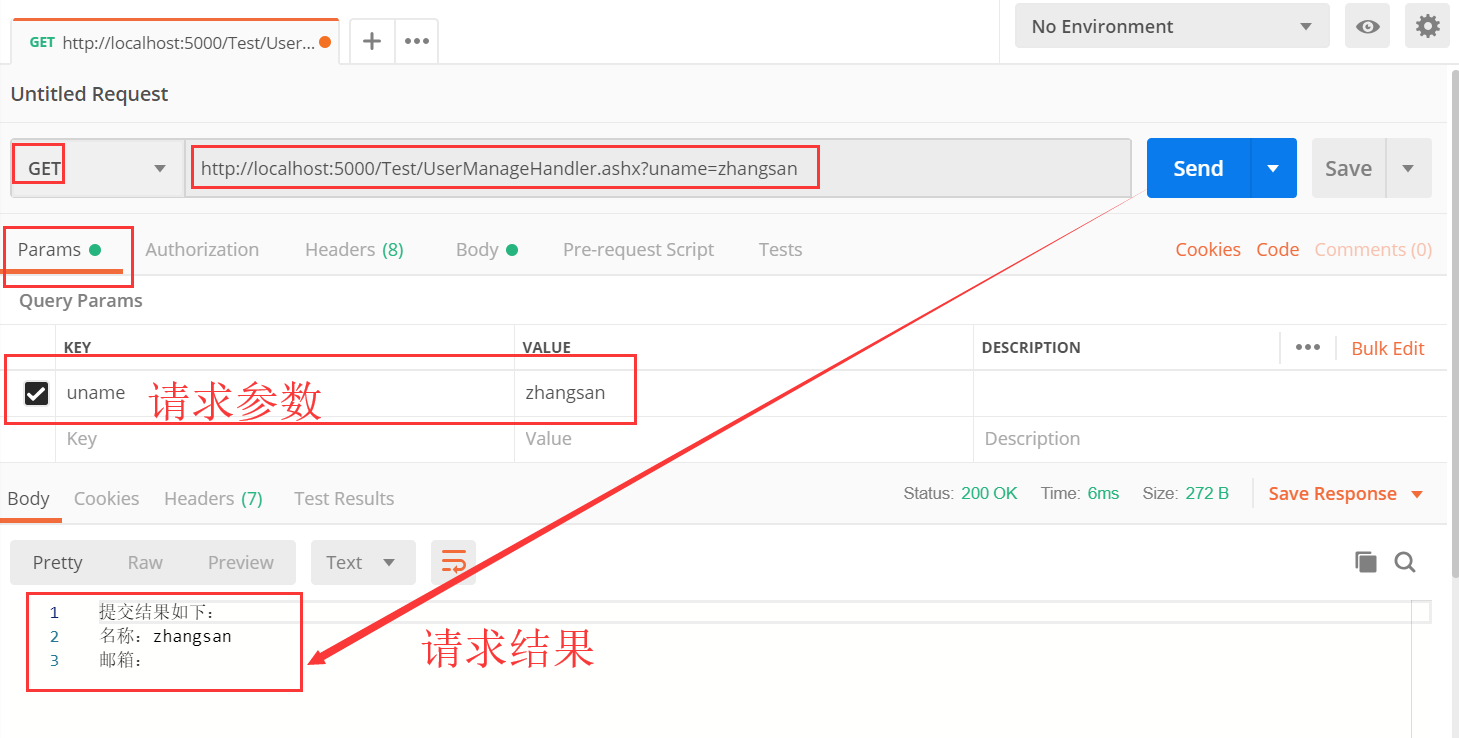
 /// <summary>

 /// 普通 GET 方式请求

 /// </summary>

 public void Request01_ByGet()

 {

     HttpWebRequest httpWebRequest = WebRequest.Create("http://localhost:5000/Test/UserManageHandler.ashx?uname=zhangsan") as HttpWebRequest;

     httpWebRequest.Method = "GET";

     HttpWebResponse httpWebResponse = httpWebRequest.GetResponse() as HttpWebResponse; // 获取响应

     if (httpWebResponse != null)

     {

         using (StreamReader sr = new StreamReader(httpWebResponse.GetResponseStream()))

         {

             string content = sr.ReadToEnd();

         }

         httpWebResponse.Close();

     }

 }

参数的格式和 GET 方式一样,是类似于 uname=zhangsan&email=123456@qq.com 这样的结构。程序代码如下:
 /// <summary>

 /// 普通 POST 方式请求

 /// </summary>

 public void Request02_ByPost()

 {

     string param = "uname=zhangsan&email=123456@qq.com";              //参数

     byte[] paramBytes = Encoding.ASCII.GetBytes(param); //参数转化为 ASCII 码

     HttpWebRequest httpWebRequest = WebRequest.Create("http://localhost:5000/Test/UserManageHandler.ashx") as HttpWebRequest;

     httpWebRequest.Method = "POST";

     httpWebRequest.ContentType = "application/x-www-form-urlencoded";

     httpWebRequest.ContentLength = paramBytes.Length;

     using (Stream reqStream = httpWebRequest.GetRequestStream())

     {

         reqStream.Write(paramBytes, , paramBytes.Length);

     }

     HttpWebResponse httpWebResponse = httpWebRequest.GetResponse() as HttpWebResponse; // 获取响应

     if (httpWebResponse != null)

     {

         using (StreamReader sr = new StreamReader(httpWebResponse.GetResponseStream()))

         {

             string content = sr.ReadToEnd();

         }

         httpWebResponse.Close();

     }

 }
如果提交的请求参数中包含中文,那么需要对其进行编码,让目标网站能够识别。
 /// <summary>

 /// 使用 GET 方式提交中文数据

 /// </summary>

 public void Request03_ByGet()

 {

     /*GET 方式通过在网络地址中附加参数来完成数据提交,对于中文的编码,常用的有 gb2312 和 utf8 两种。

      *    由于无法告知对方提交数据的编码类型,所以编码方式要以对方的网站为标准。

      *    常见的网站中, www.baidu.com (百度)的编码方式是 gb2312, www.google.com (谷歌)的编码方式是 utf8。

      */

     Encoding myEncoding = Encoding.GetEncoding("gb2312"); //确定用哪种中文编码方式

     string address = "http://www.baidu.com/s?" + HttpUtility.UrlEncode("参数一", myEncoding) + "=" + HttpUtility.UrlEncode("值一", myEncoding); //拼接数据提交的网址和经过中文编码后的中文参数

     HttpWebRequest httpWebRequest = WebRequest.Create(address) as HttpWebRequest;

     httpWebRequest.Method = "GET";

     HttpWebResponse httpWebResponse = httpWebRequest.GetResponse() as HttpWebResponse; // 获取响应

     if (httpWebResponse != null)

     {

         using (StreamReader sr = new StreamReader(httpWebResponse.GetResponseStream()))

         {

             string content = sr.ReadToEnd();

         }

         httpWebResponse.Close();

     }

 }
在上面的程序代码中,我们以 GET 方式访问了网址 http://www.baidu.com/s ,传递了参数“参数一=值一”,由于无法告知对方提交数据的编码类型,所以编码方式要以对方的网站为标准。常见的网站中, www.baidu.com (百度)的编码方式是 gb2312, www.google.com (谷歌)的编码方式是 utf-8。
/// <summary>

/// 使用 POST 方式提交中文数据

/// </summary>

public void Request04_ByPost()

{

    /* POST 方式通过在页面内容中填写参数的方法来完成数据的提交,由于提交的参数中可以说明使用的编码方式,所以理论上能获得更大的兼容性。*/

    Encoding myEncoding = Encoding.GetEncoding("gb2312"); //确定用哪种中文编码方式

    string param = HttpUtility.UrlEncode("参数一", myEncoding) + "=" + HttpUtility.UrlEncode("值一", myEncoding) + "&"

                 + HttpUtility.UrlEncode("参数二", myEncoding) + "=" + HttpUtility.UrlEncode("值二", myEncoding);

    byte[] paramBytes = Encoding.ASCII.GetBytes(param); //参数转化为 ASCII 码

    HttpWebRequest httpWebRequest = WebRequest.Create("https://www.baidu.com/") as HttpWebRequest;

    httpWebRequest.Method = "POST";

    httpWebRequest.ContentType = "application/x-www-form-urlencoded;charset=gb2312";

    httpWebRequest.ContentLength = paramBytes.Length;

    using (Stream reqStream = httpWebRequest.GetRequestStream())

    {

        reqStream.Write(paramBytes, , paramBytes.Length);

    }

    HttpWebResponse httpWebResponse = httpWebRequest.GetResponse() as HttpWebResponse; // 获取响应

    if (httpWebResponse != null)

    {

        using (StreamReader sr = new StreamReader(httpWebResponse.GetResponseStream()))

        {

            string content = sr.ReadToEnd();

        }

        httpWebResponse.Close();

    }

}
以上列出了客户端程序使用HTTP协议与服务器交互的情况,常用的是 GET 和 POST 方式。现在流行的 WebService 也是通过 HTTP 协议来交互的,使用的是 POST 方法。与以上稍有所不同的是, WebService 提交的数据内容和接收到的数据内容都是使用了 XML 方式编码。所以, HttpWebRequest 也可以使用在调用 WebService 的场景下。
 /// <summary>

 /// HTTP-GET方法,(不包含body数据)。

 /// 发送 HTTP 请求并返回来自 Internet 资源的响应(HTML代码)

 /// </summary>

 /// <param name="url">请求目标URL</param>

 /// <returns>HTTP-GET的响应结果</returns>

 public HttpResult Get(string url)

 {

     return Request(url, WebRequestMethods.Http.Get);

 }
 /// <summary>

 /// HTTP-POST方法,(不包含body数据)。

 /// 发送 HTTP 请求并返回来自 Internet 资源的响应(HTML代码)

 /// </summary>

 /// <param name="url">请求目标URL</param>

 /// <returns>HTTP-POST的响应结果</returns>

 public HttpResult Post(string url)

 {

     return Request(url, WebRequestMethods.Http.Post);

 }
(包含文本的body数据)请求
 /// <summary>

 ///   HTTP请求(包含JSON文本的body数据)

 /// </summary>

 /// <param name="url">请求目标URL</param>

 /// <param name="data">主体数据(JSON文本)。如果参数中有中文,请使用合适的编码方式进行编码,例如:gb2312或者utf-8</param>

 /// <param name="method">请求的方法。请使用 WebRequestMethods.Http 的枚举值</param>

 /// <returns></returns>

 public HttpResult UploadJson(string url, string data, string method = WebRequestMethods.Http.Post)

 {

     return Request(url, data, method, HttpContentType.APPLICATION_JSON);

 }
 /// <summary>

 ///  HTTP请求(包含普通文本的body数据)

 /// </summary>

 /// <param name="url">请求目标URL</param>

 /// <param name="data">主体数据(普通文本)。如果参数中有中文,请使用合适的编码方式进行编码,例如:gb2312或者utf-8</param>

 /// <param name="method">请求的方法。请使用 WebRequestMethods.Http 的枚举值</param>

 /// <returns></returns>

 public HttpResult UploadText(string url, string data, string method = WebRequestMethods.Http.Post)

 {

     return Request(url, data, method, HttpContentType.TEXT_PLAIN);

 }
上面的4个方法调用了公用的业务方法,分别如下:
 /// <summary>

 /// HTTP请求,(不包含body数据)。

 /// 发送 HTTP 请求并返回来自 Internet 资源的响应(HTML代码)

 /// </summary>

 /// <param name="url">请求目标URL</param>

 /// <param name="method">请求的方法。请使用 WebRequestMethods.Http 的枚举值</param>

 /// <returns>HTTP的响应结果</returns>

 private HttpResult Request(string url, string method)

 {

     HttpResult httpResult = new HttpResult();

     HttpWebRequest httpWebRequest = null;

     try

     {

         httpWebRequest = WebRequest.Create(url) as HttpWebRequest;

         httpWebRequest.Method = method;

         httpWebRequest.UserAgent = _userAgent;

         httpWebRequest.AllowAutoRedirect = _allowAutoRedirect;

         httpWebRequest.ServicePoint.Expect100Continue = false;

         HttpWebResponse httpWebResponse = httpWebRequest.GetResponse() as HttpWebResponse;

         if (httpWebResponse != null)

         {

             GetResponse(ref httpResult, httpWebResponse);

             httpWebResponse.Close();

         }

     }

     catch (WebException webException)

     {

         GetWebExceptionResponse(ref httpResult, webException);

     }

     catch (Exception ex)

     {

         GetExceptionResponse(ref httpResult, ex, method, string.Empty);

     }

     finally

     {

         if (httpWebRequest != null)

         {

             httpWebRequest.Abort();

         }

     }

     return httpResult;

 }
 /// <summary>

 ///  HTTP请求(包含文本的body数据)

 /// </summary>

 /// <param name="url">请求目标URL</param>

 /// <param name="data">主体数据(普通文本或者JSON文本)。如果参数中有中文,请使用合适的编码方式进行编码,例如:gb2312或者utf-8</param>

 /// <param name="method">请求的方法。请使用 WebRequestMethods.Http 的枚举值</param>

 /// <param name="contentType"><see langword="Content-type" /> HTTP 标头的值。请使用 ContentType 类的常量来获取</param>

 /// <returns></returns>

 private HttpResult Request(string url, string data, string method, string contentType)

 {

     HttpResult httpResult = new HttpResult();

     HttpWebRequest httpWebRequest = null;

     try

     {

         httpWebRequest = WebRequest.Create(url) as HttpWebRequest;

         httpWebRequest.Method = method;

         httpWebRequest.Headers = HeaderCollection;

         httpWebRequest.CookieContainer = CookieContainer;

         httpWebRequest.ContentType = contentType;// 此属性的值存储在WebHeaderCollection中。如果设置了WebHeaderCollection,则属性值将丢失。所以放置在Headers 属性之后设置

         httpWebRequest.UserAgent = _userAgent;

         httpWebRequest.AllowAutoRedirect = _allowAutoRedirect;

         httpWebRequest.ServicePoint.Expect100Continue = false;

         if (data != null)

         {

             httpWebRequest.AllowWriteStreamBuffering = true;

             using (Stream requestStream = httpWebRequest.GetRequestStream())

             {

                 requestStream.Write(EncodingType.GetBytes(data), , data.Length);//将请求参数写入请求流中

                 requestStream.Flush();

             }

         }

         HttpWebResponse httpWebResponse = httpWebRequest.GetResponse() as HttpWebResponse;

         if (httpWebResponse != null)

         {

             GetResponse(ref httpResult, httpWebResponse);

             httpWebResponse.Close();

         }

     }

     catch (WebException webException)

     {

         GetWebExceptionResponse(ref httpResult, webException);

     }

     catch (Exception ex)

     {

         GetExceptionResponse(ref httpResult, ex, method, contentType);

     }

     finally

     {

         if (httpWebRequest != null)

         {

             httpWebRequest.Abort();

         }

     }

     return httpResult;

 }
其中2个Request方法中用到了其他的封装类,比如:HttpResult
 /// <summary>

 ///  HTTP请求(GET,POST等)的响应返回消息

 /// </summary>

 public sealed class HttpResult

 {

     #region  字段

     /// <summary>

     ///  HTTP 响应成功,即状态码为200

     /// </summary>

     public const string STATUS_SUCCESS = "success";

     /// <summary>

     ///  HTTP 响应失败

     /// </summary>

     public const string STATUS_FAIL = "fail";

     #endregion

     #region 属性

     /// <summary>

     ///  获取或设置请求的响应状态,success 或者 fail。建议使用常量:HttpResult.STATUS_SUCCESS 与 HttpResult.STATUS_FAIL

     /// </summary>

     public string Status { get; set; }

     /// <summary>

     ///  获取或设置请求的响应状态描述

     /// </summary>

     public string StatusDescription { get; set; }

     /// <summary>

     /// 状态码。与 HttpWebResponse.StatusCode 完全相同

     /// </summary>

     public int? StatusCode { get; set; }

     /// <summary>

     /// 响应消息或错误文本

     /// </summary>

     public string Text { get; set; }

     /// <summary>

     /// 响应消息或错误(二进制格式)

     /// </summary>

     public byte[] Data { get; set; }

     /// <summary>

     /// 参考代码(用户自定义)。

     /// 当 Status 等于 success 时,该值为 null;

     /// 当 Status 等于 fail 时,该值为程序给出的用户自定义编码。

     /// </summary>

     public int? RefCode { get; set; }

     /// <summary>

     /// 附加信息(用户自定义内容,如Exception内容或者自定义提示信息)。

     /// 当 Status 等于 success 时,该值为为空

     /// 当 Status 等于 fail 时,该值为程序给出的用户自定义内容,如Exception内容或者自定义提示信息。

     /// </summary>

     public string RefText { get; set; }

     /// <summary>

     ///  获取或设置Http的请求响应。

     /// </summary>

     public HttpWebResponse HttpWebResponse { get; set; }

     ///// <summary>

     ///// 参考信息(从返回消息 WebResponse 的头部获取)

     ///// </summary>

     //public Dictionary<string, string> RefInfo { get; set; }

     #endregion

     #region 构造函数

     /// <summary>

     /// 初始化(所有成员默认值,需要后续赋值)

     /// </summary>

     public HttpResult()

     {

         Status = string.Empty;

         StatusDescription = string.Empty;

         StatusCode = null;

         Text = string.Empty;

         Data = null;

         RefCode = null;

         RefText = string.Empty;

         //RefInfo = null;

         HttpWebResponse = null;

     }

     #endregion

     #region 方法

     /// <summary>

     /// 对象复制

     /// </summary>

     /// <param name="httpResultSource">要复制其内容的来源</param>

     public void Shadow(HttpResult httpResultSource)

     {

         this.Status = httpResultSource.Status;

         this.StatusDescription = string.Empty;

         this.StatusCode = httpResultSource.StatusCode;

         this.Text = httpResultSource.Text;

         this.Data = httpResultSource.Data;

         this.RefCode = httpResultSource.RefCode;

         this.RefText += httpResultSource.RefText;

         //this.RefInfo = httpResultSource.RefInfo;

         this.HttpWebResponse = httpResultSource.HttpWebResponse;

     }

     /// <summary>

     /// 转换为易读或便于打印的字符串格式

     /// </summary>

     /// <returns>便于打印和阅读的字符串</returns>

     public override string ToString()

     {

         StringBuilder sb = new StringBuilder();

         sb.AppendFormat("Status:{0}", Status);

         sb.AppendFormat("StatusCode:{0}", StatusCode);

         sb.AppendFormat("StatusDescription:{0}", StatusDescription);

         sb.AppendLine();

         if (!string.IsNullOrEmpty(Text))

         {

             sb.AppendLine("text:");

             sb.AppendLine(Text);

         }

         if (Data != null)

         {

             sb.AppendLine("data:");

             int n = ;

             if (Data.Length <= n)

             {

                 sb.AppendLine(Encoding.UTF8.GetString(Data));

             }

             else

             {

                 sb.AppendLine(Encoding.UTF8.GetString(Data, , n));

                 sb.AppendFormat("<--- TOO-LARGE-TO-DISPLAY --- TOTAL {0} BYTES --->", Data.Length);

                 sb.AppendLine();

             }

         }

         sb.AppendLine();

         sb.AppendFormat("ref-code:{0}", RefCode);

         sb.AppendLine();

         if (!string.IsNullOrEmpty(RefText))

         {

             sb.AppendLine("ref-text:");

             sb.AppendLine(RefText);

         }

         sb.AppendLine();

         return sb.ToString();

     }

     #endregion

 }
源码下载链接: https://pan.baidu.com/s/1bYh2COYxxeG1WIYJt6Wsnw 提取码: ysqd
C# HTTP系列9 GET与POST示例的更多相关文章
- 手把手教做单点登录(SSO)系列之一:概述与示例
本系列将由浅入深的结合示例.源码以及演示视频,手把手的带大家深入最新的单点登录SSO方案选型与架构开发实战.文末附5个满足不同单点登录场景的gif动画演示(如果看不清请在图片上右键用新窗口打开),本系 ...
- asp.net core系列 36 WebAPI 搭建详细示例
一.概述 HTTP不仅仅用于提供网页.HTTP也是构建公开服务和数据的API强大平台.HTTP简单灵活且无处不在.几乎任何你能想到的平台都有一个HTTP库,因此HTTP服务可以覆盖广泛的客户端,包括浏 ...
- Go基础系列:nil channel用法示例
Go channel系列: channel入门 为select设置超时时间 nil channel用法示例 双层channel用法示例 指定goroutine的执行顺序 当未为channel分配内存时 ...
- Go基础系列:双层channel用法示例
Go channel系列: channel入门 为select设置超时时间 nil channel用法示例 双层channel用法示例 指定goroutine的执行顺序 双层通道的解释见Go的双层通道 ...
- Windbg程序调试系列1-常用命令说明&示例
Windbg程序调试是.Net高级开发需要掌握的必备技能,分析内存泄露.分析高CPU.分析线程阻塞.分析内存对象.分析线程堆栈.Live Dedugging.这个领域可以说一个技能+场景化应用的结合, ...
- WPF入门教程系列二十二——DataGrid示例(二)
DataGrid示例的后台代码 1) 通过Entity Framework 6.1 从数据库(本地数据库(local)/Test中的S_City表中读取城市信息数据,从S_ Province表中读取 ...
- 【java开发系列】—— spring简单入门示例
1 JDK安装 2 Struts2简单入门示例 前言 作为入门级的记录帖,没有过多的技术含量,简单的搭建配置框架而已.这次讲到spring,这个应该是SSH中的重量级框架,它主要包含两个内容:控制反转 ...
- Volley HTTP库系列教程(2)Volley.newRequestQueue示例,发请求的流程,取消请求
Sending a Simple Request Previous Next This lesson teaches you to Add the INTERNET Permission Use n ...
- Shiro 系列: 简单命令行程序示例
在本示例中, 使用 INI 文件来定义用户和角色. 首先学习一下 INI 文件的规范. =======================Shiro INI 的基本规范================== ...
随机推荐
- [笔记] C# 如何获取文件的 MIME Type
MIME Type 为何物: MIME 参考手册 svn.apache.org/repos/asf/httpd/httpd/trunk/docs/conf/mime.types 常规方式 对于有文件后 ...
- Java面试题:Java中的集合及其继承关系
关于集合的体系是每个人都应该烂熟于心的,尤其是对我们经常使用的List,Map的原理更该如此.这里我们看这张图即可: 1.List.Set.Map是否继承自Collection接口? List.Set ...
- Python基础23(习惯)
自己写的大段代码,注释分为两种: 一种 # 顶格写,为后注释," Ctrl+/ " 一种为边写边注释
- gsoap工具生成wsdl接口 注意事项
wsdl是通过wsdl文件作为不同应用的通信接口,所以如何生成wsdl语言很重要,但是很多时候我们发现自己编写的头文件通过gsoap工具soapcpp2.exe从头文件中无法正常生成对应的wsdl语言 ...
- es6中find方法
find() 方法返回数组中满足提供的测试函数的第一个元素的值.否则返回 undefined. , , , , ]; var found = array1.find(function(element) ...
- iOS 快速打包方法
这种打包方式应该是目前所有打包方式中最快的,就是编译工程--找到.app文件--新建Payload文件夹--拷贝.app到Payload文件夹--压缩成zip--更改后缀名为ipa--完成! 注意事项 ...
- jQuery中的index用法与inArray用法
<!DOCTYPE html> <html> <head lang="en"> <meta charset="UTF-8&quo ...
- Django框架(十八)—— drf:序列化组件(serializer)
序列化组件 # 模型层 from django.db import models class Book(models.Model): nid = models.AutoField(primary_ke ...
- openstack 创建实例报错 **aborted: Failed to allocate the network(s), not rescheduling
消息 Build of instance 6320b5f2-edc2-4e8e-b07c-0047f7ed8f6a aborted: Failed to allocate the network(s) ...
- UGUI在两个UI间坐标转换
在UGUI中,在两个Canvas之间进行坐标转换,从CanvasA下的坐标转换到CanvasB下. 或者在同一个界面下,从不同的节点下,转成相同的坐标. 函数定义 public static bool ...