
Python 爬虫之 Beautifulsoup4,爬网站图片
安装:
pip3 install beautifulsoup4

pip install beautifulsoup4
Beautifulsoup4 解析器使用 lxml,原因为,解析速度快,容错能力强,效率够高
安装解析器:
pip install lxml
使用方法:
- 加载 beautifulsoup4 模块
- 加载 urllib 库的 urlopen 模块
- 使用 urlopen 读取网页,如果是中文,需要添加 utf-8 编码模式
- 使用 beautifulsoup4 解析网页
#coding: utf8

#python 3.7

from bs4 import BeautifulSoup

from urllib.request import urlopen

#if chinese apply decode()

html = urlopen("https://www.anviz.com/product/entries/1.html").read().decode('utf-8')

soup = BeautifulSoup(html, features='lxml')

all_li = soup.find_all("li",{"class","product-subcategory-item"})

for li_title in all_li:

  li_item_title = li_title.get_text()

  print(li_item_title)
Beautifulsoup4文档: https://www.crummy.com/software/BeautifulSoup/bs4/doc.zh/#id13
方法同 jQuery 类似:
//获取所有的某个标签:soup.find_all('a'),find_all() 和 find() 只搜索当前节点的所有子节点,孙子节点

find_all()

soup.find_all("a")  //查找所有的标签

soup.find_all(re.compile("a"))  //查找匹配包含 a 的标签

soup.find_all(id="link2")

soup.find_all(href=re.compile("elsie")) //搜索匹配每个tag的href属性

soup.find_all(id=True)  //搜索匹配包含 id 的属性

soup.find_all("a", class_="sister")  //搜索匹配 a 标签中 class 为 sister

soup.find_all("p", class_="strikeout")

soup.find_all("p", class_="body strikeout")

soup.find_all(text="Elsie")  //搜索匹配内容为 Elsie

soup.find_all(text=["Tillie", "Elsie", "Lacie"])

soup.find_all("a", limit=2)  //当搜索内容满足第2页时,停止搜索

//获取tag中包含的文本内容

get_text()

soup.get_text("|")

soup.get_text("|", strip=True)

//用来搜索当前节点的父辈节点

find_parents()

find_parent()

//用来搜索兄弟节点

find_next_siblings() //返回所有符合条件的后面的兄弟节点

find_next_sibling()  //只返回符合条件的后面的第一个tag节点

//用来搜索兄弟节点

find_previous_siblings() //返回所有符合条件的前面的兄弟节点

find_previous_sibling() //返回第一个符合条件的前面的兄弟节点

find_all_next()  //返回所有符合条件的节点

find_next()  //返回第一个符合条件的节点

find_all_previous() //返回所有符合条件的节点

find_previous()  //返回第一个符合条件的节点

.select() 方法中传入字符串参数,即可使用CSS选择器的语法找到tag

soup.select("body a")

soup.select("head > title")

soup.select("p > a")

soup.select("p > a:nth-of-type(2)")

soup.select("#link1 ~ .sister")

soup.select(".sister")

soup.select("[class~=sister]")

soup.select("#link1")

soup.select('a[href]')

soup.select('a[href="http://example.com/elsie"]')

.wrap() 方法可以对指定的tag元素进行包装 [8] ,并返回包装后的结果
爬取 anviz 网站产品列表图片: demo
使用了
BeautifulSoup
requests
os
#Python 自带的模块有以下几个,使用时直接 import 即可

    import json

    import random     //生成随机数

    import datetime

    import time

    import os       //建立文件夹
#coding: utf8

#python 3.7

from bs4 import BeautifulSoup

import requests

import os

URL = "https://www.anviz.com/product/entries/2.html"

html = requests.get(URL).text

os.makedirs("./imgs/",exist_ok=True)

soup = BeautifulSoup(html,features="lxml")

all_li = soup.find_all("li",class_="product-subcategory-item")

for li in all_li:

    imgs = li.find_all("img")

    for img in imgs:

        imgUrl = "https://www.anviz.com/" + img["src"]

        r = requests.get(imgUrl,stream=True)

        imgName = imgUrl.split('/')[-]

        with open('./imgs/%s' % imgName, 'wb') as f:

            for chunk in r.iter_content(chunk_size=):

                f.write(chunk)

        print('Saved %s' % imgName)
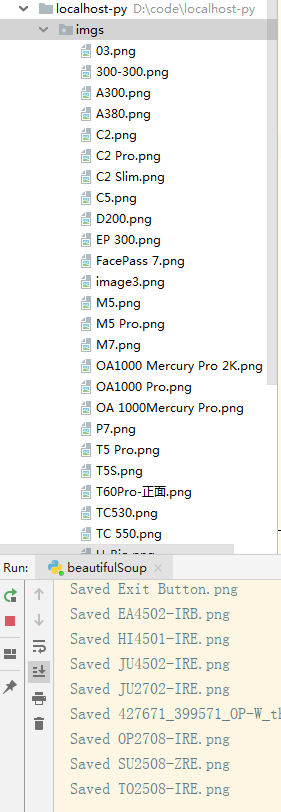
爬取的这个 URL 地址是写死的,其实这个网站是分三大块的,末尾 ID 不一样,还没搞明白怎么自动全爬。
Python 爬虫之 Beautifulsoup4,爬网站图片的更多相关文章
- Python爬虫学习之爬美女图片
最近看机器学习挺火的,然后,想要借助业余时间,来学习Python,希望能为来年找一份比较好的工作. 首先,学习得要有动力,动力,从哪里来呢?肯定是从日常需求之中来.我学Python看网上介绍.能通过P ...
- python爬虫——利用BeautifulSoup4爬取糗事百科的段子
import requests from bs4 import BeautifulSoup as bs #获取单个页面的源代码网页 def gethtml(pagenum): url = 'http: ...
- python爬虫-基础入门-爬取整个网站《3》
python爬虫-基础入门-爬取整个网站<3> 描述: 前两章粗略的讲述了python2.python3爬取整个网站,这章节简单的记录一下python2.python3的区别 python ...
- python爬虫-基础入门-爬取整个网站《2》
python爬虫-基础入门-爬取整个网站<2> 描述: 开场白已在<python爬虫-基础入门-爬取整个网站<1>>中描述过了,这里不在描述,只附上 python3 ...
- python爬虫-基础入门-爬取整个网站《1》
python爬虫-基础入门-爬取整个网站<1> 描述: 使用环境:python2.7.15 ,开发工具:pycharm,现爬取一个网站页面(http://www.baidu.com)所有数 ...
- 【转载】教你分分钟学会用python爬虫框架Scrapy爬取心目中的女神
原文:教你分分钟学会用python爬虫框架Scrapy爬取心目中的女神 本博文将带领你从入门到精通爬虫框架Scrapy,最终具备爬取任何网页的数据的能力.本文以校花网为例进行爬取,校花网:http:/ ...
- Python 爬虫入门之爬取妹子图
Python 爬虫入门之爬取妹子图 来源:李英杰 链接: https://segmentfault.com/a/1190000015798452 听说你写代码没动力?本文就给你动力,爬取妹子图.如果 ...
- Python爬虫实例:爬取猫眼电影——破解字体反爬
字体反爬 字体反爬也就是自定义字体反爬,通过调用自定义的字体文件来渲染网页中的文字,而网页中的文字不再是文字,而是相应的字体编码,通过复制或者简单的采集是无法采集到编码后的文字内容的. 现在貌似不少网 ...
- Python爬虫教程-17-ajax爬取实例(豆瓣电影)
Python爬虫教程-17-ajax爬取实例(豆瓣电影) ajax: 简单的说,就是一段js代码,通过这段代码,可以让页面发送异步的请求,或者向服务器发送一个东西,即和服务器进行交互 对于ajax: ...
- Python爬虫实战之爬取百度贴吧帖子
大家好,上次我们实验了爬取了糗事百科的段子,那么这次我们来尝试一下爬取百度贴吧的帖子.与上一篇不同的是,这次我们需要用到文件的相关操作. 本篇目标 对百度贴吧的任意帖子进行抓取 指定是否只抓取楼主发帖 ...
随机推荐
- windows linux 通过SSH X11Forwrding 使用图形化界面
有时候,我们需要在命令行中使用远程的GUI程序,这样我们就需要x11转发的来进行访问: Linux平台下不需要特别的配置,假如我们要远程的机器是centos机器,只要做如下配置即可: #vi /etc ...
- 利用开源软件自建WAF系统--OpenResty+unixhot
目录 介绍 安装Openresty 修改nginx.conf 部署WAF 测试WAF 简介:利用OpenResty+unixhot自建WAF系统 介绍 OpenResty是一个基于 Nginx 与 ...
- NGINX动态增加模块,平滑升级
这是一个小心活,不过,多操作几次,也就熟悉了. 参考URL: https://segmentfault.com/a/1190000006755963 一,安装nginx依赖包. yum install ...
- 【bzoj1997】[Hnoi2010]Planar(平面图+2-sat)
传送门 几乎和这个题一样,就不说题意了,比较特殊的点就是,这里有个结论: 平面图的边数\(m<3n-6\),\(n\)为点数. 所以我们可以通过这个减枝,\(m\)较大时直接输出\(no\).小 ...
- **目录找出最后一次修改的文件(html结果),发送报告到指定qq邮箱
import unittest,HTMLTestRunnerimport osdef runa(): path=os.getcwd() print(path) a=unittest.defaultTe ...
- Appium左右、上下滑动(Java)
网上很多文章都说用swipe来左右滑动,你把代码一贴,结果报错,看半天,原来是java-client中swipe早就被废除了!!!下面介绍一种Java写法来左右上下滑动: 首先,创建一个Swipe类 ...
- Pwn-pwn-100
题目地址http://www.whalectf.xin/files/2779dd8a2562a1d5653c5c6af9791711/binary_100 32位 ,没有防护 上IDA 很简单的栈溢出 ...
- Angular 4.x NgClass ngStyle 指令用法
<some-element [ngClass]="'first second'">...</some-element> <some-element [ ...
- [探究] dsu on tree,一类树上离线问题的做法
dsu on tree. \(\rm 0x01\) 前言\(\&\)技术分析 \(\bold{dsu~on~tree}\),中文别称"树上启发式合并"(虽然我并不承认这种称 ...
- 【08月28日】A股滚动市盈率PE历史新低排名
2010年01月01日 到 2019年08月28日 之间,滚动市盈率历史新低排名. 上市三年以上的公司,2019年08月28日市盈率在300以下的公司. 1 - 文山电力(SH600995) - 历史 ...