
【FTP】FTP文件上传下载-支持断点续传
- Jar包:apache的commons-net包;
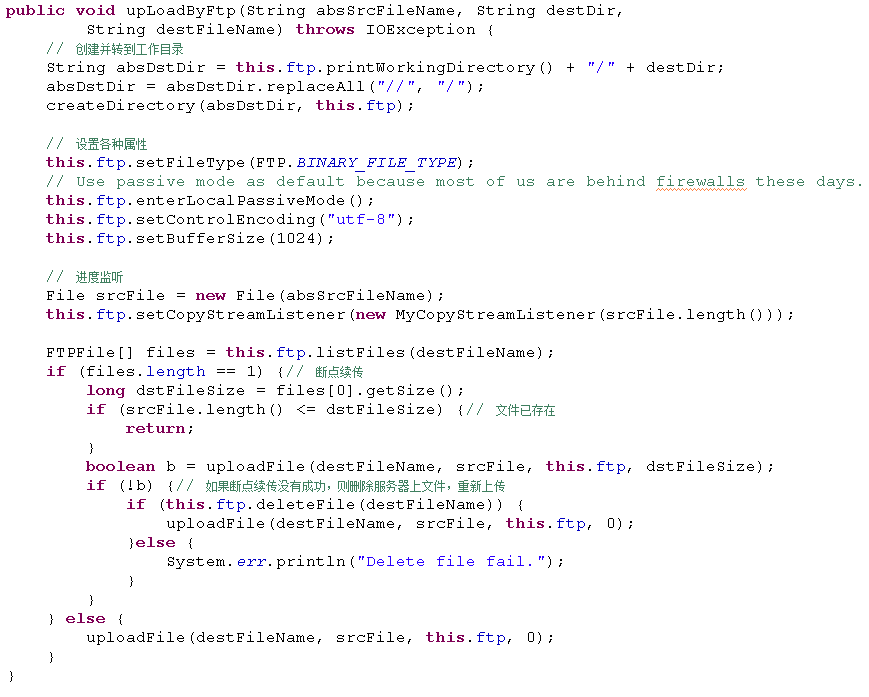
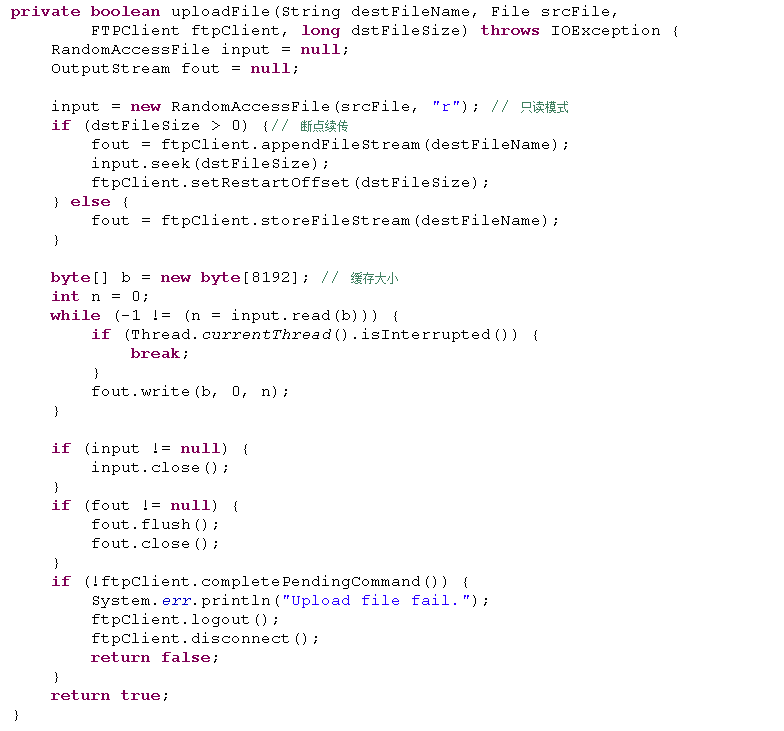
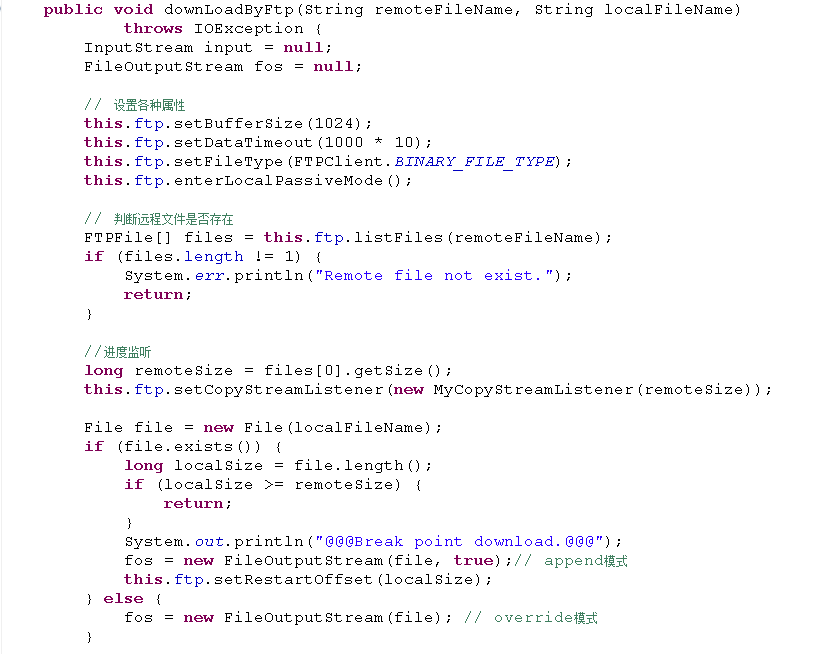
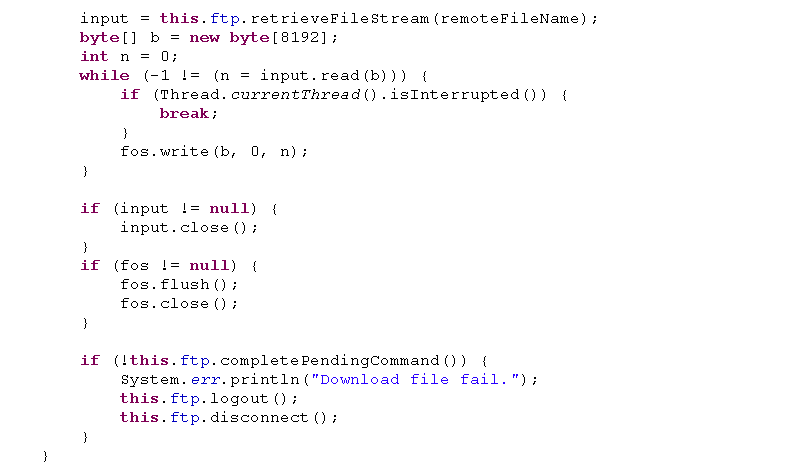
- 支持断点续传
- 支持进度监控(有时出不来,搞不清原因)
相关知识点
- 编码格式: UTF-8等;
- 文件类型: 包括[BINARY_FILE_TYPE(常用)]和[ASCII_FILE_TYPE]两种;
- 数据连接模式:一般使用LocalPassiveMode模式,因为大部分客户端都在防火墙后面;
- 系统类型:UNIX/WINDOWS等,默认为Unix
流程
- 步骤1: 创建FTPClient对象,设置ftpClient属性:如编码格式、连接超时、文件上传下载进度监听器等;
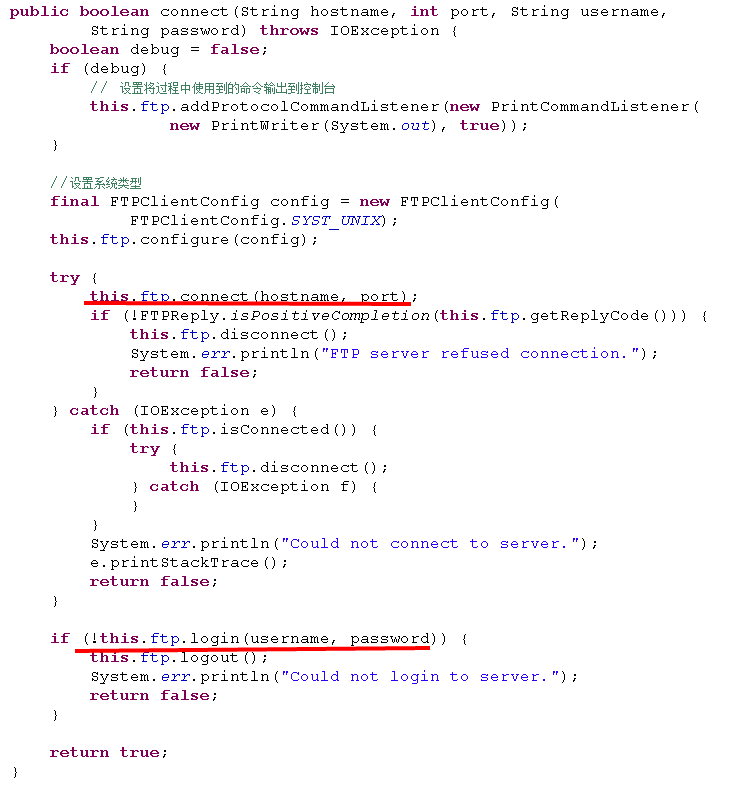
- 步骤2: 使用ftpClient连接远程server:connect();
- 步骤3: 获取connect()的返回码getReplyCode(),判断是否连接成功:isPositiveCompletion();
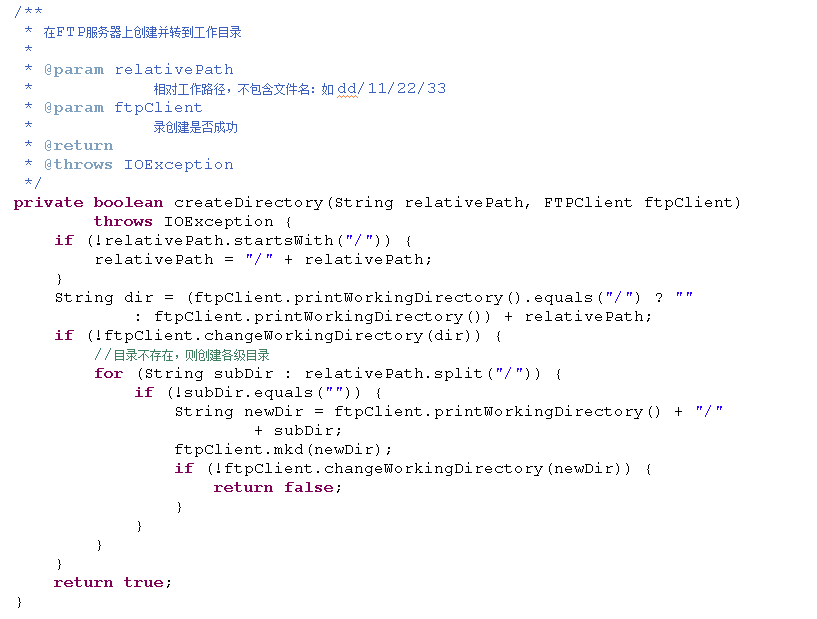
- 步骤4: 登录远程server:login(),并转到相应目录,必要时要递归创建目录;
- 步骤5: 设置ftpClient属性:如缓存大小、文件类型、超时时间、数据连接模式等;
- 步骤6: ftp相关操作:如文件上传、下载等;
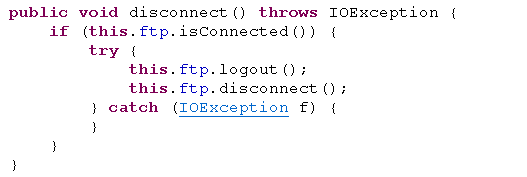
- 步骤7: 断开连接,释放资源:logout()/disconnect();
程序
FTP连接和登录
文件上传
文件下载
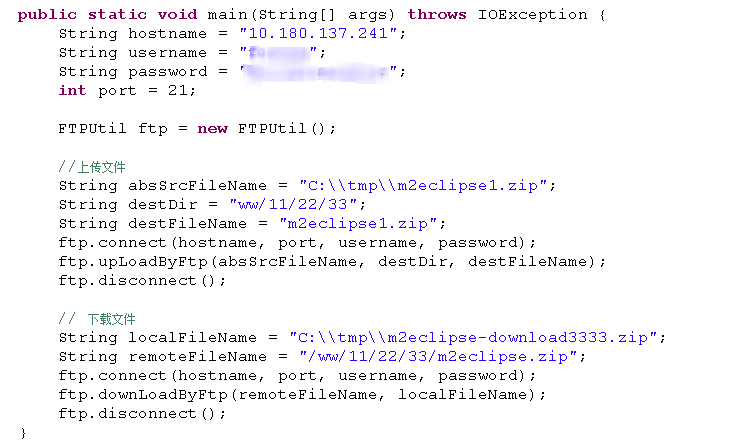
测试程序
完整程序
package com.sssppp.Communication;import java.io.File;import java.io.FileOutputStream;import java.io.IOException;import java.io.InputStream;import java.io.OutputStream;import java.io.PrintWriter;import java.io.RandomAccessFile;import org.apache.commons.net.PrintCommandListener;import org.apache.commons.net.ftp.FTP;import org.apache.commons.net.ftp.FTPClient;import org.apache.commons.net.ftp.FTPClientConfig;import org.apache.commons.net.ftp.FTPFile;import org.apache.commons.net.ftp.FTPReply;import org.apache.commons.net.io.CopyStreamEvent;import org.apache.commons.net.io.CopyStreamListener;/*** FTP进行文件上传和下载;* 支持断点续传;*/public final class FTPUtil {private final FTPClient ftp = new FTPClient();/**** @param hostname* 如:IP* @param port* @param username* @param password* @return* @throws IOException*/public boolean connect(String hostname, int port, String username,String password) throws IOException {boolean debug = false;if (debug) {// 设置将过程中使用到的命令输出到控制台this.ftp.addProtocolCommandListener(new PrintCommandListener(new PrintWriter(System.out), true));}//设置系统类型final FTPClientConfig config = new FTPClientConfig(FTPClientConfig.SYST_UNIX);this.ftp.configure(config);try {this.ftp.connect(hostname, port);if (!FTPReply.isPositiveCompletion(this.ftp.getReplyCode())) {this.ftp.disconnect();System.err.println("FTP server refused connection.");return false;}} catch (IOException e) {if (this.ftp.isConnected()) {try {this.ftp.disconnect();} catch (IOException f) {}}System.err.println("Could not connect to server.");e.printStackTrace();return false;}if (!this.ftp.login(username, password)) {this.ftp.logout();System.err.println("Could not login to server.");return false;}return true;}public void disconnect() throws IOException {if (this.ftp.isConnected()) {try {this.ftp.logout();this.ftp.disconnect();} catch (IOException f) {}}}/**** @param absSrcFileName* @param destDir* @param destFileName* @throws IOException*/public void upLoadByFtp(String absSrcFileName, String destDir,String destFileName) throws IOException {// 创建并转到工作目录String absDstDir = this.ftp.printWorkingDirectory() + "/" + destDir;absDstDir = absDstDir.replaceAll("//", "/");createDirectory(absDstDir, this.ftp);// 设置各种属性this.ftp.setFileType(FTP.BINARY_FILE_TYPE);// Use passive mode as default because most of us are behind firewalls these days.this.ftp.enterLocalPassiveMode();this.ftp.setControlEncoding("utf-8");this.ftp.setBufferSize(1024);// 进度监听File srcFile = new File(absSrcFileName);this.ftp.setCopyStreamListener(new MyCopyStreamListener(srcFile.length()));FTPFile[] files = this.ftp.listFiles(destFileName);if (files.length == 1) {// 断点续传long dstFileSize = files[0].getSize();if (srcFile.length() <= dstFileSize) {// 文件已存在return;}boolean b = uploadFile(destFileName, srcFile, this.ftp, dstFileSize);if (!b) {// 如果断点续传没有成功,则删除服务器上文件,重新上传if (this.ftp.deleteFile(destFileName)) {uploadFile(destFileName, srcFile, this.ftp, 0);}else {System.err.println("Delete file fail.");}}} else {uploadFile(destFileName, srcFile, this.ftp, 0);}}/**** @param remoteFileName* @param localFileName* @throws IOException*/public void downLoadByFtp(String remoteFileName, String localFileName)throws IOException {InputStream input = null;FileOutputStream fos = null;// 设置各种属性this.ftp.setBufferSize(1024);this.ftp.setDataTimeout(1000 * 10);this.ftp.setFileType(FTPClient.BINARY_FILE_TYPE);this.ftp.enterLocalPassiveMode();// 判断远程文件是否存在FTPFile[] files = this.ftp.listFiles(remoteFileName);if (files.length != 1) {System.err.println("Remote file not exist.");return;}//进度监听long remoteSize = files[0].getSize();this.ftp.setCopyStreamListener(new MyCopyStreamListener(remoteSize));File file = new File(localFileName);if (file.exists()) {long localSize = file.length();if (localSize >= remoteSize) {return;}System.out.println("@@@Break point download.@@@");fos = new FileOutputStream(file, true);// append模式this.ftp.setRestartOffset(localSize);} else {fos = new FileOutputStream(file); // override模式}input = this.ftp.retrieveFileStream(remoteFileName);byte[] b = new byte[8192];int n = 0;while (-1 != (n = input.read(b))) {if (Thread.currentThread().isInterrupted()) {break;}fos.write(b, 0, n);}if (input != null) {input.close();}if (fos != null) {fos.flush();fos.close();}if (!this.ftp.completePendingCommand()) {System.err.println("Download file fail.");this.ftp.logout();this.ftp.disconnect();}}/**** @param destFileName* @param srcFile* @param ftpClient* @param dstFileSize 文件写入的起始位置; >0:表示断点续传,<=0:表示上传新文件* @return* @throws IOException*/private boolean uploadFile(String destFileName, File srcFile,FTPClient ftpClient, long dstFileSize) throws IOException {RandomAccessFile input = null;OutputStream fout = null;input = new RandomAccessFile(srcFile, "r"); // 只读模式if (dstFileSize > 0) {// 断点续传fout = ftpClient.appendFileStream(destFileName);input.seek(dstFileSize);ftpClient.setRestartOffset(dstFileSize);} else {fout = ftpClient.storeFileStream(destFileName);}byte[] b = new byte[8192]; // 缓存大小int n = 0;while (-1 != (n = input.read(b))) {if (Thread.currentThread().isInterrupted()) {break;}fout.write(b, 0, n);}if (input != null) {input.close();}if (fout != null) {fout.flush();fout.close();}if (!ftpClient.completePendingCommand()) {System.err.println("Upload file fail.");ftpClient.logout();ftpClient.disconnect();return false;}return true;}/*** 在FTP服务器上创建并转到工作目录** @param relativePath* 相对工作路径,不包含文件名:如 dd/11/22/33* @param ftpClient* 录创建是否成功* @return* @throws IOException*/private boolean createDirectory(String relativePath, FTPClient ftpClient)throws IOException {if (!relativePath.startsWith("/")) {relativePath = "/" + relativePath;}String dir = (ftpClient.printWorkingDirectory().equals("/") ? "": ftpClient.printWorkingDirectory()) + relativePath;if (!ftpClient.changeWorkingDirectory(dir)) {//目录不存在,则创建各级目录for (String subDir : relativePath.split("/")) {if (!subDir.equals("")) {String newDir = ftpClient.printWorkingDirectory() + "/"+ subDir;ftpClient.mkd(newDir);if (!ftpClient.changeWorkingDirectory(newDir)) {return false;}}}}return true;}/*** 进度监听器*/private class MyCopyStreamListener implements CopyStreamListener {private long totalSize = 0;private long percent = -1; // 进度/*** 文件的总大小* @param totalSize*/public MyCopyStreamListener(long totalSize) {super();this.totalSize = totalSize;}@Overridepublic void bytesTransferred(CopyStreamEvent event) {bytesTransferred(event.getTotalBytesTransferred(),event.getBytesTransferred(), event.getStreamSize());}//totalBytesTransferred:当前总共已传输字节数;//bytesTransferred:最近一次传输字节数@Overridepublic void bytesTransferred(long totalBytesTransferred,int bytesTransferred, long streamSize) {if (percent >= totalBytesTransferred * 100 / totalSize) {return;}percent = totalBytesTransferred * 100 / totalSize;System.out.println("Completed " + totalBytesTransferred + "("+ percent + "%) out of " + totalSize + ".");}}public static void main(String[] args) throws IOException {String hostname = "10.180.137.241";String username = "xxx";String password = "xxx";int port = 21;FTPUtil ftp = new FTPUtil();//上传文件String absSrcFileName = "C:\\tmp\\m2eclipse1.zip";String destDir = "ww/11/22/33";String destFileName = "m2eclipse1.zip";ftp.connect(hostname, port, username, password);ftp.upLoadByFtp(absSrcFileName, destDir, destFileName);ftp.disconnect();// 下载文件String localFileName = "C:\\tmp\\m2eclipse-download3333.zip";String remoteFileName = "/ww/11/22/33/m2eclipse.zip";ftp.connect(hostname, port, username, password);ftp.downLoadByFtp(remoteFileName, localFileName);ftp.disconnect();}}
参考链接
【FTP】FTP文件上传下载-支持断点续传的更多相关文章
- FTP文件上传并支持断点续传(一)—— win10 本地环境 ftp站点构建
由于之前项目开发是采用是采用的FTP文件上传,就一直想学习,但由于FTP服务器是公司的,为了方便就像把本地变成ftp站点,其实很简单,但也有很多坑 这里简单介绍一下自己遇到的坑 一:开通本地的ftp权 ...
- PHP 大文件上传,支持断点续传,求具体方案、源码或者文件上传插件
文件夹数据库处理逻辑 publicclass DbFolder { JSONObject root; public DbFolder() { this.root = new JSONObject(); ...
- ftp实现文件上传(下载)
例子代码 package getUrlPic; import java.io.ByteArrayInputStream; import java.io.IOException; import java ...
- 转:【专题十一】实现一个基于FTP协议的程序——文件上传下载器
引言: 在这个专题将为大家揭开下FTP这个协议的面纱,其实学习知识和生活中的例子都是很相通的,就拿这个专题来说,要了解FTP协议然后根据FTP协议实现一个文件下载器,就和和追MM是差不多的过程的,相信 ...
- Java实现FTP批量大文件上传下载篇1
本文介绍了在Java中,如何使用Java现有的可用的库来编写FTP客户端代码,并开发成Applet控件,做成基于Web的批量.大文件的上传下载控件.文章在比较了一系列FTP客户库的基础上,就其中一个比 ...
- Python 基于Python实现Ftp文件上传,下载
基于Python实现Ftp文件上传,下载 by:授客 QQ:1033553122 测试环境: Ftp客户端:Windows平台 Ftp服务器:Linux平台 Python版本:Python 2.7 ...
- 专题十一:实现一个基于FTP协议的程序——文件上传下载器
引言: 在这个专题将为大家揭开下FTP这个协议的面纱,其实学习知识和生活中的例子都是很相通的,就拿这个专题来说,要了解FTP协议然后根据FTP协议实现一个文件下载器,就和和追MM是差不多的过程的,相信 ...
- 【ABAP系列】SAP ABAP 实现FTP的文件上传与下载
公众号:SAP Technical 本文作者:matinal 原文出处:http://www.cnblogs.com/SAPmatinal/ 原文链接:[ABAP系列]SAP ABAP 实现FTP的文 ...
- HTTP文件上传服务器-支持超大文件HTTP断点续传的实现办法
最近由于笔者所在的研发集团产品需要,需要支持高性能的大文件http上传,并且要求支持http断点续传.笔者在以前的博客如何实现支持大文件的高性能HTTP文件上传服务器已经介绍了实现大文件上传的一些基本 ...
随机推荐
- NSDateFormatter遇到无法转换的问题
NSDateFormatter并不是万能的,并不是给出什么字符串都能转遍为NSDate类型,所转换的格式必须必须和你给出的格式想对应 比如说:NSString *dateStr = @"20 ...
- Spring的Bean的基本概念
Spring其实就是一个大型的工厂,而Spring容器中的Bean就是该工厂的产品.Spring容器能够生产哪些产品,取决于配置文件的配置. 对于我们而言,使用Spring框架做两件事:开发Bean. ...
- BackTrack5-r3安装VMware Tools
bt login:root //默认的BT系统账号password:toor //默认的BT系统密码,这里的密码是不显示的.root@bt:~#startx //进入图形模式 启动BT虚拟机系统-在V ...
- Init
alloc负责分配对象空间,init负责初始化对象.init是实例方法,返回的是初始化后的对象的地址.init是NSObject的初始化方法. 子类不实现init,会执行由NSObject定义的ini ...
- jQuery 遍历 - each() 方法
定义和用法 each() 方法规定为每个匹配元素规定运行的函数. 提示:返回 false 可用于及早停止循环. 语法 $(selector).each(function(index,element)) ...
- jQuery:cookie插件的使用
Jquery插件就是在Jquery基础之上,开发的基于Jquery的javascript库. 在Jquery中,引入cookie插件后,可以很方便的定义某个cookie的名称,并设置cookie值.通 ...
- 深入解析Javascript中this关键字的使用
深入解析Javascript中面向对象编程中的this关键字 在Javascript中this关键字代表函数运行时,自动生成的一个内部对象,只能在函数内部使用.比如: function TestFun ...
- JavaScript 获取数组中最大值、最小值
笨方法 Array.prototype.max = function() { var max = this[0]; var len = this.length; for (var i = 1; i & ...
- Lua IO库详解
I/O 库提供了两套不同风格的文件处理接口. 第一种风格使用隐式的文件句柄: 它提供设置默认输入文件及默认输出文件的操作, 所有的输入输出操作都针对这些默认文件. 第二种风格使用显式的文件句柄. 当使 ...
- folly::AtomicHashmap源码分析(二)
本文为原创,转载请注明:http://www.cnblogs.com/gistao/ 背景 上一篇只是细致的把源码分析了一遍,而源码背后的设计思想并没有写,设计思想往往是最重要的,没有它,基本无法做整 ...