
iOS开发-CoreMotion框架(加速计和陀螺仪)
CoreMotion是一个专门处理Motion的框架,其中包含了两个部分加速度计和陀螺仪,在iOS4之前加速度计是由UIAccelerometer类来负责采集数据,现在一般都是用CoreMotion来处理加速度过程,不过由于UIAccelerometer比较简单,同样有人在使用。加速计由三个坐标轴决定,用户最常见的操作设备的动作移动,晃动手机(摇一摇),倾斜手机都可以被设备检测到,加速计可以检测到线性的变化,陀螺仪可以更好的检测到偏转的动作,可以根据用户的动作做出相应的动作,iOS模拟器无法模拟以上动作,真机调试需要开发者账号。
加速计
加速计的x,y,z三个方向,参考下图:
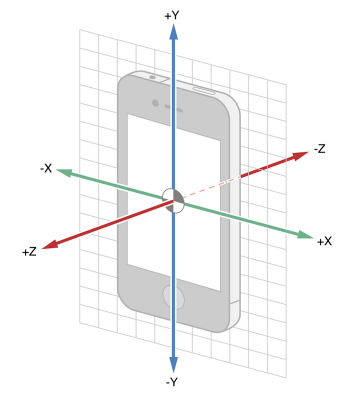
如果只需要知道设备的方向,不需要知道具体方向矢量角度,那么可以使用UIDevice进行操作,还可以根据方向就行判断,具体可以参考一下苹果官网代码:
-(void) viewDidLoad {

     // Request to turn on accelerometer and begin receiving accelerometer events

     [[UIDevice currentDevice] beginGeneratingDeviceOrientationNotifications];

     [[NSNotificationCenter defaultCenter] addObserver:self selector:@selector(orientationChanged:) name:UIDeviceOrientationDidChangeNotification object:nil];

}

- (void)orientationChanged:(NSNotification *)notification {

     // Respond to changes in device orientation

}

-(void) viewDidDisappear {

     // Request to stop receiving accelerometer events and turn off accelerometer

     [[NSNotificationCenter defaultCenter] removeObserver:self];

     [[UIDevice currentDevice] endGeneratingDeviceOrientationNotifications];

}
当用户晃动设备的时候,系统会通知每一个在用的设备,可以使本身成为第一响应者:
- (BOOL)canBecomeFirstResponder {

    return YES;

}

- (void)viewDidAppear:(BOOL)animated {

    [self becomeFirstResponder];

}
处理Motion事件有三种方式,开始(motionBegan),结束(motionEnded),取消(motionCancelled):
- (void)motionBegan:(UIEventSubtype)motion withEvent:(UIEvent *)event NS_AVAILABLE_IOS(3_0);

- (void)motionEnded:(UIEventSubtype)motion withEvent:(UIEvent *)event NS_AVAILABLE_IOS(3_0);

- (void)motionCancelled:(UIEventSubtype)motion withEvent:(UIEvent *)event NS_AVAILABLE_IOS(3_0);
motionEnded方法中处理:
- (void)motionEnded:(UIEventSubtype)motion withEvent:(UIEvent *)event {

    if (motion == UIEventSubtypeMotionShake)

    {

        // FlyElephant  http://www.cnblogs.com/xiaofeixiang

        [[NSNotificationCenter defaultCenter] postNotificationName:@"FlyElephant" object:self];

    }

}
CoreMotion在处理加速计数据和陀螺仪数据的时是一个非常重要的框架,框架本身集成了很多算法获取原生的数据,而且能很好的展现出来,CoreMotion与UIKit不同,连接的是UIEvent而不是事件响应链。CoreMotion相对于接收数据只是更简单的分发motion事件。
CMMotionManager类能够使用到设备的所有移动数据(motion data),Core Motion框架提供了两种对motion数据的操作方式:
pull方式:能够以CoreMotionManager的只读方式获取当前任何传感器状态或是组合数据;
push方式:是以块或者闭包的形式收集到想要得到的数据并且在特定周期内得到实时的更新;
pull处理方式:
    //判断加速计是否可用

    if ([_motionManager isAccelerometerAvailable]) {

        // 设置加速计采样频率

        [_motionManager setAccelerometerUpdateInterval:1 / 40.0];

        [_motionManager startAccelerometerUpdates];

    } else {

        NSLog(@"博客园-FlyElephant");

    }
触摸结束:
-(void)touchesEnded:(NSSet *)touches withEvent:(UIEvent *)event{

     CMAcceleration acceleration=_motionManager.accelerometerData.acceleration;

    NSLog(@"%f---%f---%f",acceleration.x,acceleration.y,acceleration.z);

}
push处理方式:
@property (strong,nonatomic) CMMotionManager  *motionManager;

@property (strong,nonatomic) NSOperationQueue *quene;
     _motionManager=[[CMMotionManager alloc]init];

    //判断加速计是否可用

    if ([_motionManager isAccelerometerAvailable]) {

        // 设置加速计频率

        [_motionManager setAccelerometerUpdateInterval:1 / 40.0];

        //开始采样数据

        [_motionManager startAccelerometerUpdatesToQueue:_quene withHandler:^(CMAccelerometerData *accelerometerData, NSError *error) {

            NSLog(@"%f---%f",accelerometerData.acceleration.x,accelerometerData.acceleration.y);

        }];

    } else {

        NSLog(@"博客园-FlyElephant");

    }
时间设置频率:

陀螺仪
陀螺仪其实主要方法和方式和加速计没有区别,先看张陀螺仪旋转的角度图片:
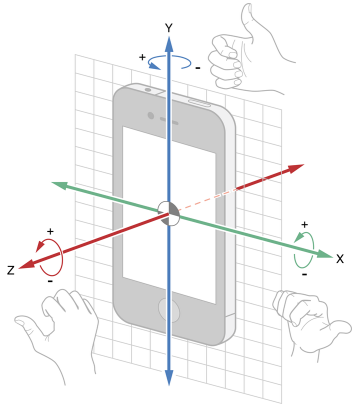
陀螺仪更新数据也有两种方式,pull方式(startGyroUpdates),push方式(startGyroUpdatesToQueue):
static const NSTimeInterval gyroMin = 0.01;

- (void)startUpdatesWithSliderValue:(int)sliderValue {

     // Determine the update interval

     NSTimeInterval delta = 0.005;

     NSTimeInterval updateInterval = gyroMin + delta * sliderValue;

     // Create a CMMotionManager

     CMMotionManager *mManager = [(APLAppDelegate *)[[UIApplication sharedApplication] delegate] sharedManager];

     APLGyroGraphViewController * __weak weakSelf = self;

     // Check whether the gyroscope is available

     if ([mManager isGyroAvailable] == YES) {

          // Assign the update interval to the motion manager

          [mManager setGyroUpdateInterval:updateInterval];

          [mManager startGyroUpdatesToQueue:[NSOperationQueue mainQueue] withHandler:^(CMGyroData *gyroData, NSError *error) {

               [weakSelf.graphView addX:gyroData.rotationRate.x y:gyroData.rotationRate.y z:gyroData.rotationRate.z];

               [weakSelf setLabelValueX:gyroData.rotationRate.x y:gyroData.rotationRate.y z:gyroData.rotationRate.z];

          }];

     }

     self.updateIntervalLabel.text = [NSString stringWithFormat:@"%f", updateInterval];

}

- (void)stopUpdates{

     CMMotionManager *mManager = [(APLAppDelegate *)[[UIApplication sharedApplication] delegate] sharedManager];

     if ([mManager isGyroActive] == YES) {

          [mManager stopGyroUpdates];

     }

}
很晚了,先睡觉了~有空补充一下~
iOS开发-CoreMotion框架(加速计和陀螺仪)的更多相关文章
- iOS开发-CoreMotion框架
转自: CoreMotion是一个专门处理Motion的框架,其中包含了两个部分 加速度计和陀螺仪,在iOS4之前加速度计是由 UIAccelerometer 类 来负责采集数据,现在一般都是用Cor ...
- iOS学习新知识-加速计和陀螺仪
一.CoreMotion框架介绍 我们知道有一些iOS的应用,会有一些特殊的要求,比如: 电子罗盘指南针之类的应用:让我们知道方向. 运动类型软件:让我们知道我们跑步多少公里. 社交软件中的摇一摇功能 ...
- iOS开发基础框架
---恢复内容开始--- //appdelegate //// AppDelegate.m// iOS开发架构//// Copyright © 2016年 Chason. All rights ...
- iOS开发 传感器(加速计、摇一摇、计步器)
一.传感器 1.什么是传感器传感器是一种感应\检测周围环境的一种装置, 目前已经广泛应用于智能手机上 传感器的作用用于感应\检测设备周边的信息不同类型的传感器, 检测的信息也不一样 iPhone中的下 ...
- iOS开发-网络框架-b
网络框架(以下称NJAFNetworking)是基于AFNetworking框架的简单封装,基本功能包括POST请求,GET请求,上传文件,下载文件,网络状态,缓存等. 为什么要使用NJAFNetwo ...
- iOS开发UIKit框架-可视化编程-XIB
1. Interface Builder 可视化编程 1> 概述 GUI : 图形用户界面(Graphical User Interface, 简称GUI, 又称图形化界面) 是指采用图形方式显 ...
- 简单搭建iOS开发项目框架
今天我们来谈谈如何搭建框架,框架需要做一些什么. 第一步:找到我们的目标我们的目标是让其他开发人员拿到手后即可写页面,不再需要考虑其他的问题. 第二步:我们需要做哪些东西各位跟着我一步一步来进行. 假 ...
- IOS开发 基础框架(Fondation Framework)的线程安全
有一种误解,认为基础框架(Foundation framework)是线程安全的,而Application Kit是非线程安全的.不幸的是,这是一个总的概括,从而造成一点误导.每个框架都包含了线程安全 ...
- iOS开发 - CoreData框架 数据持久化
Core Data Core Data是iOS5之后才出现的一个框架,它提供了对象-关系映射(ORM)的功能,即能够将OC对象转化成数据,保存在SQLite数据库文件中,也能够将保存在数据库中的数据还 ...
随机推荐
- C# Zip解压缩,规避 [content_types].xml 文件
使用 System.IO.Packaging.Package 进行压缩和解压时,会自动生成 [content_types].xml 文件. The Structure of the [Content_ ...
- 安装部署VMware vSphere 5.5文档 (6-6) 集群和vMotion
部署VMware vSphere 5.5 实施文档 ########################################################################## ...
- 机器学习之路: python线性回归 过拟合 L1与L2正则化
git:https://github.com/linyi0604/MachineLearning 正则化: 提高模型在未知数据上的泛化能力 避免参数过拟合正则化常用的方法: 在目标函数上增加对参数的惩 ...
- python语法(一)
Python是一种面向对象.直译式电脑编程语言,也是一种功能强大的通用型语言,已经具有近二十年的发展历史,成熟且稳定.在近几年,大数据,人工智能火起来之后也是水涨船高,被越来越多的人知道,并且越来越多 ...
- Java 中的浮点数取精度方法
Java 中的浮点数取精度方法 一.内容 一般在Java代码中取一个double类型的浮点数的精度,四舍五入或者直接舍去等的方式,使用了4种方法,推荐使用第一种,我已经封装成工具类了. 二.代码实现 ...
- pygame系列_pygame的各模块叙述
在pygame中,有很多模块,每个模块对应着不同的功能,如果我们知道这些模块是做什么的,那么,对我们的游戏开发会起到关键性的作用. 我们就说说pygame中的各个模块吧!!! #pygame modu ...
- Caffe2(3)----下载现成的模型并使用
Caffe2训练好的模型可在Model Zoo下载,下载的命令很简单,接下来以下载和使用squeezenet为例,进行简单说明. 1.浏览可下载的模型 已有模型都放在github上,地址:https: ...
- CentOS 7编译openssl
# 编译安装zlib库wget http://zlib.net/zlib-1.2.11.tar.gztar -zxvf zlib-1.2.11.tar.gz cd zlib-1.2.11 ./conf ...
- 计算机音频基础-PCM简介
我们在音频处理的时候经常会接触到PCM数据:它是模拟音频信号经模数转换(A/D变换)直接形成的二进制序列,该文件没有附加的文件头和文件结束标志. 声音本身是模拟信号,而计算机只能识别数字信号,要在计算 ...
- Send a WhatsApp Message programatically -- Tasker WhatsTasker
Here is My code snippet: Uri mUri = Uri.parse("smsto:+9876543210"); Intent mIntent = new I ...