
spring cloud 配置中心
1. spring cloud配置中心server
1.1 创建git仓库
首先在github上搭建一个存储配置中心的仓库,需要创建两个分支,一个是master,一个是dev分支。自己学习可以用公开库,真实环境使用的话,还是需要私库,或者自己搭建git服务器。

1.2 搭建server
使用spring cloud搭建服务器,工具使用idea,新建maven工程,配置pom.xml文件
<dependencyManagement>

        <dependencies>

            <dependency>

                <groupId>org.springframework.cloud</groupId>

                <artifactId>spring-cloud-dependencies</artifactId>

                <version>Finchley.SR1</version>

                <type>pom</type>

                <scope>import</scope>

            </dependency>

        </dependencies>

    </dependencyManagement>

    <dependencies>

        <dependency>

            <groupId>org.springframework.cloud</groupId>

            <artifactId>spring-cloud-config-server</artifactId>

        </dependency>

    </dependencies>
创建springboot启动类,启动类要加上@SpringBootApplication 和 @EnableConfigServer 这两个注解。
@SpringBootApplication: springboot启动注解
@EnableConfigServer: springcloud config server的注解,必须要加上
@SpringBootApplication
@EnableConfigServer
public class Application {

    public static void main(String[] args) {
        SpringApplication.run(Application.class, args);
    }
}
创建配置文件bootstrap.yml
spring:

  cloud:

    config:

      server:

        git:

          uri: https://github.com/hanggle/ConfigCenter.git  #git仓库地址,就是刚才创建的git仓库

          skipSslValidation: true #跳过校验

          basedir: d:///myspace///config-center///config #从git仓库拉取到的文件在本地存储的位置,可自行修改或删掉,默认存储在C盘

        # bootstrap: true

server:

  port: 8889
config-server的目录结构:
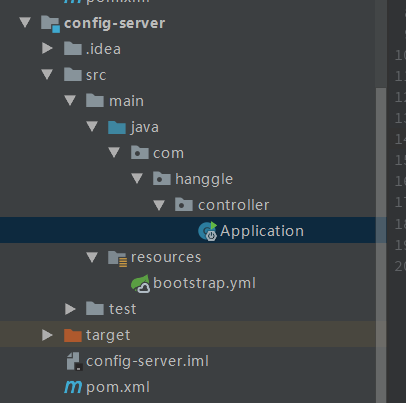
启动springboot,启动成功后可以在浏览器查看拉取到的配置信息,路径的访问有以下几种:
/{application}/{profile}[/{label}]

/{application}-{profile}.yml

/{label}/{application}-{profile}.yml

/{application}-{profile}.properties

/{label}/{application}-{profile}.properties
我创建的文件名是:application-dev.yml ,application-prod.yml
路径中占位符的表示是:
application 对应我文件中的 application
profile 对应 dev或prod
label 对应分支 master(默认是master 分支)

访问示例:
默认master分支

dev分支:

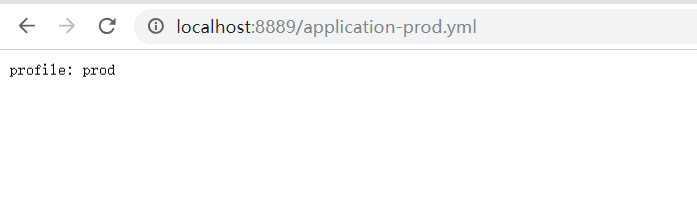
有兴趣的同学可以都试试,配置没问题都可以访问得到。
到此单机配置服务中心搭建完成了。
2. spring cloud配置中心client
使用spring cloud搭建服务器,工具使用idea,新建maven工程,配置pom.xml文件
<parent>

        <groupId>org.springframework.boot</groupId>

        <artifactId>spring-boot-starter-parent</artifactId>

        <version>2.0.4.RELEASE</version>

    </parent>

    <dependencyManagement>

        <dependencies>

            <dependency>

                <groupId>org.springframework.cloud</groupId>

                <artifactId>spring-cloud-dependencies</artifactId>

                <version>Finchley.SR1</version>

                <type>pom</type>

                <scope>import</scope>

            </dependency>

        </dependencies>

    </dependencyManagement>

    <dependencies>

        <dependency>

            <groupId>org.springframework.boot</groupId>

            <artifactId>spring-boot-starter-web</artifactId>

        </dependency>

        <dependency>

            <groupId>org.springframework.cloud</groupId>

            <artifactId>spring-cloud-starter-config</artifactId>

        </dependency>

    </dependencies>
创建springboot启动类
@SpringBootApplication

public class ClientApplication {

    public static void main(String[] args) {

        SpringApplication.run(ClientApplication.class, args);

    }

}
创建测试controller
@RestController

public class TestController {

    @Value("${mydev}")

    private String userName;

    @Value("${profile}")

    private String profile;

    @Value("${name}")

    private String name;

    @GetMapping("/test")

    public String home() {

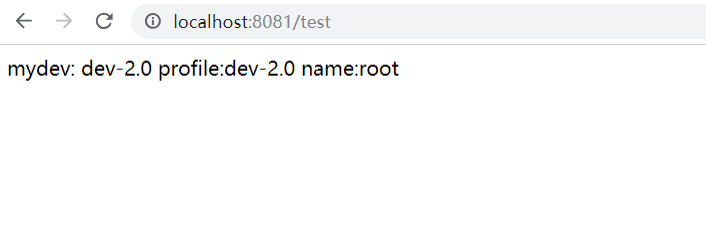
        return "mydev: " + userName +"    profile:" + profile + " name:" + name;

    }

}
配置文件
application.yml
server:

  port: 8081

  name: config-client

mydev: ${profile}
bootstrap.yml
spring:

  application:

    name: application # 指的是application-dev.xml中的application

  cloud:

    config:

      uri: http://localhost:8889 # config-server 地址

      profile: dev # 后缀  指的是application-dev.xml中的dev

      label: dev # git 分支
项目结构
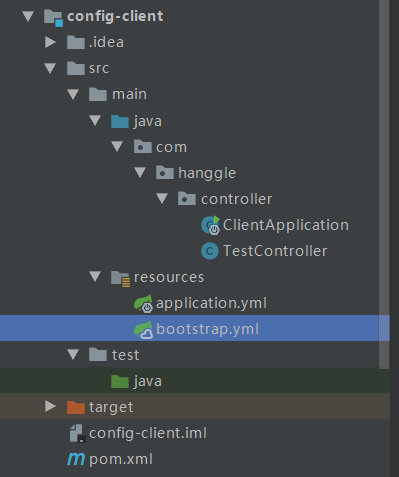
启动成功后访问
我在Github上的dev分支配置
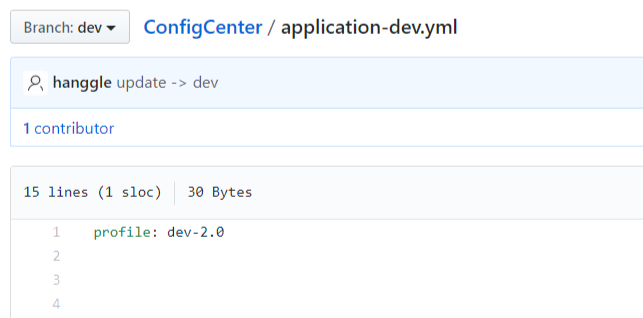
在上面我通过两种方式读取配置属性:
1、直接在java文件中使用(peofile属性)
2、是在xml文件中陪之后再在java中使用(mydev属性)
比较推荐第二种,虽然多了一步,但是可以清除的知道来源,方便找问题。
3. 总结
到此初步完成简单的使用和测试,复杂的使用还需要再研究官方文档:http://cloud.spring.io/spring-cloud-config/single/spring-cloud-config.html
单一服务肯定没办法保证高可用性,具体方案待续。。。。。。
spring cloud 配置中心的更多相关文章
- 记录一个 spring cloud 配置中心的坑,命令行端口参数无效,被覆盖,编码集问题无法读取文件等.
spring cloud 配置中心 结合GIT , 可以运行时更新配置文件.发送指令让应用重新读取配置文件. 最近在测试服务器实现了一套,结果CPU 实用率暴增,使用docker compose启动 ...
- Spring Cloud配置中心(Config)
Spring Cloud配置中心(Config) Spring Cloud是现在流行的分布式服务框架,它提供了很多有用的组件.比如:配置中心.Eureka服务发现. 消息总线.熔断机制等. 配置中心在 ...
- springcloud(五):Spring Cloud 配置中心的基本用法
Spring Cloud 配置中心的基本用法 1. 概述 本文介绍了Spring Cloud的配置中心,介绍配置中心的如何配置服务端及配置参数,也介绍客户端如何和配置中心交互和配置参数说明. 配置中心 ...
- springcloud(六):Spring Cloud 配置中心采用数据库存储配置内容
Spring Cloud 配置中心采用数据库存储配置内容 转自:Spring Cloud Config采用数据库存储配置内容[Edgware+] Spring Cloud Server配置中心采用了G ...
- (七)Spring Cloud 配置中心config
spring cloud config是一个基于http协议的远程配置实现方式. 通过统一的配置管理服务器进行配置管理,客户端通过http协议主动的拉取服务的的配置信息,完成配置获取. 下面我们对 ...
- Spring Cloud配置中心搭建(集成Git)
1. 在Github(或其他)创建配置中心仓库bounter-config-repo,然后在仓库创建两个配置文件:simon.properties.susan.properties,链接如下: htt ...
- Spring Cloud配置中心内容加密
从配置获取的配置默认是明文的,有些像数据源这样的配置需要加密的话,需要对配置中心进行加密处理. 下面使用对称性加密来加密配置,需要配置一个密钥,当然也可以使用RSA非对称性加密,但对称加密比较方便也够 ...
- Spring Cloud配置中心高可用搭建
本文通过config server连接git仓库来实现配置中心,除了git还可以使用svn或者系统本地目录都行. 引入依赖 <dependencies> <dependency> ...
- Spring Cloud配置中心客户端读取配置
微服务连接配置中心来实现外部配置的读取. 引入依赖 <dependencies> <dependency> <groupId>org.springframework ...
随机推荐
- web12 使用map型的request、session、application
电影网站:www.aikan66.com 项目网站:www.aikan66.com 游戏网站:www.aikan66.com 图片网站:www.aikan66.com 书籍网站:www.aikan66 ...
- java 转载
这几天忙于其他的事情,编程的习惯没有继续下去,偶然间看到了这篇文章,感觉收益颇丰,言归正传,下面即入主题 java基础知识小总结 在一个独立的原始程序里,只能有一个 public 类,却可以有许多 n ...
- IO异常 的处理 test
package com.throwsss; import java.io.File; import java.io.FileInputStream; import java.io.FileNotFou ...
- Unity3D游戏开发——收集当前关卡游戏中分散的物件
运用场景 许多游戏中会有一些供玩家拾起的物件,例如装备.血包.道具等.当玩家与物件进行碰撞后,则会进入仓库. 本篇介绍了简单的碰撞过程. 原理 基本的碰撞机制,用到OnTriggerEnter()碰撞 ...
- Unity发布Exe后,去掉提示分辨率的窗口
Unity版本:2017.4 菜单File->Build Settings...,修改如下图的位置,将“Display Resolution Dialog”从Enabled改为Disabled
- 更新ubuntu的源
什么是Ubuntu的软件源? 我们在使用Debian或者Ubuntu的apt-get工具来安装需要的软件时,其实就是从服务器获取需要安装的软件并把它安装在本地计算机的过程.所谓的软件源,就是我们获取软 ...
- 5G时代
电信语音承载在CDMA2G网络--所以2G基本没有网络 网络走fdd4g 如果5G时代来临,4g网络可能就会像3G一样的慢
- Openresty+Lua+Redis灰度发布
灰度发布,简单来说,就是根据各种条件,让一部分用户使用旧版本,另一部分用户使用新版本.百度百科中解释:灰度发布是指在黑与白之间,能够平滑过渡的一种发布方式.AB test就是一种灰度发布方式,让一部分 ...
- windwon安装macaca环境
一 安装配置java 1.安装java_jdk ,安装过程中顺带一起安装jre (1)选择[新建系统变量]--弹出“新建系统变量”对话框,在“变量名”文本框输入“JAVA_HOME”,在“ ...
- python3.6执行AES加密及解密方法
python版本:3.6.2 首先安装pycryptodome cmd执行命令:pip install pycryptodome 特别简单,代码如下: #!/usr/bin/python # -*- ...