
spring cloud(服务注册中心及服务提供者——初学一)
Eureka是Netflix开源的一款提供服务注册和发现的产品,它提供了完整的Service Registry和Service Discovery实现。也是springcloud体系中最重要最核心的组件之一。
Eureka的基本架构:
1、Eureka Server
- 提供服务注册和发现
2、Service Provider
- 服务提供方
- 将自身服务注册到Eureka,从而使服务消费方能够找到
3、Service Consumer
- 服务消费方
- 从Eureka获取注册服务列表,从而能够消费服务
一、创建服务注册中心
1、创建spring boot项目(利用idea的Spring Initializr快速创建项目)
2、引入eureka-server依赖(也可以在创建项目时勾选eureka-server服务,自动生成依赖) 注意版本号,版本不对可能启动会报错,本次使用Dalston.SR1版本
<?xml version="1.0" encoding="UTF-8"?>

<project xmlns="http://maven.apache.org/POM/4.0.0" xmlns:xsi="http://www.w3.org/2001/XMLSchema-instance"

    xsi:schemaLocation="http://maven.apache.org/POM/4.0.0 http://maven.apache.org/xsd/maven-4.0.0.xsd">

    <modelVersion>4.0.0</modelVersion>

    <groupId>com.daqsoft</groupId>

    <artifactId>cloud_demo</artifactId>

    <version>0.0.1-SNAPSHOT</version>

    <packaging>jar</packaging>

    <name>cloud_demo</name>

    <description>Demo project for Spring Boot</description>

    <parent>

        <groupId>org.springframework.boot</groupId>

        <artifactId>spring-boot-starter-parent</artifactId>

        <version>1.5.4.RELEASE</version>

        <relativePath/> <!-- lookup parent from repository -->

    </parent>

    <properties>

        <project.build.sourceEncoding>UTF-8</project.build.sourceEncoding>

        <project.reporting.outputEncoding>UTF-8</project.reporting.outputEncoding>

        <java.version>1.8</java.version>

        <spring-cloud.version>Dalston.SR1</spring-cloud.version>

    </properties>

    <dependencies>

        <!--添加依赖-->

        <dependency>

            <groupId>org.springframework.cloud</groupId>

            <artifactId>spring-cloud-starter-eureka-server</artifactId>

        </dependency>

        <dependency>

            <groupId>org.springframework.boot</groupId>

            <artifactId>spring-boot-starter-test</artifactId>

            <scope>test</scope>

        </dependency>

    </dependencies>

    <dependencyManagement>

        <dependencies>

            <dependency>

                <groupId>org.springframework.cloud</groupId>

                <artifactId>spring-cloud-dependencies</artifactId>

                <version>${spring-cloud.version}</version>

                <type>pom</type>

                <scope>import</scope>

            </dependency>

        </dependencies>

    </dependencyManagement>

    <build>

        <plugins>

            <plugin>

                <groupId>org.springframework.boot</groupId>

                <artifactId>spring-boot-maven-plugin</artifactId>

            </plugin>

        </plugins>

    </build>

</project>
3、启动类中开启服务注册中心功能
package com.daqsoft;

import org.springframework.boot.SpringApplication;

import org.springframework.boot.autoconfigure.SpringBootApplication;

import org.springframework.cloud.netflix.eureka.server.EnableEurekaServer;

@SpringBootApplication

//开启服务注册中心

@EnableEurekaServer

public class CloudDemoApplication {

    public static void main(String[] args) {

        SpringApplication.run(CloudDemoApplication.class, args);

    }

}
4、在默认设置下,该服务注册中心也会将自己作为客户端来尝试注册它自己,所以我们需要禁用它的客户端注册行为,只需要在application.properties中问增加如下配置:
server.port=1111

#是否将自己注册到Eureka Server,默认为TRUE

eureka.client.register-with-eureka=false
#是否从Eureka Server获取注册信息,默认为TRUE

eureka.client.fetch-registry=false
#设置与Eureka Server的交互地址,查询服务和注册服务都需要依赖这个地址

eureka.client.serviceUrl.defaultZone=http://localhost:${server.port}/eureka/
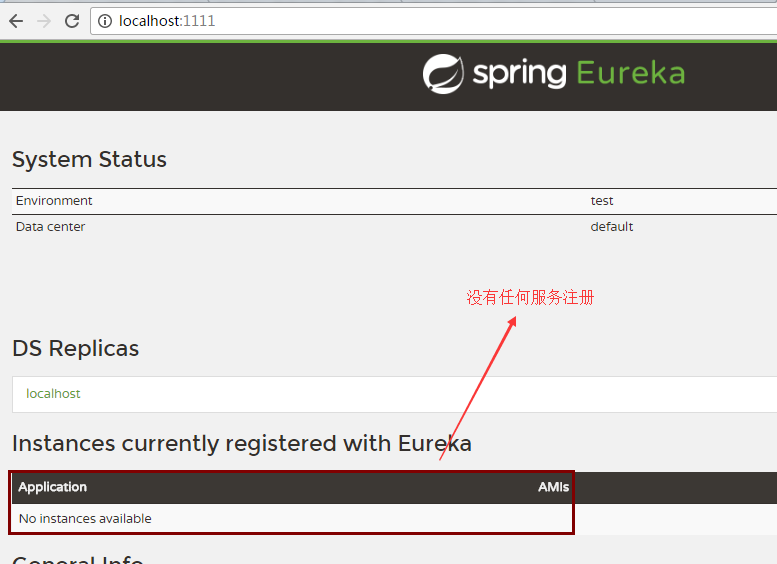
5、浏览器访问 localhost:1111 (此时没有任务服务注册)
二、创建服务提供方
1、创建spring boot项目如上
2、添加eureka依赖
<?xml version="1.0" encoding="UTF-8"?>

<project xmlns="http://maven.apache.org/POM/4.0.0" xmlns:xsi="http://www.w3.org/2001/XMLSchema-instance"

    xsi:schemaLocation="http://maven.apache.org/POM/4.0.0 http://maven.apache.org/xsd/maven-4.0.0.xsd">

    <modelVersion>4.0.0</modelVersion>

    <groupId>com.daqsoft</groupId>

    <artifactId>server_demo</artifactId>

    <version>0.0.1-SNAPSHOT</version>

    <packaging>jar</packaging>

    <name>server_demo</name>

    <description>Demo project for Spring Boot</description>

    <parent>

        <groupId>org.springframework.boot</groupId>

        <artifactId>spring-boot-starter-parent</artifactId>

        <version>1.5.4.RELEASE</version>

        <relativePath/> <!-- lookup parent from repository -->

    </parent>

    <properties>

        <project.build.sourceEncoding>UTF-8</project.build.sourceEncoding>

        <project.reporting.outputEncoding>UTF-8</project.reporting.outputEncoding>

        <java.version>1.8</java.version>

        <spring-cloud.version>Dalston.SR1</spring-cloud.version>

    </properties>

    <dependencies>

        <!--添加依赖-->

        <dependency>

            <groupId>org.springframework.cloud</groupId>

            <artifactId>spring-cloud-starter-eureka</artifactId>

        </dependency>

        <dependency>

            <groupId>org.springframework.boot</groupId>

            <artifactId>spring-boot-starter-test</artifactId>

            <scope>test</scope>

        </dependency>

    </dependencies>

    <dependencyManagement>

        <dependencies>

            <dependency>

                <groupId>org.springframework.cloud</groupId>

                <artifactId>spring-cloud-dependencies</artifactId>

                <version>${spring-cloud.version}</version>

                <type>pom</type>

                <scope>import</scope>

            </dependency>

        </dependencies>

    </dependencyManagement>

    <build>

        <plugins>

            <plugin>

                <groupId>org.springframework.boot</groupId>

                <artifactId>spring-boot-maven-plugin</artifactId>

            </plugin>

        </plugins>

    </build>

</project>
3、启动类中添加注解,激活DiscoveryClient
package com.daqsoft;

import org.springframework.boot.SpringApplication;

import org.springframework.boot.autoconfigure.SpringBootApplication;

import org.springframework.cloud.client.discovery.EnableDiscoveryClient;

@SpringBootApplication

//激活DiscoveryClient的使用

@EnableDiscoveryClient

public class ServerDemoApplication {

    public static void main(String[] args) {

        SpringApplication.run(ServerDemoApplication.class, args);

    }

}
4、创建controller提供简单的添加任务
package com.daqsoft;

import org.apache.log4j.Logger;

import org.springframework.beans.factory.annotation.Autowired;

import org.springframework.cloud.client.ServiceInstance;

import org.springframework.cloud.client.discovery.DiscoveryClient;

import org.springframework.web.bind.annotation.RequestMapping;

import org.springframework.web.bind.annotation.RequestMethod;

import org.springframework.web.bind.annotation.RequestParam;

import org.springframework.web.bind.annotation.RestController;

/**

 * @Description Created by liaoxx on 2017-6-12.

 */

@RestController

public class ComputerController {

    private final Logger logger = Logger.getLogger(getClass());

    @Autowired

    private DiscoveryClient client;

    @RequestMapping(value = "/add",method = RequestMethod.GET)

    public Integer add(@RequestParam Integer a, @RequestParam Integer b) {

        ServiceInstance instance = client.getLocalServiceInstance();

        Integer c = a + b;

        logger.info("/add , post:"+instance.getPort()+" service_id:"+instance.getServiceId()+" result:"+c);

        return c;

    }

}
5、修改配置文件如下
#指定微服务的名称后续在调用的时候只需要使用该名称就可以进行服务的访问

spring.application.name=compute-service

#方便测试,设置为不同的端口

server.port=2222

#对应服务注册中心的配置内容,指定服务注册中心的位置

eureka.client.serviceUrl.defaultZone=http://localhost:1111/eureka/
6、启动服务,再次访问 localhost:1111

spring cloud(服务注册中心及服务提供者——初学一)的更多相关文章
- spring cloud 服务注册中心eureka高可用集群搭建
spring cloud 服务注册中心eureka高可用集群搭建 一,准备工作 eureka可以类比zookeeper,本文用三台机器搭建集群,也就是说要启动三个eureka注册中心 1 本文三台eu ...
- spring Cloud服务注册中心Eureka集群
spring Cloud服务注册中心Eureka集群配置: 在application.yml文件加以下配置: server: port: 8761 tomcat: uri-encoding: UTF- ...
- Spring Cloud服务注册中心交付至kubernetes
前言 服务发现原则: 各个微服务在启动时,会将自己的网络地址等信息注册到服务发现组件中,服务发现组件会存储这些信息 服务消费者可以从服务发现组件中查询到服务提供者的网络地址,并使用该地址来远程调用服务 ...
- 孰能巧用 Spring Cloud 服务注册中心Eureka
Eureka介绍 在Spring Cloud Netflix 整合技术栈中,Eureka既可以作为服务注册中心也可以用于服务发现对整个微服务架构起着最核心的整合作用. Eureka是基于REST(Re ...
- spring Cloud服务注册中心eureka
Eureka是什么? 1.Eureka是SpringCloud Netflix的核心子模块. 2.Eureka包含Eureka Server和Eureka Client. 3.Server提供注册服务 ...
- 二、Spring Cloud之注册中心 Eureka
前言 算是正式开始学习 spring cloud 的项目知识了,大概的知道Springcloud 是由众多的微服务组成的,所以我们现在一个一个的来学习吧. 注册中心,在微服务中算是核心了.所有的服务都 ...
- Spring Cloud Eureka 注册中心集群搭建,Greenwich 最新版!
Spring Cloud 的注册中心可以由 Eureka.Consul.Zookeeper.ETCD 等来实现,这里推荐使用 Spring Cloud Eureka 来实现注册中心,它基于 Netfl ...
- IDEA 创建Spring cloud Eureka 注册中心
IDEA 创建Spring cloud Eureka 注册中心 一. 首先创建一个maven project Next之后填好groupId与artifactId,Next之后填好项目名与路径,点击F ...
- Spring Cloud Eureka 注册中心 服务消费者 服务提供者之间的关系以及高可用之间的联系
注册中心:提供服务的注册与查询(发现) 服务提供者:服务的提供方,提供服务的一方. 服务消费者:服务的消费方,使用服务的一方. 我们没有注册中心,服务提供者与服务消费者同样可以调用,通过spring中 ...
随机推荐
- POJ 3388 Japanese Puzzle (二分)
题意:给你一个n*n 的图,你总共有k 种花砖,告诉你每一种花砖的个数,让你随便安排它们的位置,问你最多有多少行和第一行是一样,并且要输出第一行的一定存在的图案. 析:首先这个题如果读懂了题意,一点也 ...
- 好文推荐系列-------(5)js模块化编程
本文主要来源于阮一峰的<Javascript模块化编程>系列文章整合,原文地址:http://www.ruanyifeng.com/blog/2012/10/javascript_modu ...
- VMware Workstation “以独占方式锁定此配置文件失败。可能其它正在运行VMware进程在使用此配置文件”
VMware Workstation客户机异常关闭之后,再启动时提示“以独占方式锁定此配置文件失败...”. 解决方法: 进入客户机的安装目录(注意,非VMware的安装目录),删除所有后缀为lck的 ...
- Nginx使用(配置开机启动)
环境: 系统:CentOS 6.5 Final 安装目录:/usr/local/nginx Nginx开机自启: ①编写shell实现控制 vi /etc/init.d/nginx 添加内容: #!/ ...
- WinSockets编程(六)select模式
select模式的思想 创建FD_SET fd_all,并初始化FD_ZERO(&fd_all); Step1 初始时: Step2 加入一个套接字之后,比如FD_SET(sServer ...
- AIX nfs简单说明
AIX 系统 NFS设置 一.NFS守护进程:NFS是通过使用许多用户级的守护进程及远程过程调用等网络应用程序来实现的.而NFS服务器及客户端的守护进程并不完全一致. 1. 作为NFS服务器所需的守护 ...
- Mysql之数据表操作
数据表操作: 查看当前数据库中所有的表: show tables; 查看当前使用数据库: select database(); 使用数据表: use 表名; 创建数据表: create table 数 ...
- golang web sample
一.学习想法 用两天的时间学习golang,但这次是先不看书的,直接写代码先. 我们常习惯边看书边学习写代码,但发现过程是比较缓慢的,所以我就先想写代码, 边写边查.就我们所知,web app一般是基 ...
- 在Win环境下配置java的环境进行开发步骤
1.下载官方JDK,网址如下 http://www.oracle.com/technetwork/java/javase/downloads/index.html
- whereis+whatis+man
使用Linux过程中无论是使用shell命令.程序开发或者用户文档都需要使用到强大的男人man命令. 使用方法也十分简单,以查看ls命令的使用方法为例: man ls man的搜索路径通常包括以下两个 ...