
OpenGL鼠标旋转图像
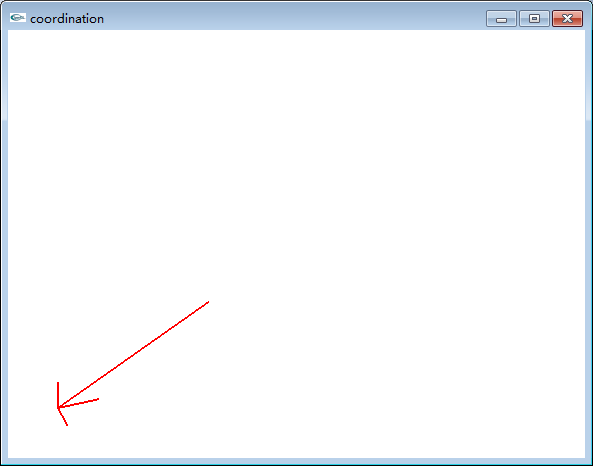
(鼠标旋转功能)
#include <iostream>

using namespace std;

#include<gl/glut.h>

GLfloat transx,transy;

GLfloat scale;

int primw=;

int primh=;

GLfloat rotatex=,rotatey=;

GLint mousepx,mousepy;

void rend(void)

{

    glClear(GL_COLOR_BUFFER_BIT);

    glPointSize();

    glLineWidth();

    glColor3f(,,);

    glPushMatrix();

    glTranslatef(transx,transy,);

    glRotatef(rotatex,,,);

    glRotatef(rotatey,,,);

    glBegin(GL_LINES);

        glVertex3f(,,);

        glVertex3f(,,);

        glVertex3f(,,);

        glVertex3f(,,);

        glVertex3f(,,);

        glVertex3f(,,);

    glEnd();

    glBegin(GL_LINES);

        glVertex3f(,,);

        glVertex3f(,,);

        glVertex3f(,,);

    glEnd();

    glPopMatrix();

    glFlush();

}

void reshape(int w, int h)

{

    glViewport(,,w,h);

    glMatrixMode(GL_PROJECTION);

    glLoadIdentity();

    if(w<=h)

        gluOrtho2D(-,,-10.0/w*h,10.0/w*h);

    else

        gluOrtho2D(-10.0/h*w,10.0/h*w,-,);

    glMatrixMode(GL_MODELVIEW);

    glLoadIdentity();

    if(w<=h)

    {

    /*    scale=(GLfloat)primw/w;*/

        transx=(-w/2.0)*20.0/w;

        transy=(-h/2.0)*20.0/w;

    }

    else

    {

/*        scale=(GLfloat)primh/h;*/

        transx=(-w/2.0)*20.0/h;

        transy=(-h/2.0)*20.0/h;

    }

}

void motion(int x, int y)

{

    int w,h;

    w=glutGet(GLUT_WINDOW_WIDTH);

    h=glutGet(GLUT_WINDOW_HEIGHT);

    if(<=x && x<=w && <=y && y<=h)

    {

        rotatex=(mousepy-y)/(GLfloat)h*;

        rotatey=(mousepx-x)/(GLfloat)w*;

/*        cout<<"rotatex:rotatey"<<rotatex<<" "<<rotatey<<endl;*/

        glutPostRedisplay();

    }

}

void mousedown(int mouse, int state , int x, int y)

{

    if(state== GLUT_DOWN)

    {

        mousepx=x;

        mousepy=y;

    }

//     cout<<"mousepx:mousepy"<<endl;

//     cout<<mousepx<<"  "<<mousepy<<endl;

}

int main(int argc,char** argv)

{

    glutInit(&argc,argv);

    glutInitDisplayMode(GLUT_RGB);

    glutInitWindowSize(primw,primh);

    glutCreateWindow("coordination");

    glClearColor(,,,);

    glutDisplayFunc(rend);

    glutMotionFunc(motion);

    glutMouseFunc(mousedown);

    glutReshapeFunc(reshape);

    glutMainLoop();

    return ;

}
以上代码的使用:
1,、放在控制台应用程序中运行会出现控制台界面(黑框)
2、新建一个Qt工程Qt Application:
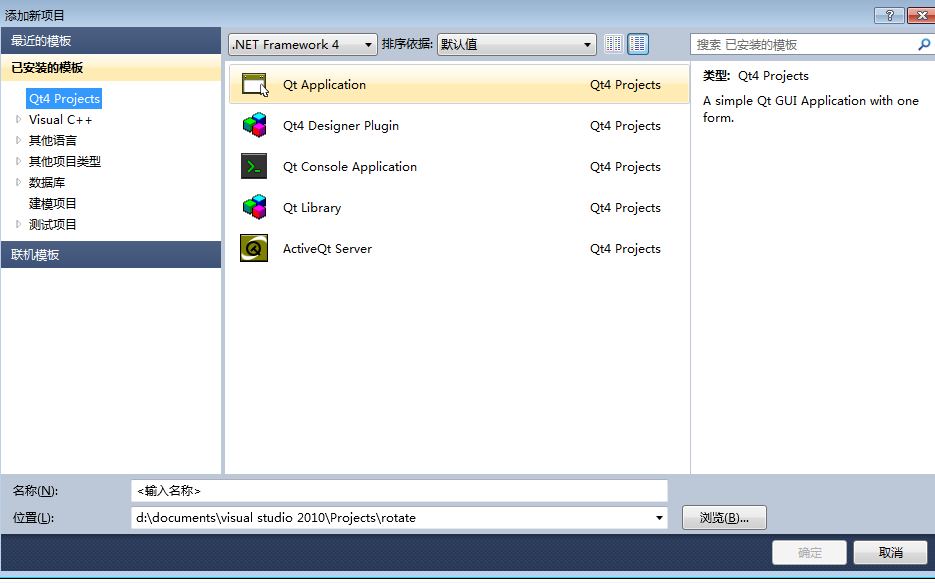
删除无用的文件(*.ui等),仅剩下main.cpp即可
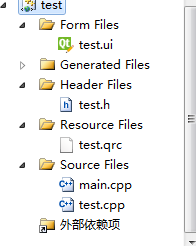
将代码复制到main.cpp中运行,没有控制台出现。
工程下载地址(注意电脑要配置Qt):http://pan.baidu.com/s/1gdEeZgZ
OpenGL鼠标旋转图像的更多相关文章
- Qt OpenGL 鼠标拾取实现
在之前的文章中讲到了OpenGL鼠标拾取操作的例子,工作中需要在Qt中实现,下面的程序演示了QT中opengl的拾取例子. 本例子在Qt5.12和Qt Creator4.8.0上测试,使用的是QOpe ...
- OpenGL 鼠标交互响应事件
OpenGL 鼠标.键盘交互响应事件 先来一个样例: uses gl,glu,glut; procedure InitEnvironment;cdecl; begin glClearColor();/ ...
- OpenGL鼠标拖拽
前序 前段时间学习3D MAX,一对比就发现差距是相当大.我也做了一个三维展示的小软件,但是拖拽操作非常不友好,如果场景的尺寸特别大,会导致拖不动,尺寸过小会导致轻轻拖一下,模型就不知道飞哪去了.我是 ...
- opengl鼠标键盘控制相机漫游
键盘wsad控制相机位移,鼠标左键按下控制相机旋转 效果如下 代码如下 #include <stdio.h> #include <string.h> #include < ...
- OpenGL(十六) 鼠标、键盘交互响应事件
OpenGL中通过鼠标和键盘跟程序交互的实现需要实现注册鼠标和键盘响应事件,在一定条件下,该事件被触发,事件里的程序被执行,达到交互的目的. 通过glutMouseFunc(&OnMouse) ...
- OpenGl读取导入3D模型并且添加鼠标移动旋转显示
原文作者:aircraft 原文链接:https://www.cnblogs.com/DOMLX/p/11543828.html 最近实习要用到opengl库就是跟opencv 有点像的那个,然后下了 ...
- OpenGl 实现鼠标分别移动多个物体 ----------移动一个物体另外一个物体不动--读取多个3d模型操作的前期踏脚石
原文作者:aircraft 原文链接:https://www.cnblogs.com/DOMLX/p/11620088.html 前言: 因为接下来的项目需求是要读取多个3D模型,并且移动拼接,那么我 ...
- OpenGl 导入读取多个3D模型 并且添加鼠标控制移动旋转
原文作者:aircraft 原文链接:https://www.cnblogs.com/DOMLX/p/11627508.html 前言: 因为接下来的项目需求是要读取多个3D模型,并且移动拼接,那么我 ...
- 从零开始openGL——三、模型加载及鼠标交互实现
前言 在上篇文章中,介绍了基本图形的绘制.这篇博客中将介绍模型的加载.绘制以及鼠标交互的实现. 模型加载 模型存储 要实现模型的读取.绘制,我们首先需要知道模型是如何存储在文件中的. 通常模型是由网格 ...
随机推荐
- C# 单例模式(转)
C#设计模式学习笔记-单例模式 最近在学设计模式,学到创建型模式的时候,碰到单例模式(或叫单件模式),现在整理一下笔记. 在<Design Patterns:Elements of Resuab ...
- Foundation--NSString+NSMutableString
NSString 字符串创建: 1.NSString *strr = @"0123456789"; 2.NSString *str = [NSString stringWithSt ...
- iOS 在特定页面 界面旋转
1.在AppDelegate.h 里添加标记 2.在AppDelegate.m 里添加这个方法 3.使用 [(AppDelegate*)[UIApplication sharedApplication ...
- ASP.NET和PHP全面对比
谁是速度之王? 刚刚在9月编程语言排行榜上取得历史性突破的PHP在Web开发领域最到的对手可能就是基于微软.NET技术的ASP.NET.近日,微软的 Joe Stagner在博客上发表了一系列文章比较 ...
- E - Number Sequence(第二季水)
Description A single positive integer i is given. Write a program to find the digit located in the p ...
- Redis操作命令大全(NodeJS版)
/*—————————————————————————————— * 本文案例基于以下运行环境: * 系统: CentOS 5.x * NodeJS版本: 0.9 以上 * Redis版本: 2.8 ...
- Hadoop学习-HDFS篇
HDFS设计基础与目标 硬件错误是常态.因此需要冗余 流式数据访问.即数据批量读取而非随机读写,Hadoop擅长做的是数据分析而不是事务处理(随机性的读写数据等). 大规模数据集 简单一致性模型.为了 ...
- 【ecos学习5】redboot 加载运行hello world
背景: 从主机 192.168.2.14 IP,下载bin文件hello到ecos. redboot>load -v -h 192.168.2.14 hello Using default pr ...
- thinkphp框架开启页面gzip压缩
Thinkphp下开启gzip压缩很简单,不管你是哪个版本,只要在你的入口文件index.PHP中加入以下两行,如果你的服务器支持,那么就OK了. define ( "GZIP_ENABLE ...
- 在android画面切换时设置跟随变动的小圆圈
首先还是老规律,上传两张效果图: 第一张图: 第二张图: 前言:我们经常在使用各类安卓APP的时候发现会有如图所示的小圆圈显示当前页所在的,甚至一般来说我们的android桌面上也应该有 ...