
【WEB前端】【报错解决】This request has been blocked; the content must be served over HTTPS.
问题描述
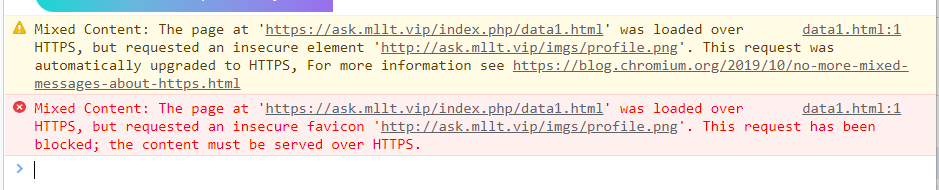
部署WEB项目后,开启了强制HTTPS,产生如下错误:
Mixed Content: The page at 'https://ask.mllt.vip/index.php/data1.html' was loaded over HTTPS, but requested an insecure favicon 'http://ask.mllt.vip/imgs/profile.png'. This request has been blocked; the content must be served over HTTPS.
问题分析
报错的原因就是当前页面是https协议加载的,但是这个页面发起了一个http的ajax请求,这种做法是非法的。HTTPS页面里动态的引入HTTP资源,比如引入一个js文件,会被直接block掉的.在HTTPS页面里通过AJAX的方式请求HTTP资源,也会被直接block掉的。
解决办法
可以在相应的页面的里加上这句代码,意思是自动将http的不安全请求升级为https
<meta http-equiv="Content-Security-Policy" content="upgrade-insecure-requests">
参考文档
【WEB前端】【报错解决】This request has been blocked; the content must be served over HTTPS.的更多相关文章
- 网页中嵌入百度地图报错:The request has been blocked,the content must served over Https
网页中嵌入百度地图 1.进入百度地图开发平台:http://lbsyun.baidu.com/index.php?title=jspopular 2.获取密钥:http://lbsyun.baidu. ...
- Mixed Content: xxx This request has been blocked; the content must be served over HTTPS.
在升级https的过程中,出现如下问题: Mixed Content: The page at 'https://www.xxx.com/denglu.html' was loaded over HT ...
- 在普通网页显示正常,加Https报This request has been blocked; the content must be served over HTTPS.,https网站加载http资源时,http资源被block
解决办法 :在html头加<meta http-equiv="Content-Security-Policy" content="upgrade-insecure- ...
- https下 http的会被阻塞 This request has been blocked; the content must be served over HTTPS.
如何在HTTPS 网页中引入HTTP资源: Mixed Content? https://segmentfault.com/q/1010000005872734/a-1020000005874533 ...
- 【Https异常】This request has been blocked; the content must be served over HTTPS
一.问题出现场景 项目从http升级到https后,jsp页面存在发送http请求的情况下就会出现该异常.因为HTTPS 是 HTTP over Secure Socket Layer,以安全为目标的 ...
- This request has been blocked; the content must be served over HTTPS.处理方案
在页面head标签中加入 <meta http-equiv="Content-Security-Policy" content="upgrade-insecure- ...
- 类库文件引用web服务报错解决方法-在 ServiceModel 客户端配置部分中,找不到引用协定的默认终结点元素
由于需求,需要改造原有应用,因原有应用是写在console下面的,现在需要开放至web下, 想到BIZ层应用代码都是一样的,又不想在web下在添加引用,而重复写代码,故将原有的console下的服务和 ...
- Authentication token manipulation error报错解决办法
Authentication token manipulation error报错解决办法 #参考http://blog.163.com/junwu_lb/blog/static/1916798920 ...
- thymeleaf Exception processing template "xxx": Exception parsing document: template="xxx", line 6 - column 3报错解决的几种方法
我是在SpringBoot项目使用Thymeleaf作为模板引擎时报的错误 controller代码非常简单,如下所示: @RequestMapping("/abc") publi ...
- eclipse创建的maven项目,pom.xml文件报错解决方法
[错误一:]maven 编译级别过低 [解决办法:] 使用 maven-compiler-plugin 将 maven 编译级别改为 jdk1.6 以上: <!-- java编译插件 --> ...
随机推荐
- USB LFPS是什么?
USB LFPS:低功耗状态下的高速数据传输 什么是USB LFPS? USB LFPS(Low-Power Signaling)指的是USB接口在低功耗状态下的一种高速数据传输技术.传统上,USB接 ...
- Android dex、odex、oat、vdex、art区别
1.dex java程序编译成class后,dx工具将所有class文件合成一个dex文件,dex文件是jar文件大小的50%左右. 2.odex(Android5.0之前)全称:Optimized ...
- KubeSphere 开源社区 2022 年度回顾与致谢
2022 年,国内的云原生技术生态日趋完善,细分技术项目也不断涌现,形成了完整的支撑应用云原生化的全生命周期技术体系.基础设施即代码.微服务.Serverless 等技术,促使基础设施资源向更加灵活弹 ...
- 常用css列表
常用css列表 color 设置文字的颜色,如: color:red; font-size 设置文字的大小,如:font-size:12px; font-family 设置文字的字体,如:font-f ...
- 你的第一个Solana SPL
简介 TFT 你的第一个SPL The first token 技术栈和库 Rust Anchor框架 Typescript(测试) 开发环境和其它网络地址 DevNet: https://api.d ...
- 从使用delete释放指针导致程序崩溃看变量初始化
先来看下面的代码 bool FuncTest(LPCTSTR lpcProc) { bool bRet = false; ... if (CONDITION1) { goto FUNC_CLEAN; ...
- 大便系统无法使用source的原因及解决方法
debian中shell脚本无法使用source的原因及解决方法 现象: shell脚本中source aaa.sh时提示 source: not found 原因: ls -l `which sh` ...
- 共享存储ISCSI
建立共享iscsi磁盘组 资源环境 服务端:192.168.2.131 客户端:192.168.2.[110,169] 服务端磁盘: [root@centos ~]# lsblk NAME MAJ:M ...
- Docker私有仓库操作----命令行
查看所有镜像 http://10.206.29.162:5000/v2/_catalog {"repositories":["dashboard"," ...
- ArcGIS遥感影像重采样操作及不同算法对比
本文介绍在ArcMap软件中,实现栅格图像重采样的具体操作,以及不同重采样方法的选择依据. 在之前的博客中,我们介绍了基于Python中Arcpy模块对栅格图像加以批量重采样的方法:而在Arc ...