
【转载】 利用p6spy拦截并查看数据库执行操作
https://blog.csdn.net/fanxiaobin577328725/article/details/71601760
一、简介
- 项目首 页:http://p6spy.github.io/p6spy/
- GitHub下载介绍页面:https://github.com/p6spy/p6spy/wiki/Download
- GitHub托管地址:https://github.com/p6spy/p6spy/tree/master
- 帮助文档地址:http://p6spy.readthedocs.io/en/latest/
- 帮助文档(pdf/epub)下载地址:http://download.csdn.net/detail/fanxiaobin577328725/9839326
- p6spy-3.0.0.zip下载地址:http://download.csdn.net/detail/fanxiaobin577328725/9839358
P6Spy is a framework that enables database data to be seamlessly(无缝地) intercepted(截获) and logged with no code changes to existing application. The P6Spy distribution includes P6Log, an application which logs all JDBC transactions for any Java application.
P6Spy 是针对数据库访问操作的动态监测框架(开源项目)它使得数据库数据可无缝截取和操纵,而不必对现有应用程序的代码作任何修改。P6Spy 分发包包括P6Log,它是一 个可记录任何 Java 应用程序的所有JDBC事务的应用程序。其配置完成使用时,可以进行数据访问性能的监测。
我们最需要的功能,查看sql语句,不是预编译的带问号的,而是真正的数据库执行的sql,更直观,更简单。
P6Spy是一个可以用来在应用程序中拦截和修改数据操作语句的开源框架。 通过P6Spy我们可以对SQL语句进行拦截,相当于一个SQL语句的记录器,这样我们可以用它来作相关的分析,比如性能分析。
P6SPY提供了如下几个功能:
- 记录SQL语句的执行时间戳。
- 记录SQL语句类型
- 记录SQL填入参数的和没有填入参数的SQL语句
- 根据配置的时间控制SQL语句的执行时间,对超出时间的SQL语句输出到日志文件中
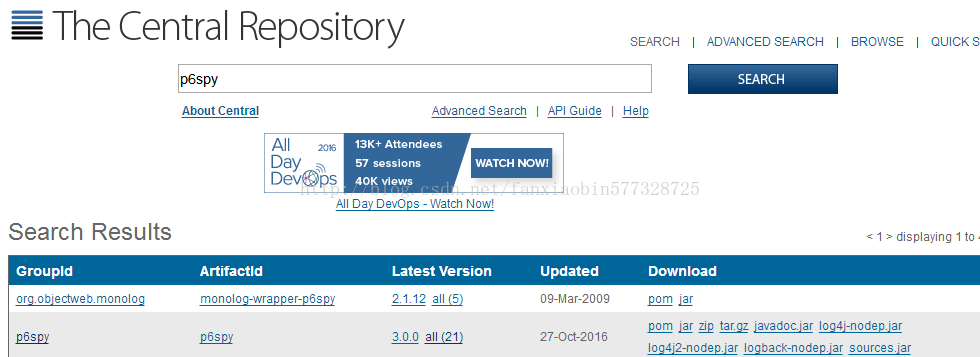
p6spy.(zip/tar.gz) - This is our distribution artifact containing everything that you need to use P6Spy. you would normally download this artifact if you are installing without any code changes.
p6spy.(zip/tar.gz) -这个文件包含了你使用P6Spy所需要的任何文件。
p6spy.jar - This is the primary artifact for p6spy. If you are integrating p6spy into your application, this is the only artifact that you need.
p6spy.jar - 这个文件是p6spy的核心文件,如果你要将p6spy集成到你的应用中,你只需要这一个文件就可以了。(当然还需要一个spy.properties配置文件,我的理解就是依赖文件只需要此jar包即可)
注意:以上两个文件在Maven仓库中已经存在,所以可以直接从Maven仓库中获取到。
Maven的POM配置:
- <!-- https://mvnrepository.com/artifact/p6spy/p6spy -->
- <dependency>
- <groupId>p6spy</groupId>
- <artifactId>p6spy</artifactId>
- <version>3.0.0</version>
- </dependency>
二、实战
<1> 下载p6spy-3.0.0.zip文件,下载地址为:http://download.csdn.net/detail/fanxiaobin577328725/9839358
<2> 配置Maven依赖,如果不使用Maven可以直接将p6spy-3.0.0.zip文件中的p6spy.jar添加到lib目录中,然后Build Path -> Add To Buil Path
<3> 添加spy.properties到项目src的根目录下,该文件在p6spy-3.0.0.zip文件中
<4> 在spy.properties文件中配置真正的JDBC驱动的类名称
driverlist=com.mysql.jdbc.Driver<5> 修改真实的JDBC的URL和驱动类,如下:
- driverClassName="com.p6spy.engine.spy.P6SpyDriver"
- url="jdbc:p6spy:mysql://<hostname>:<port>/<database>"
<6> 配置SQL的输出路径(以输出到控制台为例),在spy.properties文件中将appender=com.p6spy.engine.spy.appender.StdoutLogger前面的井号(#)去掉
<7> 正常运行程序,然后就可以看到预期的SQL语句了
三、配置文件详解
3.1 driverlist
This is a comma separated list of JDBC driver classes to load and register with DriverManager. You should list the classname(s) of the JDBC driver(s) that you want to proxy with P6Spy if any of the following conditions are met.
这个属性配置的是加载和注册DriverManager的真实的JDBC驱动类。你需要在此列出你想让P6Spy 代理的JDBC驱动的类名,而且JDBC驱动必须满足如下两个条件中任意一个。(有疑问)
- The JDBC driver does not implement the JDBC 4.0 API
- You are using a JNDI Data Source - Some application servers will prevent the automatic registration feature from working.
3.2 autoflush
For standard development, set the autoflush value to true. When set to true, every time a statement is intercepted(拦截), it is immediately(立即) written to the log file. In some cases,however, instant feedback(反应) on every statement is not a requirement.In those cases, the system performs(执行) slightly(稍微) faster with autoflush set to false.
3.3 dateformat
Setting a value for dateformat changes the date format value printed in the log file. No value prints the current time in milliseconds (unix time), a useful feature for parsing the log. The date format engine is Java’s SimpleDateFormat class. Refer to the SimpleDateFormat class in the JavaDocs for information on setting this value. An example follows:
dateformat=MM-dd-yy HH:mm:ss:SS注意:如果没有指定此属性,则默认输出的是时间戳,也就是显示最前面的那一串数字字符串。对时间戳不了解的可以参考:《时间戳》
3.4 stacktrace
If stacktrace is set, the log prints out the stack trace for each SQL statement logged.
3.5 stacktraceclass
Limits the stack traces printed to those that contain the value set in stacktraceclass. For example, specifying stacktraceclass=com.mycompany.myclass limits the printing of stack traces to the specified class value. The stack trace is converted to a String and string.indexOf(stacktraceclass) is performed.
3.6 reloadproperties and reloadpropertiesinterval
If reloadproperties is set to true, the property file is reloaded every n seconds, where n is defined by the value set by reloadpropertiesinterval. For example, if reloadproperties=true and reloadpropertiesinterval=10, the system checks the File.lastModified() property of the property file every 10 seconds, and if the file has been modified, it will be reloaded.
If you set append=true, the log will be suddenly truncated when you change your properties. This is because using reloadproperties is intended to be the equivalent of restarting your application server. Restarting your application server truncates your log file.
reloadproperties will not reload any driver information (such as realdriver, realdriver2, and realdriver3) and will not change the modules that are in memory.
3.7 appender
Appenders allow you to specify(指定) where and how log information is output. Appenders are a flexible(灵活的) architecture(结构) allowing anyone to write their own output class for P6Spy. To use an appender, specify the classname of the appender to use. The current release comes with three options which are slf4j, stdout, and logging to a file (default). Please note, that all of these output in the CSV format (where separator is: “|”).
<1> Using the File output: Uncomment(取消注释) the FileLogger appender and specify a logfile and whether or not to append to the file or to clear the file each time:
- #appender=com.p6spy.engine.spy.appender.Slf4JLogger
- #appender=com.p6spy.engine.spy.appender.StdoutLogger
- appender=com.p6spy.engine.spy.appender.FileLogger
- # name of logfile to use, note Windows users should make sure to use forward slashes in their pathname (e:/test/spy.log)
- # (used for com.p6spy.engine.spy.appender.FileLogger only)
- # (default is spy.log)
- #logfile = spy.log
- # append to the p6spy log file. if this is set to false the
- # log file is
注意:文件的默认保存路径是项目的根目录下,与src是平级的。
<2> Using StdOut: Uncomment the StdoutLogger as follows:
- #appender=com.p6spy.engine.spy.appender.Slf4JLogger
- appender=com.p6spy.engine.spy.appender.StdoutLogger
- #appender=com.p6spy.engine.spy.appender.FileLogger
<3> Using SLF4J: Uncomment the Slf4JLogger as follows:
- appender=com.p6spy.engine.spy.appender.Slf4JLogger
- #appender=com.p6spy.engine.spy.appender.StdoutLogger
- #appender=com.p6spy.engine.spy.appender.FileLogger
In general you need to slf4j-api and the appropriate bridge to the actual logging implementation as well as the logging implementation itself on your classpath. To simplify setup for those not having any of the additional dependencies already on classpath following *-nodep.jar bundles are provided as part of p6spy distribution:
- p6spy-<version>-log4j-nodep.jar - having log4j included
- p6spy-<version>-log4j2-nodep.jar - having log4j2 included and
- p6spy-<version>-logback-nodep.jar - having logback included.
Mapping to SLF4J levels is provided in the following way:
Internally is Slf4j Logger is retrieved for the: p6spy, keep this in mind when configuring your logging implementation.So for example for the log4j following could be used to restrict the p6spy logging (if using xml-based configuration) to INFO level only:
- <category name="p6spy">
- <priority value="INFO" />
- </category>
For further instructions on configuring SLF4J, see the SLF4J documentation
3.8 logMessageFormat
The log message format is selected by specifying(指定的) the class to use to format the log messages. The following classes are available with P6Spy.
com.p6spy.engine.spy.appender.SingleLineFormat which results in log messages in format:
current time|execution time|category|connection id|statement SQL String|effective SQL string解析:当前时间(默认是时间戳)|执行时间|执行的操作类型|connection id|statement SQL String|真实执行的SQL字符串
注意:你可能在看控制台输出的时候发现还是有问号呢?其实你看的是statement SQL String,再往后才是真实执行的SQL。
com.p6spy.engine.spy.appender.MultiLineFormat, which results in log messages in format:
- current time|execution time|category|connection id|statement SQL String
- effective SQL string
解析:这种格式从大体上与上面没什么区别,只是显示的细节上有所不同,首先其行首会出现一个井号(#),执行时间前面会有一个took,并带有ms单位,而且其真实执行的SQL会换行进行显示,这一点也是我想要的。总的来说,我偏向喜欢这种格式,更加清晰明了。
- current time - the current time is obtained through System.getCurrentTimeMillis() and represents the number of milliseconds that have passed since January 1, 1970 00:00:00.000 GMT. (Refer to the J2SE documentation for further details on System.getCurrentTimeMillis().) To change the format, use the dateformat property described in Common Property File Settings.
- execution time - the time it takes in milliseconds for a particular method to execute. (This is not the total cost for the SQL statement.) For example, a statement SELECT * FROM MYTABLE WHERE THISCOL =? might be executed as a prepared statement, in which the .execute() function will be measured. This is recorded as the statement category. Further, as you call .next() on the ResultSet, each .next() call is recorded in the result category.
- category - You can manage your log by including and excluding categories, which is described in Common Property File Settings.
- connection id - Indicates the connection on which the activity was logged. The connection id is a sequentially generated identifier.
- statement SQL string - This is the SQL string passed to the statement object. If it is a prepared statement,it is the prepared statement that existed prior to the parameters being set. To see the complete statement,refer to effective SQL string.
- effective SQL string - If you are not using a prepared statement, this contains no value. Otherwise,it fills in the values of the Prepared Statement so you can see the effective SQL statement that is passed to the database. Of course, the database still sees the prepared statement, but this string is a convenient way to see the actual values being sent to the database.
The com.p6spy.engine.spy.appender.MultiLineFormat might be better from a readability perspective.Because it will place the effective SQL statement on a separate line. However, the SingleLineFormat might be better if you have a need to parse the log messages. The default is com.p6spy.engine.spy.appender.SingleLineFormat for backward compatibility.
You can also supply your own log message formatter to customize the format. Simply create a class which implements the com.p6spy.engine.spy.appender.MessageFormattingStrategy interface and place it on the classpath.
3.9 filter, include, exclude
P6Spy allows you to filter SQL queries by specific strings to be present (includes property value) or not present (excludes property value). As a precondition, setting filter=true has to be provided. P6Spy will perform string matching on each statement to determine if it should be written to the log file. include accepts a comma-delimited
list of expressions which is required to appear in a statement before it can appear in the log. exclude accepts a comma-delimited list to exclude. Exclusion overrides inclusion, so that a statement matching both an include string and an exclude string is excluded.
Please note that matching mode used in the underlying regex is (achieved via prefix (?mis)):
An example showing capture of all statements having select, except those having order follow:
- filter = true
- # comma separated list of strings to include
- include = select
- # comma separated list of strings to exclude
- exclude = order
Please note, that internally following regex would be used for particular expression matching: (?mis)^(?!.*(order).*)(.*(select).*)$
An example showing only capture statements having any of: order_details, price, and price_history follows:
- filter = true
- # comma separated list of strings to include
- include = order,order_details,price,price_history
- # comma separated list of strings to exclude
- exclude =
Please note, that internally following regex would be used for particular expression matching: (?mis)^(.*(order|order_details|price|price_history).*)$
An example showing the capture of all statements, except statements order string in them follows:
- filter = false
- # comma separated list of strings to include
- include =
- # comma separated list of strings to exclude
- exclude = order
Please note, that internally following regex would be used for particular expression matching: (?mis)^(?!.*(order).*)(.*)$
As you can use full regex syntax, capture of statements having: pri[cz]e follows:
- filter = true
- # comma separated list of strings to include
- include = pri[cz]e
- # comma separated list of strings to exclude
- exclude =
Please note, that internally following regex would be used for particular expression matching: (?mis)^(.*(pri[cz]e).*)$
Moreover, please note, that special characters escaping (used in java) has to be done for the provided regular expression.As an example, matching for:
from\scustomerswould mean, that following should be specified (please note doubled backslash):
- filter=true
- include=from\\scustomers
3.10 filter, sqlexpression
If you need more control over regular expression for matching, SQL string property sqlexpression is to be used as an alternative to exclude and include. An example follows:
- filter = true
- sqlexpression = your expression
If your expression matches the SQL string, it is logged. If the expression does not match, it is not logged. Please note you can use sqlexpression together with include/exclude, where both would be evaluated.
Moreover, please note, that special characters escaping (used in java) has to be done for the provided regular expression.As an example, matching for:
^(.*(from\scustomers).*)$would mean, that following should be specified (please note doubled backslash):
- filter=true
- sqlexpression=^(.*(from\\scustomers).*)$
3.11 excludecategories
The log includes category information that describes the type of statement. This property excludes the listed categories.Valid options include the following:
- error includes P6Spy errors. (It is recommended that you include this category.)
- info includes driver startup information and property file information.
- debug is only intended for use when you cannot get your driver to work properly, because it writes everything.
- statement includes Statements, PreparedStatements, and CallableStatements.
- batch includes calls made to the addBatch() JDBC API.
- commit includes calls made to the commit() JDBC API.
- rollback includes calls made to the rollback() JDBC API.
- result includes statements generated by ResultSet.
Enter a comma-delimited list of categories to exclude from your log file. See filter, include, exclude for more details on how this process works.
3.12 outagedetection
This feature detects long-running statements that may be indicative of a database outage problem. When enabled, it logs any statement that surpasses the configurable time boundary during its execution. No other statements are logged except the long-running statements.
3.13 outagedetectioninterval
The interval property is the boundary time set in seconds. For example, if set to 2, any statement requiring at least 2 seconds is logged. The same statement will continue to be logged for as long as it executes. So, if the interval is set to 2 and a query takes 11 seconds, it is logged 5 times (at the 2, 4, 6, 8, 10-second intervals).
3.14 jmxPrefix
If set to true, the execution time will be measured in nanoseconds as opposed to milliseconds.
参考资料:
【转载】 利用p6spy拦截并查看数据库执行操作的更多相关文章
- eclipse利用sql语句对Oracle数据库进行操作
对Oracle数据库执行操作的sql语句中表名和列名都需用英文双引号("")括起来. 注(\为转义符) 1.插入数据 sql = "insert into \" ...
- 玩转SpringBoot之整合Mybatis拦截器对数据库水平分表
利用Mybatis拦截器对数据库水平分表 需求描述 当数据量比较多时,放在一个表中的时候会影响查询效率:或者数据的时效性只是当月有效的时候:这时我们就会涉及到数据库的分表操作了.当然,你也可以使用比较 ...
- C# winform窗体设计-对数据库执行增删改操作
对于学习数据库的人来说,数据库的增删改可谓是最基本的了(小编其实也只是一个小白=-=),这篇文章,小编将于大家讲解数据库增删改操作 在执行数据库增删改的时候主要使用的:Command 类 ...
- Django框架之ORM(数据库)操作
一.ORM介绍 映射关系: 表名 -------------------->类名 字段-------------------->属性 表记录----------------->类实例 ...
- django系列5.1--ORM对数据库的操作
Django---ORM数据库操作(图书管理系统基本实例) 一.基本知识 MVC模式(Model–view–controller)是软件工程中的一种软件架构模式,把软件系统分为三个基本部分:模型(Mo ...
- JDBC连接数据库及其执行操作
作者:Alvin 功能:数据库连接与实现增删改查 时间:2019年3月4日08点33分 参考文章:https://www.2cto.com/database/201805/743741.html 一. ...
- MYSQL启用日志,查看日志,利用mysqlbinlog工具恢复MySQL数据库【转载】
转自 MYSQL启用日志,查看日志,利用mysqlbinlog工具恢复MySQL数据库 - _安静 - 博客园http://www.cnblogs.com/xionghui/archive/2012/ ...
- 【转载】 Sqlserver查看数据库死锁的SQL语句
在Sqlsever数据库中,有时候操作数据库过程中会进行锁表操作,在锁表操作的过程中,有时候会出现死锁的情况出现,这时候可以使用SQL语句来查询数据库死锁情况,主要通过系统数据库Master数据库来查 ...
- ASP.NET 成功执行Update 的 ExecuteNonQuery() 返回值大于0,但是查看数据库却没有改变
//真实姓名保存 $("#TrueNameSaveBtn").click(function () { if ($("#TrueNameSaveText").va ...
- DEDECMS数据库执行原理、CMS代码层SQL注入防御思路
我们在上一篇文章中学习了DEDECMS的模板标签.模板解析原理,以及通过对模板核心类的Hook Patch来对模板的解析流量的攻击模式检测,达到修复模板类代码执行漏洞的目的 http://www.cn ...
随机推荐
- plt.gca()坐标轴移动
我们可以看到绘制出来的图有四个边框,我们通过gca()对坐标轴进行一些简单处理,代码如下. import torch import torch.nn.functional as F import ma ...
- Nuxt.js 应用中的 page:transition:finish 钩子详解
title: Nuxt.js 应用中的 page:transition:finish 钩子详解 date: 2024/10/10 updated: 2024/10/10 author: cmdrago ...
- 以 Kubernetes 原生方式实现多集群告警
作者:向军涛.雷万钧 来源:2023 上海 KubeCon 分享 可观测性来源 在 Kubernetes 集群上,各个维度的可观测性数据,可以让我们及时了解集群上应用的状态,以及集群本身的状态. Me ...
- 一文彻底弄清Redis的布隆过滤器
布隆过滤器(Bloom Filter)是一种空间效率极高的数据结构,用于快速判断一个元素是否在集合中.它能够节省大量内存,但它有一个特点:可能存在误判,即可能会认为某个元素存在于集合中,但实际上不存在 ...
- 每日学学Java开发规范,集合处理(附阿里巴巴Java开发手册(终极版))
前言 每次去不同的公司,码不同的代码,适应不同的规范,经常被老大教育规范问题,我都有点走火入魔的感觉,还是要去看看阿里巴巴Java开发规范,从中熟悉一下,纠正自己,码出高效,码出质量. 想细看的可以去 ...
- isPCBroswer:检测是否为PC端浏览器模式
function isPCBroswer() { let e = navigator.userAgent.toLowerCase() , t = "ipad" == e.match ...
- 自动化构建镜像:Packer
在介绍Packer之前,先来回顾一下未使用Packer时自定义虚拟机镜像的步骤.先在本地启动一个虚拟机,从安装系统开始,再进行自定义配置或应用安装,最后封装压缩成镜像,详细操作步骤可以参考我之前写的文 ...
- Integrating JDBC with Hibernate
One of the powerful things about Hibernate is that you do not typically need to manually write SQL: ...
- 二、STM32F103C8T6-定时器
STM32F103C8T6 定时器概述 STM32F103C8T6 作为一款广泛使用的微控制器,内置多个定时器,能够支持多种计时和控制功能,如精确延时.脉冲宽度调制(PWM).捕获比较(Capture ...
- 三菱电梯综合监控系统适配 lonele.exe 由 20180418 降级至 20150930 而调整相应的 msde2000 数据库
win10 x86 系统下程序文件的部分目录可能是 电梯综合监控系统 C:\PROGRAM FILES\上海三菱电梯有限公司 ├─电梯综合监控系统 │ │ AxInterop.BRTMFSHX.dll ...