
CentOS7使用firewalld防火墙配置端口
安装启用firewalld防火墙
CentOS7默认的防火墙是firewalld
如果没有firewalld防火墙,可以执行yum install firewalld 命令进行安装
firewalld防火墙启用与关闭
启动systemctl start firewalld
关闭systemctl stop firewalld
查看状态systemctl status firewalld
查看状态firewall-cmd --state
开机启用systemctl enable firewalld
开机禁用systemctl disable firewalld
添加开放端口
查看开放了哪些端口
firewall-cmd --zone=public --list-ports
添加端口
firewall-cmd --add-port=443/tcp --permanent //永久添加443端口,协议为tcp

firewall-cmd --reload                                       //重新加载
删除端口
firewall-cmd --zone=public --remove-port=80/tcp --permanent //删除tcp下的80端口
参数介绍:
firewall-cmd:是Linux提供的操作firewall的一个工具(注意没有字母“d”);
--permanent:表示设置为持久;
--add-port:标识添加的端口
--remove-port:标识删除的端口
配置文件
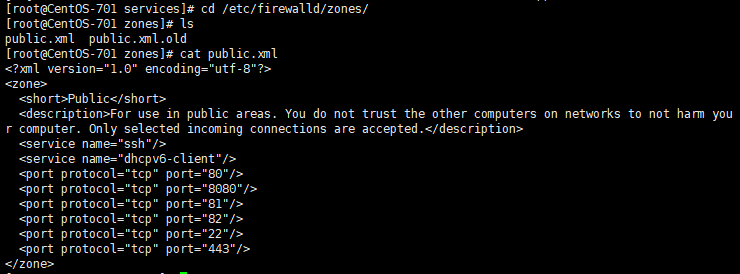
firewalld的默认区域配置文件位置在/etc/firewalld/zones/下的.xml文件中,如下图:
另外,firewall中有Zone的概念,可以将具体的端口制定到具体的zone配置文件中。
例如:添加8010端口
firewall-cmd --zone=public --permanent --add-port=8010/tcp

// --zone=public:指定的zone为public;
systemctl
systemctl是CentOS7的服务管理工具中主要的工具,它融合之前service和chkconfig的功能于一体。
启动一个服务:systemctl start firewalld.service
关闭一个服务:systemctl stop firewalld.service
重启一个服务:systemctl restart firewalld.service
显示一个服务的状态:systemctl status firewalld.service
在开机时启用一个服务:systemctl enable firewalld.service
在开机时禁用一个服务:systemctl disable firewalld.service
查看服务是否开机启动:systemctl is-enabled firewalld.service
查看已启动的服务列表:systemctl list-unit-files|grep enabled
查看启动失败的服务列表:systemctl --failed
CentOS7使用firewalld防火墙配置端口的更多相关文章
- Centos7.5 firewalld防火墙配置
CentOS 7.0默认使用的是firewall作为防火墙 1.查看firewall服务状态 systemctl status firewalld 2.查看firewall的状态 firewall-c ...
- Centos7下Firewalld防火墙配置命令
前 言 服务端口日常被拦截,记录一下常用的命令便于查询 Firewalld服务管理 查看防火墙状态 1 systemctl status firewalld 开机启用/禁用防火墙 1 s ...
- CentOS7下Firewall防火墙配置用法详解
官方文档地址: https://access.redhat.com/documentation/en-US/Red_Hat_Enterprise_Linux/7/html/Security_Guide ...
- Centos7和Centos6防火墙开放端口配置方法(避坑教学)
▲这篇文章主要为大家详细介绍了Centos7防火墙开放端口的快速方法,感兴趣的小伙伴们可以参考一下! 一.CentOS 7快速开放端口: CentOS升级到7之后,发现无法使用iptables控制Li ...
- Firewalld防火墙:端口转发与流量均衡
firewalld和iptables的关系 firewalld自身并不具备防火墙的功能,而是和iptables一样需要通过内核的netfilter来实现,也就是说firewalld和iptables一 ...
- CentOS7使用firewalld防火墙
firewalld的基本使用 启动: systemctl start firewalld 关闭: systemctl stop firewalld 查看状态: systemctl status fir ...
- 【Linux】CentOS7 打开关闭防火墙及端口
一.centos7版本对防火墙进行加强,不再使用原来的iptables,启用firewalld1.firewalld的基本使用启动: systemctl start firewalld查状态:syst ...
- CentOS7使用iptables防火墙开放端口
背景:在CentOS上面安装了mysql.svn.tomcat等软件,发现访问不了,用telnet命令查看端口,发现都不通: telnet IP 端口 CentOS7 默认使用firewalld防火墙 ...
- centos7 开放/关闭防火墙和端口
--------------------------------------------------------------防火墙----------------------------------- ...
随机推荐
- 借助表达式树感受不一样的CRUD
借助表达式树感受不一样的CRUD Intro 最近有个想法,想不写 sql 语句,做一个类似于 ORM 的东西,自己解析表达式树,生成要执行的 sql 语句,最后再执行 sql 语句,返回相应结果. ...
- gitbook 入门教程之导出电子书
gitbook 既可以将源码文件单独输出,也可以仅输出单个文件,常见的导出电子书格式主要有三种(ePub, Mobi, PDF),而这三种格式都依赖于系统本身提供的 ebook-convert 工具. ...
- vulnhub writeup - 持续更新
目录 wakanda: 1 0. Description 1. flag1.txt 2. flag2.txt 3. flag3.txt Finished Tips Basic Pentesting: ...
- AngularJS学习之旅—AngularJS 控制器(六)
1.AngularJS 控制器 AngularJS 应用程序被控制器控制. ng-controller 指令定义了应用程序控制器. 控制器是 JavaScript 对象,由标准的 JavaScript ...
- 伙伴系统之避免碎片--Linux内存管理(十六)
1 前景提要 1.1 碎片化问题 分页与分段 页是信息的物理单位, 分页是为了实现非连续分配, 以便解决内存碎片问题, 或者说分页是由于系统管理的需要. 段是信息的逻辑单位,它含有一组意义相对完整的信 ...
- STP生成树协议
STP主要作用 1.消除环路:通过阻断冗余链路来消除网络中可能存在的链路 2.链路备份:当活动那个路径发生故障时,激活备份链路,及时恢复网络连通性. 根桥选举 每个交换机启动STP后,都认为自己是根桥 ...
- nginx内置变量总结
nginx内置变量 2019-02-28 变量名称 变量用途 $atg_PARAMETER 客户端GET请求中 PARAMETER字段的值 ...
- LeetCode算法题-Non-decreasing Array(Java实现)
这是悦乐书的第283次更新,第300篇原创 01 看题和准备 今天介绍的是LeetCode算法题中Easy级别的第151题(顺位题号是665).给定一个包含n个整数的数组,您的任务是通过修改最多1个元 ...
- 【Linux基础】查看某一端口是否开放(1025为例)
1.使用lsof 命令来查看端口是否开放 lsof -i:1025 //如果有显示说明已经开放了,如果没有显示说明没有开放 lsof(list open files)是一个列出当前系统打开文件的工具. ...
- kernel笔记——网络收发包流程
本文将介绍网络连接建立的过程.收发包流程,以及其中应用层.tcp层.ip层.设备层和驱动层各层发挥的作用. 应用层 对于使用socket进行网络连接的服务器端程序,我们会先调用socket函数创建一个 ...