
ASP.NET Core基础1:应用启动流程
先看下ASP.NET Core的启动代码,如下图:
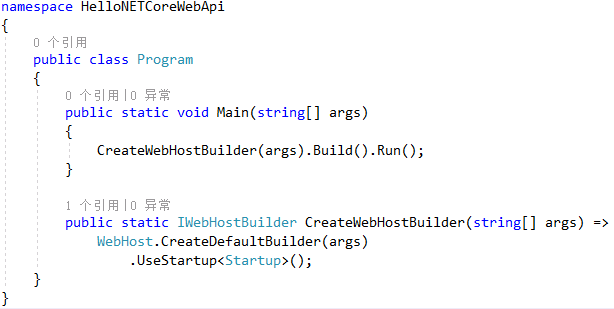
通过以上代码,我们可以初步得出以下结论:
下面结合源码代详细分析下。
宿主构造器:IWebHostBuilder
看下WebHost的静态方法CreateDefaultBuilder的源码。
/// <summary>

        /// Initializes a new instance of the <see cref="WebHostBuilder"/> class with pre-configured defaults.

        /// </summary>

        /// <remarks>

        ///   The following defaults are applied to the returned <see cref="WebHostBuilder"/>:

        ///     use Kestrel as the web server and configure it using the application's configuration providers,

        ///     set the <see cref="IHostingEnvironment.ContentRootPath"/> to the result of <see cref="Directory.GetCurrentDirectory()"/>,

        ///     load <see cref="IConfiguration"/> from 'appsettings.json' and 'appsettings.[<see cref="IHostingEnvironment.EnvironmentName"/>].json',

        ///     load <see cref="IConfiguration"/> from User Secrets when <see cref="IHostingEnvironment.EnvironmentName"/> is 'Development' using the entry assembly,

        ///     load <see cref="IConfiguration"/> from environment variables,

        ///     load <see cref="IConfiguration"/> from supplied command line args,

        ///     configure the <see cref="ILoggerFactory"/> to log to the console and debug output,

        ///     and enable IIS integration.

        /// </remarks>

        /// <param name="args">The command line args.</param>

        /// <returns>The initialized <see cref="IWebHostBuilder"/>.</returns>

        public static IWebHostBuilder CreateDefaultBuilder(string[] args)

        {

            var builder = new WebHostBuilder();

            if (string.IsNullOrEmpty(builder.GetSetting(WebHostDefaults.ContentRootKey)))

            {

                builder.UseContentRoot(Directory.GetCurrentDirectory());

            }

            if (args != null)

            {

                builder.UseConfiguration(new ConfigurationBuilder().AddCommandLine(args).Build());

            }

            builder.UseKestrel((builderContext, options) =>

                {

                    options.Configure(builderContext.Configuration.GetSection("Kestrel"));

                })

                .ConfigureAppConfiguration((hostingContext, config) =>

                {

                    var env = hostingContext.HostingEnvironment;

                    config.AddJsonFile("appsettings.json", optional: true, reloadOnChange: true)

                          .AddJsonFile($"appsettings.{env.EnvironmentName}.json", optional: true, reloadOnChange: true);

                    if (env.IsDevelopment())

                    {

                        var appAssembly = Assembly.Load(new AssemblyName(env.ApplicationName));

                        if (appAssembly != null)

                        {

                            config.AddUserSecrets(appAssembly, optional: true);

                        }

                    }

                    config.AddEnvironmentVariables();

                    if (args != null)

                    {

                        config.AddCommandLine(args);

                    }

                })

                .ConfigureLogging((hostingContext, logging) =>

                {

                    logging.AddConfiguration(hostingContext.Configuration.GetSection("Logging"));

                    logging.AddConsole();

                    logging.AddDebug();

                    logging.AddEventSourceLogger();

                })

                .ConfigureServices((hostingContext, services) =>

                {

                    // Fallback

                    services.PostConfigure<HostFilteringOptions>(options =>

                    {

                        if (options.AllowedHosts == null || options.AllowedHosts.Count == 0)

                        {

                            // "AllowedHosts": "localhost;127.0.0.1;[::1]"

                            var hosts = hostingContext.Configuration["AllowedHosts"]?.Split(new[] { ';' }, StringSplitOptions.RemoveEmptyEntries);

                            // Fall back to "*" to disable.

                            options.AllowedHosts = (hosts?.Length > 0 ? hosts : new[] { "*" });

                        }

                    });

                    // Change notification

                    services.AddSingleton<IOptionsChangeTokenSource<HostFilteringOptions>>(

                        new ConfigurationChangeTokenSource<HostFilteringOptions>(hostingContext.Configuration));

                    services.AddTransient<IStartupFilter, HostFilteringStartupFilter>();

                })

                .UseIIS()

                .UseIISIntegration()

                .UseDefaultServiceProvider((context, options) =>

                {

                    options.ValidateScopes = context.HostingEnvironment.IsDevelopment();

                });

            return builder;

        }
1,UseContentRoot
指定Web host使用的内容根目录,比如Views。默认为当前应用程序根目录。
2,UseConfiguration
//todo
3,UseKestrel
使用Kestrel作为默认的Web Server。
4,ConfigureAppConfiguration
设置当前应用程序配置。主要是读取 appsettings.json配置文件、开发环境中配置的UserSecrets、添加环境变量和命令行参数 。
5,ConfigureLogging
读取配置文件中的Logging节点,配置日志系统。
6,ConfigureServices
//todo
7,UseIIS
使用IIS中间件。
8,UseIISIntegration
使用IISIntegration中间件。
9,UseDefaultServiceProvider
设置默认的依赖注入容器。
宿主:IWebHost
在ASP.Net Core中定义了IWebHost用来表示Web应用的宿主,并提供了一个默认实现WebHost。宿主的创建是通过调用IWebHostBuilder的Build()方法来完成的。看下源码:
/// <summary>

        /// Builds the required services and an <see cref="IWebHost"/> which hosts a web application.

        /// </summary>

        public IWebHost Build()

        {

            if (_webHostBuilt)

            {

                throw new InvalidOperationException(Resources.WebHostBuilder_SingleInstance);

            }

            _webHostBuilt = true;

            var hostingServices = BuildCommonServices(out var hostingStartupErrors);

            var applicationServices = hostingServices.Clone();

            var hostingServiceProvider = GetProviderFromFactory(hostingServices);

            if (!_options.SuppressStatusMessages)

            {

                // Warn about deprecated environment variables

                if (Environment.GetEnvironmentVariable("Hosting:Environment") != null)

                {

                    Console.WriteLine("The environment variable 'Hosting:Environment' is obsolete and has been replaced with 'ASPNETCORE_ENVIRONMENT'");

                }

                if (Environment.GetEnvironmentVariable("ASPNET_ENV") != null)

                {

                    Console.WriteLine("The environment variable 'ASPNET_ENV' is obsolete and has been replaced with 'ASPNETCORE_ENVIRONMENT'");

                }

                if (Environment.GetEnvironmentVariable("ASPNETCORE_SERVER.URLS") != null)

                {

                    Console.WriteLine("The environment variable 'ASPNETCORE_SERVER.URLS' is obsolete and has been replaced with 'ASPNETCORE_URLS'");

                }

            }

            AddApplicationServices(applicationServices, hostingServiceProvider);

            var host = new WebHost(

                applicationServices,

                hostingServiceProvider,

                _options,

                _config,

                hostingStartupErrors);

            try

            {

                host.Initialize();

                var logger = host.Services.GetRequiredService<ILogger<WebHost>>();

                // Warn about duplicate HostingStartupAssemblies

                foreach (var assemblyName in _options.GetFinalHostingStartupAssemblies().GroupBy(a => a, StringComparer.OrdinalIgnoreCase).Where(g => g.Count() > 1))

                {

                    logger.LogWarning($"The assembly {assemblyName} was specified multiple times. Hosting startup assemblies should only be specified once.");

                }

                return host;

            }

            catch

            {

                // Dispose the host if there's a failure to initialize, this should clean up

                // will dispose services that were constructed until the exception was thrown

                host.Dispose();

                throw;

            }

            IServiceProvider GetProviderFromFactory(IServiceCollection collection)

            {

                var provider = collection.BuildServiceProvider();

                var factory = provider.GetService<IServiceProviderFactory<IServiceCollection>>();

                if (factory != null && !(factory is DefaultServiceProviderFactory))

                {

                    using (provider)

                    {

                        return factory.CreateServiceProvider(factory.CreateBuilder(collection));

                    }

                }

                return provider;

            }

        }
启动类:Startup
每个ASP.NET Core程序都需要一个启动类,约定命名为:Startup。Startup用于配置服务和配置HTTP请求管道。
namespace HelloNETCoreWebApi

{

    public class Startup

    {

        public Startup(IConfiguration configuration)

        {

            Configuration = configuration;

        }

        public IConfiguration Configuration { get; }

        // This method gets called by the runtime. Use this method to add services to the container.

        public void ConfigureServices(IServiceCollection services)

        {

            services.AddMvc().SetCompatibilityVersion(CompatibilityVersion.Version_2_2);

        }

        // This method gets called by the runtime. Use this method to configure the HTTP request pipeline.

        public void Configure(IApplicationBuilder app, IHostingEnvironment env)

        {

            if (env.IsDevelopment())

            {

                app.UseDeveloperExceptionPage();

            }

            else

            {

                // The default HSTS value is 30 days. You may want to change this for production scenarios, see https://aka.ms/aspnetcore-hsts.

                app.UseHsts();

            }

            app.UseHttpsRedirection();

            app.UseMvc();

        }

    }

}
Startup必须包含Configure方法, 并选择包含ConfigureServices方法,这两个方法在应用程序启动时调用,该类还可以包含这些方法的特定环境的版本,并且ConfigureServices方法(如果存在)在Configure方法之前调用。
Configure方法主要是配置ASP.NET Core的中间件,相当于我们在ASP.NET中所说的管道,ConfigureServices方法主要是配置依赖注入(DI)。
ASP.NET Core基础1:应用启动流程的更多相关文章
- asp.net core mvc剖析:启动流程
asp.net core mvc是微软开源的跨平台的mvc框架,首先它跟原有的MVC相比,最大的不同就是跨平台,然后又增加了一些非常实用的新功能,比如taghelper,viewcomponent,D ...
- ASP.NET Core Razor 视图起始页 - ASP.NET Core 基础教程 - 简单教程,简单编程
原文:ASP.NET Core Razor 视图起始页 - ASP.NET Core 基础教程 - 简单教程,简单编程 ASP.NET Core Razor 视图起始页 上一章节中我们介绍了布局视图, ...
- 通过重建Hosting系统理解HTTP请求在ASP.NET Core管道中的处理流程[下]:管道是如何构建起来的?
在<中篇>中,我们对管道的构成以及它对请求的处理流程进行了详细介绍,接下来我们需要了解的是这样一个管道是如何被构建起来的.总的来说,管道由一个服务器和一个HttpApplication构成 ...
- net core mvc剖析:启动流程
net core mvc剖析:启动流程 asp.net core mvc是微软开源的跨平台的mvc框架,首先它跟原有的MVC相比,最大的不同就是跨平台,然后又增加了一些非常实用的新功能,比如taghe ...
- ASP.NET Core 动作结果 - ASP.NET Core 基础教程 - 简单教程,简单编程
原文:ASP.NET Core 动作结果 - ASP.NET Core 基础教程 - 简单教程,简单编程 ASP.NET Core 动作结果 前面的章节中,我们一直使用简单的 C# 类作为控制器. 虽 ...
- ASP.NET Core 配置 MVC - ASP.NET Core 基础教程 - 简单教程,简单编程
原文:ASP.NET Core 配置 MVC - ASP.NET Core 基础教程 - 简单教程,简单编程 ASP.NET Core 配置 MVC 前面几章节中,我们都是基于 ASP.NET 空项目 ...
- ASP.NET Core 中间件 - ASP.NET Core 基础教程 - 简单教程,简单编程
原文:ASP.NET Core 中间件 - ASP.NET Core 基础教程 - 简单教程,简单编程 ASP.NET Core 中间件 上一章节中,我们我们有讲到 Startup 类中的 Confi ...
- ASP.NET Core 项目配置 ( Startup ) - ASP.NET Core 基础教程 - 简单教程,简单编程
原文:ASP.NET Core 项目配置 ( Startup ) - ASP.NET Core 基础教程 - 简单教程,简单编程 ASP.NET Core 项目配置 ( Startup ) 前面几章节 ...
- ASP.NET Core 基本项目目录结构 - ASP.NET Core 基础教程 - 简单教程,简单编程
原文:ASP.NET Core 基本项目目录结构 - ASP.NET Core 基础教程 - 简单教程,简单编程 ASP.NET Core 基本项目目录结构 上一章节中我们成功创建了一个名为 Hell ...
- ASP.NET Core 新建项目 - macOS 环境 - ASP.NET Core 基础教程 - 简单教程,简单编程
原文:ASP.NET Core 新建项目 - macOS 环境 - ASP.NET Core 基础教程 - 简单教程,简单编程 ASP.NET Core 新建项目 - macOS 环境 对于任何语言和 ...
随机推荐
- Session Cookie介绍和使用
Cookie机制 Cookie机制 Cookie是服务器存储在本地计算机上的小块文本,并随每个请求发送到同一服务器. IETF RFC 2965 HTTP状态管理机制是一种通用的cookie规范. W ...
- windows下 mysql 5.6.40 卸载 安装 修改密码
最近执行另一个mysql版本导出的sql脚本,出现问题!出于一些原因,把之前的mysql5.5卸载,由于卸载不干净出现了一些问题.特此总结方法! 参考链接: https://blog.csdn.net ...
- HTML块元素,行内元素,类,头部元素
总结HTML块元素,行内元素,类,头部元素 块元素: 在HTML中,块级元素的高度为其内容的高度,宽度会扩展到与父容器同宽.默认情况下,块级元素会独占一行,并且元素前后行留空. 示例:<h1&g ...
- 将本地jar包打包到本地仓库和上传到私服
1.本地jar打包到本地仓库 mvn install:install-file -Dfile=jar包完整地址或相对地址 -DgroupId=自定义的groupID -DartifactId=自定义的 ...
- 发现了学校教务处官网的两个BUG
许久没有写博客了,感觉自己技术还差的好多-_-好像没啥好写的,之前学完了某易的WEB安全基础视频教程,自认对WEB安全入了门,忍不住就想拿学校教务处官网来练练手 教务处登录界面如图所示(为保护隐私,部 ...
- HBuilder git合作-从Git Hub Clone项目
1.Clone项目 打开”Git Respository"视图,选“Clone a Git Respository" 2.为了能正确pull项目,所有队员都必须做以下配置(其始只是 ...
- Razor Page Library:开发独立通用RPL(内嵌wwwroot资源文件夹)
ASP.NET Core知多少系列:总体介绍及目录 Demo路径:GitHub-RPL.Demo 1. Introduction Razor Page Library 是ASP.NET Core 2. ...
- [Bash]LeetCode195. 第十行 | Tenth Line
Given a text file file.txt, print just the 10th line of the file. Example: Assume that file.txt has ...
- [Swift]LeetCode264.丑数 II | Ugly Number II
Write a program to find the n-th ugly number. Ugly numbers are positive numbers whose prime factors ...
- [Swift]LeetCode524. 通过删除字母匹配到字典里最长单词 | Longest Word in Dictionary through Deleting
Given a string and a string dictionary, find the longest string in the dictionary that can be formed ...