
__x__(37)0909第五天__背景图按钮
link,hover,active三种按键状态,存放三张图片
缺点:
资源只有在被使用时,才会被加载。
页面第一次加载时,会出现短暂的延迟闪烁,造成一次不佳的用户体验。
图片整合技术 CSS-Sprite 雪碧图:
将三张图片整合为一张图片,在不同的伪类中通过设置 background-position 来切换图片。
一次请求一次加载,一次加载一张图片,相当于多张图片。
优势:
- 减小资源的大小,省了颜色表
- 提高了访问效率
实例效果:
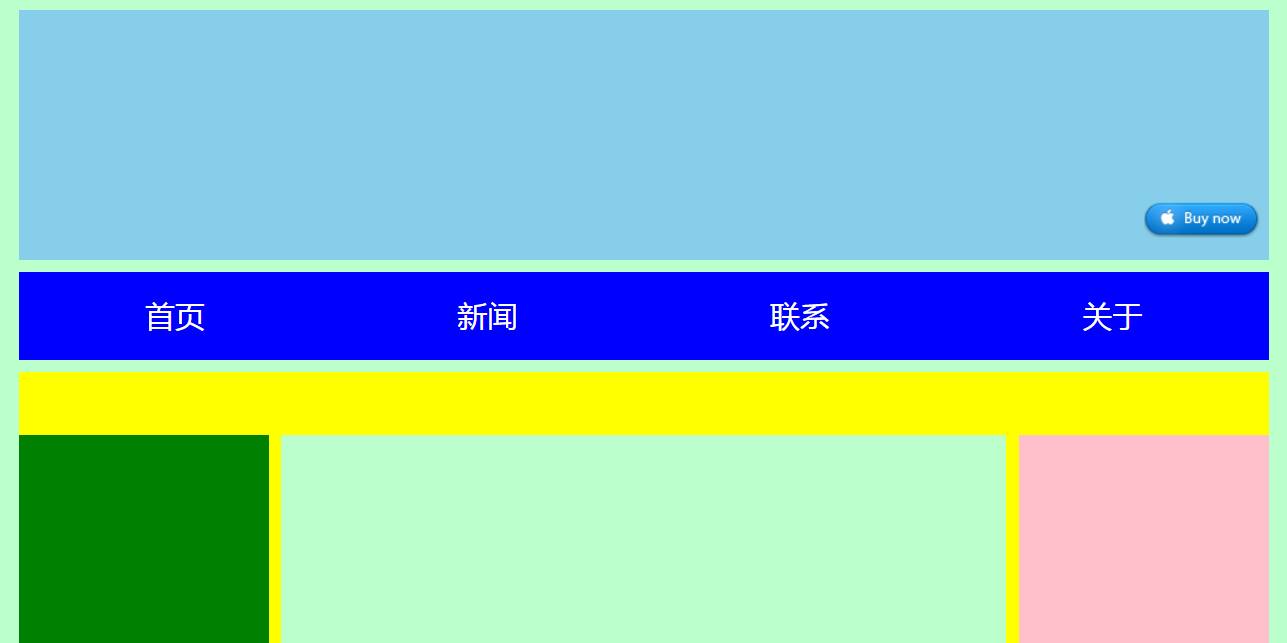
html代码:
<!doctype html>

<html>

    <head>

        <meta charset="utf-8" />

        <title>湖南城市学院</title>

        <link rel="stylesheet" type="text/css" href="css/hncu.css" />

    </head>

    <body>

        <div id="hncu_header">

            <div id="hncu_search">

                <a href="#" id="search_btn"></a>

            </div>

        </div>

        <ul id="hncu_nav">

            <li>

                <a href="#">首页</a>

            </li>

            <li>

                <a href="#">新闻</a>

            </li>

            <li>

                <a href="#">联系</a>

            </li>

            <li>

                <a href="#">关于</a>

            </li>

        </ul>

        <div id="hncu_content">

            <div id="hncu_left"></div>

            <div id="hncu_center"></div>

            <div id="hncu_right"></div>

        </div>

        <div id="hncu_footer">

        </div>

    </body>

</html>
css源代码:
@charset "utf-8";

*{

    margin: 0px;

    padding: 0px;

}

body{

    background-color: #bfc;

}

#hncu_header{

    width: 1000px;

    height: 200px;

    background-color: skyblue;

    margin: 10px auto 10px;

}

#hncu_search{

    width: 360px;

    height: 180px;

    background-color: skyblue;

    overflow:hidden;

    zoom:;

    margin: 10px auto 10px;

    float: right;

}

#search_btn {

    display: block;

    width: 93px;

    height: 29px;

    background-color: skyblue;

    background-repeat: no-repeat;

    position: relative;

    left: 260px;

    top: 144px;

}

#search_btn:link {

    background-image: url(../img/btn.png);

}

#search_btn:hover {

    background-position: -93px 0px;

}

#search_btn:active {

    background-position: -186px 0px;

}

#hncu_nav{

    width: 1000px;

    height: 70px;

    background-color: blue;

    list-style:none;

    margin:0px auto 10px;

    overflow:hidden;

    zoom:;

}

#hncu_nav li{

    width: 25%;

    height: 70px;

    float: left;

}

#hncu_nav a{

    width: 100%;

    height: 70px;

    color: white;

    line-height: 70px;

    text-align: center;

    text-decoration: none;

    float: left;

}

#hncu_nav a:link{

    background-color: blue;

}

#hncu_nav a:visited{

    background-color: blue;

}

#hncu_nav a:hover{

    background-color: red;

}

#hncu_nav a:active{

    color: blue;

}

#hncu_content{

    width: 1000px;

    height: 600px;

    background-color: yellow;

    margin:0px auto 10px;

}

#hncu_left{

    width: 200px;

    height: 500px;

    background-color: green;

    margin-top:50px;

    float:left;

}

#hncu_center{

    width: 580px;

    height: 500px;

    background-color: #bfc;

    margin-top:50px;

    margin-right: 10px;

    margin-left: 10px;

    float:left;

}

#hncu_right{

    width: 200px;

    height: 500px;

    background-color: pink;

    margin-top:50px;

    float:left;

}

#hncu_footer{

    width:1000px;

    height:200px;

    background-color:skyblue;

    margin:0px auto 10px;

}
__x__(37)0909第五天__背景图按钮的更多相关文章
- __x__(36)0908第五天__背景 background
1. 背景 background: red url(img/cat.gif) repeat-x fixed; 2. 背景颜色 background-color: red; 3. 背景图片 backgr ...
- __x__(38)0909第五天__雪碧图的制作
1. 用ps打开目标图片若干. 2. 调整合适的画布大小. 3. 将图片拖曳到一张里. 4. 存储为Web所用格式,选择 png24 .
- __x__(39)0909第五天__ 表格 table
表格 表示一种格式化的数据,如课程表,银行对账单... ... 在网页中,使用 table 创建一个表格. html代码: <!doctype html> <html> < ...
- __x__(40)0909第五天__表格 table 的 css 样式 美化
如果就向下面的代码那样,不写 tbody , 则浏览器自添加 tbody , 并将所有的 tr 移入 tbody 意味着 tr 并非 table 的子元素,而是 tbody 的子元素. 所以 以后编写 ...
- __x__(41)0909第五天__长表格
长表格 银行流水,表格很长... 则需要将表格分为 表头 thead ,主体数据 tbody , 表格底部 tfoot 三个标签无顺序要求,易于维护:thead → tfoot → tbody 如果没 ...
- __x__(29)0908第五天__高度塌陷 问题
高度塌陷 在文档流中,父元素的高度默认是被子元素撑开的. 但是当为 子元素 设置 float 时,子元素会完全脱离文档流,无法再撑开父元素,导致父元素高度塌陷...以致于布局混乱 变成 BFC块级格式 ...
- __x__(30)0908第五天__导航条的练习 <div>版本
效果图: html源代码: <!doctype html> <html> <head> <meta charset="utf-8" /& ...
- __x__(31)0908第五天__导航条的练习 <ul> 版本
效果图: html代码: <!doctype html> <html> <head> <meta charset="utf-8" /&g ...
- __x__(34)0908第五天__ 定位 position
position 定位 指将原始摆放到页面的任意位置. 继承性:no 默认值:static 没有定位,原始出现在正常的文档流中 可选值: static : 默认值,元素没有开启定位 ...
随机推荐
- flyway和liquibase的使用样例
在代码上我们有svn和git等诸多的版本控制方法. 但是在数据库上却没有相应的工具.一度导致多环境见的数据库同步难以维持. flyway和liquibase都是常见的数据库版本控制工具. flyway ...
- 第三节: EF调用普通SQL语句的两类封装(ExecuteSqlCommand和SqlQuery )
一. 前言 在前面的两个章节中,我们分别详细介绍了EF的增删改的两种方式(方法和状态)和EF查询的两种方式( Lambda和Linq ),进行到这里,可以说对于EF,已经入门了,本来应该继续往下进行E ...
- Python列表中查找某个元素的索引(多个)
enumerate() 函数用于将一个可遍历的数据对象(如列表.元组或字符串)组合为一个索引序列,同时列出数据和数据下标,一般用在 for 循环当中. 以下是 enumerate() 方法的语法: e ...
- sql 发送邮件
一.启用Database Mail XPs功能. 查看Database Mail XPs功能是否打开,从返回结果来看,value为0说明没有打开,注意SQL Mail XPs是SQL Server早期 ...
- angularjs指令中的compile与link函数详解补充
通常大家在使用ng中的指令的时候,用的链接函数最多的是link属性,下面这篇文章将告诉大家complie,pre-link,post-link的用法与区别. angularjs里的指令非常神奇,允许你 ...
- 原生js写轮播图效果
<script> var picarr=[ "pic/lb1.jpg", "pic/lb2.jpg", "pic/lb3.jpg" ...
- Django的项目创建,以及该端口号,语言随地区而变化
注:myway是项目的名称创建项目:cd wwwdjango-admin startproject mywaycd mywaypython manage.py runserver 如果想改Django ...
- springboot集成elasticsearch遇到的问题
public interface EsBlogRepository extends ElasticsearchRepository<EsBlog,String>{ Page<EsBl ...
- Node.js使用jszip实现打包zip压缩包
一.前言 最近有这样的一个需求,需要把两个同名的.mtl文件和.obj文件打包成一个同名的.zip压缩包.刚开始文件不多的时候,只有几个,或者十几个,甚至二三十个的时候,还能勉强接受手动修改,但是随着 ...
- JQuery EasyUI 初始
基于jQuery的用户界面插件集合 1. jQuery easyui提供了一个完整的组件的集合,包括强大的DataGrid,树网格,面板.用户可以使用他们一起,或者只是用一些组件,组合和构建他想要的跨 ...