
__x__(31)0908第五天__导航条的练习 <ul> 版本
效果图:
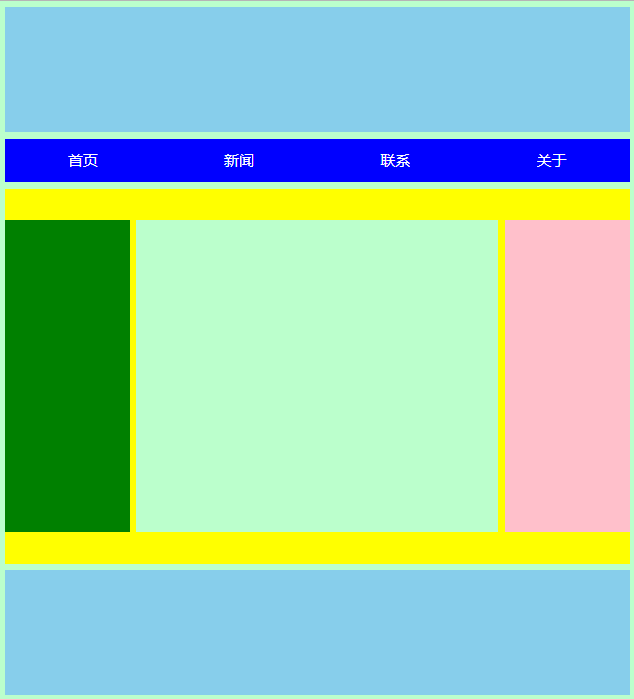
html代码:
<!doctype html>

<html>

    <head>

        <meta charset="utf-8" />

        <title>湖南城市学院</title>

        <link rel="stylesheet" type="text/css" href="css/hncu.css" />

    </head>

    <body>

        <div id="hncu_header">

        </div>

        <ul id="hncu_nav">

            <li>

                <a href="#">首页</a>

            </li>

            <li>

                <a href="#">新闻</a>

            </li>

            <li>

                <a href="#">联系</a>

            </li>

            <li>

                <a href="#">关于</a>

            </li>

        </ul>

        <div id="hncu_content">

            <div id="hncu_left"></div>

            <div id="hncu_center"></div>

            <div id="hncu_right"></div>

        </div>

        <div id="hncu_footer">

        </div>

    </body>

</html>
css代码:
@charset "utf-8";

*{

    margin: 0px;

    padding: 0px;

}

body{

    background-color: #bfc;

}

#hncu_header{

    width: 1000px;

    height: 200px;

    background-color: skyblue;

    margin:10px auto 10px;

}

#hncu_nav{

    width: 1000px;

    height: 70px;

    background-color: blue;

    list-style:none;

    margin:0px auto 10px;

    overflow:hidden;

    zoom:;

}

#hncu_nav li{

    width: 25%;

    height: 70px;

    float: left;

}

#hncu_nav a{

    width: 100%;

    height: 70px;

    color: white;

    line-height: 70px;

    text-align: center;

    text-decoration: none;

    float: left;

}

#hncu_nav a:link{

    background-color: blue;

}

#hncu_nav a:visited{

    background-color: blue;

}

#hncu_nav a:hover{

    background-color: red;

}

#hncu_nav a:active{

    color: blue;

}

#hncu_content{

    width: 1000px;

    height: 600px;

    background-color: yellow;

    margin:0px auto 10px;

}

#hncu_left{

    width: 200px;

    height: 500px;

    background-color: green;

    margin-top:50px;

    float:left;

}

#hncu_center{

    width: 580px;

    height: 500px;

    background-color: #bfc;

    margin-top:50px;

    margin-right: 10px;

    margin-left: 10px;

    float:left;

}

#hncu_right{

    width: 200px;

    height: 500px;

    background-color: pink;

    margin-top:50px;

    float:left;

}

#hncu_footer{

    width:1000px;

    height:200px;

    background-color:skyblue;

    margin:0px auto 10px;

}
__x__(31)0908第五天__导航条的练习 <ul> 版本的更多相关文章
- __x__(30)0908第五天__导航条的练习 <div>版本
效果图: html源代码: <!doctype html> <html> <head> <meta charset="utf-8" /& ...
- __x__(29)0908第五天__高度塌陷 问题
高度塌陷 在文档流中,父元素的高度默认是被子元素撑开的. 但是当为 子元素 设置 float 时,子元素会完全脱离文档流,无法再撑开父元素,导致父元素高度塌陷...以致于布局混乱 变成 BFC块级格式 ...
- __x__(34)0908第五天__ 定位 position
position 定位 指将原始摆放到页面的任意位置. 继承性:no 默认值:static 没有定位,原始出现在正常的文档流中 可选值: static : 默认值,元素没有开启定位 ...
- __x__(35)0908第五天__ 层级 z-index
如果三个 div 全部设置 position: absolute; 绝对定位,且未设置 z-index, 则从代码结构上 下面的元素 会盖住 上面的元素. z-index 层级: 通过 z-i ...
- __x__(36)0908第五天__背景 background
1. 背景 background: red url(img/cat.gif) repeat-x fixed; 2. 背景颜色 background-color: red; 3. 背景图片 backgr ...
- 为什么要使用ul li布局网站导航条?使用ul li布局网站网页导航必要性
会布局的都知道网站导航条布局非常重要,可能一个导航条最终布局效果有时可以使用ul li列表标签布局,有时可以不用ul li布局,而是直接一个div盒子里直接放锚文本超链接的栏目名称,也能实现,看下图. ...
- __x__(32)0908第五天__Photoshop的基本操作
1. 设置 Photoshop 的单位为 像素px 2. 标尺 显示与隐藏 Ctrl + r 3. 放大与缩小 Ctrl + 1 放大到100% Ctrl + 0 适应屏幕 Alt + ...
- __x__(35)0908第五天__opacity 透明度
opacity 透明度 设置一个 0 - 1 之间的值. opacity: 0; 完全透明 opacity: 0.5 半透明 opacity: 1; 完全不透明 缺点: IE8及以 ...
- __x__(37)0909第五天__背景图按钮
link,hover,active三种按键状态,存放三张图片 缺点: 资源只有在被使用时,才会被加载. 页面第一次加载时,会出现短暂的延迟闪烁,造成一次不佳的用户体验. 图片整合技术 CSS-Spri ...
随机推荐
- 金融量化分析【day112】:双均线策略
一.双均线策略 1.什么是双均线策略? 2.实现代码 def initialize(context): set_benchmark('601318.XSHG') set_option('use_rea ...
- Linux记录-grafana opentsdb安装
wget https://dl.grafana.com/oss/release/grafana-6.1.4-1.x86_64.rpm sudo yum localinstall grafana-6.1 ...
- JS的基础知识回顾
前言:JS应用在浏览器端,基于浏览器事件执行,功能十分强大,不容错过
- 关于java集合的练习
关于java集合的练习 练习一:Collection集合练习 一.产生10个1-100的随机数,并放到一个数组中,把数组中大于等于10的数字放到一个list集合中,并打印到控制台. public cl ...
- qsort()函数详解
一 写在开头1.1 本节内容学习C语言中的qsort()函数. 二 qsort()2.1 函数原型 void qsort( void *base, size_t nmemb, size_t size, ...
- Java设计模式之原型设计模式
概述 设计模式(Design Pattern)是一套被反复使用.多数人知晓的.经过分类的.代码设计经验的总结. 使用设计模式的目的:为了代码可重用性.让代码更容易被他人理解.保证代码可靠性. 设计模式 ...
- ElasticSearch 索引 剖析
ElasticSearch index 剖析 在看ElasticSearch权威指南基础入门中关于:分片内部原理这一小节内容后,大致对ElasticSearch的索引.搜索底层实现有了一个初步的认识. ...
- java获取上个星期第一天和最后一天
package com.goldcn.jzgmanageplat.b2b.controller; import java.text.SimpleDateFormat;import java.util. ...
- 401 experience
AM: 块元素与内联元素 : div与span的区别 span只能设置水平的margin(左右内外边距) 在span里面加 display:block; 内联转块(相当于给span加了上下的边距)反 ...
- 设计模式十: 生成器模式(Builder Pattern)
简介 生成器模式属于创建型模式的一种, 又叫建造者模式. 生成器模式涉及4个关键角色:产品(Product),抽象生成器(builder),具体生成器(ConcreteBuilder),指挥者(Dir ...