
ERROR 1071 (42000): Specified key was too long; max key length is 767 bytes
今天在MySQL 5.6版本的数据库中修改InnoDB表字段长度时遇到了"ERROR 1071 (42000): Specified key was too long; max key length is 767 bytes"错误,第一次遇到这个错误,遂花了点学习、研究过、总结这个问题。
我们先来创建一个测试表,构造这样的错误。
mysql> use MyDB;
Reading table information for completion of table and column names
You can turn off this feature to get a quicker startup with -A
Database changed
mysql> CREATE TABLE `TEST` (
-> `CODE_NAME` varchar(100) NOT NULL DEFAULT '',
-> `CODE_SEQ` smallint(6) NOT NULL DEFAULT '1',
-> `ACTIVE` char(1) DEFAULT 'Y',
-> `CODE_VALUE1` varchar(250) DEFAULT NULL,
-> PRIMARY KEY (`CODE_NAME`,`CODE_SEQ`),
-> KEY `IDX_GEN_CODE` (`CODE_NAME`,`CODE_VALUE1`)
-> ) ENGINE=InnoDB DEFAULT CHARSET=utf8;
Query OK, 0 rows affected (0.02 sec)
mysql> ALTER TABLE TEST MODIFY CODE_VALUE1 VARCHAR(350);
ERROR 1071 (42000): Specified key was too long; max key length is 767 bytes
mysql>
其实这个“ERROR 1071 (42000): Specified key was too long; max key length is 767 bytes”错误是指超出索引字节的限制,并不是指字段长度限制。在官方文档“Limits on InnoDB Tables”有关于这方面的介绍、描述(详情请见参考资料):
MySQL 5.6文档内容如下
By default, the index key prefix length limit is 767 bytes. See Section 13.1.13, “CREATE INDEX Syntax”. For example, you might hit this limit with a column prefix index of more than 255 characters on a TEXT or VARCHAR column, assuming a utf8mb3 character set and the maximum of 3 bytes for each character. When the innodb_large_prefix configuration option is enabled, the index key prefix length limit is raised to 3072 bytes for InnoDB tables that use DYNAMIC or COMPRESSED row format.
Attempting to use an index key prefix length that exceeds the limit returns an error. To avoid such errors in replication configurations, avoid enablinginnodb_large_prefix on the master if it cannot also be enabled on slaves.
The limits that apply to index key prefixes also apply to full-column index keys.
MySQL 5.7文档内容如下:
If innodb_large_prefix is enabled (the default), the index key prefix limit is 3072 bytes for InnoDB tables that use DYNAMIC or COMPRESSED row format. If innodb_large_prefix is disabled, the index key prefix limit is 767 bytes for tables of any row format.
innodb_large_prefix is deprecated and will be removed in a future release. innodb_large_prefix was introduced in MySQL 5.5 to disable large index key prefixes for compatibility with earlier versions of InnoDB that do not support large index key prefixes.
The index key prefix length limit is 767 bytes for InnoDB tables that use the REDUNDANT or COMPACT row format. For example, you might hit this limit with a column prefix index of more than 255 characters on a TEXT or VARCHAR column, assuming a utf8mb3 character set and the maximum of 3 bytes for each character.
Attempting to use an index key prefix length that exceeds the limit returns an error. To avoid such errors in replication configurations, avoid enablinginnodb_large_prefix on the master if it cannot also be enabled on slaves.
The limits that apply to index key prefixes also apply to full-column index keys.
如果启用了系统变量innodb_large_prefix(默认启用,注意实验版本为MySQL 5.6.41,默认是关闭的,MySQL 5.7默认开启),则对于使用DYNAMIC或COMPRESSED行格式的InnoDB表,索引键前缀限制为3072字节。如果禁用innodb_large_prefix,则对于任何行格式的表,索引键前缀限制为767字节。
innodb_large_prefix将在以后的版本中删除、弃用。在MySQL 5.5中引入了innodb_large_prefix,用来禁用大型前缀索引,以便与不支持大索引键前缀的早期版本的InnoDB兼容。
对于使用REDUNDANT或COMPACT行格式的InnoDB表,索引键前缀长度限制为767字节。例如,您可能会在TEXT或VARCHAR列上使用超过255个字符的列前缀索引达到此限制,假设为utf8mb3字符集,并且每个字符最多包含3个字节。
尝试使用超出限制的索引键前缀长度会返回错误。要避免复制配置中出现此类错误,请避免在主服务器上启用enableinnodb_large_prefix(如果无法在从服务器上启用)。
适用于索引键前缀的限制也适用于全列索引键。
注意:上面是767个字节,而不是字符,具体到字符数量,这就跟字符集有关。GBK是双字节的,UTF-8是三字节的
解决方案:
1:启用系统变量innodb_large_prefix
注意:光有这个系统变量开启是不够的。必须满足下面几个条件:
1: 系统变量innodb_large_prefix为ON
2: 系统变量innodb_file_format为Barracuda
3: ROW_FORMAT为DYNAMIC或COMPRESSED
如下测试所示:
mysql> show variables like '%innodb_large_prefix%';
+---------------------+-------+
| Variable_name | Value |
+---------------------+-------+
| innodb_large_prefix | OFF |
+---------------------+-------+
1 row in set (0.00 sec)
mysql> set global innodb_large_prefix=on;
Query OK, 0 rows affected (0.00 sec)
mysql> ALTER TABLE TEST MODIFY CODE_VALUE1 VARCHAR(350);
ERROR 1709 (HY000): Index column size too large. The maximum column size is 767 bytes.
mysql>
mysql> show variables like '%innodb_file_format%';
+--------------------------+-----------+
| Variable_name | Value |
+--------------------------+-----------+
| innodb_file_format | Antelope |
| innodb_file_format_check | ON |
| innodb_file_format_max | Barracuda |
+--------------------------+-----------+
3 rows in set (0.01 sec)
mysql> set global innodb_file_format=Barracuda;
Query OK, 0 rows affected (0.00 sec)
mysql> ALTER TABLE TEST MODIFY CODE_VALUE1 VARCHAR(350);
ERROR 1709 (HY000): Index column size too large. The maximum column size is 767 bytes.
mysql>
mysql>
mysql> show table status from MyDB where name='TEST'\G;
*************************** 1. row ***************************
Name: TEST
Engine: InnoDB
Version: 10
Row_format: Compact
Rows: 0
Avg_row_length: 0
Data_length: 16384
Max_data_length: 0
Index_length: 16384
Data_free: 0
Auto_increment: NULL
Create_time: 2018-09-20 13:53:49
Update_time: NULL
Check_time: NULL
Collation: utf8_general_ci
Checksum: NULL
Create_options:
Comment:
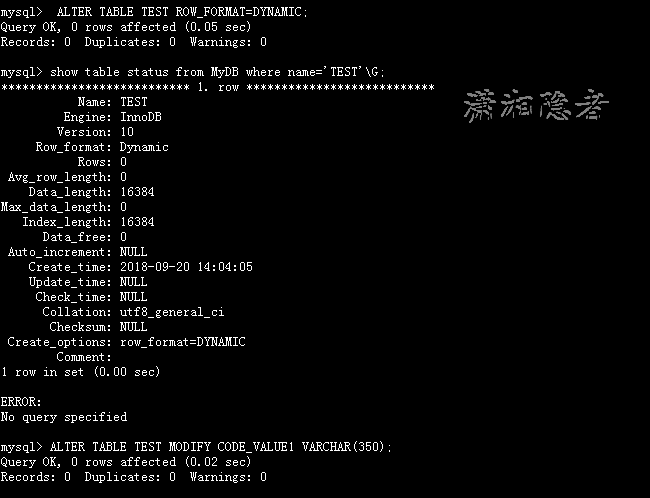
mysql> ALTER TABLE TEST ROW_FORMAT=DYNAMIC;
Query OK, 0 rows affected (0.05 sec)
Records: 0 Duplicates: 0 Warnings: 0
mysql> show table status from MyDB where name='TEST'\G;
*************************** 1. row ***************************
Name: TEST
Engine: InnoDB
Version: 10
Row_format: Dynamic
Rows: 0
Avg_row_length: 0
Data_length: 16384
Max_data_length: 0
Index_length: 16384
Data_free: 0
Auto_increment: NULL
Create_time: 2018-09-20 14:04:05
Update_time: NULL
Check_time: NULL
Collation: utf8_general_ci
Checksum: NULL
Create_options: row_format=DYNAMIC
Comment:
1 row in set (0.00 sec)
ERROR:
No query specified
mysql> ALTER TABLE TEST MODIFY CODE_VALUE1 VARCHAR(350);
Query OK, 0 rows affected (0.02 sec)
Records: 0 Duplicates: 0 Warnings: 0
2:使用前缀索引解决这个问题
之所以要限制索引键值的大小,是因为性能问题,而前缀索引能很好的解决这个问题。不需要修改任何系统变量。
mysql> show index from TEST;
..................................
mysql> ALTER TABLE TEST DROP INDEX IDX_GEN_CODE;
Query OK, 0 rows affected (0.00 sec)
Records: 0 Duplicates: 0 Warnings: 0
mysql> CREATE IDX_GEN_CODE TEST ON TEST (CODE_NAME, CODE_VALUE1(12));
Query OK, 0 rows affected (0.01 sec)
Records: 0 Duplicates: 0 Warnings: 0
mysql> ALTER TABLE TEST MODIFY CODE_VALUE1 VARCHAR(350);
Query OK, 1064 rows affected (0.08 sec)
Records: 1064 Duplicates: 0 Warnings: 0
问题延伸: 为什么InnoDB的索引字节数限制为767字节? 而不是800字节呢? 这样限制又是出于什么具体性能的考虑呢? 暂时还没有弄清楚这些细节问题!
参考资料:
https://dev.mysql.com/doc/refman/5.6/en/innodb-restrictions.html
https://dev.mysql.com/doc/refman/5.7/en/innodb-restrictions.html
ERROR 1071 (42000): Specified key was too long; max key length is 767 bytes的更多相关文章
- 索引长度过长 ERROR 1071 (42000): Specified key was too long; max key length is 767 bytes
1.发现问题 今天在修改innodb表的某个列的长度时,报如下错误: alter table test2 modify column id varchar(500); ERROR 1071 (4200 ...
- ERROR 1071 (42000): Specified key was too long; max key length is 1000 bytes
这个错误是我在安装ambari平台时,准备为ambari指定mysql数据库时,执行建表语句时遇到的. ERROR 1071 (42000): Specified key was too long; ...
- 【laravel5.6】 Illuminate\Database\QueryException : SQLSTATE[42000]: Syntax error or access violation: 1071 Specified key was too long; max key length is 1000 bytes
在进行数据迁移时候报错: 特殊字段太长报错, php artisan migrate 现在utf8mb4包括存储emojis支持.如果你运行MySQL v5.7.7或者更高版本,则不需要做任何事情. ...
- Using innodb_large_prefix to avoid ERROR #1071,Specified key was too long; max key length is 1000 bytes
Using innodb_large_prefix to avoid ERROR 1071 单列索引限制上面有提到单列索引限制767,起因是256×3-1.这个3是字符最大占用空间(ut ...
- laravel migrate时报错:Syntax error or access violation: 1071 Specified key was too long; max key length is 767 bytes
今天在学习laravel的路由模型绑定时,在按照文档执行php artisan migrate时报错. In Connection.php line 664: SQLSTATE[42000]: Syn ...
- laravel错误1071 Specified key was too long; max key length is 1000 bytes
Laravel 5.5 环境,php artisan migrate 之后,出现错误如题. 检查了一下,代码是这样的: $table->increments('id'); $table-> ...
- 导入sql文件报错:1071 Specified key was too long; max key length is 767 bytes
ref: https://stackoverflow.com/questions/1814532/1071-specified-key-was-too-long-max-key-length-is-7 ...
- OpenStack安装keyston 错误BError: (pymysql.err.InternalError) (1071, u‘Specified key was too long; max key length is 767 bytes‘) [SQL: u‘\nCREATE TABLE migrate_ver
折腾了两天的错误,BError: (pymysql.err.InternalError) (1071, u‘Specified key was too long; max key length is ...
- flask建表遇到的错误: flask,sqlalchemy.exc.OperationalError: (MySQLdb._exceptions.OperationalError) (1071, 'Specified key was too long; max key length is 767 bytes')
error:flask,sqlalchemy.exc.OperationalError: (MySQLdb._exceptions.OperationalError) (1071, 'Specifie ...
随机推荐
- [Swift]LeetCode707. 设计链表 | Design Linked List
Design your implementation of the linked list. You can choose to use the singly linked list or the d ...
- java客户端与服务端交互通用处理 框架解析
一.综述 java 客户端与服务端交互过程中,采用NIO通讯是异步的,客户端基本采用同一处理范式,来进行同异步的调用处理. 处理模型有以下几个要素: 1. NIO发送消息后返回的Future 2. 每 ...
- VMware修改为静态ip
选择编辑-虚拟机网路编辑器-NAT模式记录 本机cmd执行命令:ipconfig /all 查看VMnet8的ip地址,跟虚拟机子网ip一个网段 确定. su - root 切换到root用户下 修 ...
- Python爬虫入门教程 15-100 石家庄政民互动数据爬取
石家庄政民互动数据爬取-写在前面 今天,咱抓取一个网站,这个网站呢,涉及的内容就是 网友留言和回复,特别简单,但是网站是gov的.网址为 http://www.sjz.gov.cn/col/14900 ...
- windows下使用jenkins持续集成.net项目
前言 随着微服务的兴起,原先一个庞大的项目,被切分一个个功能独立的微服务,虽然使得业务系统的扩展性和维护性得到提升,但是也加大了维护人员的工作量.有的系统由成百上千个微服务组成,如果每次有修改,都要手 ...
- 痞子衡嵌入式:飞思卡尔Kinetis系列MCU启动那些事(1)- KBOOT架构
大家好,我是痞子衡,是正经搞技术的痞子.今天痞子衡给大家介绍的是飞思卡尔Kinetis系列MCU的KBOOT架构. Bootloader是嵌入式MCU开发里很常见的一种专用的应用程序,在一个没有Boo ...
- Spring中使用的设计模式
目录 Spring使用的设计模式 1.单例模式 2.原型模式 3.模板模式 4.观察者模式 5.工厂模式 简单工厂模式 工厂方法模式 6.适配器模式 7.装饰者模式 8.代理模式 9.策略模式 S ...
- Python并发编程之学习异步IO框架:asyncio 中篇(十)
大家好,并发编程 进入第十章.好了,今天的内容其实还挺多的,我准备了三天,到今天才整理完毕.希望大家看完,有所收获的,能给小明一个赞.这就是对小明最大的鼓励了.为了更好地衔接这一节,我们先来回顾一下上 ...
- Smobiler 4.0 正式发布
l Smobiler4.0提供了三大技术亮点:第三方插件.JS.自定义控件等: 强大的插件移动应用引擎 Smobiler支持分插件打包功能和插件扩展机制,让应用开发更加灵活. 分插件打包是指Smo ...
- .Net语言 APP开发平台——Smobiler学习日志:如何设置页面的title
1.修改Mobile Form的TitleText的属性 输入需要显示标题,如图1: 2.修改Mobile Form的TitleStyle属性 其中包括Image属性(窗体图标).BackColor属 ...