
Mybatis 通用 Mapper 和 Spring 集成
依赖
正常情况下,在原有依赖基础上增加的 mapper-spring。
<!-- https://mvnrepository.com/artifact/tk.mybatis/mapper-spring -->

<dependency>

    <groupId>tk.mybatis</groupId>

    <artifactId>mapper-spring</artifactId>

    <version>1.0.5</version>

</dependency>
如果想使用其他版本的依赖文件,可以在Maven仓库上搜索“tk.mybatis”。
配置
MapperScannerConfigurer xml
<bean class="tk.mybatis.spring.mapper.MapperScannerConfigurer">

    <property name="basePackage" value="tk.mybatis.mapper.mapper"/>

    <property name="sqlSessionFactoryBeanName" value="sqlSessionFactory"/>

    <property name="properties">

        <value>

            mappers=tk.mybatis.mapper.common.Mapper

        </value>

    </property>

</bean>
@MapperScan 注解
Spring Boot 环境中使用 application.properties] 配置文件
在 Spring Boot 中使用 Mapper 时,如果选择使用注解方式,可以不引入 mapper-starter 依赖。
特别提醒:Spring Boot 中常见的是配置文件方式,使用环境变量或者运行时的参数都可以配置,这些配置都可以对通用 Mapper 生效。
在 propertie 配置中:
mapper.mappers=tk.mybatis.mapper.common.Mapper,tk.mybatis.mapper.common.Mapper2

mapper.not-empty=true
tk.mybatis.mapper.session.Configuration 配置
使用要求:MyBatis (3.4.0+) 和 mybatis-spring (1.3.0+)
注意该类的包名,这个类继承了 MyBatis 的 Configuration 类,并且重写了 addMappedStatement 方法,如下:
@Override

public void addMappedStatement(MappedStatement ms) {

    try {

        super.addMappedStatement(ms);

        //在这里处理时,更能保证所有的方法都会被正确处理

        if (this.mapperHelper != null) {

            this.mapperHelper.processMappedStatement(ms);

        }

    } catch (IllegalArgumentException e) {

        //这里的异常是导致 Spring 启动死循环的关键位置,为了避免后续会吞异常,这里直接输出

        e.printStackTrace();

        throw new RuntimeException(e);

    }

}
tk.mybatis.mapper.session.Configuration 提供了 3 种配置通用 Mapper 的方式,如下所示:
/**

 * 直接注入 mapperHelper

 *

 * @param mapperHelper

 */

public void setMapperHelper(MapperHelper mapperHelper) {

    this.mapperHelper = mapperHelper;

}

/**

 * 使用属性方式配置

 *

 * @param properties

 */

public void setMapperProperties(Properties properties) {

    if (this.mapperHelper == null) {

        this.mapperHelper = new MapperHelper();

    }

    this.mapperHelper.setProperties(properties);

}

/**

 * 使用 Config 配置

 *

 * @param config

 */

public void setConfig(Config config) {

    if (mapperHelper == null) {

        mapperHelper = new MapperHelper();

    }

    mapperHelper.setConfig(config);

}
这里直接配置一个 tk 中提供的 Configuration,然后注入到 SqlSessionFactoryBean 中。
使用 tk.mybatis.mapper.session.Configuration 和 Spring 集成
@Bean

public SqlSessionFactory sqlSessionFactory() throws Exception {

    SqlSessionFactoryBean sessionFactory = new SqlSessionFactoryBean();

    sessionFactory.setDataSource(dataSource());

    //创建 Configuration,设置通用 Mapper 配置

    tk.mybatis.mapper.session.Configuration configuration = new tk.mybatis.mapper.session.Configuration();

    //有 3 种配置方式

    configuration.setMapperHelper(new MapperHelper());

    sessionFactory.setConfiguration(configuration);

    return sessionFactory.getObject();

}
代码演示
创建一个超类接口,继承通用mapper内部的所有方法,然后就可以直接调用了。
public interface BaseMapper<T> extends InsertSelectiveMapper<T>, UpdateByExampleSelectiveMapper<T>, UpdateByPrimaryKeySelectiveMapper<T>,

        SelectOneMapper<T>, SelectByPrimaryKeyMapper<T>, SelectMapper<T>, SelectByExampleMapper<T>, SelectByExampleRowBoundsMapper<T>,

        SelectCountByExampleMapper<T> {}
下面介绍一下通用Mapper的内置方法
countByExample --- 根据条件查询数量
int countByExample(UserExample example);

//完整案例

UserExample example=new UserExample();

Criteria criteria = example.createCriteria();

criteria.andAgeEqualTo(23);

int count=userDAO.countByExample(example);

//相当于:select count(*) from user where age=23;
deleteByExample --- 根据条件删除多条
int deleteByExample(AccountExample example);

//完整的案例

UserExample example = new UserExample();

 Criteria criteria = example.createCriteria();

 criteria.andUsernameEqualTo("joe");

 userDAO.deleteByExample(example);

 //相当于:delete from user where username='joe'
deleteByPrimaryKey ---根据主键删除
int deleteByPrimaryKey(Integer id);

//完整案例

userDAO.deleteByPrimaryKey(101);

//相当于:delete from user where id=101
insertSelective --- 插入数据
int insertSelective(Account record);

//完整的案例

User user = new User();

user.setUsername("test");

user.setPassword("123456")

user.setEmail("674531003@qq.com");

userDAO.insertSelective(user);

//相当于:insert into user(username,password,email) values('test','123456','674531003@qq.com');
selectByExample --- 根据条件查询数据
 List<Account> selectByExample(AccountExample example);

//完整的案例

UserExample example = new UserExample();

Criteria criteria = example.createCriteria();

criteria.andUsernameEqualTo("joe");

criteria.andUsernameIsNull();

example.setOrderByClause("username asc,email desc");

List<?> list = userDAO.selectByExample(example);

//相当于:select * from user where username = 'joe' and username is null order by username asc,email desc

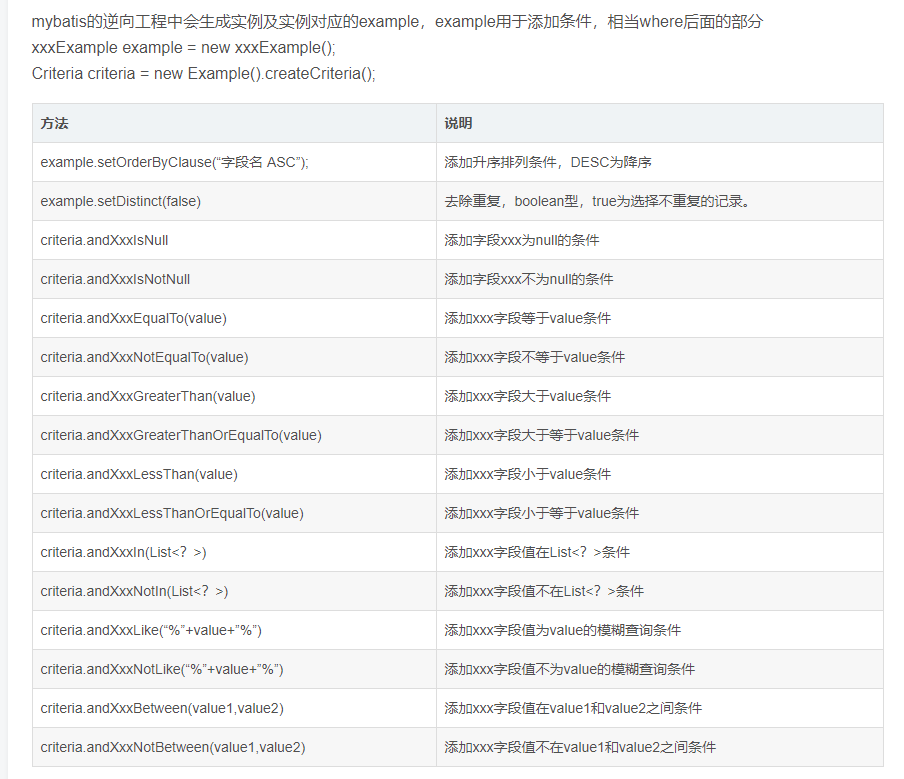
//注:在myBatis 生成的文件UserExample.java中包含一个static 的内部类 Criteria ,在Criteria中有很多方法,主要是定义SQL 语句where后的查询条件。
selectByPrimaryKey --- 根据主键查询数据
Account selectByPrimaryKey(Integer id);

//相当于select * from user where id = id
updateByExampleSelective --- 按条件更新值不为null的字段
int updateByExampleSelective(@Param("record") Account record, @Param("example") AccountExample example);

 //完整的案列

UserExample example = new UserExample();

Criteria criteria = example.createCriteria();

criteria.andUsernameEqualTo("joe");

 User user = new User();

user.setPassword("123"); userDAO.updateByPrimaryKeySelective(user,example);

//相当于:update user set password='123' where username='joe'
updateByPrimaryKeySelective --- 根据主键更新
int updateByPrimaryKeySelective(Account record);

 //完整的案例

User user = new User();

user.setId(101);

user.setPassword("joe");

userDAO.updateByPrimaryKeySelective(user);

//相当于:update user set password='joe' where id=101
最后补一张从网上盗的关于Example的图
Mybatis 通用 Mapper 和 Spring 集成的更多相关文章
- spring boot集成MyBatis 通用Mapper 使用总结
spring boot集成MyBatis 通用Mapper 使用总结 2019年 参考资料: Spring boot集成 MyBatis 通用Mapper SpringBoot框架之通用mapper插 ...
- Spring boot集成 MyBatis 通用Mapper
配置 POM文件 <parent> <groupId>org.springframework.boot</groupId> <artifactId>sp ...
- SpringBoot 3.SpringBoot 整合 MyBatis 逆向工程以及 MyBatis 通用 Mapper
一.添加所需依赖,当前完整的pom文件如下: <project xmlns="http://maven.apache.org/POM/4.0.0" xmlns:xsi=&qu ...
- springboot学习笔记:11.springboot+shiro+mysql+mybatis(通用mapper)+freemarker+ztree+layui实现通用的java后台管理系统(权限管理+用户管理+菜单管理)
一.前言 经过前10篇文章,我们已经可以快速搭建一个springboot的web项目: 今天,我们在上一节基础上继续集成shiro框架,实现一个可以通用的后台管理系统:包括用户管理,角色管理,菜单管理 ...
- 值得收藏的Mybatis通用Mapper使用大全。
引言 由于小编的记性不太好,每次在写代码的时候总是把通用mapper的方法记错,所以今天把通用mapper的常用方法做一下总结,方便以后直接查看.好了,不废话啦. 引包 <!-- 通用Mappe ...
- (一 、上)搭建简单的SpringBoot + java + maven + mysql + Mybatis+通用Mapper 《附项目源码》
最近公司一直使用 springBoot 作为后端项目框架, 也负责搭建了几个新项目的后端框架.在使用了一段时间springBoot 后,感觉写代码 比spring 更加简洁了(是非常简洁),整合工具也 ...
- springboot学习笔记:8. springboot+druid+mysql+mybatis+通用mapper+pagehelper+mybatis-generator+freemarker+layui
前言: 开发环境:IDEA+jdk1.8+windows10 目标:使用springboot整合druid数据源+mysql+mybatis+通用mapper插件+pagehelper插件+mybat ...
- springboot学习笔记:9.springboot+mybatis+通用mapper+多数据源
本文承接上一篇文章:springboot学习笔记:8. springboot+druid+mysql+mybatis+通用mapper+pagehelper+mybatis-generator+fre ...
- Mybatis通用Mapper介绍和使用
Mybatis通用Mapper介绍与使用 前言 使用Mybatis的开发者,大多数都会遇到一个问题,就是要写大量的SQL在xml文件中,除了特殊的业务逻辑SQL之外,还有大量结构类似的增删改查SQL. ...
随机推荐
- 前端ajax请求百度地图api
$.ajax({ type: "get", url: 'http://api.map.baidu.com/place/v2/search', data:{ ak:'您的ak', q ...
- 题解-洛谷P1981 表达式求值(模拟+处理优先级的递归)
https://www.luogu.org/problemnew/show/P1981 (原题链接) 显然乘法的优先级高与加法,因此碰到乘号就要优先把一连串与乘号相连的数算出,很容易想到递归.可用普通 ...
- Java基础 -- 复用类(组合和继承)
复用类有两种实现方式. 在新的类中产生现有类的对象,由于新的类是由现有类的对象所组成,所以这种方法称之为组合. 采用继承实现. 一 组合语法 下面创建两个类WaterSource和Sprinkler ...
- Python判断自定义的参数格式是否正确
import argparse def args_validation(valid_list, valid_value): assert valid_value in valid_list, 'inv ...
- Java反射、反射练习整理
反射 JAVA反射机制是在运行状态中,对于任意一个类,都能够知道这个类的所有属性和方法:对于任意一个对象,都能够调用它的任意一个方法和属性:这种动态获取的信息以及动态调用对象的方法的功能称为java语 ...
- 金融量化分析【day112】:双均线策略
一.双均线策略 1.什么是双均线策略? 2.实现代码 def initialize(context): set_benchmark('601318.XSHG') set_option('use_rea ...
- Docker:macvlan实现容器跨主机通信 [十四]
一.什么是macvlan 1.macvlan 本身是 linux kernel 模块,其功能是允许在同一个物理网卡上配置多个 MAC 地址, 2.即多个 interface,每个 interface ...
- Mac tree命令的使用,输出目录树结构
安装: brew install tree 常用命令: tree --help: 查看帮助信息 tree -d: 只显示文件夹 tree -D: 显示文件的最后修改时间 tree -I no ...
- free命令查看内存信息
free介绍 FREE(1) Linux User’s Manual FREE(1) NAME free - Display amount of free and used memory in the ...
- [Luogu P1144]最短路计数
emmmm这个题看起来非常复杂,实际上仔细一分析发现到一个点最短路的个数就是所有前驱最短路个数之和.如果在图上表示也就是以1为根的bfs搜索树,一个点的最短路个数等于每一个能够向它扩展的所有点的最短路 ...