
【java学习笔记】文件读写(IO流)
1.字节流 FileInputStream、FileOutputStream
①FileInputStream
 import java.io.FileInputStream;

 public class FileInputStreamDemo {

     public static void main(String[] args) throws Exception {

         FileInputStream in = new FileInputStream("D:\\a.txt");

         // 构建一个字节数组作为缓冲区

         byte[] bs = new byte[10];

         // 定义一个变量来记录读取的字节个数

         int len = -1;

         while ((len = in.read(bs)) != -1) {

             System.out.println(new String(bs, 0, len, "utf-8"));

         }

         in.close();

     }

 }
②FileOutputStream
 import java.io.FileOutputStream;

 public class FileOutputStreamDemo {

     public static void main(String[] args) throws Exception {

         //true是追加。不加true,或者是false会新建并覆盖已有的。

         FileOutputStream out = new FileOutputStream("D:\\a.txt", false);

         // 字节流身上没有缓冲区

         out.write("缓冲区".getBytes("utf-8")); //utf-8编码

         out.write("abc".getBytes());

         out.close();

     }

 }
关于流中的异常处理
1.将刘对象放在try之外声明并且赋值为null,放到try内初始化。
2.在关流之前需要判断流对象是否初始化成功(判断流对象是否为null)。
3.关流之后需要将流对象强制置为null,防止关流失败流对象依然占用文件。
4.需要在关流之前手动冲刷缓冲区以防关流失败导致一部分数据死在缓冲区中。
③用FileInputStream、FileOutputStream复制文件
 import java.io.FileInputStream;

 import java.io.FileNotFoundException;

 import java.io.FileOutputStream;

 import java.io.IOException;

 public class CopyFileDemo {

     public static void main(String[] args) {

         FileInputStream in = null;

         FileOutputStream out = null;

         try {

             in = new FileInputStream("D:\\a.zip");

             out = new FileOutputStream("C:\\a.zip");

             // 构建一个字节数组作为缓冲区

             byte[] bs = new byte[1024 * 1024 * 10];

             // 定义一个变量来记录每次读取的字节个数

             int len = -1;

             while ((len = in.read(bs)) != -1) {

                 out.write(bs, 0, len);

             }

         } catch (FileNotFoundException e) {

             e.printStackTrace();

         } catch (IOException e1){

             e1.printStackTrace();

         } finally{

             if(in != null){

                 try {

                     in.close();

                 } catch (IOException e) {

                     e.printStackTrace();

                 } finally {

                     in = null;

                 }

             }

             if(out != null){

                 try {

                     out.close();

                 } catch (IOException e) {

                     e.printStackTrace();

                 } finally {

                     out = null;

                 }

             }

         }

     }

 }
2.转换流 InputStreamReader、OutputStreamWriter
①InputStreamReader 将字节转化为字符的流
 import java.io.FileInputStream;

 import java.io.InputStreamReader;

 public class InputStreamReaderDemo {

     public static void main(String[] args) throws Exception {

         // 底层靠的是FileInputStream

         // 读取出来的是字节,但是展现的是字符---将字节转化为字符

         InputStreamReader in = new InputStreamReader(new FileInputStream("D:\\test.txt"), "utf-8");

         char[] cs = new char[3];

         in.read(cs);

         in.close();

         System.out.println(cs);

     }

 }
②OutputStreamWriter 将字符转化为字节的流
 import java.io.FileOutputStream;

 import java.io.IOException;

 import java.io.OutputStreamWriter;

 public class OutputStreamWriterDemo {

     public static void main(String[] args) throws IOException {

         // OutputStreamWriter将字符转化为字节的流

         // 实际上是用FileOutputStream来写出数据

         // 传入的参数是字符形式,但是最后以字节形式向外写出---字符转字节

         OutputStreamWriter ow = new OutputStreamWriter(new FileOutputStream("D:\\test.txt"), "utf-8");

         ow.write("转换流");

         ow.close();

     }

 }
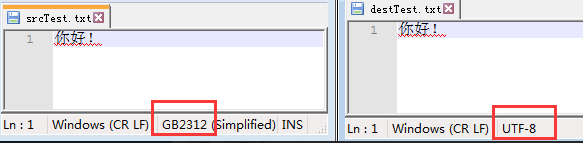
③用InputStreamReader、OutputStreamWriter改变文件的编码
 import java.io.FileInputStream;

 import java.io.FileOutputStream;

 import java.io.IOException;

 import java.io.InputStreamReader;

 import java.io.OutputStreamWriter;

 public class ChangeEncode {

     public static void main(String[] args) {

         changeEncode("srcTest.txt", "destTest.txt", "gbk", "utf-8");

         System.out.println("over");

     }

     public static void changeEncode(String srcFile, String destFile, String srcEncodeType, String dstEncodeType){

         InputStreamReader isr = null;

         OutputStreamWriter osw = null;

         try {

             isr = new InputStreamReader(new FileInputStream(srcFile),srcEncodeType);

             osw = new OutputStreamWriter(new FileOutputStream(destFile),dstEncodeType);

             char[] cs = new char[1024];

             int len = 0;

             while((len = isr.read(cs)) != -1){

                 osw.write(cs, 0, len);

                 osw.flush();

             }

         } catch (Exception e) {

             e.printStackTrace();

         } finally {

             if(isr != null){

                 try {

                     isr.close();

                 } catch (IOException e) {

                     e.printStackTrace();

                 } finally {

                     isr = null;

                 }

             }

             if(osw != null){

                 try {

                     osw.close();

                 } catch (IOException e) {

                     e.printStackTrace();

                 } finally {

                     osw = null;

                 }

             }

         }

     }

 }
效果:
3.字符流 FileReader,FileWriter
①FileReader
Demo1:单个字符读取
 import java.io.FileReader;

 public class FileReaderDemo1 {

     public static void main(String[] args) throws Exception {

         // 创建了一个输入流对象指向了要读取的文件

         FileReader reader = new FileReader("D:\\a.txt");

         // 返回的是这字符所对应的编码

         // int i = reader.read();

         // 定义一个变量来存储读取的字符

         int i = -1;

         // 如果读取到文件的末尾,则返回一个-1

         while ((i = reader.read()) != -1) {

             System.out.println((char)i);

         }

         reader.close();

     }

 }
Demo2:多个字符读取
 import java.io.FileReader;

 public class FileReaderDemo2 {

     public static void main(String[] args) throws Exception {

         FileReader reader = new FileReader("D:\\a.docx");

         // 提供一个字符数组作为缓冲区

         char[] cs = new char[20];

         // 定义一个变量来记录每次读取到的字符个数

         int i = -1;

         // 如果读取到了末尾同样返回一个-1

         // 返回本次读取到的字符个数

         while ((i = reader.read(cs)) != -1) {

             System.out.println(new String(cs, 0, i));

         }

         reader.close();

     }

 }
②FileWriter
import java.io.FileWriter;

import java.io.IOException;

public class FileWriterDemo1 {

    public static void main(String[] args) throws IOException {

        FileWriter writer = new FileWriter("D:\\a.txt");

        writer.write("def");

        writer.flush();

        writer.close();

        writer = null;

        System.out.println(writer);

    }

}
③用FileReader,FileWriter复制文件
 import java.io.FileReader;

 import java.io.FileWriter;

 import java.io.IOException;

 public class CopyFile {

     public static void main(String[] args) {

         FileReader reader = null;

         FileWriter writer = null;

         try {

             reader = new FileReader("D:\\a.txt");

             writer = new FileWriter("D:\\b.txt");

             char[] cs = new char[10];

             int i = -1;

             while ((i = reader.read(cs)) != -1) {

                 writer.write(cs, 0, i);

             }

             writer.flush();

         } catch (Exception e) {

             e.printStackTrace();

         } finally {

             if (reader != null) {

                 try {

                     reader.close();

                 } catch (IOException e) {

                     e.printStackTrace();

                 } finally {

                     reader = null;

                 }

             }

             if (writer != null) {

                 try {

                     writer.close();

                 } catch (IOException e) {

                     e.printStackTrace();

                 } finally {

                     writer = null;

                 }

             }

         }

     }

 }
CopyFile字符流
4.缓冲流 BufferedReader、BufferedWriter
①BufferedReader
import java.io.BufferedReader;

import java.io.FileReader;

public class BufferedReaderDemo {

    public static void main(String[] args) throws Exception {

        // 实际上读取文件的是FileReader,BufferedReader的作用是在FileReader的基础上来提供一个缓冲区

        BufferedReader br = new BufferedReader(new FileReader("D:\\aaa.txt"));

//      BufferedReader br = new BufferedReader(new InputStreamReader(new FileInputStream("D:\\a.txt")));

        // 每次读取一行数据

        String str = null;

        while ((str = br.readLine()) != null) {

            System.out.println(str);

        }

        // 关流: 要么只关外层的流,要么从里向外关

        br.close();

    }

}
②BufferedWriter
 import java.io.BufferedWriter;

 import java.io.FileOutputStream;

 import java.io.FileWriter;

 import java.io.OutputStreamWriter;

 public class BufferedWriterDemo {

     public static void main(String[] args) throws Exception {

         BufferedWriter bw = new BufferedWriter(new FileWriter("D:\\aaa.txt"));

 //      BufferedWriter bw = new BufferedWriter(new OutputStreamWriter(new FileOutputStream("D:\\a.txt")));

         bw.write("123");

         bw.flush();

         bw.close();

     }

 }
③用BufferedReader、BufferedWriter改变文件的编码
 import java.io.BufferedReader;

 import java.io.BufferedWriter;

 import java.io.FileInputStream;

 import java.io.FileOutputStream;

 import java.io.IOException;

 import java.io.InputStreamReader;

 import java.io.OutputStreamWriter;

 public class ChangeEncode {

     public static void main(String[] args) {

         changeEncode("srcTest.txt", "destTest.txt", "gbk", "utf-8");

         System.out.println("over");

     }

     public static void changeEncode(String srcFile, String destFile, String srcEncodeType, String dstEncodeType){

         InputStreamReader isr = null;

         BufferedReader br = null;

         OutputStreamWriter osw = null;

         BufferedWriter bw = null;

         try {

             isr = new InputStreamReader(new FileInputStream(srcFile),srcEncodeType);

             br = new BufferedReader(isr);

             osw = new OutputStreamWriter(new FileOutputStream(destFile),dstEncodeType);

             bw = new BufferedWriter(osw);

             String line = null;

             while((line = br.readLine()) != null){

                 bw.write(line);

                 bw.newLine();

             }

         } catch (Exception e) {

             e.printStackTrace();

         } finally{

             if(br != null){

                 try {

                     br.close();

                 } catch (IOException e) {

                     e.printStackTrace();

                 } finally {

                     br = null;

                 }

             }

             if(bw != null){

                 try {

                     bw.close();

                 } catch (IOException e) {

                     e.printStackTrace();

                 } finally {

                     bw = null;

                 }

             }

         }

     }

 }
ChangeEncode
5.合并流 SequenceInputStream
将多个流放入一个Vector集合中,利用Vector的elements方法来获取一个Enumeration对象,再利用Enumeration对象来构建SequenceInputStream对象。
 import java.io.FileInputStream;

 import java.io.FileOutputStream;

 import java.io.InputStream;

 import java.io.SequenceInputStream;

 import java.util.Enumeration;

 import java.util.Vector;

 public class SequenceInputStreamDemo {

     public static void main(String[] args) throws Exception {

         FileInputStream in1 = new FileInputStream("D:\\a.txt");

         FileInputStream in2 = new FileInputStream("D:\\b.txt");

         FileInputStream in3 = new FileInputStream("D:\\c.txt");

         Vector<InputStream> v = new Vector<>();

         v.add(in1);

         v.add(in2);

         v.add(in3);

         // 将v转化为一个Enumeration对象

         Enumeration<InputStream> e = v.elements();

         // 构建合并流对象

         SequenceInputStream sis = new SequenceInputStream(e);

         // 创建一个输出流对象指向合并后的文件

         FileOutputStream out = new FileOutputStream("D:\\test.txt");

         byte[] bs = new byte[5];

         int len = -1;

         while ((len = sis.read(bs)) != -1) {

             out.write(bs, 0, len);

         }

         sis.close();

         out.close();

     }

 }
其它文件读写练习:
1.统计目录中java代码的行数
 import java.io.BufferedReader;

 import java.io.File;

 import java.io.FileReader;

 import java.io.IOException;

 public class CountCodeLine {

     public static void main(String[] args) {

         File dir = new File(".\\src\\lianxi");

         System.out.println(countCodeLine(dir));

     }

     //java中代码行数

     public static int countCodeLine(File file){

         if(file == null){

             return 0;

         }

         if(!file.isDirectory()){

             if(file.getName().endsWith(".java")){

                 return javaLine(file);

             }

             else

                 return 0;

         }else{

             int sum = 0;

             File[] fs = file.listFiles();

             for(File f : fs){

                 sum += countCodeLine(f);

             }

             return sum;

         }

     }

     private static int javaLine(File file){

         BufferedReader br = null;

         int countLine = 0;

         try {

             br = new BufferedReader(new FileReader(file.getAbsolutePath()));

             while ((br.readLine()) != null) {

                 countLine++;

             }

         } catch (IOException e) {

             e.printStackTrace();

         }finally{

             if(br != null){

                 try {

                     br.close();

                 } catch (IOException e) {

                     e.printStackTrace();

                 }finally{

                     br = null;

                 }

             }

         }

         return countLine;

     }

 }
2.将文件切块保存
 import java.io.File;

 import java.io.FileInputStream;

 import java.io.FileOutputStream;

 import java.util.Properties;

 import java.util.UUID;

 public class FileSplit {

     public static void main(String[] args) throws Exception {

         // 使用Properties来记录文件的切块

         Properties p = new Properties();

         File file = new File("D:\\a.avi");

         FileInputStream in = new FileInputStream(file);

         // 定义一个变量来记录文件快的个数

         int count = 0;

         byte[] bs = new byte[1024 * 1024 * 5];

         int len = -1;

         while ((len = in.read(bs)) != -1) {

             // 获取一个统一的值

             int hash = UUID.randomUUID().toString().hashCode();

             String h = Integer.toHexString(hash);

             // 补足8位

             int rest = 8 - h.length();

             for (int i = 0; i < rest; i++) {

                 h = "0" + h;

             }

             // 产生对应的路径

             String path = "D:\\split";

             for (char c : h.toCharArray()) {

                 path = path + "\\" + c;

             }

             System.out.println(path);

             // 产生目录

             new File(path).mkdirs();

             // 文件块的路径

             path = path + "\\" + UUID.randomUUID().toString();

             // 记录文件块的路径

             p.setProperty("" + count, path);

             count++;

             // 将文件块放到目录里面

             FileOutputStream out = new FileOutputStream(path);

             out.write(bs, 0, len);

             out.close();

         }

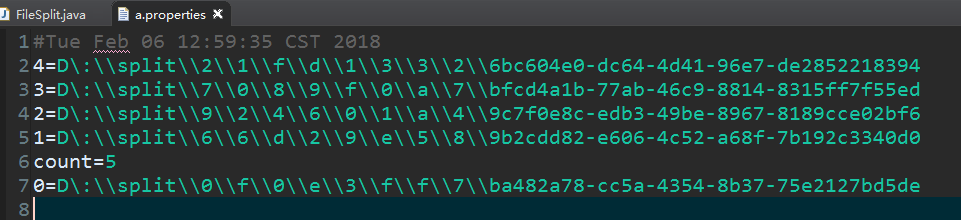
         p.setProperty("count", "" + count);

         p.store(new FileOutputStream("a.properties"), null);

         in.close();

     }

 }
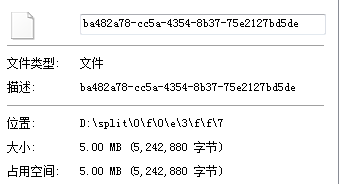
拆分效果:
3.将切块的文件整合
 import java.io.FileInputStream;

 import java.io.FileOutputStream;

 import java.io.InputStream;

 import java.io.SequenceInputStream;

 import java.util.Properties;

 import java.util.Vector;

 public class FileUnion {

     public static void main(String[] args) throws Exception {

         Properties p = new Properties();

         p.load(new FileInputStream("a.properties"));

         // 文件切得块数

         int count = Integer.parseInt(p.getProperty("count"));

         Vector<InputStream> v = new Vector<>();

         // 创建输入流指向对应的文件快

         for (int i = 0; i < count; i++) {

             v.addElement(new FileInputStream(p.getProperty(i + "")));

         }

         // 创建一个输出流来指向新文件

         FileOutputStream out = new FileOutputStream("C:\\a.avi");

         SequenceInputStream sis = new SequenceInputStream(v.elements());

         // 读取数据

         byte[] bs = new byte[1024 * 1024 * 1];

         int len = -1;

         while((len = sis.read(bs)) != -1){

             out.write(bs, 0, len);

         }

         out.close();

         sis.close();

     }

 }
【java学习笔记】文件读写(IO流)的更多相关文章
- Java学习笔记-文件读写和Json数组
Java文件读写 Java中I/O流对文件的读写有很多种方法,百度后主要看了以下三种 第一种方式:使用FileWriter和FileReader,对文件内容按字符读取,代码如下 String dir ...
- Java学习笔记31(IO:Properties类)
Properties类,表示一个持久的j集,可以存在流中,或者从流中加载 是Hashtable的子类 map集合的方法都能用 用途之一:在开发项目中,我们最后交给客户的是一个编译过的class文件,客 ...
- Java学习笔记(7)---流(Stream),文件(File)
1.Stream流 a.定义: Java.io 包几乎包含了所有操作输入.输出需要的类.所有这些流类代表了输入源和输出目标. Java.io 包中的流支持很多种格式,比如:基本类型.对象.本地化字符集 ...
- Java学习笔记--文件IO
简介 对于任何程序设计语言,输入和输出(Input\Output)都是系统非常核心的功能,程序运行需要数据,而数据的获取往往需要跟外部系统进行通信,外部系统可能是文件.数据库.其他程序.网络.IO设备 ...
- Java基础学习笔记二十 IO流
转换流 在学习字符流(FileReader.FileWriter)的时候,其中说如果需要指定编码和缓冲区大小时,可以在字节流的基础上,构造一个InputStreamReader或者OutputStre ...
- Java学习笔记33(IO:打印流,IO流工具类)
打印流: 有两个类:PrintStream PrintWriter类,两个类的方法一样,构造方法不一样 PrintStream构造方法:接收File类型,接收字符串文件名,接收字节输出流(Ou ...
- java学习笔记30(IO :缓冲流)
缓冲流: 读取数据大量的文件时,读取的速度慢,java提供了一套缓冲流,提高IO流的效率: 缓冲流分为字节缓冲流和字符缓冲流: 字节输入缓冲流和字节输出缓冲流如下: package com.zs.De ...
- Java学习笔记7(IO)
IO(输入输出) IO流按照操作数据的不同,分为字节流和字符流,按照数据传输方向分为输入流和输出流. 字节流 计算机中,所有文件都是以二进制(字节)形式存在,IO流中针对字节的输入输出提供了一系列的流 ...
- Java学习笔记40(缓冲流)
缓冲流: 在读写文件的各种流中,最令人烦恼的就是效率问题, 而缓冲流的目的就是提高读写效率 字节输出缓冲流: package demo; import java.io.BufferedOutputSt ...
随机推荐
- Java自学能学会吗?最新Java高级学习路线
就好像一千个人心中有一千个哈利波特一样,这个答案不绝对也不唯一,Java好学但自学的确阻力有些大,作为一门技术语言,它所蕴含的智慧绝对不是靠几本XX入门,XX框架之类的书所能概括,自学Java你要做好 ...
- 跨域资源共享 CORS 详解(转)
add by zhj: 公司在一个web产品上,做前后端分离,前后端提供独立的服务,使用不同的域名,通过http进行交互,在 前端,会涉及到跨域访问的问题,前端使用了CORS,后端同时需要做相应修改, ...
- Nginx+Keepalived负载均衡高可用
Nginx+Keepalived负载均衡高可用方案: Nginx 使用平台:unix.linux.windows. 功能: A.www web服务 http 80 b.负载均衡(方向代理proxy) ...
- [js] 如何 在 jQuery 中的 $.each 循环中使用 break 和 continue
jQuery中each类似于javascript的for循环 但不同于for循环的是在each里面不能使用break结束循环,也不能使用continue来结束本次循环,想要实现类似的功能就只能用ret ...
- iOS-Mac Charles抓包工具的使用【Mac 抓包工具Charles】
1.下载文件 Charles安装包以及破解文件下载地址:http://charles.iiilab.com 2.安装及使用 使用介绍 http://www.cocoachina.com/ios/201 ...
- Go笔记-变量
声明变量的一般形式: var indentifier type 实例: var a int var b bool var str string var ( ...
- How to fix “HTTP Status Code 505 – HTTP Version Not Supported” error?--转
http://dotnetstock.com/technical/http-status-code-505-http-version-not-supported/ The reason for the ...
- Linux系统zookeeper环境搭建(单机、伪分布式、分布式)
本人现在对zookeeper的环境搭建做一个总结,一般zookeeper的安装部署可以有三种模式,单机模式.伪分布式和分布式,这三种模式在什么时候应用具体看大家的使用场景,如果你只有一台机器且只是想自 ...
- BZOJ 4025: 二分图 [线段树CDQ分治 并查集]
4025: 二分图 题意:加入边,删除边,查询当前图是否为二分图 本来想练lct,然后发现了线段树分治的做法,感觉好厉害. lct做法的核心就是维护删除时间的最大生成树 首先口胡一个分块做法,和hno ...
- BZOJ 3881: [Coci2015]Divljak [AC自动机 树链的并]
3881: [Coci2015]Divljak 题意:添加新文本串,询问某个模式串在多少种文本串里出现过 模式串建AC自动机,考虑添加一个文本串,走到的节点记录下来求树链的并 方法是按dfs序排序去重 ...