
mongodb 3.4 分片 一主 一副 一仲 鉴权集群部署.
Docker方式部署
为了避免过分冗余,并且在主节点挂了,还能顺利自动提升,所以加入仲裁节点
mongodb版本:
环境:一台虚拟机
三个configsvr 副本: 端口为 27020,27021,27022
两个分片:
shard1:-> 三个副本,端口为 27010,27011,27012
shard2:-> 三个副本,端口为 27013,27014,27015
一个路由:mongos -> 端口为 27023
前置条件:
创建数据存储文件的目录
mkdir /usr/local/mongodb/data

mkdir /usr/local/mongodb/log

cd /usr/local/mongodb/data

mkdir c0 && mkdir c1 && mkdir c2 && mkdir s100 && mkdir s101 &&  mkdir s102 && mkdir s200 && mkdir s201 && mkdir s202
生成鉴权需要的keyfile,keyfile 内容不能太长,否则启动不了,权限不能太大,否则也是启动不了
openssl rand -base64 512 > /usr/local/mongodb/keyfile

chmod 600 /usr/local/mongodb/keyfile
副本模式启动configsvr
 mongod --dbpath /usr/local/mongodb/data/c0 --logpath /usr/local/mongodb/log/c0.log --fork --smallfiles --port  --replSet cs --configsvr --bind_ip=192.168.1.9

 mongod --dbpath /usr/local/mongodb/data/c1 --logpath /usr/local/mongodb/log/c1.log --fork --smallfiles --port  --replSet cs --configsvr --bind_ip=192.168.1.9

 mongod --dbpath /usr/local/mongodb/data/c2 --logpath /usr/local/mongodb/log/c2.log --fork --smallfiles --port  --replSet cs --configsvr --bind_ip=192.168.1.9
集群配置,登陆任意一个configsvr
mongo 192.168.1.9:
var css={_id:"cs","configsvr":true,members:[{_id:,host:"192.168.1.9:27020"},{_id:,host:"192.168.1.9:27021"},{_id:,host:"192.168.1.9:27022"}]}

rs.initiate(css)
副本模式启动分片1
 mongod --dbpath /usr/local/mongodb/data/s100 --logpath /usr/local/mongodb/log/s100.log --fork --smallfiles --port  --replSet shard1 --shardsvr --bind_ip=192.168.1.9

 mongod --dbpath /usr/local/mongodb/data/s101 --logpath /usr/local/mongodb/log/s101.log --fork --smallfiles --port  --replSet shard1 --shardsvr --bind_ip=192.168.1.9

 mongod --dbpath /usr/local/mongodb/data/s102 --logpath /usr/local/mongodb/log/s102.log --fork --smallfiles --port  --replSet shard1 --shardsvr --bind_ip=192.168.1.9
登陆任意一个分片1
use admin;

var cnf={_id:"shard1",members:[{_id:,host:"192.168.1.9:27017"},{_id:,host:"192.168.1.9:27018"}]}

rs.initiate(cnf)

rs.addArb("192.168.1.9:27019")#仲裁节点
副本模式启动分片2
 mongod --dbpath /usr/local/mongodb/data/s100 --logpath /usr/local/mongodb/log/s100.log --fork --smallfiles --port  --replSet shard2 --shardsvr --bind_ip=192.168.1.9

 mongod --dbpath /usr/local/mongodb/data/s101 --logpath /usr/local/mongodb/log/s101.log --fork --smallfiles --port  --replSet shard2 --shardsvr --bind_ip=192.168.1.9

 mongod --dbpath /usr/local/mongodb/data/s102 --logpath /usr/local/mongodb/log/s102.log --fork --smallfiles --port  --replSet shard2 --shardsvr --bind_ip=192.168.1.9
登陆任意一个分片2,操作同分片1
启动路由
mongos --logpath /usr/local/mongodb/log/m23.log --port --fork --configdb cs/192.168.1.9:,192.168.1.9:,192.168.1.9: --bind_ip=192.168.1.9
登陆路由
mongo 192.168.1.9:
添加分片,这里写全了分片的 host, 实际只需要添加其中一个副本或者仲裁host即可 可选192.168.1.9:27010 192.168.1.9:27011 192.168.1.9:27012 其中一个

设置分片数据库,设置片键
mongos> sh.enableSharding("testdb")
mongos> sh.shardCollection("testdb.orderInfo",{"_id":"hashed"})

{ "collectionsharded" : "testdb.orderInfo", "ok" :  }
趁还没有加上鉴权,赶紧添加用户
use admin

db.createUser(

   {

     user: "dba",

     pwd: "dba",

     roles: [ { role: "userAdminAnyDatabase", db: "admin" } ]

   }

 )
use testdb
mongos> db.createUser(

...   {

...     user: "testuser",

...     pwd: "testuser",

...     roles: [ { role: "readWrite", db: "testdb" } ]

...   }

... )

Successfully added user: {

    "user" : "testuser",

    "roles" : [

        {

            "role" : "readWrite",

            "db" : "testdb"

        }

    ]

}

mongos> db.auth("testuser","testuser")

mongos> exit
然后依次关闭mongodb,等下添加鉴权再启动.
因为懒,我选择重启,自己的电脑,随便整,别太较真.......

依次启动mongod,这次加上鉴权参数 --keyFile /usr/local/mongodb/keyfile
mongod --dbpath /usr/local/mongodb/data/c0 --logpath /usr/local/mongodb/log/c0.log --keyFile /usr/local/mongodb/keyfile --fork --smallfiles --port  --replSet cs --configsvr --bind_ip=192.168.1.9

 mongod --dbpath /usr/local/mongodb/data/c1 --logpath /usr/local/mongodb/log/c1.log --keyFile /usr/local/mongodb/keyfile --fork --smallfiles --port  --replSet cs --configsvr --bind_ip=192.168.1.9

 mongod --dbpath /usr/local/mongodb/data/c2 --logpath /usr/local/mongodb/log/c2.log --keyFile /usr/local/mongodb/keyfile --fork --smallfiles --port  --replSet cs --configsvr --bind_ip=192.168.1.9

 mongod --dbpath /usr/local/mongodb/data/s100 --logpath /usr/local/mongodb/log/s100.log --keyFile /usr/local/mongodb/keyfile --fork --smallfiles --port  --replSet shard1 --shardsvr --bind_ip=192.168.1.9

 mongod --dbpath /usr/local/mongodb/data/s101 --logpath /usr/local/mongodb/log/s101.log --keyFile /usr/local/mongodb/keyfile --fork --smallfiles --port  --replSet shard1 --shardsvr --bind_ip=192.168.1.9

 mongod --dbpath /usr/local/mongodb/data/s102 --logpath /usr/local/mongodb/log/s102.log --keyFile /usr/local/mongodb/keyfile --fork --smallfiles --port  --replSet shard1 --shardsvr --bind_ip=192.168.1.9

 mongod --dbpath /usr/local/mongodb/data/s100 --logpath /usr/local/mongodb/log/s100.log --keyFile /usr/local/mongodb/keyfile --fork --smallfiles --port  --replSet shard2 --shardsvr --bind_ip=192.168.1.9

 mongod --dbpath /usr/local/mongodb/data/s101 --logpath /usr/local/mongodb/log/s101.log --keyFile /usr/local/mongodb/keyfile --fork --smallfiles --port  --replSet shard2 --shardsvr --bind_ip=192.168.1.9

 mongod --dbpath /usr/local/mongodb/data/s102 --logpath /usr/local/mongodb/log/s102.log --keyFile /usr/local/mongodb/keyfile --fork --smallfiles --port  --replSet shard2 --shardsvr --bind_ip=192.168.1.9

mongos --logpath /usr/local/mongodb/log/m23.log --port  --fork --keyFile /usr/local/mongodb/keyfile --configdb cs/192.168.1.9:,192.168.1.9:,192.168.1.9: --bind_ip=192.168.1.9
测试:
[root@ conf]# mongo 192.168.1.9:

MongoDB shell version v3.4.10

connecting to: 192.168.1.9:

MongoDB server version: 3.4.

mongos> use testdb

switched to db testdb

mongos> db.auth("testuser","testuser")

mongos> db.auth("testuser","testuser")

mongos> exit

bye
或者
mongo 192.168.1.9:/testdb -u testuser -p
测试不使用账号密码
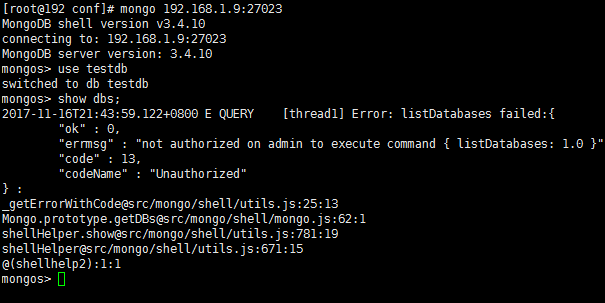
使用dba登陆,创建超级管理员用户,否则没有sh权限
mongos> use admin

switched to db admin

mongos> db.createUser(

...    {

...      user: "root",

...      pwd: "root",

...      roles: [ { role: "root", db: "admin" } ]

...    }

...  )

Successfully added user: {

    "user" : "root",

    "roles" : [

        {

            "role" : "root",

            "db" : "admin"

        }

    ]

}

mongos> db.auth("root","root")

1

mongos> sh.status();

--- Sharding Status ---

  sharding version: {

      "_id" : 1,

      "minCompatibleVersion" : 5,

      "currentVersion" : 6,

      "clusterId" : ObjectId("5a0d5d371c121ebe9dcbdace")

  }

  shards:

        {  "_id" : "shard1",  "host" : "shard1/192.168.1.9:27010,192.168.1.9:27011,192.168.1.9:27012",  "state" : 1 }

        {  "_id" : "shard2",  "host" : "shard2/192.168.1.9:27013,192.168.1.9:27014,192.168.1.9:27015",  "state" : 1 }

  active mongoses:

        "3.4.10" : 1

  autosplit:

        Currently enabled: yes

  balancer:

        Currently enabled:  yes

        Currently running:  no

NaN

        Failed balancer rounds in last 5 attempts:  2

        Last reported error:  could not find host matching read preference { mode: "primary" } for set shard1

        Time of Reported error:  Fri Nov 17 2017 08:33:47 GMT+0800 (CST)

        Migration Results for the last 24 hours:

                28 : Success

                1 : Failed with error 'aborted', from shard2 to shard1

  databases:

        {  "_id" : "testdb",  "primary" : "shard2",  "partitioned" : true }

                testdb.orderInfo

                        shard key: { "taxNo" : 1, "lastModifyDate" : 1 }

                        unique: false

                        balancing: true

                        chunks:

                                shard1    28

                                shard2    29

                        too many chunks to print, use verbose if you want to force print
补充:
集群用户不能用来认证单个shard节点,必须要在shard节点单独建立用户
以下测试,片键为公司编码以及用户名,复合键片,实现多热点
插入500W 单文档数据,不包含内嵌文档,在NVME 固态硬盘下表现 速度非常快.只用了56秒
完成插入查看数据分布情况
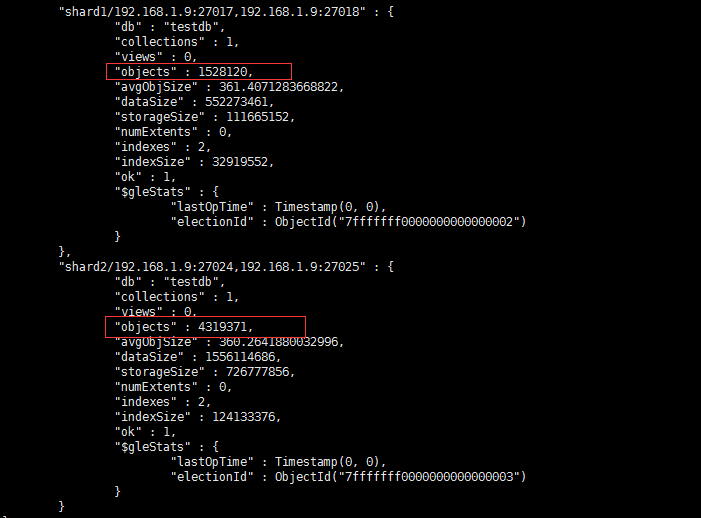
分布不太均衡,等一会再看一次
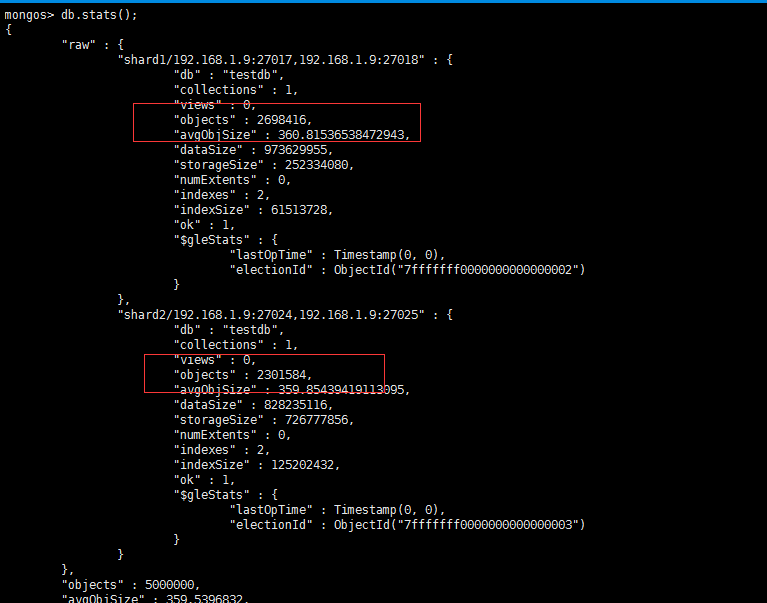
非常均衡,因为我用了9个公司编码,14个随机用户名插入.但是只有两个分片,所以导致数据会分发倒第一次插入的分片中,导致数据需要频繁自动均衡.建议有条件的,初始化的时候,创建多个分片
mongodb 3.4 分片 一主 一副 一仲 鉴权集群部署.的更多相关文章
- Docker mongodb 3.4 分片 一主 一副 一仲 鉴权集群部署.
非docker部署 为了避免过分冗余,并且在主节点挂了,还能顺利自动提升,所以加入仲裁节点 为什么要用docker部署,因为之前直接在虚拟机启动10个mongod 进程.多线程并发测试的时候,mong ...
- 搭建一个分布式MongoDB鉴权集群
今天休假在家,测试并搭建了一个replica set shard MongoDB鉴权集群.replica set shard 鉴权集群中文资料比较少,本文是个人笔记,同时也希望对后来者有所帮助.本文仅 ...
- MongoDB DBA 实践8-----Linux系统Mongodb分片集群部署
在Linux系统中,主要是使用命令行进行mongodb的分片集群部署 一.先决条件 mongodb安装成功,明确路径, MongoDB的几个路径: /var/lib/mongodb /var/log/ ...
- MongoDB(7):集群部署实践,包含复制集,分片
注: 刚开始学习MongoDB,写的有点麻烦了,网上教程都是很少的代码就完成了集群的部署, 纯属个人实践,错误之处望指正!有好的建议和资料请联系我QQ:1176479642 集群架构: 2mongos ...
- MongoDB分片集群部署方案
前言 副本集部署是对数据的冗余和增加读请求的处理能力,却不能提高写请求的处理能力:关键问题是随着数据增加,单机硬件配置会成为性能的瓶颈.而分片集群可以很好的解决这一问题,通过水平扩展来提升性能.分片部 ...
- Mongodb集群部署ReplicaSet+Sharding -摘自网络
网上关于三种集群方式的搭建方式很多,都是分开来介绍的.Replica Set (复制集成)主要是做主从库的,但是没法实现负载均衡的效果,真正实现这个的,是Sharding(分片集群),通过数据分布在每 ...
- mtools 是由MongoDB 官方工程师实现的一套工具集,可以很快速的日志查询分析、统计功能,此外还支持本地集群部署管理.
mtools 是由MongoDB 官方工程师实现的一套工具集,可以很快速的日志查询分析.统计功能,此外还支持本地集群部署管理 https://www.cnblogs.com/littleatp/p/9 ...
- 图解MongoDB集群部署原理(3)
MongoDB的集群部署方案中有三类角色:实际数据存储结点.配置文件存储结点和路由接入结点. 连接的客户端直接与路由结点相连,从配置结点上查询数据,根据查询结果到实际的存储结点上查询和存储数据.Mon ...
- RocketMQ学习笔记(16)----RocketMQ搭建双主双从(异步复制)集群
1. 修改RocketMQ默认启动端口 由于只有两台机器,部署双主双从需要四个节点,所以只能修改rocketmq的默认启动端口,从官网下载rocketmq的source文件,解压后使用idea打开,全 ...
随机推荐
- 转-Determining whether a Computer Needs to be Rebooted
1 如何检查机器是否因为装了Windows更新而需要重新启动 2 Determining whether a Computer Needs to be Rebooted 3 How can I tel ...
- 开发步骤Dubbo、spring mvc、springboot、SSM整合开发步骤
一.Dubbo开发步骤: 链接:https://pan.baidu.com/s/1pMPO1kf 密码:9zaa 第一: 1.创建consumer工程2.在pom.xml文件下添加配置3.添加appl ...
- Android Studio 下获取debug sha1和md5
Open Android Studio Open Your Project Click on Gradle (From Right Side Panel, you will see Gradle Ba ...
- java去重(1通过迭代器,2直接赋值)
1.List<Integer> list=new ArrayList<Integer>(); //有值 List<Integer> listTemp= new A ...
- google的grpc在golang中的使用
GRPC是google开源的一个高性能.跨语言的RPC框架,基于HTTP2协议,基于protobuf 3.x,基于Netty 4.x. 前面写过一篇golang标准库的rpc包的用法,这篇文章接着讲一 ...
- jumpserver v0.4.0 基于 CenOS7 的安装详解
标签(linux): jumpserver 笔者Q:972581034 交流群:605799367.有任何疑问可与笔者或加群交流 笔者已经弃用Jumpserver,并自已开发了shell跳板机. sh ...
- maven将本地jar包导入本地仓库
从maven中央仓库下载下来的jar包手动导入本地库,如下图 以下其中maven的dependency <dependency> <groupId>org.molgenis&l ...
- 完全卸载SQL Server 2008r2
完全卸载SQL Server 2008r2 "五一"时进行了系统重装,在没有卸载SQL Server 2008情况下尝试安装SQL Server 2008r2 ,安装提示成功但 ...
- template()方法
template(id, data)方法: id:必传,渲染模板的id. data:可选,一个Object对象. return:传data—>渲染完成html代码:不传data—>一个渲染 ...
- 使用localhost可以访问,但使用本地ip+端口号无法访问
今天想使用ip访问本机的iview-admin项目,结果怎么配置都无法访问,根据iview工程执行的命令npm run dev了解到是webpack配置的问题,打开工程里的node_modules文件 ...