
[Python Study Notes]CS架构远程访问获取信息--Client端v2.0
更新内容:
1.增加内存信息获取
2.增加电池信息获取
3.增加磁盘信息获取
4.重新布局窗体
5.增加窗体名称
6.增加连接成功之前,不可按压
效果图:
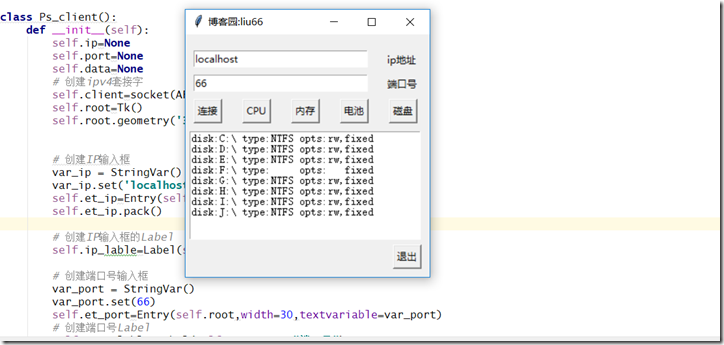
'''''''''''''''''''''''''''''''''''''''''''''''''''''''''''''''''''''''''''''''''''''''''''''''''''

>>文件: ps_client.py

>>作者: liu yang

>>邮箱: liuyang0001@outlook.com

>>博客: www.cnblogs.com/liu66blog

'''''''''''''''''''''''''''''''''''''''''''''''''''''''''''''''''''''''''''''''''''''''''''''''''''

#!/usr/bin/env python

# -*- coding: utf-8 -*-

import sys, os

from socket import *

from tkinter import *

class Ps_client():

    def __init__(self):

        self.ip=None

        self.port=None

        self.data=None

        # 创建ipv4套接字

        self.client=socket(AF_INET,SOCK_STREAM)

        self.root=Tk()

        self.root.geometry('300x300+250+250')

        # 创建IP输入框

        var_ip = StringVar()

        var_ip.set('localhost')

        self.et_ip=Entry(self.root,width=30,textvariable=var_ip)

        self.et_ip.pack()

        # 创建IP输入框的Label

        self.ip_lable=Label(self.root,text="ip地址")

        # 创建端口号输入框

        var_port = StringVar()

        var_port.set(66)

        self.et_port=Entry(self.root,width=30,textvariable=var_port)

        # 创建端口号Label

        self.port_lable=Label(self.root,text="端口号")

        # 创建连接按钮,注意!!!command=后面的连接的不加括号

        self.connButton=Button(self.root,text="连接",command=self.connect)

        # 创建获取cpu按钮

        self.getCpuButton=Button(self.root,text="CPU",state='disable',command=self.get_cpu_info)

        # 创建获取memory按钮

        self.getMemoryButton=Button(self.root,text="内存",state='disable',command=self.get_memory_info)

        # 创建获取battery按钮

        self.getBatteryButton = Button(self.root, text="电池", state='disable', command=self.get_battery_info)

        # 创建获取disk按钮

        self.getDiskButton=Button(self.root,text="磁盘",state='disable',command=self.get_disk_info)

        # 创建断开按钮

        self.exitButton=Button(self.root,text="退出",state='disable',command=self.exit_connect)

        self.txtBox=Text(self.root,width=40,height=10)

    def main(self):

        self.root.title('博客园:liu66')

        self.et_ip.place(x=10,y=20)

        self.et_port.place(x=10,y=50)

        self.ip_lable.place(x=245,y=20)

        self.port_lable.place(x=245,y=50)

        self.connButton.place(x=10,y=80)

        self.getCpuButton.place(x=70,y=80)

        self.getMemoryButton.place(x=130,y=80)

        self.getBatteryButton.place(x=190,y=80)

        self.getDiskButton.place(x=250,y=80)

        self.txtBox.place(x=5,y=120)

        self.exitButton.place(x=255,y=260)

        # self.txtBox.insert(INSERT,'在这里显示内容')

        self.root.mainloop()

    def connect(self):

        self.ip=self.et_ip.get()

        try:

            self.port=int(self.et_port.get())

        except ValueError:

            self.txtBox.delete(0.0,END)

            self.txtBox.insert(0.0,"请输入合法的ip和端口...")

        else:

            print("ip:%s"%self.ip)

            print("port:%s"%self.port)

            self.txtBox.delete(0.0,END)

            self.txtBox.insert(0.0,"正在链接中...")

            try:

                self.client.connect((self.ip,self.port))

            except OSError:

                print("向一个无法连接的网络尝试了一个套接字操作")

                self.txtBox.delete(0.0, END)

                self.txtBox.insert(0.0, "%s:%d连接失败..."%(self.ip,self.port))

            else:

                print("%s连接成功..."%self.ip)

                self.txtBox.delete(0.0, END)

                self.txtBox.insert(0.0, "%s:%d连接成功..."%(self.ip,self.port))

                # 连接成功则将其他按钮变为可按状态

                self.exitButton['state']='active'

                self.getCpuButton['state']='active'

                self.getMemoryButton['state']='active'

                self.getBatteryButton['state']='active'

                self.getDiskButton['state']='active'

    def get_cpu_info(self):

        self.data='cpu'

        self.client.send(self.data.encode('utf-8'))

        # 将接受的数据装换成浮点数据

        cpu_used=float(self.client.recv(1024).decode('utf-8'))

        print('CPU使用率:%0.2f'%cpu_used+'%')

        self.txtBox.delete(0.0, END)

        # 字符串前加上r为防转义

        self.txtBox.insert(0.0, "当前的cpu使用率:%0.2f"%cpu_used+r"%")

    def get_memory_info(self):

        self.data='memory'

        self.client.send(self.data.encode('utf-8'))

        memory_message=self.client.recv(1024).decode('utf-8')

        print(memory_message)

        # 清除显示

        self.txtBox.delete(0.0, END)

        # 显示内存信息

        self.txtBox.insert(0.0, "%s" %memory_message)

    def get_battery_info(self):

        self.data='battery'

        self.client.send(self.data.encode('utf-8'))

        battery_message=self.client.recv(1024).decode('utf-8')

        print(battery_message)

        # 清除显示

        self.txtBox.delete(0.0, END)

        # 显示内存信息

        self.txtBox.insert(0.0, "%s" %battery_message)

    def get_disk_info(self):

        self.data='disk'

        self.client.send(self.data.encode('utf-8'))

        disk_message=self.client.recv(1024).decode('utf-8')

        print(disk_message)

        # 清除显示

        self.txtBox.delete(0.0, END)

        # 显示内存信息

        self.txtBox.insert(0.0, "%s" %disk_message)

    def exit_connect(self):

        self.client.close()

        self.txtBox.delete(0.0, END)

        self.txtBox.insert(0.0, "当前连接已断开...")

        print("当前连接已断开...")

        self.exitButton['state'] = 'disable'

        self.getCpuButton['state'] = 'disable'

        self.getMemoryButton['state'] = 'disable'

        # 关闭当前窗口

        self.root.destroy()

if __name__ == '__main__':

    Ps=Ps_client()

    Ps.main()
[Python Study Notes]CS架构远程访问获取信息--Client端v2.0的更多相关文章
- [Python Study Notes]CS架构远程访问获取信息--SERVER端v2.0
更新内容: 1.增加内存信息获取 2.增加电池信息获取 3.增加磁盘信息获取 4.重新布局窗体 5.增加窗体名称 6.增加连接成功之前,不可按压 ''''''''''''''''''''''''''' ...
- [Python Study Notes]CS架构远程访问获取信息--Client端v1.0
更新内容: 1.添加entry栏默认ip和port口 2.修正退出功能 3.添加退出自动关闭窗口功能 4.优化cpu显示为固定保留两位小数 '''''''''''''''''''''''''''''' ...
- [Python Study Notes]CS架构远程访问获取信息--Client端
''''''''''''''''''''''''''''''''''''''''''''''''''''''''''''''''''''''''''''''''''''''''''''''''''' ...
- [Python Study Notes]CS架构远程访问获取信息--SERVER端
''''''''''''''''''''''''''''''''''''''''''''''''''''''''''''''''''''''''''''''''''''''''''''''''''' ...
- Eureka系列(三)获取服务Client端具体实现
获取服务Client 端流程 我们先看下面这张图片,这张图片简单描述了下我们Client是如何获取到Server已续约实例信息的流程: 从图片中我们可以知晓大致流程就是Client会自己开启一个 ...
- [Python Study Notes]进程信息(丁丁软件监控进程,http-post)
''''''''''''''''''''''''''''''''''''''''''''''''''''''''''''''''''''''''''''''''''''''''''''''''''' ...
- [Python Study Notes]cpu信息
''''''''''''''''''''''''''''''''''''''''''''''''''''''''''''''''''''''''''''''''''''''''''''''''''' ...
- [Python Study Notes]电池信息
''''''''''''''''''''''''''''''''''''''''''''''''''''''''''''''''''''''''''''''''''''''''''''''''''' ...
- [Python Study Notes]内存信息
''''''''''''''''''''''''''''''''''''''''''''''''''''''''''''''''''''''''''''''''''''''''''''''''''' ...
随机推荐
- sublime text3怎么批量查找替换文件夹中的字符
在编写代码的时候,往往有些代码是重复的,但是如果要改一处代码,其他的地方也要改.那么怎么批量修改呢?下面小编就以sublime text3为例来讲解一下sublime text3怎么批量查找替换文件夹 ...
- TP5 中实现支付宝支付 利用model层调用支付宝类库
<?php /** * Created by PhpStorm. * User: admin * Date: 2017/8/16 * Time: 09:16 */ namespace app\a ...
- [拾 得] zip gzip bzip2 & tar 压缩/打包 四大金刚
坚持知识分享,该文章由Alopex编著, 转载请注明源地址: http://www.cnblogs.com/alopex/ 索引: 介绍压缩和打包 gzip bzip2 zip 的基本使用 gz ...
- Java Reflection(getXXX和getDeclaredXXX)
package com.sunchao.reflection; public class Person { private int age ; private String name; public ...
- ASPNET5 依赖注入(Dependency Injection)
依赖注入一直是asp.net web框架(Web API,SignalR and MVC)中不可或缺的一部分,但是在以前,这个框架都是各自升级,都有各自的依赖注入实现方式,即使Katana项目想通过O ...
- selenium+python自动化测试系列(一):登录
最近接手商城的项目,针对后台测试,功能比较简单,但是流程比较繁多,涉及到前后台的交叉测试.在对整个项目进行第一轮测试完成之后,考虑以后回归测试任务比较重,为了减轻回归测试的工作量,所以考虑后台 ...
- Python初识 - day5
一.装饰器(decorator) 1.定义:本质是函数(装饰其它函数),就是为了其它函数添加附加功能. 2.原则:一是不能修改被装饰函数的源代码:二是不能修改被装饰函数的调用方式. 3.装饰器包含的知 ...
- sqlserver2008客户端设置主键自增
是标识改为是
- ProgressDialog的使用及逻辑处理
一般用的情况先声明一个ProgressDialog progressShow = true;(用来判断用户是否点击了取消键) final ProgressDialog pd = new Progres ...
- remoteViews简介
RemoteViews从字面上看是一种远程视图.RemoteViews具有View的结构,既然是远程View,那么它就可以在其他进程中显示.由于它可以跨进程显示,所以为了能够更新他的界面,Remote ...