
20.QT-Qpixmap实现图片鼠标缩放,鼠标拖动示例(详解)
通过 QPainter 绘画实现,以本地图片985*740为例
如下图所示:
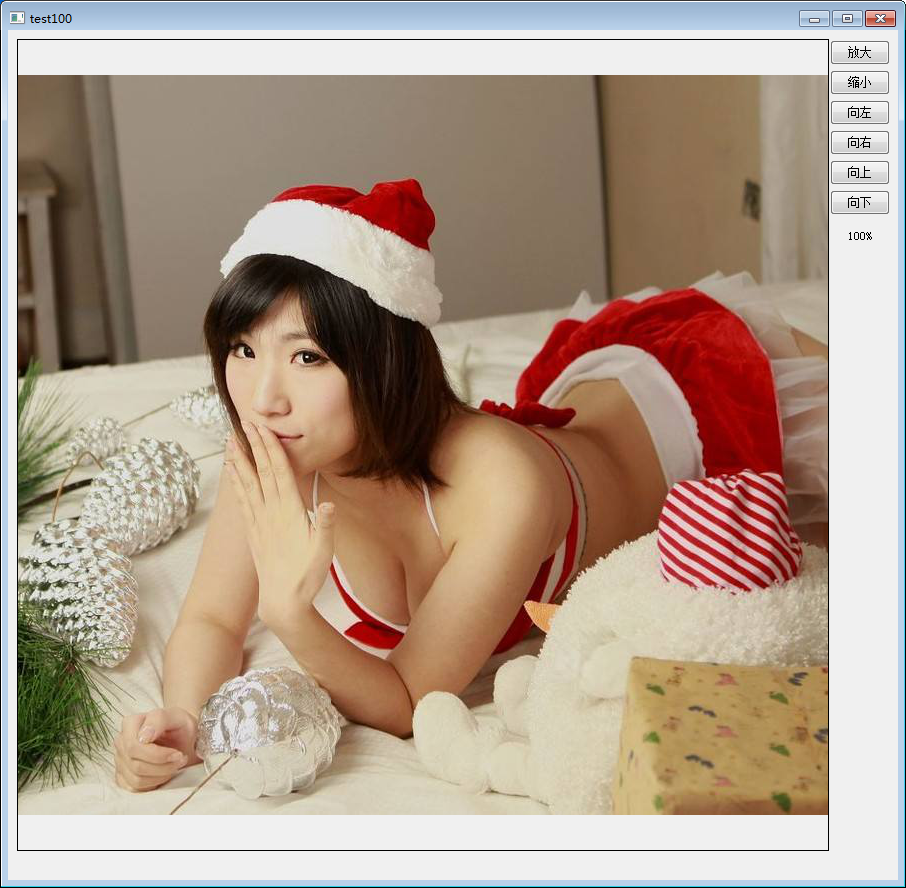
效果如下所示:

实现原理
主要通过以下函数实现:
void QPainter::drawTiledPixmap ( int x, int y, int w int h const QPixmap & pixmap, int sx = , int sy =  );

      //平铺显示pixmap

      //x y w h :表示绘画区域

      //sx  sy  :表示Qpixmap绘画起始位置
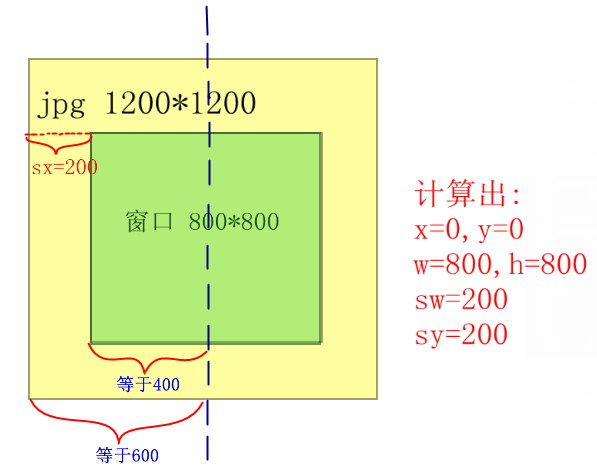
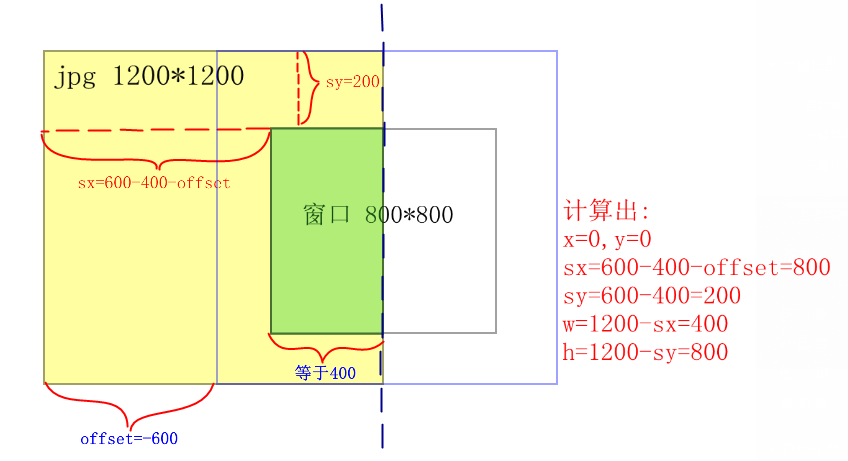
只要算出x y w h sx sy就能实现超出窗口不显示的效果
举个例子,如下图所示,居中显示1200*1200时:
当图片左偏移600时,也就是offset=-600时,则只能在窗口上显示一半的图片:
代码实现
widget.h:
#ifndef WIDGET_H

#define WIDGET_H

#include <QWidget>

#include <QtGui>

class Widget : public QWidget

{

    Q_OBJECT

private :

    QPixmap  *pix;

    int action;          //动作(放大,缩小,移动...)

    int pixW;            //图片宽

    int pixH;            //图片高

    QRect Paint;         //绘画区域

    float ratio;                //比例

    QPoint offset;              //一次的图片偏移值

    QPoint Alloffset;           //总偏移

    QLabel label;

    QPushButton  BigButton;

    QPushButton  LittleButton;

    QPushButton  LiftButton;

    QPushButton  RightButton;

    QPushButton  UpButton;

    QPushButton  DownButton;

    void AddComboItem(QComboBox* cmbo);

    bool event(QEvent * event);

    void wheelEvent(QWheelEvent* e);     //鼠标滑轮事件

private slots:

    void    onUpClicked();

    void    onDownClicked();

    void    OnLiftClicked();

    void    OnRightClicked();

    void    onLittleClicked();

    void    onBigClicked();

   void paintEvent(QPaintEvent *event);

public:

    explicit Widget();

    enum  Type {

        None          = ,

        Amplification ,

        Shrink,

        Lift,

        Right,

        Up,

        Down,

        Move

    };

};

#endif // WIDGET_H
widget.cpp:
#include "widget.h"

Widget::Widget():

    BigButton("放大",this),

    LittleButton("缩小",this),

    LiftButton("向左",this),

    RightButton("向右",this),

    UpButton("向上",this),

    DownButton("向下",this),

    Paint(,,,),

    Alloffset(,),

    label("100%",this)

{

    ratio= 1.0;             //初始化图片缩放比例

    action = Widget::None;

    pixW = ;            //设置图片尺寸为985*740

    pixH = ;

    pix = new QPixmap;

    pix->load(":/pic/img.jpg");

    BigButton.setGeometry(,,,);

    connect(&BigButton,SIGNAL(clicked()),this,SLOT(onBigClicked()));

    LittleButton.setGeometry(,,,);

    connect(&LittleButton,SIGNAL(clicked()),this,SLOT(onLittleClicked()));

    LiftButton.setGeometry(,,,);

    connect(&LiftButton,SIGNAL(clicked()),this,SLOT(OnLiftClicked()));

    RightButton.setGeometry(,,,);

    connect(&RightButton,SIGNAL(clicked()),this,SLOT(OnRightClicked()));

    UpButton.setGeometry(,,,);

    connect(&UpButton,SIGNAL(clicked()),this,SLOT(onUpClicked()));

    DownButton.setGeometry(,,,);

    connect(&DownButton,SIGNAL(clicked()),this,SLOT(onDownClicked()));

    label.move(,);

    resize(,);

}

bool Widget::event(QEvent * event)

{

    static bool press=false;

    static QPoint PreDot;

    if(event->type() == QEvent::MouseButtonPress )

    {

           QMouseEvent *mouse = dynamic_cast<QMouseEvent* >(event);

           //判断鼠标是否是左键按下,且鼠标位置是否在绘画区域

           if(mouse->button()==Qt::LeftButton &&Paint.contains(mouse->pos()))

           {

               press=true;

               QApplication::setOverrideCursor(Qt::OpenHandCursor); //设置鼠标样式

               PreDot = mouse->pos();

           }

    }

else if(event->type() == QEvent::MouseButtonRelease)

{

    QMouseEvent *mouse = dynamic_cast<QMouseEvent* >(event);

    //判断鼠标是否是左键释放,且之前是在绘画区域

    if(mouse->button()==Qt::LeftButton && press )

    {

        QApplication::setOverrideCursor(Qt::ArrowCursor); //改回鼠标样式

        press=false;

    }

}

 if(event->type() == QEvent::MouseMove)              //移动图片

 {

      if(press)

     {

        QMouseEvent *mouse = dynamic_cast<QMouseEvent* >(event);

        offset.setX(mouse->x() - PreDot.x());

        offset.setY(mouse->y() - PreDot.y());

        PreDot = mouse->pos();

        action = Widget::Move;

        this->update();

     }

 }

return QWidget::event(event);

}

void Widget::wheelEvent(QWheelEvent* event)     //鼠标滑轮事件

{

 if (event->delta()>) {      //上滑,缩小

    action=Widget::Shrink;

    this->update();

 } else {                    //下滑,放大

     action=Widget::Amplification;

     this->update();

 }

 event->accept();

}

void Widget::paintEvent(QPaintEvent *event)

{

  QPainter painter(this);

  int NowW = ratio *pixW;

  int NowH = ratio *pixH;

if(action==Widget::Amplification)           //缩小

{

      ratio-=0.1*ratio;

    if(ratio<0.018)

      ratio = 0.01;

    /*显示比例*/

    QString str;

    str.sprintf("%.0f%",ratio*);

    label.setText(str) ;

}

else  if(action==Widget::Shrink)           //放大

{

     ratio+=0.1*ratio;

   if(ratio>4.5)

     ratio = 5.000;

    /*显示比例*/

    QString str;

    str.sprintf("%.0f%",ratio*);

    label.setText(str);

}

if(action==Widget::Amplification || action==Widget::Shrink)      //更新图片

{

  NowW = ratio *pixW;

  NowH = ratio *pixH;

  pix->load(":/pic/img.jpg");                 //重新装载,因为之前的图片已经被缩放过

  *pix = pix->scaled(NowW, NowH,Qt::KeepAspectRatio);

  action=Widget::None;

}

if(action==Widget::Move)                    //移动

{

    int offsetx=Alloffset.x()+offset.x();

    Alloffset.setX(offsetx);

    int offsety=Alloffset.y()+offset.y();

    Alloffset.setY(offsety);

    action=Widget::None;

}

if(abs(Alloffset.x())>=(Paint.width()/ + NowW/ -))    //限制X偏移值

{

    if(Alloffset.x()>)

        Alloffset.setX(Paint.width()/ + NowW/ -);

    else

     Alloffset.setX(-Paint.width()/ + -NowW/ +);

}

if(abs(Alloffset.y())>=(Paint.height()/ + NowH/ -))    //限制Y偏移值

{

    if(Alloffset.y()>)

        Alloffset.setY(Paint.height()/ + NowH/ -);

    else

     Alloffset.setY(-Paint.height()/ + -NowH/ +);

}

int x = Paint.width()/ + Alloffset.x() -NowW/;

if(x<)

    x=;

int y = Paint.height()/ + Alloffset.y() -NowH/;

if(y<)

    y=;

int  sx = NowW/ - Paint.width()/ - Alloffset.x();

if(sx<)

    sx=;

int  sy = NowH/ - Paint.height()/ - Alloffset.y();

if(sy<)

    sy=;

int w =(NowW - sx)>Paint.width()? Paint.width() : (NowW - sx);

if(w>(Paint.width()-x))

    w = Paint.width()-x;

int h =(NowH - sy)>Paint.height()? Paint.height() : (NowH - sy);

if(h>(Paint.height()-y))

    h = Paint.height()-y;

  painter.drawRect(Paint.x()-,Paint.y()-,Paint.width()+,Paint.height()+); //画框

  painter.drawTiledPixmap(x+Paint.x(),y+Paint.y(),w,h,*pix,sx,sy);             //绘画图形

}

void  Widget::onLittleClicked()

{

  action=Widget::Amplification;

  this->update();

}

void  Widget::onBigClicked()

{

  action=Widget::Shrink;

  this->update();

}

void Widget::onUpClicked()

{

  action=Widget::Move;

  offset.setX();

  offset.setY(-);

  this->update();

}

void Widget::onDownClicked()

{

  action=Widget::Move;

  offset.setX();

  offset.setY();

  this->update();

}

void Widget::OnLiftClicked()

{

  action=Widget::Move;

  offset.setX(-);

  offset.setY();

  this->update();

}

void Widget::OnRightClicked()

{

  action=Widget::Move;

  offset.setX() ;

  offset.setY() ;

  this->update();

}
20.QT-Qpixmap实现图片鼠标缩放,鼠标拖动示例(详解)的更多相关文章
- VS+Qt+Halcon——显示图片,实现鼠标缩放、移动图片
摘要 本篇博文记录一下,用VS+Qt+Halcon实现对图片的读取以及鼠标缩放,移动(鼠标事件调用了halcon自带的算子)的过程.以及遇到的坑..... 先来看一下动态效果图: 主要控件: 添加一个 ...
- 第15.12节PyQt(Python+Qt)入门学习:可视化设计界面组件布局详解
一.引言 在Qt Designer中,在左边部件栏的提供了界面布局相关部件,如图: 可以看到共包含有四种布局部件,分别是垂直布局(Vertical Layout).水平布局(Horizontal La ...
- (转)JPEG图片数据结构分析- 附Png数据格式详解.doc
一.简述 JPEG是一个压缩标准,又可分为标准JPEG.渐进式JPEG及JPEG2000三种: ①标准JPEG:以24位颜色存储单个光栅图像,是与平台无关的格式,支持最高级别的压缩,不过,这种压 ...
- Qt QPixmap QImage 图片等比例缩放到指定大小
QPixmap pixmap(path); //pixmap=QPixmap::fromImage(imgShow); pixmap = pixmap.scaled(, , Qt::KeepAspec ...
- QPixmap,QImage图片大小缩放linux版
注意事项: 1.装载图片的地址有时候会读取不到.可以多摸索一下当前系统对应的格式. 2.scaled缩放方式选择 3.注意保存路径.下面程序保存路径是当前执行文件目录中. PicOpera::PicO ...
- 如何用jQuery实现div随鼠标移动而移动(详解)?----2017-05-12
重点是弄清楚如何获取鼠标现位置与移动后位置,div现在位置与移动后位置: 用jQuery实现div随鼠标移动而移动,不是鼠标自身的位置!!而是div相对于之前位置的移动 代码如下:(注意看绿色部分的解 ...
- Android仿微信朋友圈图片浏览器(支持图片手势缩放,拖动)
※效果 watermark/2/text/aHR0cDovL2Jsb2cuY3Nkbi5uZXQvbGluZ2xvbmd4aW4yNA==/font/5a6L5L2T/fontsize/400/fil ...
- PyQt(Python+Qt)学习随笔:QLineEdit行编辑器功能详解
专栏:Python基础教程目录 专栏:使用PyQt开发图形界面Python应用 专栏:PyQt入门学习 老猿Python博文目录 一.概述 QLineEdit部件是一个单行文本编辑器,支持撤消和重做. ...
- 图片懒加载lazyload.js详解
简介 lazyload.js用于长页面图片的延迟加载,视口外的图片会在窗口滚动到它的位置时再进行加载,这是与预加载相反的. 优点 它可以提高页面加载速度: 在某些情况清晰它也可以帮助减少服务器负载. ...
随机推荐
- windows的服务中的登录身份本地系统账户、本地服务账户和网络服务账户修改
以一个redis服务为例: 一个redis注册服务后一般是网络服务账户,但是当系统不存在网络服务账户时,就会导致redis服务无法正常启动.接下来修改redis服务的登录身份. cmd下输入如下命令: ...
- ngnix服务器搭建
1. 到nginx官网上下载相应的安装包,http://nginx.org/en/download.html:下载进行解压,将解压后的文件放到自己心仪的目录下,我的解压文件放在了d盘根目录下,如下图 ...
- 在AndroidManifest.xml文件中设置Android程序的启动界面方法
从网上搜集了一堆的Android代码,比如Android的Login程序和Android的Helloworld程序,但是却总不能正确运行一个正确的程序,郁闷了很久,终于在一次一次的测试后成功的在And ...
- Oracle Global Finanicals Technical Reference(二)
Skip Headers Oracle Global Finanicals Oracle Global Financials Technical Reference Manual Release 11 ...
- ZooKeeper 权限管理
这其中一个显而易见的问题就是权限:如果我的数据被别人动了怎么办? 方案一:采用ZooKeeper支持的ACL digest方式,用户自己定义节点的权限 这种方案将zookeeper的acl和diges ...
- 解决IE7兼容H5新标签的方法
外部引入JS <script src="http://cdn.bootcss.com/html5shiv/r29/html5.min.js"></script&g ...
- WebStorm常用快捷键总结
在使用WebStorm的过程中,常用快捷键整理: 1. 必备快捷键 Ctrl+/:注释当前行 Ctrl+Shift+/:当前位置插入注释 Ctrl+Alt+/:块注释,并Focus到首行,写注释说明 ...
- Android studio统计项目总行数
有时候在项目开发中会用到统计项目的总行数功能,今天就教大家如何利用studio进行总行数的统计: 1.打开要统计总行数的项目,按住Ctrl+Shift+A(或者点击导航栏的Help->Find ...
- Unknown entity: org.jbpm.services.task.audit.TaskEventImpl
1. use this persistence.xml - simply copy it into src/main/resources/META-INF please note the name o ...
- docker的安装和基础使用
Docker EE/Docker CE简介与版本规划 版本区别 Docker EE Docker EE由公司支持,可在经过认证的操作系统和云提供商中使用,并可运行来自Docker Store的.经过认 ...