
Animation Physics and The Realization Of Animation In Browsers
Animation Physics
Background
With the development of computer science technology, people are facing more and more information everyday. The traditional static way to display information can't always make our brains excited in the age of information explosion. In this artcile, I will show your the science behind the general animation.
Persistence of vision
Persistence of vision refers to the optical illusion that occurs when visual perception of an object does not cease for some time after rays of light proceeding from it have ceased to enter the eye. According this phenomenon, people build animation. In ancient China, people draw a bird and a birdcage on different side of a pan. When you twist the pan, you will see the bird in the birdcage. It's the early application of persistence of vision.
Television broadcasting system and frame
According to the persistence of vision, people can watch animation if we play a series of images in a very short time. But how short the time is? TV in the era of the use of analog signals, television broadcasting system mainly PAL, NTSC, SECAM three, they were using different frame rates. NTSC requires 25 frames in a second while PAL and SECAM require 25 frames in a second. In lastest monitor can play 240 frame a secord, it bring a better experience of watching animation.
3D
3D movie technology has improved sharply in the passing years. The following images will show you why we can see 3d movies.
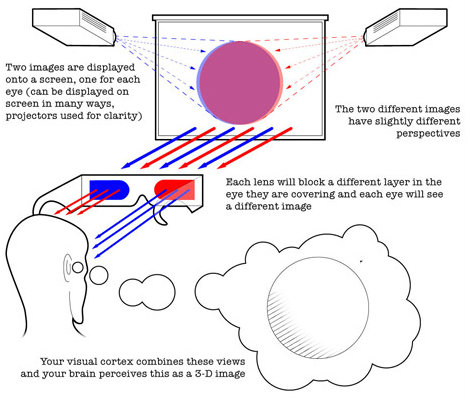

Whatever the technology we use, the key why we can see 3d movied is our brain. Our brain can merge 2 images into one!
Acoustics
The early movies are black and white and silent, but the sound is clearly indispensable. The sound also has its 3D world! Our brain can also composite the sound you hear from left ear and right ear. I believe the acoustics is a very big topic so that I'd like to further this topic in the other articles.
Animation In Browsers
Background
October 2014m HTML5 standard officially released. In the ealier time, the only officially standard was the HTML 4.01 which was released in 1999. Obviously, the HTML4 has been out of data for a long time. At the begining of the 21st century is a period of rapid development of the internet. In order to meet the increasingly complex requirements of the interaction, Java Applet, ActiveX, Flash, Microsoft Silverlight, SVG and the other front-end technology bloom in that era. Then we went through a battle of browser. In that time, developers have to write one style 4 times (-o, -webkit, -moz, -ms). Of course, there are still many ways to avoid writting 4 times. Sass, Less and some other solutions came to the world. Almost at this time, the internet for mobile rose. Because Android and IOS's native browser both use the webkit core, it is more convenient to coding HTML5 for mobile.
The diversity of technology must lead to the increase in learning. Apple killed flash when it delivered the IPhone4. HTML5 standrad came to the word eventually.
HTML5 defines simple animation, excessive, browser storage, multi-threaded, websocket and some other features which only appeared in the native system in the past. However the battle of browsers never ends. The barriers always exists in the latest technology field. After few years of PhoneGap, a wind of React Native blows up. Web Audio is still a draft, it's still hard to apply 3D TV technology in browser. The good news is that we have more and more technoloy for our creation.
GPU&CPU
In the early browser, the task is single-threaded. All the work for graphic, network and calculation is done in one thread. In the absence of WebGL and CSS3 era, engineers never think about the GPU in front-end programming. With the development of HTML5, graphics technology has been rapid improved. Hardware acceleration went into thr front-end engineers' eye sight.
Before diving in the browser, let's figure out the difference between CPU and GPU. According to John von Neumann's computer system, the computer consists of operator, controller, memory, input device and output device. CPU is known as the operator of the computer while GPU slowly went the public eye in the current years. Modern CPU using multi-core design, each core has a large enough cache, you can handle a variety of complex operations. GPU has more cores compared to each, but each core cache is smaller relative to the CPU. GPU is more suitable for 3D rendering calculations.
In the browser, CPU does the the traditional DOM operation and 2D animation calculation while GPU take the response of rendering WebGL and 3D things. There are many APIs in the traditional DOM for Javascript calls, Dom's data structure can be repeatedly read and modified, which is more dependent on the cache. In WebGl, the content of the Canvas can not be read once it is rendered, and the programmer usually creates other data structures to store the data model, and each rendering is relatively independent. The real scence of browser's rendering, CPU and GPU are usually used together.

CSS animiation
In CSS3, there are 2 new properties, transition and animation. We can only use CSS3 to build some simple animation. But more importantly, we can get a glimpse of some of the basic elements of animation. Duration, delay, time-function, and property are necessary elements. Compared to Javascript animation, CSS3 animation rendering process is the browser automatically, the code level of the control ability is more weak. In a browser that supports matrix transformations, transform's animated browser optimizes itself and the browser automatically use GPU to do the hardware acceleration .
Dom animation
DOM animation relative to the Canvas animation, which are elements can be directly interactive, more consumption of CPU resources. In the process of rendering the browser interface, redraw and rearrangement has been happening, and will produce greater performance consumption. The redraw occurs when the style attribute of the element changes, and the rearrangement occurs when the element's position property or the DOM tree changes. In the DOM tree, the rearrangement of the parent node causes the rearrangement of the child nodes, and the absolute positioning elements that get rid of the document flow are relatively more suitable for DOM animations.
Canvas animation
Canvas has 3D and 2D rendering modes. Different from the DOM element, Canvas inside the graphics can not be drawn after the need to clear the drawing board to redraw. If you need to store any information, you need to use Javascript to create some other objects to save. Because the redraw of the entire Canvas will bring a lot of performance consumption, the common optimization method is part of the redraw Canvas and multiple canvas to achieve animation.
SVG animation
SVG is an extensible markup language used to describe vector graphics. In early browsers, SVG existed as a plugin, and modern browsers built support for SVG. SVG also has some of the features of the DOM and Canvas elements. First, all SVG elements can be assigned an ID and then operated directly via the Javascript API. By changing the element properties, you can change its appearance. Compared to DOM elements, SVG elements can show more richer images, and almost all vector graphics can be represented by various Bessel curves. Bessel curves can be converted directly to each other, a lot of irregular graphics transition animation is based on SVG.
Timeline
Animation is based on the art of time, no matter what technology you use to achieve animation, time is a very important element. In the browser, there are two kinds of basic units of time, natural time and frame number of two units. The two units can be converted to each other, but will be subject to the calculation of the thread resources. Animals in natural time are animations such as CSS animations, SVG animations, and Javascript in APIs such as setTimeout, setInterval, and so on. And requestAnimationFrame is based on the number of computer frames to achieve animation. Relatively speaking requestAnimationFrame is more suitable for drawing animation, better performance. SetTimeout and setInterval Although the same function can be implemented on a surface with different APIs, the browser is not the same in the threading mechanism of the browser. The difference here is especially true when the browser resources are tight.
Summary
Thanks to our brains, we can see and hear the 3d world. It is also our brains that give us the feeling of the world.
With the knowledge of browser, we can focus more on the detail of animation. It meams both better experience and more smooth communication with the engineers.
Animation Physics and The Realization Of Animation In Browsers的更多相关文章
- Android Animation学习(六) View Animation介绍
Android Animation学习(六) View Animation介绍 View Animation View animation系统可以用来执行View上的Tween animation和F ...
- Android Animation学习(一) Property Animation原理介绍和API简介
Android Animation学习(一) Property Animation介绍 Android Animation Android framework提供了两种动画系统: property a ...
- Android动画主要包含补间动画(Tween)View Animation、帧动画(Frame)Drawable Animation、以及属性动画Property Animation
程序运行效果图: Android动画主要包含补间动画(Tween)View Animation.帧动画(Frame)Drawable Animation.以及属性动画Property Animatio ...
- Android Animation学习(一) Property Animation介绍
Android Animation Android framework提供了两种动画系统: property animation (introduced in Android 3.0)和view an ...
- Android animation学习笔记之view/drawable animation
前一章中总结了android animation中property animation的知识和用法,这一章总结View animation和Drawable animation的有关知识: View ...
- Animation 把动画片段拖入Animation组件里后不能播放
1. 选中动画片段,点击右上角三道横杠那个按钮,选择Debug: 2.选择Legacy,然后再点击那个三道横岗的按钮,选择Normal就可以用了应该.
- Unity之Animation动画
Unity之Animation绘制动画 这篇文章做最简单的动画,让一个立方体从左边移动到右边. 1.创建一个Unity的新工程,名为TestAnimation,点击Create And Open按键, ...
- [UE4]Animation Techniques used in Paragon部分翻译及索引
视频地址:https://www.youtube.com/watch?v=1UOY-FMm-xo 主要内容:该视频由Paragon游戏制作者Laurent Delayen(Senior Program ...
- 虾扯蛋:Android View动画 Animation不完全解析
本文结合一些周知的概念和源码片段,对View动画的工作原理进行挖掘和分析.以下不是对源码一丝不苟的分析过程,只是以搞清楚Animation的执行过程.如何被周期性调用为目标粗略分析下相关方法的执行细节 ...
随机推荐
- 使用Eclipse在Excel中找出两张表中相同证件号而姓名或工号却出现不同的的项
1:首先把Excel中的文本复制到txt中,复制如下: A表: 证件号 工号 姓名 310110xxxx220130004 101 傅家宜3101 ...
- webpack的安装与使用
在安装 Webpack 前,你本地环境必须已安装nodejs. 可以使用npm安装,当然由于 npm 安装速度慢,也可以使用淘宝的镜像及其命令 cnpm,安装使用介绍参照:使用淘宝 NPM 镜像. 使 ...
- ::在c++中什么意思
(1)表示“域操作符” 例:声明了一个类A,类A里声明了一个成员函数void f(),但没有在类的声明里给出f的定义,那么在类外定义f时, 就要写成void A::f(),表示这个f()函数是类A的成 ...
- vue学习笔记(二)——简单的介绍以及安装
学习编程需要的是 API+不断地练习^_^ Vue官网:https://cn.vuejs.org/ 菜鸟教程:http://www.runoob.com/vue2/vue-tutorial.html ...
- java实现最小生成树的prim算法和kruskal算法
在边赋权图中,权值总和最小的生成树称为最小生成树.构造最小生成树有两种算法,分别是prim算法和kruskal算法.在边赋权图中,如下图所示: 在上述赋权图中,可以看到图的顶点编号和顶点之间邻接边的权 ...
- Java的栈和队列
package com.ipmotor.sm.db;import java.util.LinkedList;import java.util.Queue;import java.util.Stack; ...
- JavaScript ES6 module 模块
在使用JavaScript开发大型项目时,模块开发概念是一个必须考虑的问题.其目的就是通过命名空间对各类业务对象进行一定的封装,防止命名冲突. 本篇着重介绍ES6 module中的export和imp ...
- linux_通配符
通配符和正则表达式区别? 通配符用在用户命令行bash环境,而正则表达式用于linux三剑客(awk, sed, grep) 那,有哪些通配符? * 所有字符 五星 ls *.txt # 列举目 ...
- maven多模块搭建
此时你会发现父模块含有如下内容 这是因为创建的maven项目都带有样例,比如上图的这张图片 各种artifact都是做什么的呢,@参考文章中给出了答案 怎么创建不带这些呢? 那就创建simple pr ...
- junit源码解析--捕获测试结果
OK,前面的博客我们整理了junit运行完了所有的测试用例,那么OK了,现在开始该收集测试结果了. 在这最后一步中,junit主要是玩一个类,TestResult.这里类中封装了几个参数,在初始化这个 ...