
cassandra 在window上的demo
Cassandra window使用
1. 下载:http://cassandra.apache.org/download/。
2. 解压后,bin目录下,cassandra.bat 直接启动。 Cassandra-cli.bat进入cassandra。
3. 安装python2.7.10 版本太高,可能会不兼容,安装python 使用 CQL 操作cassandra数据库。
4. 配置环境变量后,以管理员方式运行 cmd :
powershell Set-ExecutionPolicy Unrestricted 成功如下:
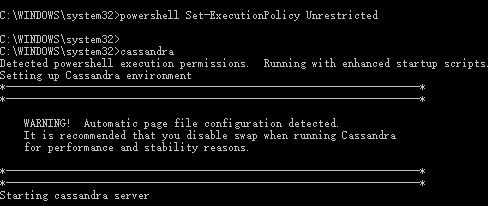
5. cmd cqlsh.bat进入cql编辑;(没有安装python 无法使用cqlsh.bat)
CREATE KEYSPACE IF NOT EXISTS pimin_net
WITH REPLICATION = {'class': 'SimpleStrategy','replication_factor':1};
USE pimin_net;
CREATE TABLE IF NOT EXISTS users (
id uuid,
first_name varchar,
last_name varchar,
age int,
emails set<text>,
avatar blob,
PRIMARY KEY (id)
);
SELECT * FROM users;
用户表(users)包含了主键、firest_name、last_name、年龄、多个邮箱地址以及头像。关于使用java驱动,建议使用eclipse+maven创建,比如我们创建一个cassandra.test的工程。在pom.xml里面加入
<dependency>
<groupId>com.datastax.cassandra</groupId>
<artifactId>cassandra-driver-core</artifactId>
<version>2.1.0</version>
</dependency>
|
1 2 3 4 5 |
<dependency> <groupId>com.datastax.cassandra</groupId> <artifactId>cassandra-driver-core</artifactId> <version>2.1.0</version> </dependency> |
如果环境不允许使用maven,那么就自己找依赖包吧:cassandra-driver-core-2.1.0.jar、netty-3.9.0.Final.jar、guava-16.0.1.jar、metrics-core-3.0.2.jar和slf4j-api-1.7.5.jar。
解压目录 lib和 apache-cassandra-2.1.16\tools\lib 下,有jar包。
下面是所有java测试代码:实现连接Cassandra集群,新增数据,查询数据。其他的情况类似。
如果需要远程连接,那么cassandra.yaml里面的rpc_address就需要改变为您当前环境实际的IP地址,否则会报错! 本地:client.connect("127.0.0.1");
package cassandra;
import java.io.File;
import java.io.FileInputStream;
import java.io.FileNotFoundException;
import java.io.FileOutputStream;
import java.io.IOException;
import java.nio.ByteBuffer;
import java.nio.channels.FileChannel;
import java.util.HashSet;
import java.util.Set;
import java.util.UUID;
import com.datastax.driver.core.BoundStatement;
import com.datastax.driver.core.Cluster;
import com.datastax.driver.core.Host;
import com.datastax.driver.core.Metadata;
import com.datastax.driver.core.PreparedStatement;
import com.datastax.driver.core.ResultSet;
import com.datastax.driver.core.Row;
import com.datastax.driver.core.Session;
public class TestJava {
private Cluster cluster;
private Session session;
public Cluster getCluster() {
return cluster;
}
public void setCluster(Cluster cluster) {
this.cluster = cluster;
}
public Session getSession() {
return session;
}
public void setSession(Session session) {
this.session = session;
}
/**
* 连接节点
*
* @param node
*/
public void connect(String node) {
cluster = Cluster.builder().addContactPoint(node).build();
Metadata metadata = cluster.getMetadata();
System.out.printf("Connected to cluster: %s\n", metadata.getClusterName());
for (Host host : metadata.getAllHosts()) {
System.out.printf("Datatacenter: %s; Host: %s; Rack: %s\n", host.getDatacenter(), host.getAddress(), host.getRack());
}
this.session = cluster.connect();
}
public void insertData() {
PreparedStatement insertStatement = getSession().prepare(
"INSERT INTO pimin_net.users "
+ "(id, first_name, last_name, age, emails,avatar) "
+ "VALUES (?, ?, ?, ?, ?, ?);");
BoundStatement boundStatement = new BoundStatement(insertStatement);
Set<String> emails = new HashSet<String>();
emails.add("xxx@qq.com");
emails.add("xxx@163.com");
java.nio.ByteBuffer avatar = null;
try {
avatar = toByteBuffer("f:\\user.png");
avatar.flip();
System.out.println("头像大小:" + avatar.capacity());
} catch (IOException e) {
// TODO Auto-generated catch block
e.printStackTrace();
}
getSession().execute(boundStatement.bind(UUID.fromString("756716f7-2e54-4715-9f00-91dcbea6cf50"),
"pi", "min", 10, emails, avatar));
}
public void loadData() {
ResultSet resultSet = getSession().execute(
"SELECT first_name,last_name,age,avatar FROM pimin_net.users;");
System.out
.println(String
.format("%-30s\t%-20s\t%-20s\n%s", "first_name","last_name", "age",
"-------------------------------+-----------------------+--------------------"));
for (Row row : resultSet) {
System.out.println(String.format("%-30s\t%-20s\t%-20s",
row.getString("first_name"), row.getString("last_name"),
row.getInt("age")));
ByteBuffer byteBuffer = row.getBytes("avatar");
System.out.println("头像大小:" + (byteBuffer.limit() - byteBuffer.position()));
FileOutputStream fileOutputStream = null;
try {
fileOutputStream = new FileOutputStream("f:\\2.png");
} catch (FileNotFoundException e) {
// TODO Auto-generated catch block
e.printStackTrace();
}
try {
fileOutputStream.write(byteBuffer.array(),
byteBuffer.position(),
byteBuffer.limit() - byteBuffer.position());
fileOutputStream.close();
} catch (IOException e) {
// TODO Auto-generated catch block
e.printStackTrace();
}
}
System.out.println();
}
public void close() {
cluster.close();
}
/**
* 读取文件
*
* @param filename
* @return
* @throws IOException
*/
public static ByteBuffer toByteBuffer(String filename) throws IOException {
File f = new File(filename);
if (!f.exists()) {
throw new FileNotFoundException(filename);
}
FileChannel channel = null;
FileInputStream fs = null;
try {
fs = new FileInputStream(f);
channel = fs.getChannel();
ByteBuffer byteBuffer = ByteBuffer.allocate((int) channel.size());
while ((channel.read(byteBuffer)) > 0) {
// do nothing
// System.out.println("reading");
}
return byteBuffer;
} catch (IOException e) {
e.printStackTrace();
throw e;
} finally {
try {
channel.close();
} catch (IOException e) {
e.printStackTrace();
}
try {
fs.close();
} catch (IOException e) {
e.printStackTrace();
}
}
}
public static void main(String[] args) {
TestJava client = new TestJava();
client.connect("127.0.0.1");
client.insertData();
client.loadData();
client.session.close();
client.close();
}
}
cassandra 在window上的demo的更多相关文章
- jquery.form 和MVC4做无刷新上传DEMO
jquery.form 和MVC4做无刷新上传DEMO HTML: <script src="~/Scripts/jquery-1.10.2.min.js"></ ...
- TensorFlow 在android上的Demo(1)
转载时请注明出处: 修雨轩陈 系统环境说明: ------------------------------------ 操作系统 : ubunt 14.03 _ x86_64 操作系统 内存: 8GB ...
- window上利用pip安装pandas
官网推荐的是直接使用Anoconda,它集成了pandas,可以直接使用.安装挺简单的,有windows下的安装包.如果不想安装庞大的Anoconda,那就一步一步用pip来安装pandas.下面我主 ...
- 在window上安装pandas
之前在ubuntu上安装pandas,用的easy_install.这次在window上同样方法装遇到"unable to find vcvarsall.bat",看一些网上帖子好 ...
- iOS UIButton加在window上点击无效果问题
UIButton加在window上,点击没有效果,找了很久,原来是没有加上这名:[self.window makeKeyAndVisible]; self.window = [[UIWindow al ...
- 【原】window上安装elasticserach
[window上安装elasticserach] 系统环境:2008R2 x64测试安装用的服务器IP:192.168.12.52elasticsearch版本:2.3.4JDK版本:jdk 1.8. ...
- 往github上传demo
一直在github上寻找demo,但怎么传demo上githun呢? http://www.2cto.com/kf/201504/390397.html 首先在github上 new一个reposit ...
- 关于Windows高DPI的一些简单总结(Window上一般默认是96 dpi 作为100% 的缩放比率)
我们知道,关于高DPI的支持, Windows XP时代就开始有了, 那时关于高DPI的支持比较简单, 但是从Vista/Win7 到现在Win8 /Win8.1, Windows关于高DPI的支持已 ...
- Jetson TX2上的demo(原创)
Jetson TX2上的demo 一.快速傅里叶-海动图 sample The CUDA samples directory is copied to the home directory on th ...
随机推荐
- java--银行业务调度系统
转载请申明出处:http://blog.csdn.net/xmxkf 1. 银行调度业务系统的题目来源与需求阐述 银行业务调度系统: 模拟实现银行业务调度系统逻辑,具体需求如下: 1.银行内有6个 ...
- Linux内核中断和异常分析(下)
这节,我们继续上,中(以前的日志有)篇目进行分析,结合一个真实的驱动案例来描述linux内核中驱动的中断机制,首先我们先了解一下linux内核中提供的中断接口. 这个接口我们需要包含一个头文件:#in ...
- asp.net 下的中文分词检索工具 - jieba.net
jieba是python下的一个检索库, 有人将这个库移植到了asp.net 平台下, 完全可以替代lucene.net以及盘古分词的搭配 之所以写这个, 其实是因为昨天面试时, 被问到网站的关键字检 ...
- android DialogFragment 实现Dialog展示扫二维码图片展示
近期开发项目,做个按钮点击弹出展示微信二维码关注微信公众号的展示框,于是想到DialogFragment,期间对Dialog的title的底框字体颜色做出相关设置,记录如下: 下面是 DialogFr ...
- HTML 5核心内容
demo飞象 HTML 5 系列文章索引:http://www.cnblogs.com/webabcd/archive/2012/05/27/2520567.html demo飞象HTML 5 (11 ...
- 在线学习Java免费资源推荐
你想学习Java吗?来对地方了!这篇文章将会介绍很多高质量的免费资源,包括网页.论坛.电子书和速查表. Java是一种面向对象的编程语言,拥有独立.多线程.安全.动态和健壮的特点.归功于其多功能的特点 ...
- 初识Java——日期的格式化
import java.util.*; class DateTest{ static{ System.out.println("谢谢使用!");//代码块,在初始化类时,先执行代码 ...
- MySQL中遇到的几种报错及其解决方法
MySQL中遇到的几种报错及其解决方法 1.[Err] 1064 - You have an error in your SQL syntax; check the manual that corre ...
- 在WinForm应用程序中快速实现多语言的处理
在国际化环境下,越来越多的程序需要做多语言版本,以适应各种业务需求的变化.在Winform应用程序中实现多语言也有常规的处理方式处理,不过需要针对每个语言版本,重新修改Winform界面的显示,对一些 ...
- Triangle (第8届山东省赛的某题)
triangle(第8届山东省赛的某题) 传送门 题意:喵了个呜,这题意真是峰回路转啊.懒死了,不想描述. 做法:我们拿set或线段树维护exp的最小值,每次取出exp值最小的边,删除之.并更新这条边 ...