
DeepLearning4J 环境搭建【转】
深度学习Deeplearning4j eclipse 开发环境搭建
eclipse设置deeplearning4j开发环境:手动添加jar包
https://deeplearning4j.org/cn/eclipse
eclipse maven设置deeplearning4j开发环境
https://depiesml.wordpress.com/2015/08/26/dl4j-gettingstarted/
准备:首先要配置eclipse maven 以及maven插件
1. 创建maven工程:
点击eclipse File->new->other 弹出对话框输入maven
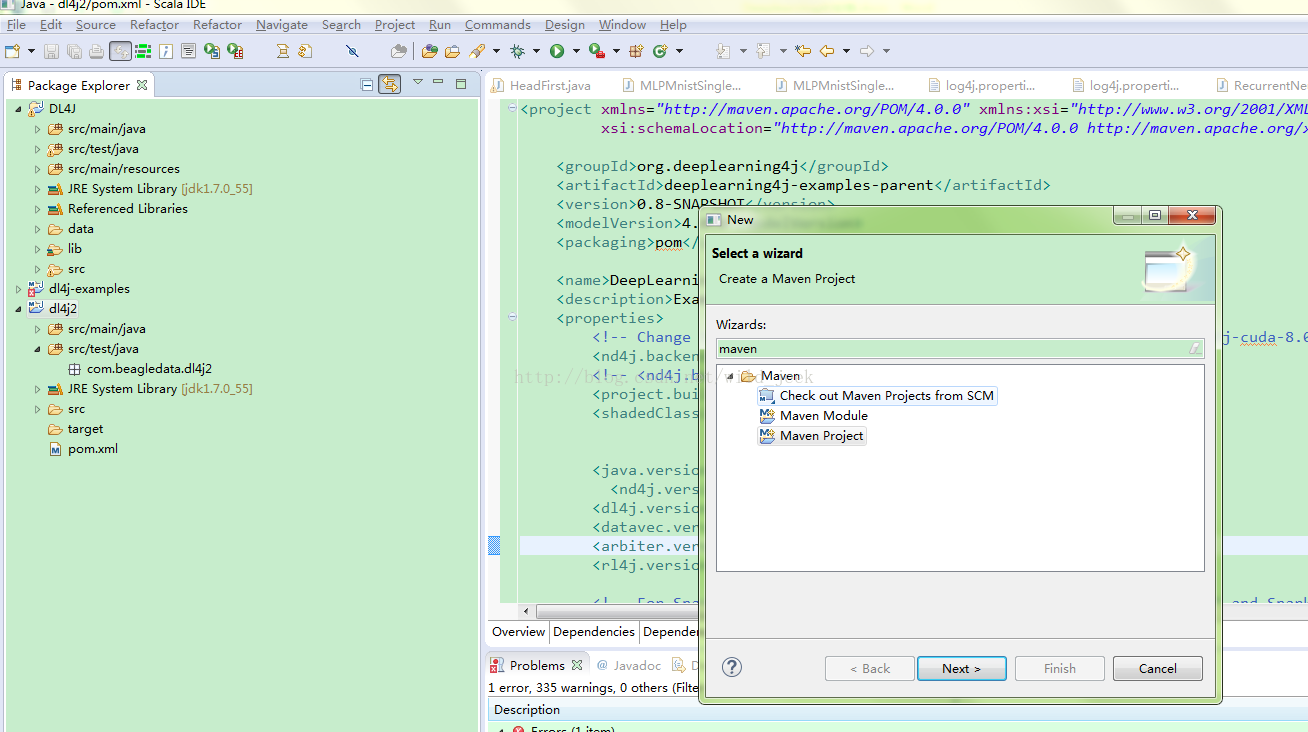
点击 Maven Preject next 选择maven-archtype-quickstart1.1 选择项输入grouptid : com.test ArtifactID :dl4j 点击finish
2. 修改pom文件
将下边pom内容复制到原来pom中 :
https://github.com/deeplearning4j/dl4j-examples/blob/master/pom.xml
pom中添加依赖:
- <dependencyManagement>
- <dependencies>
- <dependency>
- <groupId>org.nd4j</groupId>
- <artifactId>nd4j-native-platform</artifactId>
- <version>${nd4j.version}</version>
- </dependency>
- <dependency>
- <groupId>org.nd4j</groupId>
- <artifactId>nd4j-cuda-7.5-platform</artifactId>
- <version>${nd4j.version}</version>
- </dependency>
- <dependency>
- <groupId>org.nd4j</groupId>
- <artifactId>nd4j-cuda-8.0-platform</artifactId>
- <version>${nd4j.version}</version>
- </dependency>
- </dependencies>
- </dependencyManagement>
- <dependencies>
- <!-- ND4J backend. You need one in every DL4J project. Normally define
- artifactId as either "nd4j-native-platform" or "nd4j-cuda-7.5-platform" -->
- <dependency>
- <groupId>org.nd4j</groupId>
- <artifactId>${nd4j.backend}</artifactId>
- </dependency>
- <!-- Core DL4J functionality -->
- <dependency>
- <groupId>org.deeplearning4j</groupId>
- <artifactId>deeplearning4j-core</artifactId>
- <version>${dl4j.version}</version>
- </dependency>
- <dependency>
- <groupId>org.deeplearning4j</groupId>
- <artifactId>deeplearning4j-nlp</artifactId>
- <version>${dl4j.version}</version>
- </dependency>
- <!-- deeplearning4j-ui is used for HistogramIterationListener + visualization:
- see http://deeplearning4j.org/visualization -->
- <dependency>
- <groupId>org.deeplearning4j</groupId>
- <artifactId>deeplearning4j-ui_${scala.binary.version}</artifactId>
- <version>${dl4j.version}</version>
- </dependency>
- <!-- Force guava versions for using UI/HistogramIterationListener -->
- <dependency>
- <groupId>com.google.guava</groupId>
- <artifactId>guava</artifactId>
- <version>${guava.version}</version>
- </dependency>
- <!-- datavec-data-codec: used only in video example for loading video data -->
- <dependency>
- <artifactId>datavec-data-codec</artifactId>
- <groupId>org.datavec</groupId>
- <version>${datavec.version}</version>
- </dependency>
- <!-- Used in the feedforward/classification/MLP* and feedforward/regression/RegressionMathFunctions
- example -->
- <dependency>
- <groupId>jfree</groupId>
- <artifactId>jfreechart</artifactId>
- <version>${jfreechart.version}</version>
- </dependency>
- <dependency>
- <groupId>org.jfree</groupId>
- <artifactId>jcommon</artifactId>
- <version>${jcommon.version}</version>
- </dependency>
- <!-- Used for downloading data in some of the examples -->
- <dependency>
- <groupId>org.apache.httpcomponents</groupId>
- <artifactId>httpclient</artifactId>
- <version>4.3.5</version>
- </dependency>
- </dependencies>
3. 更新
右击项目名->Maven ->Update Project
DeepLearning4J 环境搭建【转】的更多相关文章
- .NET Core系列 : 1、.NET Core 环境搭建和命令行CLI入门
2016年6月27日.NET Core & ASP.NET Core 1.0在Redhat峰会上正式发布,社区里涌现了很多文章,我也计划写个系列文章,原因是.NET Core的入门门槛相当高, ...
- Azure Service Fabric 开发环境搭建
微服务体系结构是一种将服务器应用程序构建为一组小型服务的方法,每个服务都按自己的进程运行,并通过 HTTP 和 WebSocket 等协议相互通信.每个微服务都在特定的界定上下文(每服务)中实现特定的 ...
- rnandroid环境搭建
react-native 环境搭建具体步骤这个大家已经玩烂了,这个主要是记录下来自己做win7系统遇到的坑 1.com.android.ddmlib.installexception 遇到这个问题,在 ...
- python开发环境搭建
虽然网上有很多python开发环境搭建的文章,不过重复造轮子还是要的,记录一下过程,方便自己以后配置,也方便正在学习中的同事配置他们的环境. 1.准备好安装包 1)上python官网下载python运 ...
- springMVC初探--环境搭建和第一个HelloWorld简单项目
注:此篇为学习springMVC时,做的笔记整理. MVC框架要做哪些事情? a,将url映射到java类,或者java类的方法上 b,封装用户提交的数据 c,处理请求->调用相关的业务处理—& ...
- 【定有惊喜】android程序员如何做自己的API接口?php与android的良好交互(附环境搭建),让前端数据动起来~
一.写在前面 web开发有前端和后端之分,其实android还是有前端和后端之分.android开发就相当于手机app的前端,一般都是php+android或者jsp+android开发.androi ...
- Nexus(一)环境搭建
昨天,成功搭建了自己的 Maven 环境(详见:Maven(一)环境搭建),今天就来研究和探讨下 Nexus 的搭建! 使用背景: 安装环境:Windows 10 -64位 JDK版本:1.7 Mav ...
- 「译」JUnit 5 系列:环境搭建
原文地址:http://blog.codefx.org/libraries/junit-5-setup/ 原文日期:15, Feb, 2016 译文首发:Linesh 的博客:环境搭建 我的 Gith ...
- appium+robotframework环境搭建
appium+robotframework环境搭建步骤(Windows系统的appium自动化测试,只适用于测试安卓机:ios机需要在mac搭建appium环境后测试) 搭建步骤,共分为3部分: 一. ...
随机推荐
- 【Python】改变对象的字符串显示
问题 改变对象实例的打印或显示输出,让它们更具可读性. 解决方案 要改变一个实例的字符串表示,可重新定义它的 __str__() 和 __repr__() 方法.例如: class Pair: def ...
- Codeforces命令行工具
https://github.com/xalanq/cf-tool Codeforces Tool 是 Codeforces 的命令行界面的工具. 这玩意儿挺快.挺小.挺强大,还跨平台哦. 特点 提交 ...
- Attach to process 的问题
Attach to process找不到W3WP选项怎么办?刷新它的一个网页
- Prism 4 文档 ---第4章 模块化应用程序开发
模块化应用程序是指将一个应用程序拆分成一系列的可以组合的功能单元.一个客户端模块封装了应用程序的一部分,并且通常是一系列相关的关注点.它可以包含一个相关的组件的集合,就像用户界面,应用程序功能,和一些 ...
- 公客网beta阶段发布说明
项目 公客 公正客观的课程评价网站 功能说明 评价的增删改 对课程发表评价 限制评价次数(3次),删除与增量修改评价 评价下的讨论与点赞 在评价下添加讨论,支持在讨论中使用@与对方交流想法 为评价点赞 ...
- dilworth定理+属性排序(木棍加工)
P1233 木棍加工 题目描述 一堆木头棍子共有n根,每根棍子的长度和宽度都是已知的.棍子可以被一台机器一个接一个地加工.机器处理一根棍子之前需要准备时间.准备时间是这样定义的: 第一根棍子的准备时间 ...
- L171
As much as we thirst for approval, we dread condemnation.我们渴望赞许,同样也害怕受到指责.If somebody's father was o ...
- 一个浮动 css3效果
<!DOCTYPE html> <html lang="en"> <head> <meta charset="UTF-8&quo ...
- PostgreSQL提升为主库 时间线加一的问题
在使用PostgreSQL高可用集群过程中发现一个很难解决的问题,先记录在这里. 我们知道在PG流复制集群中,如果主库死掉了,备库要提升为主库有两种方法: 1)pg_ctl promote 2)创建对 ...
- DIV css中cursor属性详解-鼠标移到图片变换鼠标形状 (转)
css中cursor属性详解-鼠标移到图片变换鼠标形状 语法: cursor : auto | all-scroll | col-resize| crosshair | default | han ...