
DeepLearning4J 环境搭建【转】
深度学习Deeplearning4j eclipse 开发环境搭建
eclipse设置deeplearning4j开发环境:手动添加jar包
https://deeplearning4j.org/cn/eclipse
eclipse maven设置deeplearning4j开发环境
https://depiesml.wordpress.com/2015/08/26/dl4j-gettingstarted/
准备:首先要配置eclipse maven 以及maven插件
1. 创建maven工程:
点击eclipse File->new->other 弹出对话框输入maven
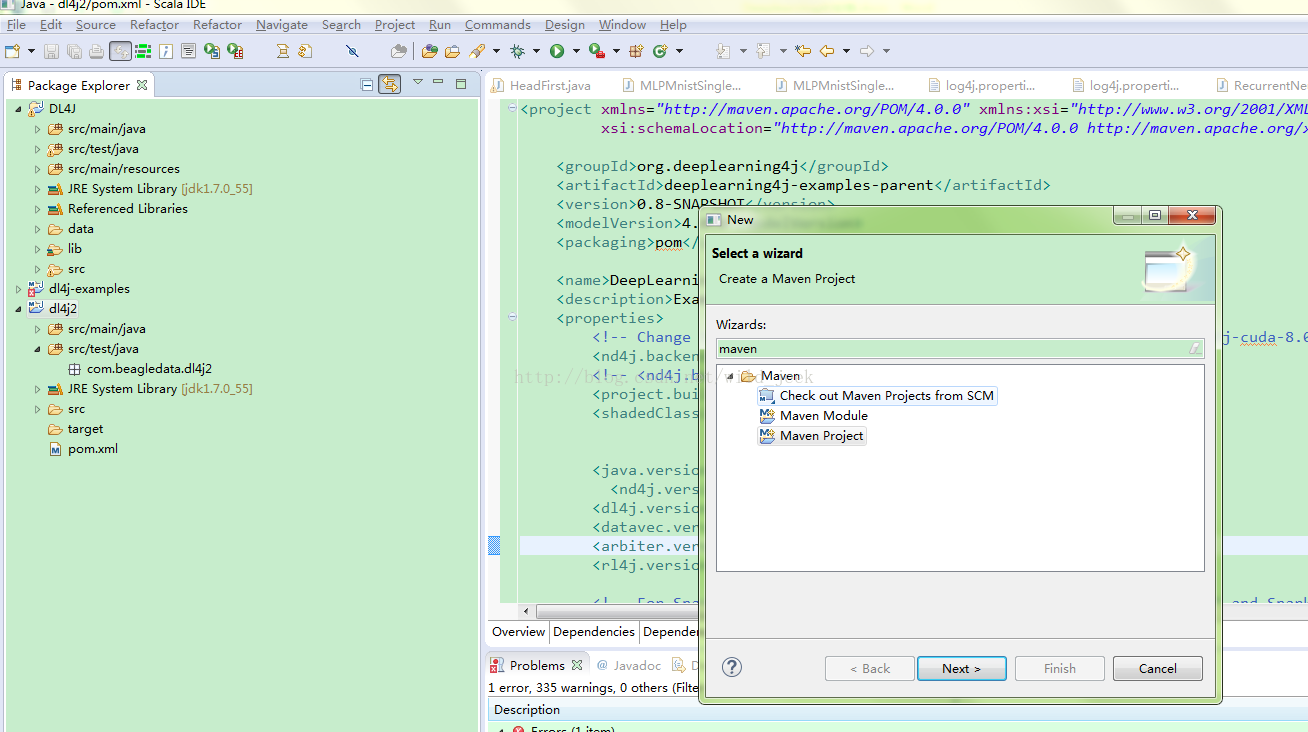
点击 Maven Preject next 选择maven-archtype-quickstart1.1 选择项输入grouptid : com.test ArtifactID :dl4j 点击finish
2. 修改pom文件
将下边pom内容复制到原来pom中 :
https://github.com/deeplearning4j/dl4j-examples/blob/master/pom.xml
pom中添加依赖:
- <dependencyManagement>
- <dependencies>
- <dependency>
- <groupId>org.nd4j</groupId>
- <artifactId>nd4j-native-platform</artifactId>
- <version>${nd4j.version}</version>
- </dependency>
- <dependency>
- <groupId>org.nd4j</groupId>
- <artifactId>nd4j-cuda-7.5-platform</artifactId>
- <version>${nd4j.version}</version>
- </dependency>
- <dependency>
- <groupId>org.nd4j</groupId>
- <artifactId>nd4j-cuda-8.0-platform</artifactId>
- <version>${nd4j.version}</version>
- </dependency>
- </dependencies>
- </dependencyManagement>
- <dependencies>
- <!-- ND4J backend. You need one in every DL4J project. Normally define
- artifactId as either "nd4j-native-platform" or "nd4j-cuda-7.5-platform" -->
- <dependency>
- <groupId>org.nd4j</groupId>
- <artifactId>${nd4j.backend}</artifactId>
- </dependency>
- <!-- Core DL4J functionality -->
- <dependency>
- <groupId>org.deeplearning4j</groupId>
- <artifactId>deeplearning4j-core</artifactId>
- <version>${dl4j.version}</version>
- </dependency>
- <dependency>
- <groupId>org.deeplearning4j</groupId>
- <artifactId>deeplearning4j-nlp</artifactId>
- <version>${dl4j.version}</version>
- </dependency>
- <!-- deeplearning4j-ui is used for HistogramIterationListener + visualization:
- see http://deeplearning4j.org/visualization -->
- <dependency>
- <groupId>org.deeplearning4j</groupId>
- <artifactId>deeplearning4j-ui_${scala.binary.version}</artifactId>
- <version>${dl4j.version}</version>
- </dependency>
- <!-- Force guava versions for using UI/HistogramIterationListener -->
- <dependency>
- <groupId>com.google.guava</groupId>
- <artifactId>guava</artifactId>
- <version>${guava.version}</version>
- </dependency>
- <!-- datavec-data-codec: used only in video example for loading video data -->
- <dependency>
- <artifactId>datavec-data-codec</artifactId>
- <groupId>org.datavec</groupId>
- <version>${datavec.version}</version>
- </dependency>
- <!-- Used in the feedforward/classification/MLP* and feedforward/regression/RegressionMathFunctions
- example -->
- <dependency>
- <groupId>jfree</groupId>
- <artifactId>jfreechart</artifactId>
- <version>${jfreechart.version}</version>
- </dependency>
- <dependency>
- <groupId>org.jfree</groupId>
- <artifactId>jcommon</artifactId>
- <version>${jcommon.version}</version>
- </dependency>
- <!-- Used for downloading data in some of the examples -->
- <dependency>
- <groupId>org.apache.httpcomponents</groupId>
- <artifactId>httpclient</artifactId>
- <version>4.3.5</version>
- </dependency>
- </dependencies>
3. 更新
右击项目名->Maven ->Update Project
DeepLearning4J 环境搭建【转】的更多相关文章
- .NET Core系列 : 1、.NET Core 环境搭建和命令行CLI入门
2016年6月27日.NET Core & ASP.NET Core 1.0在Redhat峰会上正式发布,社区里涌现了很多文章,我也计划写个系列文章,原因是.NET Core的入门门槛相当高, ...
- Azure Service Fabric 开发环境搭建
微服务体系结构是一种将服务器应用程序构建为一组小型服务的方法,每个服务都按自己的进程运行,并通过 HTTP 和 WebSocket 等协议相互通信.每个微服务都在特定的界定上下文(每服务)中实现特定的 ...
- rnandroid环境搭建
react-native 环境搭建具体步骤这个大家已经玩烂了,这个主要是记录下来自己做win7系统遇到的坑 1.com.android.ddmlib.installexception 遇到这个问题,在 ...
- python开发环境搭建
虽然网上有很多python开发环境搭建的文章,不过重复造轮子还是要的,记录一下过程,方便自己以后配置,也方便正在学习中的同事配置他们的环境. 1.准备好安装包 1)上python官网下载python运 ...
- springMVC初探--环境搭建和第一个HelloWorld简单项目
注:此篇为学习springMVC时,做的笔记整理. MVC框架要做哪些事情? a,将url映射到java类,或者java类的方法上 b,封装用户提交的数据 c,处理请求->调用相关的业务处理—& ...
- 【定有惊喜】android程序员如何做自己的API接口?php与android的良好交互(附环境搭建),让前端数据动起来~
一.写在前面 web开发有前端和后端之分,其实android还是有前端和后端之分.android开发就相当于手机app的前端,一般都是php+android或者jsp+android开发.androi ...
- Nexus(一)环境搭建
昨天,成功搭建了自己的 Maven 环境(详见:Maven(一)环境搭建),今天就来研究和探讨下 Nexus 的搭建! 使用背景: 安装环境:Windows 10 -64位 JDK版本:1.7 Mav ...
- 「译」JUnit 5 系列:环境搭建
原文地址:http://blog.codefx.org/libraries/junit-5-setup/ 原文日期:15, Feb, 2016 译文首发:Linesh 的博客:环境搭建 我的 Gith ...
- appium+robotframework环境搭建
appium+robotframework环境搭建步骤(Windows系统的appium自动化测试,只适用于测试安卓机:ios机需要在mac搭建appium环境后测试) 搭建步骤,共分为3部分: 一. ...
随机推荐
- 虚拟机中安装windows server 2008方法
我们简单的介绍一下怎么在虚拟机上安装 windows server 2008系统. 工具/原料 已经安装好的虚拟机. windows server 2008 iso系统镜像 方法/步骤1虚拟机上虚 ...
- 分布式锁tair redis zookeeper,安全性
tair分布式锁实现:https://yq.aliyun.com/articles/58928 redis分布式锁:https://www.cnblogs.com/jianwei-dai/p/6137 ...
- wordpress启动
wordpress启动 公司需要使用到wordpress 特意下载源码进行研究,才发现里面都是.php文件,需要运行php而不得不去配置运行环境 步骤如下 Wampserver32 使用的360安装的 ...
- Repeat a string repeat a string
重要的事情说3遍! 重复一个指定的字符串 num次,如果num是一个负数则返回一个空字符串. 这是一些对你有帮助的资源: Global String Object 这道题的思路就是按照题目要求一步一步 ...
- NPOI自定义单元格背景颜色
经常在NPOI群里聊天时发现有人在问NPOI设置单元格背景颜色的问题,而Tony Qu大神的博客里没有相关教程,刚好最近在做项目时研究了一下这一块,在这里总结一下. 在NPOI中默认的颜色类是HSSF ...
- 使用Eclipse EE(汉化版) 创建一个JavaWeb工程
第一步:打开eclipse ee,单击“文件”-->单击“新建”-->单击“动态Web项目”. 若没找到“动态Web项目”,单击“其他” -->在弹出的窗口中打开“Web”下拉菜单 ...
- LeetCode OJ:Word Pattern(单词模式)
Given a pattern and a string str, find if str follows the same pattern. Here follow means a full mat ...
- Django中构造响应对象的方式
1 HttpResponse 可以使用django.http.HttpResponse来构造响应对象. HttpResponse(content=响应体, content_type=响应体数据类型, ...
- 【HEVC学习与研究】29、解码第一个Coding Quadtree结构(1)
ctu tree属性 http://blog.csdn.net/shaqoneal/article/details/26088817
- SDKMAN 软件开发工具包管理器
SDKMAN 是用来在类Unix 系统中管理多个版本的开发环境的工具.提供命令行接口来安装.切换.删除.列出候选版本. SDKMAN!是在大多数基于Unix的系统上管理多个软件开发套件的并行版本的工具 ...