
php+bootstrap+jquery+mysql实现购物车项目案例
获取源码
一键三连后,评论区留下邮箱安排发送:)
介绍
使用php,bootstrap,jquery,mysql实现的简易购物车案例。
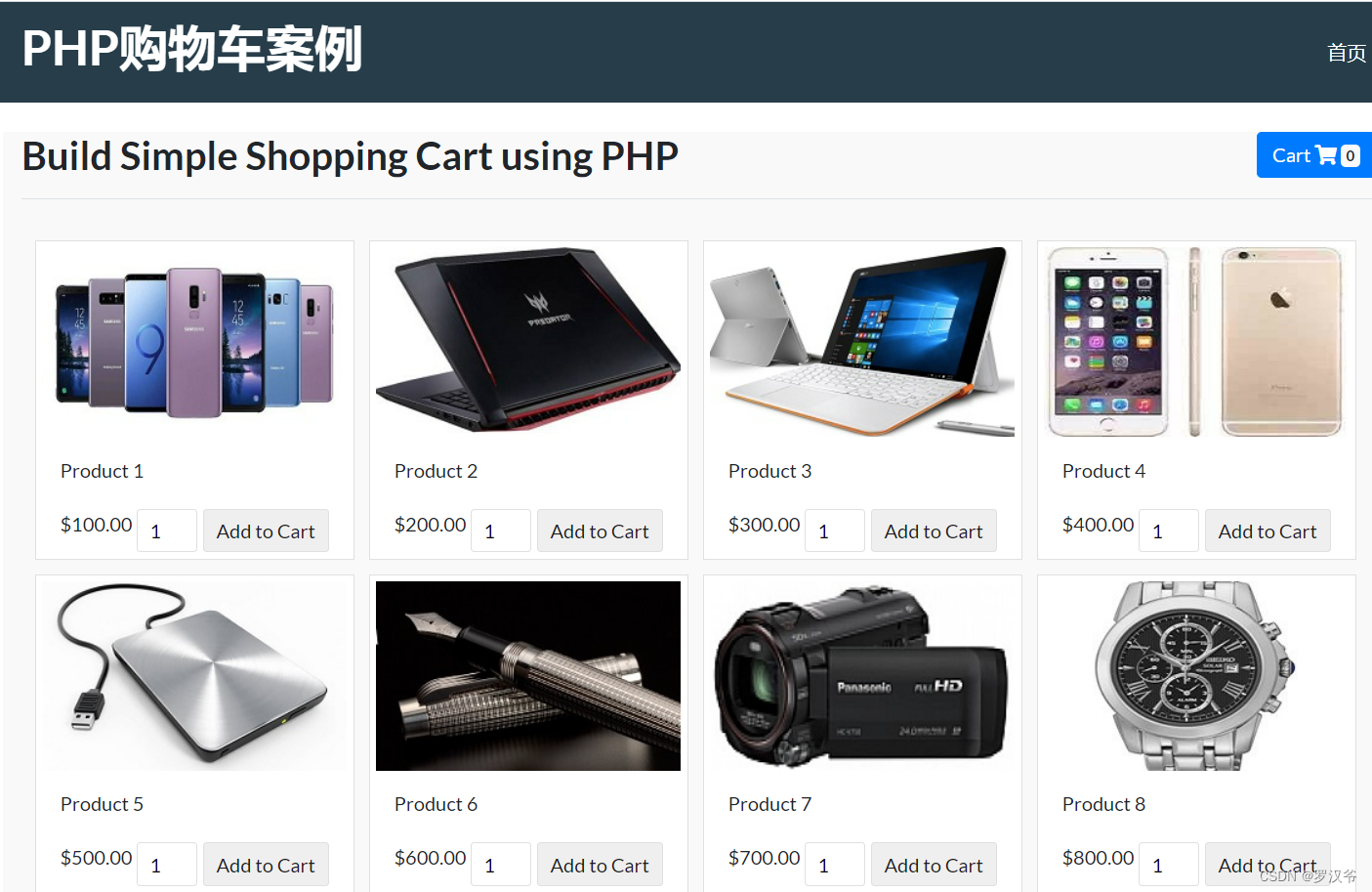

通过本案例,你将学习到以下知识点:
- php 操作 mysql 实现增删改查
- 掌握 php 常用数组函数
- 掌握 php $_session 对象使用
- 掌握 php 基本的面向对象编程知识
- 掌握 bootstrap 基本的布局和样式组件使用
技术栈
- php7.0+
- bootstrap4.0+
- jquery
- mysql5.7
开发步骤
只展示核心代码,完整项目请按文章开头说明获取。
项目概览
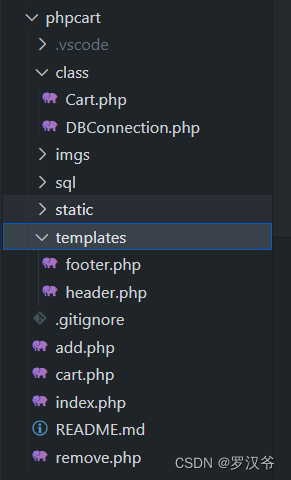
创建表结构
CREATE TABLE `products` (

	  `id` int(11) NOT NULL,

	  `name` varchar(255) NOT NULL,

	  `sku` varchar(255) NOT NULL,

	  `image` text NOT NULL,

	  `price` double(10,2) NOT NULL

	)
php连接mysql
class DBConnection {

    private $_dbHostname = "localhost";

    private $_dbName = "demo_DB";

    private $_dbUsername = "root";

    private $_dbPassword = "";

    private $_con;

    public function __construct() {

    	try {

        	$this->_con = new PDO("mysql:host=$this->_dbHostname;dbname=$this->_dbName", $this->_dbUsername, $this->_dbPassword);

        	$this->_con->setAttribute(PDO::ATTR_ERRMODE, PDO::ERRMODE_EXCEPTION);

	    } catch(PDOException $e) {

			echo "Connection failed: " . $e->getMessage();

		}

    }

    // return Connection

    public function returnConnection() {

        return $this->_con;

    }

}

?>
创建购物车类
class Cart

	{

	    protected $db;

	    private $_sku;

	    public function setSKU($sku) {

	        $this->_sku = $sku;

	    }

	    public function __construct() {

	        $this->db = new DBConnection();

	        $this->db = $this->db->returnConnection();

	    }

	    // getAll Product

	    public function getAllProduct() {

	    	try {

	    		$sql = "SELECT * FROM products";

			    $stmt = $this->db->prepare($sql);

			    $stmt->execute();

			    $result = $stmt->fetchAll(\PDO::FETCH_ASSOC);

	            return $result;

			} catch (Exception $e) {

			    die("Oh noes! There's an error in the query!");

			}

	    }

	    // get Student

	    public function getProduct() {

	    	try {

	    		$sql = "SELECT * FROM products WHERE sku=:sku";

			    $stmt = $this->db->prepare($sql);

			    $data = [

			    	'sku' => $this->_sku

				];

			    $stmt->execute($data);

			    $result = $stmt->fetch(\PDO::FETCH_ASSOC);

	            return $result;

			} catch (Exception $e) {

			    die("Oh noes! There's an error in the query!");

			}

	    }

	}
创建首页
<?php

session_start();

include('class/Cart.php');

$cart = new Cart();

$product_array = $cart->getAllProduct();

include('templates/header.php');

if(!empty($_SESSION["cart_item"])){

	$count = count($_SESSION["cart_item"]);

} else {

	$count = 0;

}

?>

<section class="showcase">

  <div class="container">

    <div class="pb-2 mt-4 mb-2 border-bottom">

      <h2>Build Simple Shopping Cart using PHP <a style="float: right;" href="cart.php" class="btn btn-primary text-right">  Cart <i class="fa fa-shopping-cart" aria-hidden="true"></i> <span class="badge badge-light" id="cart-count"><?php print $count; ?></span></a></h2>

    </div>

	<div class="row">

	<div class="col" id="add-item-bag" style="width:100%;"></div>

<div id="product-grid">

	<?php

	if (!empty($product_array)) {

		foreach($product_array as $key=>$value){

	?>

		<div class="product-item">

			<div class="product-image"><img src="<?php echo $product_array[$key]["image"]; ?>"></div>

			<div class="product-tile-footer">

			<div class="product-title"><?php echo $product_array[$key]["name"]; ?></div>

			<div class="product-price"><?php echo "$".$product_array[$key]["price"]; ?></div>

			<div class="cart-action">

			<input type="text" class="product-quantity" id="qty-<?php echo $product_array[$key]["id"]; ?>" name="quantity" value="1" size="2" />

			<button type="button" class="btnAddAction" data-itemid="<?php echo $product_array[$key]["id"]; ?>" id="product-<?php echo $product_array[$key]["id"]; ?>" data-action="action" data-sku="<?php echo $product_array[$key]["sku"]; ?>" data-proname="<?php echo $product_array[$key]["sku"]; ?>"> Add to Cart</button>

		</div>

			</div>

		</div>

	<?php

		}

	}

	?>

</div>

    </div>

</div>

</section>

<?php include('templates/footer.php');?>
添加购物车逻辑
<?php

	session_start();

	$json = array();

	include('class/Cart.php');

	$cart = new Cart();

	$cart->setSKU($_POST["sku"]);

	$productByCode = $cart->getProduct();

	if(!empty($_POST["quantity"])) {

		$itemArray = array($productByCode["sku"]=>array('name'=>$productByCode["name"], 'sku'=>$productByCode["sku"], 'quantity'=>$_POST["quantity"], 'price'=>$productByCode["price"], 'image'=>$productByCode["image"]));

		if(!empty($_SESSION["cart_item"])) {

			if(in_array($productByCode["sku"],array_keys($_SESSION["cart_item"]))) {

				foreach($_SESSION["cart_item"] as $k => $v) {

						if($productByCode["sku"] == $k) {

							if(empty($_SESSION["cart_item"][$k]["quantity"])) {

								$_SESSION["cart_item"][$k]["quantity"] = 0;

							}

							$_SESSION["cart_item"][$k]["quantity"] += $_POST["quantity"];

						}

				}

			} else {

				$_SESSION["cart_item"] = array_merge($_SESSION["cart_item"],$itemArray);

			}

		} else {

			$_SESSION["cart_item"] = $itemArray;

		}

		$json['count'] = count($_SESSION["cart_item"]);

	}

	header('Content-Type: application/json');

	echo json_encode($json);

	?>
删除购物车商品逻辑
	<?php

	session_start();

	$json = array();

	$total_quantity = 0;

	$total_price = 0;

	$count = 0;

	if(!empty($_SESSION["cart_item"]) && count($_SESSION["cart_item"])>0) {

		if(!empty($_SESSION["cart_item"])) {

			foreach($_SESSION["cart_item"] as $k => $v) {

					if($_POST["sku"] == $k)

						unset($_SESSION["cart_item"][$k]);

					if(empty($_SESSION["cart_item"]))

						unset($_SESSION["cart_item"]);

			}

		}

		$bindHTML = '';

		foreach ($_SESSION["cart_item"] as $item){

			$total_quantity += $item["quantity"];

			$total_price += ($item["price"]*$item["quantity"]);

		}

		$count = count($_SESSION["cart_item"]);

		$json['total_quantity'] = $total_quantity;

		$json['total_price'] = number_format($total_price, 2);

		$json['count'] = $count;

	}

	header('Content-Type: application/json');

	echo json_encode($json);

	?>
部署方式
- 安装 php 运行环境,例如:使用 phpstudy
- 将文件夹
phpcart复制到 apache 网站运行目录,例如:D:\program\phpstudy_pro\WWW - phpstudy 中配置网站运行目录和端口
- 修改文件
class\DBConnection.php中数据库信息 - 创建数据库
phpcart导入 sql 文件sql/phpcart.sql - 打开谷歌浏览器,访问路径:
http://localhost:8082/phpcart/cart.php
php+bootstrap+jquery+mysql实现购物车项目案例的更多相关文章
- 使用Jquery+EasyUI 进行框架项目开发案例讲解之五 模块(菜单)管理源码分享
http://www.cnblogs.com/huyong/p/3454012.html 使用Jquery+EasyUI 进行框架项目开发案例讲解之五 模块(菜单)管理源码分享 在上四篇文章 ...
- 使用Jquery+EasyUI 进行框架项目开发案例讲解之四 组织机构管理源码分享
http://www.cnblogs.com/huyong/p/3404647.html 在上三篇文章 <使用Jquery+EasyUI进行框架项目开发案例讲解之一---员工管理源码分享> ...
- 使用Jquery+EasyUI 进行框架项目开发案例讲解之三---角色管理源码分享
使用Jquery+EasyUI 进行框架项目开发案例讲解之三 角色管理源码分享 在上两篇文章 <使用Jquery+EasyUI进行框架项目开发案例讲解之一---员工管理源码分享> ...
- 使用Jquery+EasyUI 进行框架项目开发案例讲解之二---用户管理源码分享
使用Jquery+EasyUI 进行框架项目开发案例讲解之二 用户管理源码分享 在上一篇文章<使用Jquery+EasyUI进行框架项目开发案例讲解之一---员工管理源码分享>我们分享 ...
- 【推荐】使用Jquery+EasyUI进行框架项目开发案例讲解之一---员工管理源码分享
使用Jquery+EasyUI 进行框架项目开发案例讲解之一 员工管理源码分享 在开始讲解之前,我们先来看一下什么是Jquery EasyUI?jQuery EasyUI是一组基于jQuery的U ...
- 使用Jquery+EasyUI进行框架项目开发案例解说之中的一个---员工管理源代码分享
使用Jquery+EasyUI 进行框架项目开发案例解说之中的一个 员工管理源代码分享 在開始解说之前,我们先来看一下什么是Jquery EasyUI?jQuery EasyUI是一组基于jQuery ...
- 使用Jquery+EasyUI 进行框架项目开发案例解说之二---用户管理源代码分享
使用Jquery+EasyUI 进行框架项目开发案例解说之二 用户管理源代码分享 在上一篇文章<使用Jquery+EasyUI进行框架项目开发案例解说之中的一个---员工管理源代码分享> ...
- 使用Jquery+EasyUI进行框架项目开发案例讲解之一---员工管理源码分享
使用Jquery+EasyUI进行框架项目开发案例讲解之一---员工管理源码分享 使用Jquery+EasyUI 进行框架项目开发案例讲解之一 员工管理源码分享 在开始讲解之前,我们先来看一下什 ...
- (转)使用Jquery+EasyUI 进行框架项目开发案例讲解之四---组织机构管理源码分享
原文地址:http://www.cnblogs.com/huyong/p/3404647.html 在上三篇文章 <使用Jquery+EasyUI进行框架项目开发案例讲解之一---员工管理源码 ...
- (转)使用Jquery+EasyUI进行框架项目开发案例讲解之一---员工管理源码分享
原文地址:http://www.cnblogs.com/huyong/archive/2013/09/24/3334848.html 使用Jquery+EasyUI 进行框架项目开发案例讲解之一 员工 ...
随机推荐
- 【css】 text-align 居中导航
原理 :利用 inline-block 将 导航 作为 文本 , 被外层具有 text-align 属性的导航盒子包含 .从而实现居中效果 1. html 结构 <header> < ...
- apicloud(沉浸式导航篇) - 手机状态栏 有黑边的解决办法
在 index.html 的 apiready 中加上 第一种 : 可设置全屏 api.setFullScreen({ fullScreen: true }); 第二种:设置状 ...
- 一次异常OOM问题学习跟踪的过程
摘要 春节后第一周一个项目出现了OOM的问题. 平台研发和产品研发跟踪了接近一周的时间也没有最终确认问题根因. 这里总结一下整个过程, 希望以后在遇到相同问题时会有进一步的结论. 产品的稳定运行离不开 ...
- [转帖]HTTP2 Sampler for JMeter
https://www.cnblogs.com/a00ium/p/10462572.html 今天开发大大说能不能帮忙压一下HTTP2的链接,便去查了一下相关的东西. HTTP 2.0 的出现,相比于 ...
- [转帖]Docker限制容器的资源
docker在默认运行容器的情况下,是不会对运行的容器进行资源限制的,在自己的实验环境的话是随便你怎么弄的,不过在生产中是一定会对docker运行的容器进行资源限制的,如果不限制的话在生产中会带来 ...
- github-keydb 知识
https://github.com/Snapchat/KeyDB KeyDB is now a part of Snap Inc! Check out the announcement here R ...
- 行云部署成长之路--慢SQL优化之旅 | 京东云技术团队
当项目的SQL查询慢得像蜗牛爬行时,用户的耐心也在一点点被消耗,作为研发,我们可不想看到这样的事.这篇文章将结合行云部署项目的实践经验,带你走进SQL优化的奇妙世界,一起探索如何让那些龟速的查询飞 ...
- Skia 编译及踩坑实践
本文要点 •了解并入门 Skia.OpenGL 和 Vulkan •了解 Skia 在后端渲染上的坑点 前言 Skia 是什么 Skia 是一个开源 2D 图形库,提供可跨各种硬件和软件平台工作的通用 ...
- vue3中provide和inject的使用
1.provide 和 inject 的讲解 provide和inject可以实现嵌套组件之间进行传递数据. 这两个函数都是在setup函数中使用的. 父级组件使用provide向下进行传递数据: 子 ...
- MongoDB 选型介绍
什么是 MongoDB 前言 MongoDB 的主要特性 MongoDB 对比关系型数据库 MySQL 什么时候考虑 MongoDB 参考 什么是 MongoDB 前言 MongoDB 是一个开源.高 ...