
1、安装gitlab
1、安装Gitlab
Gitlab分为社区版和企业版(收费),这里安装的是ce社区版本
方式一:
Gitlab官方有提供好的rpm包仓库,所以采用yum安装即可。
[root@localhost ~]# curl -s https://packages.gitlab.com/install/repositories/gitlab/gitlab-ce/script.rpm.sh | sudo bash #添加yum源
[root@localhost ~]# yum makecache #更新yum缓存
[root@localhost ~]# yum install gitlab-ce #默认安装最新版;还可以yum install gitlab-ce-x.x.x指定版本来安装
方式二:
如果官方提供的源下载比较慢,可以采用国内镜像源如清华的(https://mirrors.tuna.tsinghua.edu.cn/gitlab-ce/yum/el7/)来安装
[root@localhost ~]# vim /etc/yum.repos.d/gitlab-ce.repo
[gitlab-ce]
name=Gitlab
baseurl=https://mirrors.tuna.tsinghua.edu.cn/gitlab-ce/yum/el$releasever/
gpgcheck=0
enabled=1
[root@localhost ~]# yum makecache
[root@localhost ~]# yum -y install
gitlab-ce
gitlab主要目录:
/var/opt/gitlab/git-data/repositories/:库默认存储目录
/opt/gitlab/:应用代码和相应的依赖程序
/var/opt/gitlab/:gitlab-ctl reconfigure命令编译后的应用数据和配置文件,不需要人为修改配置
/etc/gitlab:配置文件目录
/var/log/gitlab:此目录下存放了gitlab各个组件产生的日志
/var/opt/gitlab/backups/:备份文件生成的目录
2、修改配置
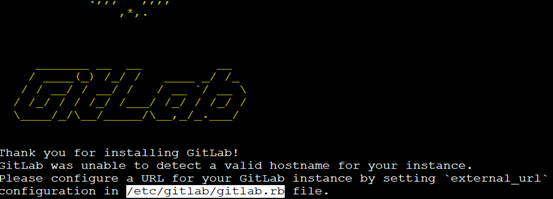
安装后,按照提示修改配置文件中的url地址为本地服务器的地址:
[root@localhost ~]# vim
/etc/gitlab/gitlab.rb
external_url
'http://192.168.100.161'
[root@localhost ~]#
gitlab-ctl reconfigure #重新加载配置
浏览器访问:
浏览器访问,第一次登录需要设置密码(不小于8位),登陆用户名为root
gitlab常用命令:
gitlab-ctl start # 启动所有 gitlab 组件;
gitlab-ctl stop # 停止所有 gitlab 组件;
gitlab-ctl restart # 重启所有 gitlab 组件;
gitlab-ctl
reconfigure # 启动服务;
vim /etc/gitlab/gitlab.rb
# 修改默认的配置文件;
gitlab-rake gitlab:check
SANITIZE=true --trace # 检查gitlab;
gitlab-ctl status # 查看服务状态;
gitlab-ctl tail nginx # 查看日志;
1、安装gitlab的更多相关文章
- CentOS安装gitlab,gerrit,jenkins并配置ci流程
CentOS安装gitlab,gerrit,jenkins并配置ci流程 By Wenbin juandx@163.com 2016/4/9 这是我参考了网上很多的文档,配置了这三个软件在一个机器上, ...
- CentOS安装gitLab服务器
首先利用gitlab-install-el6.sh安装,比较简单: (出处:http://www.linuxidc.com/Linux/2013-06/85754.htm) 1:如果有条件,提供一台全 ...
- Centos6安装Gitlab
安装参考 https://about.gitlab.com/downloads/ 可以从清华的镜像下载安装包, 注意区分自己用的是哪个发行版 https://mirror.tuna.tsinghua. ...
- centos 6.5 6.6 6.7安装gitlab教程(社区版)
简单的说安装gitlab就两种办法主要介绍第一种:官网推荐的方法: 1.新建yum源 新建 /etc/yum.repos.d/gitlab-ce.repo,内容为 [gitlab-ce] name=g ...
- Mac安装GitLab CE记录
0 REF REF1 原始的GitLab Documentation REF2 Installation-guide-for-GitLab-on-OS-X REF3 如何在Mac 终端升级ruby版本 ...
- Docker安装Gitlab
一.Ubuntu16.4上Docker安装Gitlab 1.安装docker 参见:https://docs.docker.com/engine/installation/linux/ubuntuli ...
- centos 6.5安装GitLab全过程和问题记录
GitLab,是一个使用 Ruby on Rails 开发的开源应用程序,与Github类似,能够浏览源代码,管理缺陷和注释,非常适合在团队内部使用. 官方只提供了Debian/Ubuntu系统下的安 ...
- Ubuntu 14.04下安装GitLab指南
摘要 GitLab 是一个用于仓库管理系统的开源项目.使用Git作为代码管理工具,并在此基础上搭建起来的web服务. 在GitLab的官方网站上面对Ubuntu的支持也是很好的,有比较详尽的安装指南. ...
- ubuntu 16.04.2 源码安装gitlab并且利用runner持续集成
参考原档:https://gitlab.com/gitlab-org/gitlab-ce/blob/master/doc/install/installation.md#using-https 本章只 ...
- Ubuntu Docker 简单安装 GitLab
相关博文: Ubuntu 简单安装 Docker Ubuntu 简单安装和配置 GitLab 服务器版本 Ubuntu 16.04 LTS. 1. 安装和配置 安装命令: sudo docker ru ...
随机推荐
- Android开发之adt bundle安装
这个学期开了一门手机游戏开发的课,所以就接触到了adt bundle,Android开发环境有三种方式,分别是JDK+SDK+Eclipse+ADT.JDK+adt-bundle与JDK+Androi ...
- 黑龙江大学图书馆抢座python
2019.11.01 增加成功发送QQ邮件. 2019.10.31更新 晚上测试成功 ========================== 昨晚肝了一晚上,今天已经写出成品并且部署到服务器上了,代码很 ...
- [Contract] Solidity 判断 mapping 值的存在
比如 mapping(address => uint) tester,只需要判断 mapping 是否为默认值 0, tester[msg.sender] == 0 "You can ...
- 《C++Primer》第五版习题答案--第六章【学习笔记】
<C++Primer>第五版习题答案--第六章[学习笔记] ps:答案是个人在学习过程中书写,可能存在错漏之处,仅作参考. 作者:cosefy Date: 2020/1/16 第六章:函数 ...
- PHP Strings
<?php //1. how to use mail function //create short variable names $name=$_POST['name']; $email=$_ ...
- Codeforces Round #622(Div 2)C2. Skyscrapers (hard version)
题目链接 : C2. Skyscrapers (hard version) 题目描述 : 与上一道题类似,只是数据范围变大, 5e5, 如果用我们原来的方法,铁定是超时的. 考察点 : 单调栈,贪心, ...
- java简单验证码生成程序
下面的函数,返回的字符串就是所需验证码 public String id(){ Random ra =new Random(); st=""; String [] w= {&quo ...
- linux(服务器)如何确认网卡(网口)对应的配置文件
服务器装完系统就要配置网络,然而服务器经常是多网卡多网口,我们在某个网口插上网线后,到/etc/sysconfig/network-scripts/下配置ip时无法确定网口对应的配置文件.(比如是et ...
- 【学习笔记】BP神经网络
转自 huaweizte123的CSDN博客 链接 https://blog.csdn.net/huaweizte123/article/details/78803045 第一步.向前传播得到预测数 ...
- Building a Space Station POJ - 2031 三维最小生成树,其实就是板子题
#include<iostream> #include<cmath> #include<algorithm> #include<cstdio> usin ...