
springboot web - 启动(2) run()
接上一篇
在创建 SpringApplication 之后, 调用了 run() 方法.
public ConfigurableApplicationContext run(String... args) {

  //定时器, 监控启动时间

    StopWatch stopWatch = new StopWatch();

    stopWatch.start();

    ConfigurableApplicationContext context = null;

    Collection<SpringBootExceptionReporter> exceptionReporters = new ArrayList<>();

    //java.awt.headless是一种模式用于在缺少显示屏、键盘或者鼠标时的系统配置,很多监控工具如jconsole 需要将该值设置为true,系统变量默认为true

    configureHeadlessProperty();

    //从 spring.factories 配置中获取监听器

    SpringApplicationRunListeners listeners = getRunListeners(args);

   //启动监听器

    listeners.starting();

    try {

     //对 args 进行封装, 此处args 是 {}

        ApplicationArguments applicationArguments = new DefaultApplicationArguments(

                args);

        //构造容器环境

        ConfigurableEnvironment environment = prepareEnvironment(listeners,

                applicationArguments);

        //设置需要忽略的bean

        configureIgnoreBeanInfo(environment);

        //打印banner

        Banner printedBanner = printBanner(environment);

        //创建容器, 此处创建的是 AnnotationConfigServletWebServerApplicationContext

        context = createApplicationContext();

        //实例化SpringBootExceptionReporter.class,用来支持报告关于启动的错误

        exceptionReporters = getSpringFactoriesInstances(

                SpringBootExceptionReporter.class,

                new Class[] { ConfigurableApplicationContext.class }, context);

        //准备容器

        prepareContext(context, environment, listeners, applicationArguments,

                printedBanner);

        //刷新容器

        refreshContext(context);

        //刷新容器后的扩展接口

        afterRefresh(context, applicationArguments);

        stopWatch.stop();

        if (this.logStartupInfo) {

            new StartupInfoLogger(this.mainApplicationClass)

                    .logStarted(getApplicationLog(), stopWatch);

        }
     //遍历调用监听器的started()方法, 发布 ApplicationStartedEvent 事件

        listeners.started(context);

        callRunners(context, applicationArguments);

    }

    catch (Throwable ex) {

        handleRunFailure(context, ex, exceptionReporters, listeners);

        throw new IllegalStateException(ex);

    }

    try {
     //遍历调用监听器的 running() 方法, 发布 ApplicationReadyEvent 事件

        listeners.running(context);

    }

    catch (Throwable ex) {

        handleRunFailure(context, ex, exceptionReporters, null);

        throw new IllegalStateException(ex);

    }

    return context;

}
configureHeadlessProperty()
private static final String SYSTEM_PROPERTY_JAVA_AWT_HEADLESS = "java.awt.headless";

private boolean headless = true;

private void configureHeadlessProperty() {

    System.setProperty(SYSTEM_PROPERTY_JAVA_AWT_HEADLESS, System.getProperty(

            SYSTEM_PROPERTY_JAVA_AWT_HEADLESS, Boolean.toString(this.headless)));

}
这里会默认设置为 true.
getRunListeners()
private SpringApplicationRunListeners getRunListeners(String[] args) {

    Class<?>[] types = new Class<?>[] { SpringApplication.class, String[].class };

    return new SpringApplicationRunListeners(logger, getSpringFactoriesInstances(

            SpringApplicationRunListener.class, types, this, args));

}
这里是获取配置的监听器, 并封装到 SpringApplicationRunListeners 了中的 this.liseners 属性中.
这里获取到的是: org.springframework.boot.context.event.EventPublishingRunListener
listeners 这块内容比较多, 放在后面去详细解析
prepareEnvironment()
private ConfigurableEnvironment prepareEnvironment(

        SpringApplicationRunListeners listeners,

        ApplicationArguments applicationArguments) {

    //根据webApplicationType, 创建运行环境, 此处创建的是 StandardServletEnviroment

    ConfigurableEnvironment environment = getOrCreateEnvironment();

   //配置环境

    configureEnvironment(environment, applicationArguments.getSourceArgs());

   //给监听器设置环境,遍历监听器,调用其 enviromentParepared() 方法,发布环境已准备事件

    listeners.environmentPrepared(environment);

    bindToSpringApplication(environment);

    if (this.webApplicationType == WebApplicationType.NONE) {

        environment = new EnvironmentConverter(getClassLoader())

                .convertToStandardEnvironmentIfNecessary(environment);

    }

    ConfigurationPropertySources.attach(environment);

    return environment;

}
configureIgnoreBeanInfo()
public static final String IGNORE_BEANINFO_PROPERTY_NAME = "spring.beaninfo.ignore";

private void configureIgnoreBeanInfo(ConfigurableEnvironment environment) {

    if (System.getProperty(

            CachedIntrospectionResults.IGNORE_BEANINFO_PROPERTY_NAME) == null) {

        Boolean ignore = environment.getProperty("spring.beaninfo.ignore",

                Boolean.class, Boolean.TRUE);

        System.setProperty(CachedIntrospectionResults.IGNORE_BEANINFO_PROPERTY_NAME,

                ignore.toString());

    }

}
默认设置 spring.beaninfo.ignore 为 true
printBanner()
private Banner printBanner(ConfigurableEnvironment environment) {

    if (this.bannerMode == Banner.Mode.OFF) {

        return null;

    }

    ResourceLoader resourceLoader = (this.resourceLoader != null ? this.resourceLoader

            : new DefaultResourceLoader(getClassLoader()));

    SpringApplicationBannerPrinter bannerPrinter = new SpringApplicationBannerPrinter(

            resourceLoader, this.banner);

    if (this.bannerMode == Mode.LOG) {

        return bannerPrinter.print(environment, this.mainApplicationClass, logger);

    }

    return bannerPrinter.print(environment, this.mainApplicationClass, System.out);

}
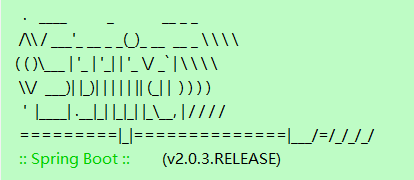
这里是打印 banner , 在 application.yml 中, 加入配置
spring:

    main:

        banner-mode: "off"
可以关闭 banner 打印, 当然这里也可以自定义自己的 banner . 可有可无的功能, 不去管它. 打印就打印吧.
createApplicationContext()
public static final String DEFAULT_WEB_CONTEXT_CLASS = "org.springframework.boot."

            + "web.servlet.context.AnnotationConfigServletWebServerApplicationContext";

public static final String DEFAULT_REACTIVE_WEB_CONTEXT_CLASS = "org.springframework."

            + "boot.web.reactive.context.AnnotationConfigReactiveWebServerApplicationContext";

public static final String DEFAULT_CONTEXT_CLASS = "org.springframework.context."

            + "annotation.AnnotationConfigApplicationContext";

protected ConfigurableApplicationContext createApplicationContext() {

    Class<?> contextClass = this.applicationContextClass;

    if (contextClass == null) {

        try {

            switch (this.webApplicationType) {

            case SERVLET:

                contextClass = Class.forName(DEFAULT_WEB_CONTEXT_CLASS);

                break;

            case REACTIVE:

                contextClass = Class.forName(DEFAULT_REACTIVE_WEB_CONTEXT_CLASS);

                break;

            default:

                contextClass = Class.forName(DEFAULT_CONTEXT_CLASS);

            }

        }

        catch (ClassNotFoundException ex) {

            throw new IllegalStateException(

                    "Unable create a default ApplicationContext, "

                            + "please specify an ApplicationContextClass",

                    ex);

        }

    }

    return (ConfigurableApplicationContext) BeanUtils.instantiateClass(contextClass);

}
根据环境类型, 创建 ApplicationContext 对象 : AnnotationConfigServletWebServerApplicationContext
prepareContext()
private void prepareContext(ConfigurableApplicationContext context,

        ConfigurableEnvironment environment, SpringApplicationRunListeners listeners,

        ApplicationArguments applicationArguments, Banner printedBanner) {

    context.setEnvironment(environment);

    //容器的后置处理

    postProcessApplicationContext(context);

    //对this.initializers中存放的类进行初始化操作, 调用其initialize()方法

    applyInitializers(context);

    //遍历监听器, 调用其 contextPrepared() 方法, 进行容器准备好的操作, 此处为空操作, 留给子类重写扩展

    listeners.contextPrepared(context);

    //日志打印

    if (this.logStartupInfo) {

        logStartupInfo(context.getParent() == null);

        logStartupProfileInfo(context);

    }

    // Add boot specific singleton beans

    context.getBeanFactory().registerSingleton("springApplicationArguments",

            applicationArguments);

    if (printedBanner != null) {

        context.getBeanFactory().registerSingleton("springBootBanner", printedBanner);

    }

    //拿this.primarySources + this.sources, 此处拿到的是SbmvcApplication

    Set<Object> sources = getAllSources();

    Assert.notEmpty(sources, "Sources must not be empty");

    //将SbmvcApplication注册到容器里

    load(context, sources.toArray(new Object[0]));

    //遍历监听器, 调用其contextLoaded()方法, 进行容器加载后的操作

    listeners.contextLoaded(context);

}
refreshContext()
private void refreshContext(ConfigurableApplicationContext context) {

    refresh(context);

    if (this.registerShutdownHook) {

        try {

            context.registerShutdownHook();

        }

        catch (AccessControlException ex) {

            // Not allowed in some environments.

        }

    }

}

protected void refresh(ApplicationContext applicationContext) {

    Assert.isInstanceOf(AbstractApplicationContext.class, applicationContext);

    ((AbstractApplicationContext) applicationContext).refresh();

}

@Override

public void refresh() throws BeansException, IllegalStateException {

    synchronized (this.startupShutdownMonitor) {

        // Prepare this context for refreshing.

        prepareRefresh();

        // Tell the subclass to refresh the internal bean factory.

        ConfigurableListableBeanFactory beanFactory = obtainFreshBeanFactory();

        // Prepare the bean factory for use in this context.

        prepareBeanFactory(beanFactory);

        try {

            // Allows post-processing of the bean factory in context subclasses.

            postProcessBeanFactory(beanFactory);

            // Invoke factory processors registered as beans in the context.

            invokeBeanFactoryPostProcessors(beanFactory);

            // Register bean processors that intercept bean creation.

            registerBeanPostProcessors(beanFactory);

            // Initialize message source for this context.

            initMessageSource();

            // Initialize event multicaster for this context.

            initApplicationEventMulticaster();

            // Initialize other special beans in specific context subclasses.

            onRefresh();

            // Check for listener beans and register them.

            registerListeners();

            // Instantiate all remaining (non-lazy-init) singletons.

            finishBeanFactoryInitialization(beanFactory);

            // Last step: publish corresponding event.

            finishRefresh();

        }

        catch (BeansException ex) {

            if (logger.isWarnEnabled()) {

                logger.warn("Exception encountered during context initialization - " +

                        "cancelling refresh attempt: " + ex);

            }

            // Destroy already created singletons to avoid dangling resources.

            destroyBeans();

            // Reset 'active' flag.

            cancelRefresh(ex);

            // Propagate exception to caller.

            throw ex;

        }

        finally {

            // Reset common introspection caches in Spring's core, since we

            // might not ever need metadata for singleton beans anymore...

            resetCommonCaches();

        }

    }

}
这里执行的内容非常多, 不在此解析了.
afterRefresh()
protected void afterRefresh(ConfigurableApplicationContext context,

        ApplicationArguments args) {

}
这里是一个空方法, 可以留个子类重写, 进行扩展操作
callRunners()
private void callRunners(ApplicationContext context, ApplicationArguments args) {

    List<Object> runners = new ArrayList<>();

    runners.addAll(context.getBeansOfType(ApplicationRunner.class).values());

    runners.addAll(context.getBeansOfType(CommandLineRunner.class).values());

    AnnotationAwareOrderComparator.sort(runners);

    for (Object runner : new LinkedHashSet<>(runners)) {

        if (runner instanceof ApplicationRunner) {

            callRunner((ApplicationRunner) runner, args);

        }

        if (runner instanceof CommandLineRunner) {

            callRunner((CommandLineRunner) runner, args);

        }

    }

}
执行到这里是, 容器里面还没有哪两个类, 所以 runners.size() = 0. 没有执行什么逻辑.
总结:
run() 方法主要进行了以下几个操作
1. 获取并启动了监听器, 发布了 容器启动事件(ApplicationStartingEvent )
2. 构造容器环境
3. 创建容器
4. 实例化 SpringBootExceptionReporter , 用来支持报告关于启动的错误
5. 准备容器
6. 刷新容器
7. 执行刷新完容器的操作(暂时为空操作)
8. 发布了 容器启动完成事件(ApplicationStartedEvent)
9. 发布了 容器已准备好事件(ApplicationReadyEvent), 如果执行失败, 则会发布容器失败事件(ApplicationFailedEvent)
springboot web - 启动(2) run()的更多相关文章
- springboot web - 启动(1) 创建SpringApplication
一. 测试代码 @SpringBootApplication public class SbmvcApplication { public static void main(String[] args ...
- springboot web - 启动(4) tomcat
接第二篇 第二篇里面, 看到容器创建的是 AnnotationConfigServletWebServerApplicationContext 类型. 一 .类图 二. 构造 public Gener ...
- springboot web开发【转】【补】
pom.xml引入webjars的官网 https://www.webjars.org/ https://www.thymeleaf.org/doc/tutorials/3.0/usingthymel ...
- springboot:非web启动
需要运行一些调度任务,但是又不想放到web容器中运行. 见红色代码: import java.util.concurrent.ThreadPoolExecutor; import org.spring ...
- springboot之启动原理解析
前言 SpringBoot为我们做的自动配置,确实方便快捷,但是对于新手来说,如果不大懂SpringBoot内部启动原理,以后难免会吃亏.所以这次博主就跟你们一起一步步揭开SpringBoot的神秘面 ...
- Springboot 项目启动后执行某些自定义代码
Springboot 项目启动后执行某些自定义代码 Springboot给我们提供了两种"开机启动"某些方法的方式:ApplicationRunner和CommandLineRun ...
- SpringBoot的启动流程分析(1)
通过分析我们可以找到 org.springframework.boot.SpringApplication 中如下, public static ConfigurableApplicationCont ...
- 深入理解SpringBoot之启动探究
SpringApplication是SpringBoot的启动程序,我们通过它的run方法可以快速启动一个SpringBoot应用.可是这里面到底发生了什么?它是处于什么样的机制简化我们程序启动的?接 ...
- java框架之SpringBoot(10)-启动流程及自定义starter
启动流程 直接从 SpringBoot 程序入口的 run 方法看起: public static ConfigurableApplicationContext run(Object source, ...
随机推荐
- WeChall_Enlightment (Encoding)
解题: 刚开始一看这题就蒙逼了,完全没思路,过了几天后再仔细去想想,应该是二进制的ascii码,但是原来的三张图虽然都是8的倍数,但完全转换不成有用的东西,题目的意思能否找到光,百度了一下关于三原色的 ...
- Dapper系列 作者:懒懒的程序员一枚
Dapper 第一篇简单介绍什么是小巧玲珑?Dapper如何工作安装需求方法参数结果常用类型 Dapper 第二篇 Execute 方法介绍描述存储过程Insert语句Update语句Delete语句 ...
- who 命令
1)显示系统启动时间 [root@node1 ~]# who -b 系统引导 2020-01-10 11:41 2)显示系统当前的运行级别 [root@node1 ~]# who -r 运行级别 3 ...
- One Stage目标检测
在计算机视觉中,目标检测是一个难题.在大型项目中,首先需要先进行目标检测,得到对应类别和坐标后,才进行之后的各种分析.如人脸识别,通常是首先人脸检测,得到人脸的目标框,再对此目标框进行人脸识别.如果该 ...
- Centos 下设置静态ip地址
今天小编遇到了需要设置centos(6.4) 下静态ip地址,下面把详细步骤记录下来. 1> 首先打开这个 vi /etc/sysconfig/network-scripts/ifcfg- ...
- this的使用情况
this的几种使用情况 1.在普通函数内部,this指向的是window,在严格模式下,this的值是undefined function fun(){ console.log(this); } fu ...
- 2019SACC中国系统架构师大会 day1总结
早上:一. 爱奇艺的大数据中台战略: a) 介绍爱奇艺的产业文化.b) 通过大中台,可以进行部分数据的沉淀,用于后续的分析处理等等.. 从数据中台和业务中台,建立一种“苹果园“的生态系统.从原始的长视 ...
- postfix 被当作垃圾邮件中转站
磁盘 io 总是满的状态 该服务器只有监控和邮件elk在上面. 发现邮件日志 疯狂的输出 tail -f /var/log/maillog 大致都是来自于 yahoo.com.tw的东西 清空了 /v ...
- Vscode开发Python环境安装
VSCode 开发 Python 使用python,主要是做一些工具和爬虫的操作,语法简单,功能复杂,入手很快. 我们通过在 VSCode 中搜索 Python 插件,发现,开发 python 的话, ...
- 搭建fastdfs文件服务器
一.安装FastDFS环境 1.跟踪服务器(Tracker Server) tracker1:192.168.2.134 tracker2:192.168.2.135 2.存储服务器(Storage ...