
Flume-日志聚合
Flume-1 监控文件 /tmp/tomcat.log。
Flume-2 监控某一个端口的数据流。
Flume-1 与 Flume-2 将数据发送给 Flume-3,Flume-3 将最终数据打印到控制台。
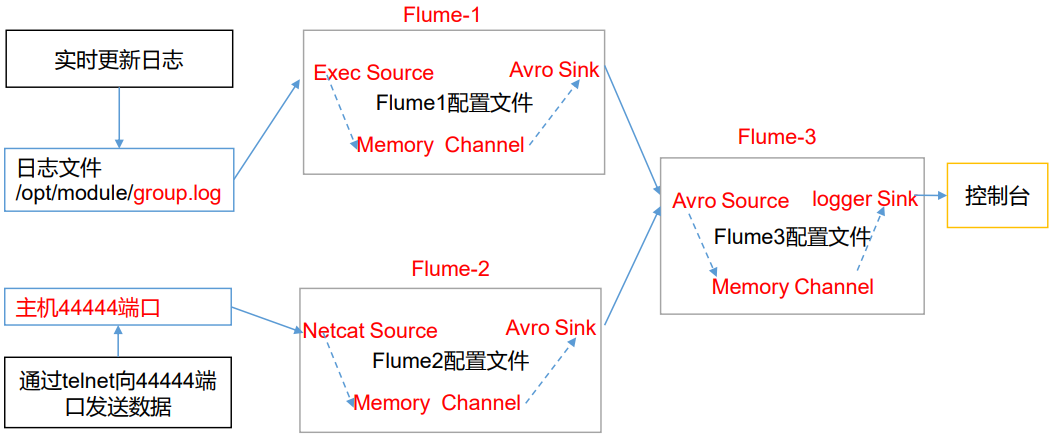
一、创建配置文件
1.flume1-logger-flume.conf
配置 Source 用于监控 hive.log 文件,配置 Sink 输出数据到下一级 Flume。
# Name the components on this agent

a1.sources = r1

a1.sinks = k1

a1.channels = c1

# Describe/configure the source

a1.sources.r1.type = exec

a1.sources.r1.command = tail -F /tmp/tomcat.log

a1.sources.r1.shell = /bin/bash -c

# Describe the sink

a1.sinks.k1.type = avro

a1.sinks.k1.hostname = h136

a1.sinks.k1.port = 4141

# Describe the channel

a1.channels.c1.type = memory

a1.channels.c1.capacity = 1000

a1.channels.c1.transactionCapacity = 100

# Bind the source and sink to the channel

a1.sources.r1.channels = c1

a1.sinks.k1.channel = c1
2.flume2-netcat-flume.conf
配置 Source 监控端口 44444 数据流,配置 Sink 数据到下一级 Flume。
# Name the components on this agent

a2.sources = r1

a2.sinks = k1

a2.channels = c1

# Describe/configure the source

a2.sources.r1.type = netcat

a2.sources.r1.bind = h136

a2.sources.r1.port = 4444

# Describe the sink

a2.sinks.k1.type = avro

a2.sinks.k1.hostname = h136

a2.sinks.k1.port = 4141

# Use a channel which buffers events in memory

a2.channels.c1.type = memory

a2.channels.c1.capacity = 1000

a2.channels.c1.transactionCapacity = 100

# Bind the source and sink to the channel

a2.sources.r1.channels = c1

a2.sinks.k1.channel = c1
3.flume3-flume-logger.conf
配置 source 用于接收 flume1 与 flume2 发送过来的数据流,最终合并后 sink 到控制台。
# Name the components on this agent

a3.sources = r1

a3.sinks = k1

a3.channels = c1

# Describe/configure the source

a3.sources.r1.type = avro

a3.sources.r1.bind = h136

a3.sources.r1.port = 4141

# Describe the sink

a3.sinks.k1.type = logger

# Describe the channel

a3.channels.c1.type = memory

a3.channels.c1.capacity = 1000

a3.channels.c1.transactionCapacity = 100

# Bind the source and sink to the channel

a3.sources.r1.channels = c1

a3.sinks.k1.channel = c1
二、测试
flume3-flume-logger.conf 接收数据,需要先启动。
cd /opt/apache-flume-1.9.-bin

bin/flume-ng agent --conf conf/ --name a3 --conf-file /tmp/flume-job/group4/flume3-flume-logger.conf -Dflume.root.logger=INFO,console

bin/flume-ng agent --conf conf/ --name a2 --conf-file /tmp/flume-job/group4/flume2-netcat-flume.conf -Dflume.root.logger=INFO,console

bin/flume-ng agent --conf conf/ --name a1 --conf-file /tmp/flume-job/group4/flume1-logger-flume.conf -Dflume.root.logger=INFO,console
向监控目录的文件和端口发送数据
echo '789qwewqe' >> /tmp/tomcat.log

echo '123cvbcvbcv' >> /tmp/tomcat.log

echo '456jkuikmjh' >> /tmp/tomcat.log

yum -y install nc

# 需要与配置中的参数一致,若配的是主机名就不能写 IP 地址

nc h136

Flume-日志聚合的更多相关文章
- 网站行为跟踪 Website Activity Tracking Log Aggregation 日志聚合 In comparison to log-centric systems like Scribe or Flume
网站行为跟踪 Website Activity Tracking 访客信息处理 Log Aggregation 日志聚合 Apache Kafka http://kafka.apache.org/ ...
- 【转】Flume日志收集
from:http://www.cnblogs.com/oubo/archive/2012/05/25/2517751.html Flume日志收集 一.Flume介绍 Flume是一个分布式.可 ...
- Apache Flume日志收集系统简介
Apache Flume是一个分布式.可靠.可用的系统,用于从大量不同的源有效地收集.聚合.移动大量日志数据进行集中式数据存储. Flume简介 Flume的核心是Agent,Agent中包含Sour ...
- Hadoop生态圈-flume日志收集工具完全分布式部署
Hadoop生态圈-flume日志收集工具完全分布式部署 作者:尹正杰 版权声明:原创作品,谢绝转载!否则将追究法律责任. 目前为止,Hadoop的一个主流应用就是对于大规模web日志的分析和处理 ...
- Flume日志收集 总结
Flume是一个分布式.可靠.和高可用的海量日志聚合的系统,支持在系统中定制各类数据发送方,用于收集数据: 同时,Flume提供对数据进行简单处理,并写到各种数据接受方(可定制)的能力. (1) 可靠 ...
- Flume日志采集框架的使用
文章作者:foochane 原文链接:https://foochane.cn/article/2019062701.html Flume日志采集框架 安装和部署 Flume运行机制 采集静态文件到h ...
- flume日志采集框架使用
flume日志采集框架使用 本次学习使用的全部过程均不在集群上,均在本机环境,供学习参考 先决条件: flume-ng-1.6.0-cdh5.8.3.tar 去cloudrea下载flume框架,笔 ...
- yarn配置日志聚合
[原文地址] 日志聚集是YARN提供的日志中央化管理功能,它能将运行完成的Container/任务日志上传到HDFS上,从而减轻NodeManager负载,且提供一个中央化存储和分析机制.默认情况下, ...
- openshift 容器云从入门到崩溃之八《日志聚合》
日志可以分为两部分 业务日志 业务日志一般是要长期保留的,以供以后有问题随时查询,elk是现在比较流行的日志方案,但是容器日志最好不要落地所以不能把logstash客户端包在容器里面 可以使用logs ...
- 010 Spark中的监控----日志聚合的配置,以及REST Api
一:History日志聚合的配置 1.介绍 Spark的日志聚合功能不是standalone模式独享的,是所有运行模式下都会存在的情况 默认情况下历史日志是保存到tmp文件夹中的 2.参考官网的知识点 ...
随机推荐
- ELK 错误: retrying failed action with response code: 403, kibana无log显示
今天10点时候同事报出kibana突然不显示log了,开始紧急排查 1. 从数据源头查起,先看被filebeat监视的log文件是否在更新(一般只要log对应服务在正常运行,log文件中就会有数据持续 ...
- 在cmd下import cv2报错——OpenCV实现BRISK
平台:win10 x64 +JetBrains PyCharm 2018.2.4 x64 +Anaconda3(python3.7.0+opencv3.4.5) Issue说明:同学发了个python ...
- touchgfx -- Integration
将UI连接到系统 在大多数应用程序中,UI需要以某种方式连接到系统的其余部分,并发送和接收数据.这可以与硬件外围设备(传感器数据,A / D转换,串行通信等)接口,也可以与其他软件模块接口. 本文介绍 ...
- 使用python下载图片(福利)
刚学python 没多久, 代码处处是漏洞,也希望各位大佬理解一下 爬出来的图片... 使用的 是 https://www.tianapi.com/ 接口下的 美女图片... (需要自己注册一个账号 ...
- Hadoop_14_MapReduce框架结构及其运行流程
1.MapReduce原理篇 Mapreduce是一个分布式运算程序的编程框架,是用户开发“基于hadoop的数据分析应用”的核心框架: Mapreduce核心功能是将用户编写的业务逻辑代码和自带默认 ...
- linux——系统命令
(1) 显示系统日期和时间:date 显示系统当前时间 例如:date (1) 切换用户:su 用户名 以其他用户身份使用系统,(类似windows10系统,有些程序以管理员身份执行) ① 从r ...
- D. Connected Components Croc Champ 2013 - Round 1 (并查集+技巧)
292D - Connected Components D. Connected Components time limit per test 2 seconds memory limit per t ...
- Java&Selenium&JS&AWT之那些难以点击到的按钮
一.摘要 本篇博文的重点并不是简单的click()方法,而是要讲的是那些click()方法失效的时候的处理方式,其实做自动化久了我们都能发现研发的代码并不是都那么美丽,selenium支持的8种定位方 ...
- GET /static/plugins/bootstrap/css/bootstrap.css HTTP/1.1" 404 1718
引用的Bootstrap一直不出来,页面中的静态资源无法加载, 报这个错的原因,是因为配置setting时候没有配置好. 后面在setting里面添加下面这段就好了 STATICFILES_DIRS ...
- H5项目 使用Cropper.js 实现图片 裁剪 操作 (APP端)
参考地址: 1.https://www.jianshu.com/p/b252a7cbcf0b 2.https://blog.csdn.net/weixin_38023551/article/detai ...