
CSS:Tutorial three
1、CSS Links
links can be styled differently depending on what state they are in.
The four links states are:
a:link- a normal, unvisited linka:visited- a link the user has visiteda:hover- a link when the user mouses over ita:active- a link the moment it is clicked
Text Decoration
The text-decoration property is mostly used to remove underlines from links:
a:link {

  text-decoration: none;

}

a:visited {

  text-decoration: none;

}

a:hover {

  color:red;

  text-decoration: underline;

}

a:active {

  text-decoration: underline;

}
Advanced - Link Buttons
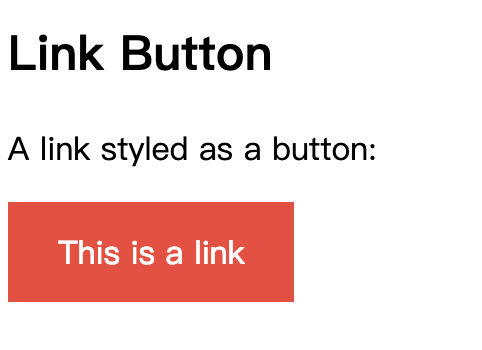
This example demonstrates a more advanced example where we combine several CSS properties to display links as boxes/buttons:
a:link, a:visited {

  background-color: #f44336;

  color: white;

  padding: 14px 25px;

  text-align: center;

  text-decoration: none;

  display: inline-block;

}

a:hover, a:active {

  background-color: red;

}
2、CSS Lists
HTML Lists and CSS List Properties
In HTML, there are two main types of lists:
- unordered lists (<ul>) - the list items are marked with bullets
- ordered lists (<ol>) - the list items are marked with numbers or letters
The CSS list properties allow you to:
- Set different list item markers for ordered lists
- Set different list item markers for unordered lists
- Set an image as the list item marker
- Add background colors to lists and list items
Different List Item Markers
The list-style-type property specifies the type of list item marker.
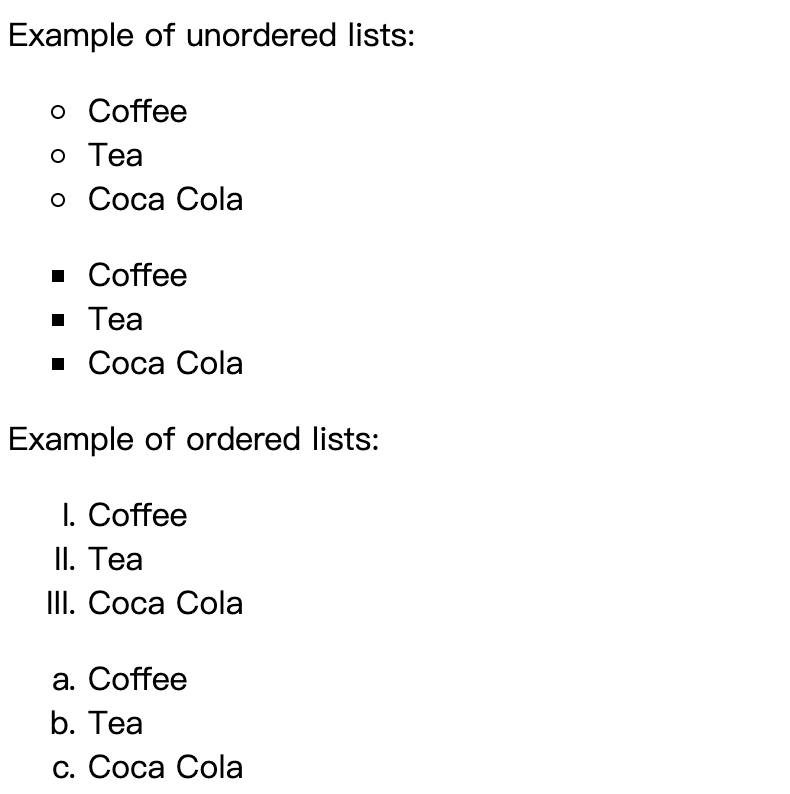
The following example shows some of the available list item markers:
ul.a {

  list-style-type: circle;

}

ul.b {

  list-style-type: square;

}

ol.c {

  list-style-type: upper-roman;

}

ol.d {

  list-style-type: lower-alpha;

}
An Image as The List Item Marker
The list-style-image property specifies an image as the list item marker:
ul {

  list-style-image: url('sqpurple.gif');

}
Position The List Item Markers
The list-style-position property specifies the position of the list-item markers (bullet points).
"list-style-position: outside;" means that the bullet points will be outside the list item. The start of each line of a list item will be aligned vertically. This is default:
- Coffee - A brewed drink prepared from roasted coffee beans...
- Tea
- Coca-cola
"list-style-position: inside;" means that the bullet points will be inside the list item. As it is part of the list item, it will be part of the text and push the text at the start:
- Coffee - A brewed drink prepared from roasted coffee beans...
- Tea
- Coca-cola
ul.a {

  list-style-position: outside;

}

ul.b {

  list-style-position: inside;

}
Remove Default Settings
The list-style-type:none property can also be used to remove the markers/bullets. Note that the list also has default margin and padding. To remove this, add margin:0 and padding:0 to <ul> or <ol>:
ul {

  list-style-type: none;

  margin:;

  padding:;

}
List - Shorthand property
When using the shorthand property, the order of the property values are:
list-style-type(if a list-style-image is specified, the value of this property will be displayed if the image for some reason cannot be displayed)list-style-position(specifies whether the list-item markers should appear inside or outside the content flow)list-style-image(specifies an image as the list item marker)
If one of the property values above are missing, the default value for the missing property will be inserted, if any.
ul {

  list-style: square inside url("sqpurple.gif");

}
CSS:Tutorial three的更多相关文章
- CSS:Tutorial four
1.CSS Tables To specify table borders in CSS, use the border property. The example below specifies a ...
- CSS:Tutorial two
1.CSS Text text color, text align... Text Decoration The text-decoration property is used to set or ...
- CSS:Tutorial one
1.Three Ways to Insert CSS External style sheet Internal style sheet Inline style External Style She ...
- Hover.css:一组超实用的 CSS3 悬停效果和动画
Hover.css 是一套基于 CSS3 的鼠标悬停效果和动画,这些可以非常轻松的被应用到按钮.LOGO 以及图片等元素.所有这些效果都是只需要单一的标签,必要的时候使用 before 和 after ...
- CSS:opacity 的取值范围是 0~1
CSS:opacity 的取值范围是 0~1,难怪设置为 1~100 看不到效果.
- CSS:CSS定位和浮动
CSS2.1规定了3种定位方案 1.Normal flow:普通流(相对定位 position relative.静态定位 position static) 普通流(normal flow,国内有人翻 ...
- CSS: word-wrap和word-break
最近修改页面排版的一些问题,发现关于内容分词换行有两个主要的CSS: word-wrap 和 word-break 特别是word-wrap还有个取值break-word,更使得这两个属性容易混淆. ...
- CSS:不可思议的border属性
原文:Magic of CSS border property 译文:不可思议的CSS border属性 译者:dwqs 在CSS中,其border属性有很多的规则.对于一些事物,例如三角形或者其它的 ...
- Normalize.css:优化重置CSS默认属性
Normalize.css:优化重置CSS默认属性 官方网站:http://necolas.github.io/normalize.css/ 项目仓库:https://github.com/necol ...
随机推荐
- Android图片加载框架之Picasso
相信做Android开发的对Square公司一定不会陌生,大名鼎鼎的网络请求框架Retrofit就来源于它,今天学习的是该公司出品的图片加载框架Picasso. 项目地址 https://github ...
- go——类型的本质
在声明一个新类型之后,声明一个该类型的方法之前,需要先回答一个问题:这个类型的本质是什么. 如果给这个类型增加或删除某个值,是要创建一个新值,还是要更改当前的值? 如果是要创建一个新值,该类型的方法就 ...
- php优化,操作码优化,缓存优化
一.php缓存加速器软件种类 xcache,eaccelerator,zend,apc如何选择:建议xcache,eaccelerator,二选一,首选xcachexcache更快 二.php缓存加速 ...
- bootstrap基本使用
bootstrap是封装了css和js代码实现酷炫的效果,所以使用的时候,比如说是列表效果,直接调用它本身定义的函数就ok了 静态文件 把href='..static/..'里面改为url_for静态 ...
- day9 文件的读取
文件操作 一.打开文件 f = open('歌词.txt','w',encoding='utf-8') # f:文件操作符 文件句柄 文件操作对象 open打开文件是依赖了操作系统提供的途径 操作系统 ...
- 从零到一创建ionic移动app:基础开发环境搭建
myAPP项目是在Ubuntu14.04下创建 本项目开发node 4.5/cordova 6/ionic 2 第一步 安装nodejs npm install -g n n v4.5.0 使 ...
- js高级---js架构
ECMAScript1997 年欧洲计算机制造商协会 39 号技术委员会制定了ECMA-262标准(别名 ECMAScript),而浏览器只是负责实现,ie浏览器实现的结果是jscript,远景浏览器 ...
- C/C++中0xcccccccc...
* 0xABABABAB : Used by Microsoft's HeapAlloc() to mark "no man's land" guard bytes after a ...
- 微信小程序:其中wxml和wxss的样式说明
微信小程序:其中wxml和wxss的样式说明 一.简介 对于css不熟悉的Android程序员来说,开发微信小程序面临的一个比较困难的问题就是界面的排版了.微信小程序的排版就跟wxml和wxss有关了 ...
- jQuery带小图标的Tab切换焦点图
在线演示 本地下载