
CSS:Tutorial one
1、Three Ways to Insert CSS
- External style sheet
- Internal style sheet
- Inline style
External Style Sheet
With an external style sheet, you can change the look of an entire website by changing just one file!
Each page must include a reference to the external style sheet file inside the <link> element. The <link> element goes inside the <head> section:
<head>

<link rel="stylesheet" type="text/css" href="mystyle.css">

</head>
Internal Style Sheet
An internal style sheet may be used if one single page has a unique style.
Internal styles are defined within the <style> element, inside the <head> section of an HTML page:
<head>

<style>

body {

  background-color: linen;

}

h1 {

  color: maroon;

  margin-left: 40px;

}

</style>

</head>
Inline Styles
An inline style may be used to apply a unique style for a single element.
To use inline styles, add the style attribute to the relevant element. The style attribute can contain any CSS property.
The example below shows how to change the color and the left margin of a <h1> element:
<h1 style="color:blue;margin-left:30px;">This is a heading</h1>
2、CSS Colors
Colors are specified using predefined color names, or RGB, HEX, HSL, RGBA, HSLA values.
backgroud color 、 text color 、border color
Color Values
In HTML, colors can also be specified using RGB values, HEX values, HSL values, RGBA values, and HSLA values:
Same as color name "Tomato":
rgb(255, 99, 71)

#ff6347

hsl(9, 100%, 64%)
Same as color name "Tomato", but 50% transparent:
rgba(255, 99, 71, 0.5)

hsla(9, 100%, 64%, 0.5)
3、CSS Backgrounds
The CSS background properties are used to define the background effects for elements.
CSS background properties:
- background-color
- background-image
- background-repeat
- background-attachment
- background-position
Background Image
The background-image property specifies an image to use as the background of an element.
By default, the image is repeated so it covers the entire element.
The background image for a page can be set like this:
body {

  background-image: url("paper.gif");

}
By default, the background-image property repeats an image both horizontally and vertically.
body {

  background-image: url("gradient_bg.png");

  background-repeat: repeat-x;

}
Background Image - Fixed position
To specify that the background image should be fixed (will not scroll with the rest of the page), use the background-attachment property:
body {

  background-image: url("img_tree.png");

  background-repeat: no-repeat;

  background-position: right top;

  background-attachment: fixed;

}
Background - Shorthand property
To shorten the code, it is also possible to specify all the background properties in one single property. This is called a shorthand property.
The shorthand property for background is background:
body {

  background: #ffffff url("img_tree.png") no-repeat right top;

}
4、CSS Borders
Border Style
The border-style property specifies what kind of border to display.
The following values are allowed:
dotted- Defines a dotted borderdashed- Defines a dashed bordersolid- Defines a solid borderdouble- Defines a double bordergroove- Defines a 3D grooved border. The effect depends on the border-color valueridge- Defines a 3D ridged border. The effect depends on the border-color valueinset- Defines a 3D inset border. The effect depends on the border-color valueoutset- Defines a 3D outset border. The effect depends on the border-color valuenone- Defines no borderhidden- Defines a hidden border
The border-style property can have from one to four values (for the top border, right border, bottom border, and the left border).
Border Width
The border-width property specifies the width of the four borders.
The width can be set as a specific size (in px, pt, cm, em, etc) or by using one of the three pre-defined values: thin, medium, or thick.
The border-width property can have from one to four values (for the top border, right border, bottom border, and the left border).
Border - Shorthand Property
You can also specify all the individual border properties for just one side:
p {

  border-left: 6px solid red;

  background-color: lightgrey;

}
Rounded Borders
The border-radius property is used to add rounded borders to an element:
p {

  border: 2px solid red;

  border-radius: 5px;

}
5、CSS Margins
he CSS margin properties are used to create space around elements, outside of any defined borders.
With CSS, you have full control over the margins. There are properties for setting the margin for each side of an element (top, right, bottom, and left).
If the margin property has three values:
- margin: 25px 50px 75px;
- top margin is 25px
- right and left margins are 50px
- bottom margin is 75px
If the margin property has two values:
- margin: 25px 50px;
- top and bottom margins are 25px
- right and left margins are 50px
The auto Value
You can set the margin property to auto to horizontally center the element within its container.
The element will then take up the specified width, and the remaining space will be split equally between the left and right margins:
div {

  width: 300px;

  margin: auto;

  border: 1px solid red;

}
The inherit Value
This example lets the left margin of the <p class="ex1"> element be inherited from the parent element (<div>):
<!DOCTYPE html>

<html>

<head>

<style>

div {

  border: 1px solid red;

  margin-left: 100px;

}

p.ex1 {

  margin-left: inherit;

}

</style>

</head>

<body>

<h2>Use of the inherit value</h2>

<p>Let the left margin be inherited from the parent element:</p>

<div>

<p class="ex1">This paragraph has an inherited left margin (from the div element).</p>

</div>

</body>

</html>
Margin Collapse
Top and bottom margins of elements are sometimes collapsed into a single margin that is equal to the largest of the two margins.
This does not happen on left and right margins! Only top and bottom margins!
Look at the following example:
<!DOCTYPE html>

<html>

<head>

<style>

h1 {

  margin: 0 0 50px 0;

}

h2 {

  margin: 20px 0 0 0;

}

</style>

</head>

<body>

<p>In this example the h1 element has a bottom margin of 50px and the h2 element has a top margin of 20px. Then, the vertical margin between h1 and h2 should have been 70px (50px + 20px). However, due to margin collapse, the actual margin ends up being 50px.</p>

<h1>Heading 1</h1>

<h2>Heading 2</h2>
All HTML elements can be considered as boxes. In CSS, the term "box model" is used when talking about design and layout.
The CSS box model is essentially a box that wraps around every HTML element. It consists of: margins, borders, padding, and the actual content.
</body>

</html>
similar padding
6、CSS Box Model
All HTML elements can be considered as boxes. In CSS, the term "box model" is used when talking about design and layout.
The CSS box model is essentially a box that wraps around every HTML element. It consists of: margins, borders, padding, and the actual content.
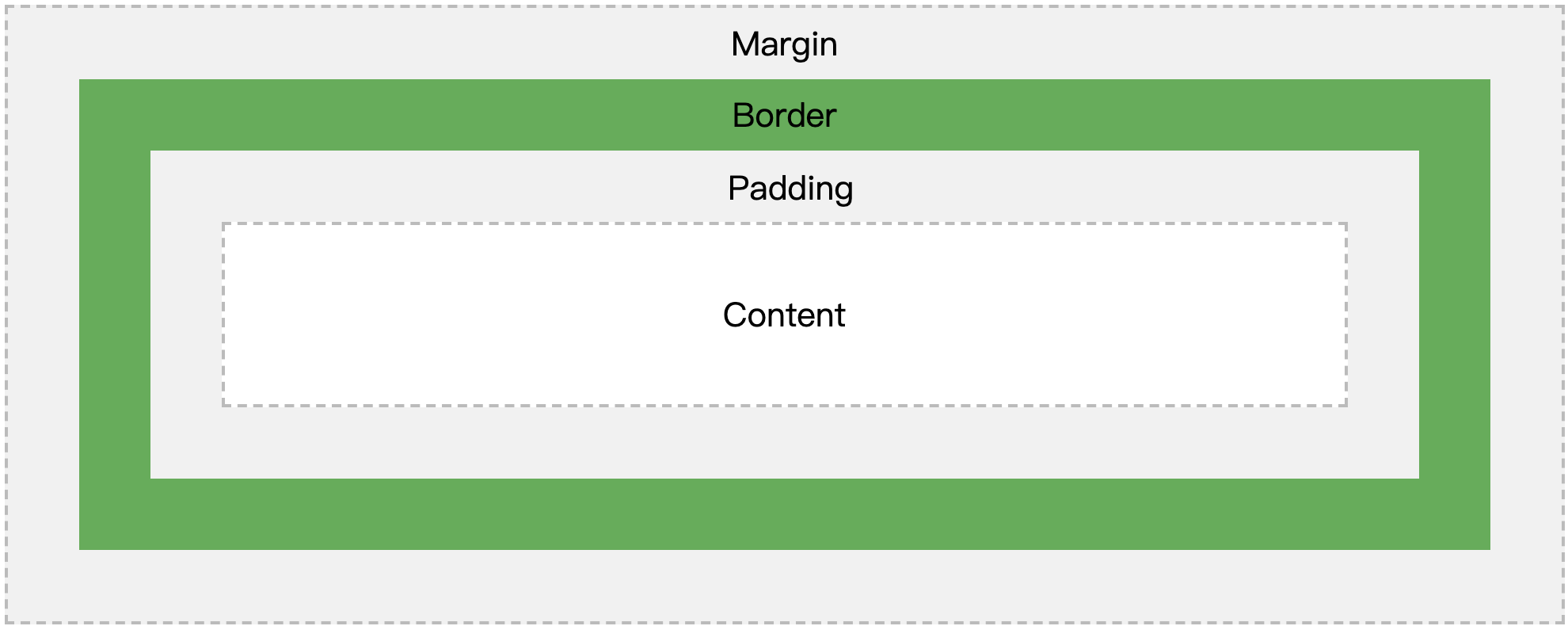
Explanation of the different parts:
- Content - The content of the box, where text and images appear
- Padding - Clears an area around the content. The padding is transparent
- Border - A border that goes around the padding and content
- Margin - Clears an area outside the border. The margin is transparent
7、CSS Outline
An outline is a line that is drawn around elements, OUTSIDE the borders, to make the element "stand out".
CSS has the following outline properties:
outline-styleoutline-coloroutline-widthoutline-offsetoutlin
Note: Outline differs from borders! Unlike border, the outline is drawn outside the element's border, and may overlap other content. Also, the outline is NOT a part of the element's dimensions; the element's total width and height is not affected by the width of the outline.
The outline-style property specifies the style of the outline, and can have one of the following values:
dotted- Defines a dotted outlinedashed- Defines a dashed outlinesolid- Defines a solid outlinedouble- Defines a double outlinegroove- Defines a 3D grooved outlineridge- Defines a 3D ridged outlineinset- Defines a 3D inset outlineoutset- Defines a 3D outset outlinenone- Defines no outlinehidden- Defines a hidden outline
Outline - Shorthand property
The outline property is a shorthand property for setting the following individual outline properties:
outline-widthoutline-style(required)outline-color
The outline property is specified as one, two, or three values from the list above. The order of the values does not matter.
p.ex1 {outline: dashed;}

p.ex2 {outline: dotted red;}

p.ex3 {outline: 5px solid yellow;}

p.ex4 {outline: thick ridge pink;}
Outline Offset
The outline-offset property adds space between an outline and the edge/border of an element. The space between an element and its outline is transparent.
The following example specifies an outline 15px outside the border edge:

CSS:Tutorial one的更多相关文章
- CSS:Tutorial four
1.CSS Tables To specify table borders in CSS, use the border property. The example below specifies a ...
- CSS:Tutorial three
1.CSS Links links can be styled differently depending on what state they are in. The four links stat ...
- CSS:Tutorial two
1.CSS Text text color, text align... Text Decoration The text-decoration property is used to set or ...
- Hover.css:一组超实用的 CSS3 悬停效果和动画
Hover.css 是一套基于 CSS3 的鼠标悬停效果和动画,这些可以非常轻松的被应用到按钮.LOGO 以及图片等元素.所有这些效果都是只需要单一的标签,必要的时候使用 before 和 after ...
- CSS:opacity 的取值范围是 0~1
CSS:opacity 的取值范围是 0~1,难怪设置为 1~100 看不到效果.
- CSS:CSS定位和浮动
CSS2.1规定了3种定位方案 1.Normal flow:普通流(相对定位 position relative.静态定位 position static) 普通流(normal flow,国内有人翻 ...
- CSS: word-wrap和word-break
最近修改页面排版的一些问题,发现关于内容分词换行有两个主要的CSS: word-wrap 和 word-break 特别是word-wrap还有个取值break-word,更使得这两个属性容易混淆. ...
- CSS:不可思议的border属性
原文:Magic of CSS border property 译文:不可思议的CSS border属性 译者:dwqs 在CSS中,其border属性有很多的规则.对于一些事物,例如三角形或者其它的 ...
- Normalize.css:优化重置CSS默认属性
Normalize.css:优化重置CSS默认属性 官方网站:http://necolas.github.io/normalize.css/ 项目仓库:https://github.com/necol ...
随机推荐
- JQuery操作select中的option
html页面代码例如以下: <!DOCTYPE html PUBLIC "-//W3C//DTD XHTML 1.0 Transitional//EN" "http ...
- Java泛型一:基本介绍和使用
原文地址http://blog.csdn.net/lonelyroamer/article/details/7864531 现在开始深入学习java的泛型了,以前一直只是在集合中简单的使用泛型,根本就 ...
- SqlServer分页总结-摘抄
sqlserver2008不支持关键字limit ,所以它的分页sql查询语句将不能用mysql的方式进行,幸好sqlserver2008提供了top,rownumber等关键字,这样就能通过这几个关 ...
- hibernate 关联关系
<hibernate-mapping package="com.srts.system.domain"> <class name="Sys_UserRo ...
- 125. Valid Palindrome(判断忽略标点的字符串是否回文,加个正则,与上一题解法一样)
Given a string, determine if it is a palindrome, considering only alphanumeric characters and ignori ...
- elastic job配置
zookeeper注册中心配置 1 package com.zwh.pay.account.worker; import com.dangdang.ddframe.job.reg.zookeeper. ...
- 理解音视频 PTS 和 DTS
视频 视频的播放过程可以简单理解为一帧一帧的画面按照时间顺序呈现出来的过程,就像在一个本子的每一页画上画,然后快速翻动的感觉. 但是在实际应用中,并不是每一帧都是完整的画面,因为如果每一帧画面都是完整 ...
- ubuntu linux 1604 编译安装tesseract-ocr 4.0
主要参考官方的编译,梳理一下整个流程 Linux The build instructions for Linux also apply to other UNIX like operating sy ...
- [Ctsc2000]冰原探险
Description 传说中,南极有一片广阔的冰原,在冰原下藏有史前文明的遗址.整个冰原被横竖划分成了很多个大小相等的方格.在这个冰原上有N个大小不等的矩形冰山,这些巨大的冰山有着和南极一样古老的历 ...
- Oracle常见的几种登录方式
1.运行SQLPLUS工具 C:\Users\csb>sqlplus(回车) (输入账户)system(回车) (输入密码) (回车) 2.直接进入SQLPLUS命令提示符,无用户的登陆 C:\ ...