
day 5 飞机发射子弹 难点??
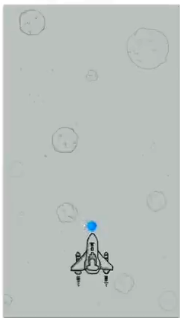
1.效果图
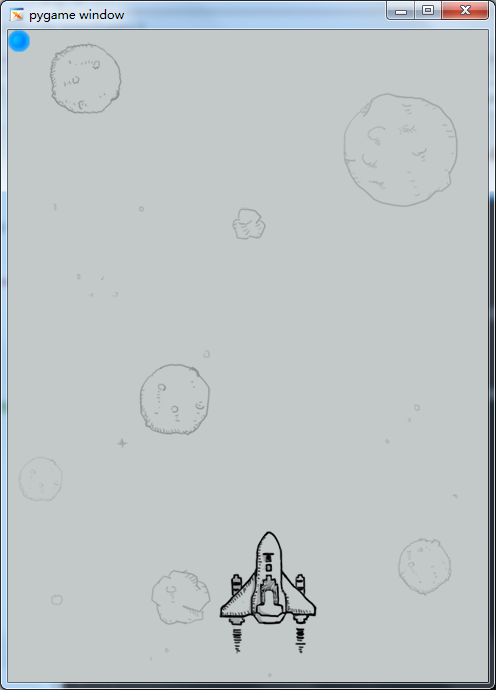
2.飞机发出子弹
#-*- coding:utf-8 -*-

import pygame

import time

from pygame.locals import *

class HeroPlane(object):

    '''飞机类'''

    def __init__(self,screen_temp):

        self.x = 210

        self.y = 500

        self.screen = screen_temp

        self.image = pygame.image.load("./feiji/hero1.png")

        self.bullent_list = [] #存放发射出去的子弹的引用

    def display(self):

        self.screen.blit(self.image,(self.x,self.y))

        for bullent in self.bullent_list:

            bullent.display()

    def move_left(self):

        self.x -= 5

    def move_right(self):

        self.x += 5

    def fire(self):

        self.bullent_list.append(Bullent(self.screen))

class Bullent(object):

    def __init__(self,screen_temp):

        self.x = 0

        self.y = 0

        self.screen = screen_temp

        self.image = pygame.image.load("./feiji/bullet.png")

    def display(self):

        self.screen.blit(self.image,(self.x,self.y))

def key_control(hero_temp):

     ## 检测键盘

    #获取事件,比如按键等

    for event in pygame.event.get():

        #判断是否是点击了退出按钮

        if event.type == QUIT:

            print("exit")

            exit()

        #判断是否是按下了键

        elif event.type == KEYDOWN:

            #检测按键是否是a或者left

            if event.key == K_a or event.key == K_LEFT:

                print('left')

                hero_temp.move_left()

            #检测按键是否是d或者right

            elif event.key == K_d or event.key == K_RIGHT:

                print('right')

                hero_temp.move_right()

            #检测按键是否是空格键

            elif event.key == K_SPACE:

                print('space')

                hero_temp.fire()

def main():

    #1.创建窗口

    screen = pygame.display.set_mode((480,652),0,32) #x=480,y=852  #0,32固定参数

    #2.创建一个背景图片

    background = pygame.image.load("./feiji/background.png").convert()

    #3.创建飞机图片

    hero = HeroPlane(screen)

    ##3. 把背景图片放到窗口中显示

    while True:

        screen.blit(background,(0,0))#图片顶点在窗口的位置

        hero.display()

        #x += 1

        #y -= 1

        ## 检测键盘

        key_control(hero)

        pygame.display.update()

        time.sleep(0.02)  #占用cpu太多,降低点

if __name__ == "__main__":

    main()
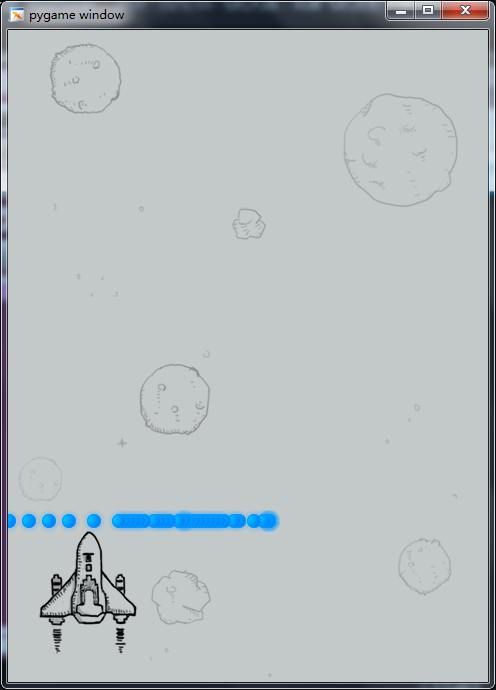
3.调整子弹位置,
#-*- coding:utf-8 -*-

import pygame

import time

from pygame.locals import *

class HeroPlane(object):

    '''飞机类'''

    def __init__(self,screen_temp):

        self.x = 210

        self.y = 500

        self.screen = screen_temp

        self.image = pygame.image.load("./feiji/hero1.png")

        self.bullent_list = [] #存放发射出去的子弹的引用

    def display(self):

        self.screen.blit(self.image,(self.x,self.y))

        for bullent in self.bullent_list:

            bullent.display()

    def move_left(self):

        self.x -= 5

    def move_right(self):

        self.x += 5

    def fire(self):

        self.bullent_list.append(Bullent(self.screen,self.x,self.y))

class Bullent(object):

    def __init__(self,screen_temp,x,y):

        self.x = x+40

        self.y = y-20

        self.screen = screen_temp

        self.image = pygame.image.load("./feiji/bullet.png")

    def display(self):

        self.screen.blit(self.image,(self.x,self.y))

def key_control(hero_temp):

     ## 检测键盘

    #获取事件,比如按键等

    for event in pygame.event.get():

        #判断是否是点击了退出按钮

        if event.type == QUIT:

            print("exit")

            exit()

        #判断是否是按下了键

        elif event.type == KEYDOWN:

            #检测按键是否是a或者left

            if event.key == K_a or event.key == K_LEFT:

                print('left')

                hero_temp.move_left()

            #检测按键是否是d或者right

            elif event.key == K_d or event.key == K_RIGHT:

                print('right')

                hero_temp.move_right()

            #检测按键是否是空格键

            elif event.key == K_SPACE:

                print('space')

                hero_temp.fire()

def main():

    #1.创建窗口

    screen = pygame.display.set_mode((480,652),0,32) #x=480,y=852  #0,32固定参数

    #2.创建一个背景图片

    background = pygame.image.load("./feiji/background.png").convert()

    #3.创建飞机图片

    hero = HeroPlane(screen)

    ##3. 把背景图片放到窗口中显示

    while True:

        screen.blit(background,(0,0))#图片顶点在窗口的位置

        hero.display()

        #x += 1

        #y -= 1

        ## 检测键盘

        key_control(hero)

        pygame.display.update()

        time.sleep(0.02)  #占用cpu太多,降低点

if __name__ == "__main__":

    main()
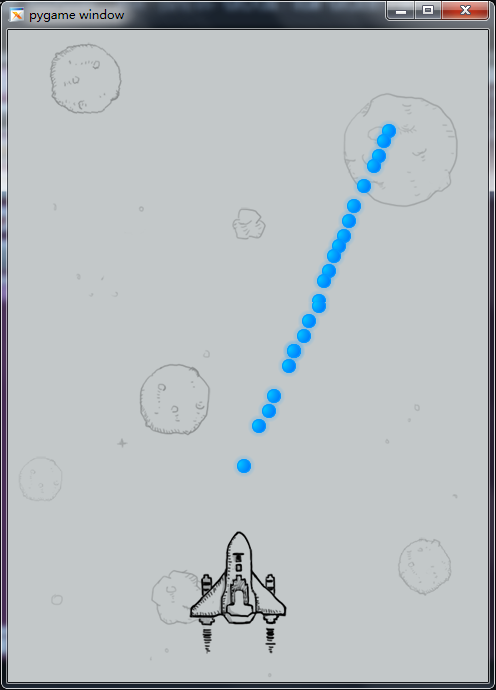
4.让子弹动起来
#-*- coding:utf-8 -*-

import pygame

import time

from pygame.locals import *

class HeroPlane(object):

    '''飞机类'''

    def __init__(self,screen_temp):

        self.x = 210

        self.y = 500

        self.screen = screen_temp

        self.image = pygame.image.load("./feiji/hero1.png")

        self.bullent_list = [] #存放发射出去的子弹的引用

    def display(self):

        self.screen.blit(self.image,(self.x,self.y))

        for bullent in self.bullent_list:

            bullent.display()

            bullent.move()

    def move_left(self):

        self.x -= 5

    def move_right(self):

        self.x += 5

    def fire(self):

        self.bullent_list.append(Bullent(self.screen,self.x,self.y))

class Bullent(object):

    def __init__(self,screen_temp,x,y):

        self.x = x+40

        self.y = y-20

        self.screen = screen_temp

        self.image = pygame.image.load("./feiji/bullet.png")

    def display(self):

        self.screen.blit(self.image,(self.x,self.y))

    def move(self):

        self.y -= 5

def key_control(hero_temp):

     ## 检测键盘

    #获取事件,比如按键等

    for event in pygame.event.get():

        #判断是否是点击了退出按钮

        if event.type == QUIT:

            print("exit")

            exit()

        #判断是否是按下了键

        elif event.type == KEYDOWN:

            #检测按键是否是a或者left

            if event.key == K_a or event.key == K_LEFT:

                print('left')

                hero_temp.move_left()

            #检测按键是否是d或者right

            elif event.key == K_d or event.key == K_RIGHT:

                print('right')

                hero_temp.move_right()

            #检测按键是否是空格键

            elif event.key == K_SPACE:

                print('space')

                hero_temp.fire()

def main():

    #1.创建窗口

    screen = pygame.display.set_mode((480,652),0,32) #x=480,y=852  #0,32固定参数

    #2.创建一个背景图片

    background = pygame.image.load("./feiji/background.png").convert()

    #3.创建飞机图片

    hero = HeroPlane(screen)

    ##3. 把背景图片放到窗口中显示

    while True:

        screen.blit(background,(0,0))#图片顶点在窗口的位置

        hero.display()

        ## 检测键盘

        key_control(hero)

        pygame.display.update()

        time.sleep(0.02)  #占用cpu太多,降低点

if __name__ == "__main__":

    main()
day 5 飞机发射子弹 难点??的更多相关文章
- [知了堂学习笔记]_用JS制作《飞机大作战》游戏_第4讲(创建敌方飞机、敌方飞机发射子弹、玩家子弹击中敌方小飞机,小飞机死亡)
一.创建敌方飞机 1.思考创建思路: 创建敌方飞机思路与创建玩家飞机思路一样: (1)思考敌方飞机具备什么属性: 敌方飞机的图片.坐标.飞行速度.状态(是否被击中) 设置小飞机被击中时消失时间.飞机可 ...
- Egret学习笔记 (Egret打飞机-8.敌机和主角飞机发射子弹)
经过前面几章的准备,我们差不多已经具备了一个基本的框架,这一章我们就开始添砖加瓦了. 敌机定时发射一个子弹,子弹的方向是从上到下,但是发射子弹的代码应该放在哪儿呢? 从面向对象编程的思想来说,子弹是敌 ...
- 用JS制作《飞机大作战》游戏_第4讲(创建敌方飞机、敌方飞机发射子弹、玩家子弹击中敌方小飞机,小飞机死亡)-陈远波
一.创建敌方飞机 1.思考创建思路: 创建敌方飞机思路与创建玩家飞机思路一样: (1)思考敌方飞机具备什么属性: 敌方飞机的图片.坐标.飞行速度.状态(是否被击中) 设置小飞机被击中时消失时间.飞机可 ...
- [知了堂学习笔记]_用JS制作《飞机大作战》游戏_第3讲(玩家发射子弹)
一.公布上一讲中玩家飞机上.下.右移动实现的代码: /*=========================键盘按下事件 keycode为得到键盘相应键对应的数字==================== ...
- 用JS制作《飞机大作战》游戏_第3讲(玩家发射子弹)-陈远波
一.公布上一讲中玩家飞机上.下.右移动实现的代码: /*=========================键盘按下事件 keycode为得到键盘相应键对应的数字==================== ...
- unity零基础开始学习做游戏(四)biu~biu~biu发射子弹打飞机
-------小基原创,转载请给我一个面子 主角都能移动了,那不得做点什么伸张正义,守护世界和平的事嘛,拿起家伙biu~biu~biu~ 首先得做一个好人和一个坏人 老规矩,Canvas下创建两个Im ...
- Unity 飞机的子弹轨迹
最近公司在开发一款儿童打飞机游戏. 策划跟我说能在子弹上加上一些轨迹就好了. 比如 旋转 左右移动呀.然后它就很愉快的跑去截其他游戏的图啦... 我看见图的时候, 解决方案: 1. 使用牛逼的 ...
- Egret学习笔记 (Egret打飞机-9.子弹对敌机和主角的碰撞)
运行起来,虽然主角飞机和敌机都在互相发射子弹,但是子弹打中了就和没打中效果是一样的.. 这一章我们就来处理子弹和飞机的碰撞问题. 我们所有的操作都是基于Main这个容器来做的.所以我就把这个处理放到M ...
- android小游戏 飞机躲子弹
最近android老师让每人写一个小东西,因为之前学awt时写过一个java版的飞机躲子弹,所以这次想写成android版的. 文件直接导入就行http://files.cnblogs.com/fil ...
随机推荐
- Android(java)学习笔记207:Android下的属性动画(Property Animation)
1. 属性动画(Property Animation)引入: 在手机上去实现一些动画效果算是件比较炫酷的事情,因此Android系统在一开始的时候就给我们提供了两种实现动画效果的方式,逐帧动画(fra ...
- PHP 基础系列(三) 【转】PHP 函数实现原理及性能分析
作者:HDK (百度) 前言 在任何语言中,函数都是最基本的组成单元.对于PHP的函数,它具有哪些特点?函数调用是怎么实现的?php函数的性能如何,有什么使用建议?本文将从原理出发进行分析结合实际的性 ...
- Codeforces Round #540 (Div. 3) D1. Coffee and Coursework (Easy version) 【贪心】
任意门:http://codeforces.com/contest/1118/problem/D1 D1. Coffee and Coursework (Easy version) time limi ...
- MyBatis(2)增删改查
本次全部学习内容:MyBatisLearning 查: 根据id查询用户信息,得到一个用户信息 在User.xml文件中添加代码: <mapper namespace="tes ...
- 阿里云linux服务器登录失败,Connection closed
ssh_exchange_identification: read: Connection reset by peer报错如下: [root@izbp17x1~]# ssh admin@139.196 ...
- Nodejs与mysql连接池的应用(pool)
/* * 连接池 连接和缓存的技术 * */ var mysql = require('mysql'); var pool = mysql.createPool({ connectionLimit:2 ...
- 【题解】洛谷P1514 [NOIP2010TG] 引水入城(DFS+DP)
次元传送门:洛谷P1514 思路 可以证明如果有解 那么每个蓄水池可以覆盖到的干旱区必定是线段 证明: 举个栗子 8 9 8 7 9 7 6 9 6 明显到不了中间的点 如果不是连续的线段 中间肯定有 ...
- BindingException: Invalid bound statement (not found)问题排查:SpringBoot集成Mybatis重点分析
重构代码,方法抛出异常:BindingException: Invalid bound statement (not found) 提示信息很明显:mybatis没有提供某方法 先不解释问题原因和排查 ...
- git-git remote
使用git的时候难免会用到remote tracking,下面简要记录一下在使用git remote时的一些技巧 (1)add $git remote add origin https://githu ...
- 一致性模型(consistency model)
比如下面的例子: 一行X值在节点M和节点N上有副本 客户端A在节点M上写入行X的值 一段时间后,客户端B在节点N上读取行X的值 一致性模型所要做的就是决定客户端B能否看到客户端A写的值.一致性模型分为 ...