
Unity 飞机的子弹轨迹
最近公司在开发一款儿童打飞机游戏. 策划跟我说能在子弹上加上一些轨迹就好了. 比如 旋转 左右移动呀.然后它就很愉快的跑去截其他游戏的图啦。。。
我看见图的时候,
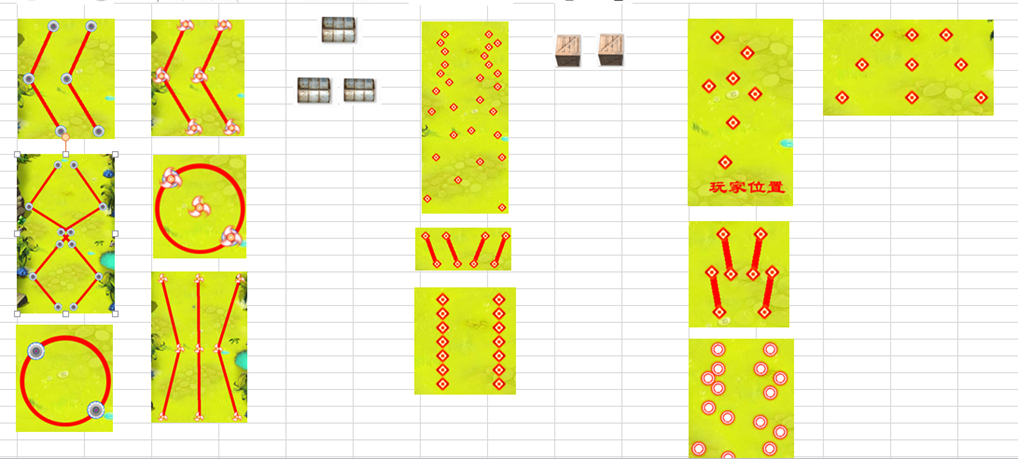
解决方案:
1. 使用牛逼的算法,实现子弹轨迹的移动(第一种应该是正确的解决方案)
2. 发射子弹次数 + 前后移动 + 左右移动 + 围绕某点旋转 + 自身旋转 = 子弹轨迹. 采用组合方式实现
目前采用第二种方式:
我们来看下子弹,两个齿轮会绕着中心旋转, 并且向下移动. ( 围绕某点旋转 + 自身旋转 + 前后移动 = 实现效果)
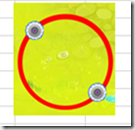
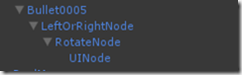
子弹的GameObject节点层次关系: (此结构和任意组合,但不要把全部功能放在同一个节点上. =。=这样理不清还会受到干扰)
前后移动节点(看两个齿轮中心点向下移动)
左右移动节点(无这个功能,无需开启脚本)
围绕父节点旋转节点(两个此轮围绕中心旋转)
自身旋转节点(比如齿轮它自身会旋转)
下面的子弹实现方式: 自身旋转 + 左右移动 + 上下移动 = 实现效果
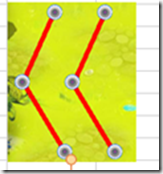
============================================================================================================================
代码区域:
左右移动脚本:
using UnityEngine;

using System.Collections;

namespace Bullet

{

    /// <summary>

    /// 子弹横向左右移动

    /// </summary>

    public class BulletHorizontal : MonoBehaviour

    {

        public bool isLeft;                 //是否向左移动

        public float moveLocation;          //移动的位置

        public float speed;                 //移动速度

        private Vector3 leftPosition;       //左边的目标点

        private Vector3 rightPosition;      //右边的目标点

        void Awake()

        {

            leftPosition = new Vector3(transform.localPosition.x - moveLocation, transform.localPosition.y, transform.localPosition.z);

            rightPosition = new Vector3(transform.localPosition.x + moveLocation, transform.localPosition.y, transform.localPosition.z);

        }

        void Update()

        {

            if (isLeft)

            {

                transform.localPosition += (Vector3.right * speed * Time.deltaTime);

                //transform.Translate(Vector3.right * speed * Time.deltaTime);

                if (transform.localPosition.x >= rightPosition.x)

                {

                    isLeft = !isLeft;

                }

            }

            else

            {

                transform.localPosition += (Vector3.left * speed * Time.deltaTime);

                //transform.Translate(Vector3.left * speed * Time.deltaTime);

                if (transform.localPosition.x <= leftPosition.x)

                {

                    isLeft = !isLeft;

                }

            }

        }

    }

}
子弹旋转脚本:
using UnityEngine;

using System.Collections;

using BearGame;

namespace Bullet

{

    /// <summary>

    /// 子弹旋转

    /// </summary>

    public class BulletRotate : MonoBehaviour

    {

        public RotationDirection rotationDirection;

        public float speed;

        public Transform rotateNode;

        public void Update()

        {

            if (rotateNode != null)

            {

                //围绕某一节点旋转

                switch (rotationDirection)

                {

                    case RotationDirection.Left:

                        this.transform.RotateAround(rotateNode.transform.position, Vector3.forward, speed);

                        break;

                    case RotationDirection.Right:

                        this.transform.RotateAround(rotateNode.transform.position, Vector3.forward, -(speed));

                        break;

                }

            }

            else

            {

                //自身旋转

                switch (rotationDirection)

                {

                    case RotationDirection.Left:

                        this.transform.Rotate(Vector3.forward, speed);

                        break;

                    case RotationDirection.Right:

                        this.transform.Rotate(Vector3.forward, -(speed));

                        break;

                }

            }

        }

    }

    /// <summary>

    /// 旋转的方向

    /// </summary>

    public enum RotationDirection

    {

        Left,

        None,

        Right

    }

}
子弹前后移动:
using UnityEngine;

using System.Collections;

using BearGame;

namespace Bullet

{

    /// <summary>

    /// 子弹前后移动

    /// </summary>

    public class BulletVertical : MonoBehaviour

    {

        public float speed = 0;

        public BulletDirectionEnum direction;

        private Vector3 dir;

        public delegate void BulletOutScreen(GameObject gameObject);

        /// <summary>

        /// 子弹越屏之后,触发的事件,用于销毁子弹

        /// </summary>

        /// <param name="gameObject"></param>

        public static event BulletOutScreen OnBulletDestroy;

        void Start()

        {

            switch (direction)

            {

                case BulletDirectionEnum.Up:

                    dir = Vector3.up;

                    break;

                case BulletDirectionEnum.Bottom:

                    dir = -Vector3.up;

                    break;

                case BulletDirectionEnum.Left:

                    dir = Vector3.left;

                    break;

                case BulletDirectionEnum.Right:

                    dir = Vector3.right;

                    break;

            }

        }

        void Update()

        {
                transform.Translate(dir * speed * Time.deltaTime);

                if (transform.localPosition.y > Screen.height)

                {

                    transform.gameObject.SetActive(false);

                    //调用子弹出屏幕事件
}
        }

    }

    /// <summary>

    /// 子弹移动的方向

    /// </summary>

    public enum BulletDirectionEnum

    {

        Up,

        Bottom,

        Left,

        Right,

        None

    }

}
子弹轨迹总体脚本控制:
using UnityEngine;

using System.Collections;

using BearGame;

namespace Bullet

{

    public class BulletMode : MonoBehaviour

    {

        /// <summary>

        /// 子弹预设

        /// </summary>

        private GameObject bullet;

        /// <summary>

        /// 子弹的名称

        /// </summary>

        private string bulletName;

        /// <summary>

        /// 子弹爆炸特效

        /// </summary>

        public Transform bulletEffect;

        /// <summary>

        /// 向左右移动

        /// </summary>

        public BulletHorizontal bulletHorizontal;

        /// <summary>

        /// 向前后移动

        /// </summary>

        public BulletVertical bulletForce;

        /// <summary>

        /// 围绕某一个点旋转

        /// </summary>

        public BulletRotate bulletRotateARound;

        /// <summary>

        /// 围绕自身旋转

        /// </summary>

        public BulletRotate bulletRotateOneself;

        #region 属性

        public GameObject Bullet

        {

            get

            {

                if (bullet == null)

                {

                    bullet = this.gameObject;

                }

                return bullet;

            }

            set { bullet = value; }

        }

        public string BulletName

        {

            get

            {

                if (string.IsNullOrEmpty(bulletName))

                {

                    bulletName = this.gameObject.name;

                }

                return bulletName;

            }

            set { bulletName = value; }

        }

        #endregion

        public void TrunOFFALLScript()

        {

            if (bulletRotateOneself != null) bulletRotateOneself.enabled = false;

            if (bulletRotateARound != null) bulletRotateARound.enabled = false;

            if (bulletForce != null) bulletForce.enabled = false;

            if (bulletHorizontal != null) bulletHorizontal.enabled = false;

        }

        public void TrunOpenALLScript()

        {

            if (bulletRotateOneself != null) bulletRotateOneself.enabled = true;

            if (bulletRotateARound != null) bulletRotateARound.enabled = true;

            if (bulletForce != null) bulletForce.enabled = true;

            if (bulletHorizontal != null) bulletHorizontal.enabled = true;

        }

    }

}
Unity 飞机的子弹轨迹的更多相关文章
- [知了堂学习笔记]_用JS制作《飞机大作战》游戏_第4讲(创建敌方飞机、敌方飞机发射子弹、玩家子弹击中敌方小飞机,小飞机死亡)
一.创建敌方飞机 1.思考创建思路: 创建敌方飞机思路与创建玩家飞机思路一样: (1)思考敌方飞机具备什么属性: 敌方飞机的图片.坐标.飞行速度.状态(是否被击中) 设置小飞机被击中时消失时间.飞机可 ...
- 用JS制作《飞机大作战》游戏_第4讲(创建敌方飞机、敌方飞机发射子弹、玩家子弹击中敌方小飞机,小飞机死亡)-陈远波
一.创建敌方飞机 1.思考创建思路: 创建敌方飞机思路与创建玩家飞机思路一样: (1)思考敌方飞机具备什么属性: 敌方飞机的图片.坐标.飞行速度.状态(是否被击中) 设置小飞机被击中时消失时间.飞机可 ...
- android小游戏 飞机躲子弹
最近android老师让每人写一个小东西,因为之前学awt时写过一个java版的飞机躲子弹,所以这次想写成android版的. 文件直接导入就行http://files.cnblogs.com/fil ...
- Egret学习笔记 (Egret打飞机-8.敌机和主角飞机发射子弹)
经过前面几章的准备,我们差不多已经具备了一个基本的框架,这一章我们就开始添砖加瓦了. 敌机定时发射一个子弹,子弹的方向是从上到下,但是发射子弹的代码应该放在哪儿呢? 从面向对象编程的思想来说,子弹是敌 ...
- day 5 飞机发射子弹 难点??
1.效果图 2.飞机发出子弹 #-*- coding:utf-8 -*- import pygame import time from pygame.locals import * class Her ...
- Egret学习笔记 (Egret打飞机-9.子弹对敌机和主角的碰撞)
运行起来,虽然主角飞机和敌机都在互相发射子弹,但是子弹打中了就和没打中效果是一样的.. 这一章我们就来处理子弹和飞机的碰撞问题. 我们所有的操作都是基于Main这个容器来做的.所以我就把这个处理放到M ...
- [知了堂学习笔记]_用JS制作《飞机大作战》游戏_第3讲(玩家发射子弹)
一.公布上一讲中玩家飞机上.下.右移动实现的代码: /*=========================键盘按下事件 keycode为得到键盘相应键对应的数字==================== ...
- 用JS制作《飞机大作战》游戏_第3讲(玩家发射子弹)-陈远波
一.公布上一讲中玩家飞机上.下.右移动实现的代码: /*=========================键盘按下事件 keycode为得到键盘相应键对应的数字==================== ...
- Egret学习笔记 (Egret打飞机-5.实现子弹对象)
上一章把飞机添加到屏幕上,但是飞机要发射子弹对吧?那么这一章我们就来实现一下发射子弹,并实现一个简单的子弹对象池 先来捋一捋思路 1.创建一个子弹对象 2.然后添加一个bitmap,显示子弹贴图 3. ...
随机推荐
- mount命令汇总(转载)
(一)挂接命令(mount) 首先,介绍一下挂接(mount)命令的使用方法,mount命令参数非常多,这里主要讲一下今天我们要用到的. 命令格式: mount [-t vfstype] [-o op ...
- WPF最基本的4个引用
Windowsbase Windows基本类库 PresentationCore wpf核心类库 PresentationFramework wpf框架 System.Axml 系统类库
- c++之 scanf 接收用户输入内容
该代码全部在Visual Studio 2015中编写,有关VS2015的安装后期在写相关的博客 scanf 介绍 在程序开发中,有时候需要通过获取用户输入的数据,进行对应的操作,scanf就是用来接 ...
- LinqToXML~读XML文件
linq的出现,带给我们的是简结,快速,可读性,它由linq to sql,linq to object,linq to XML组成,我的博客之前有对linq to sql的讲解,而今天,我将讲一个l ...
- mysql 自己定义存储过程和触发器
mysql 自己定义存储过程和触发器 --存储过程示范 DROP PROCEDURE IF EXISTS PRO_TEST; CREATE PROCEDURE PRO_TEST(IN NUM_IN I ...
- POJ 1469 ZOJ1140 二分匹配裸题
很裸,左点阵n,右点阵m 问最大匹配是否为n #include <cstdio> #include <cstring> #include <vector> usin ...
- input输入字母自动大小写转换
<!DOCTYPE html> <html> <head> <meta http-equiv="Content-Type" content ...
- samba服务器加入域控主机所需要修改的配置文件
samba服务器加入域控主机,成为域成员,当用户访问samba服务器上的共享文件时,直接到域控主机上进行认证.samba服务器上不需要像先前一样创建系统用户,创建samba用户及密码. 1.安装环境( ...
- Cisco cmd 命令
1.enable 开启全局配置模式:disable 禁用配置模式 2.config进入配置模式 3.line 设置进入用户模式密码:分为 line aux 0;line console 0;line ...
- SQL Server根据列名查表
select a.name, b.name from syscolumns a, sysobjects b where a.name = 'XXXX' and a.id = b.id and b.xt ...