
企业级工作流解决方案(十四)--集成Abp和ng-alain--自动化脚本
对于.net方向,做过自动化的,应该没有人不熟悉msbuild吧,非常强大的代码编译工具,.net平台的编译工作都是交给他来完成的,包括.net core的命令,本质上都是调用msbuild来执行的
对于发布到window平台,linux平台,或者用jenkins管理,核心基础还是绕不开msbuild
Msbuild目录结构

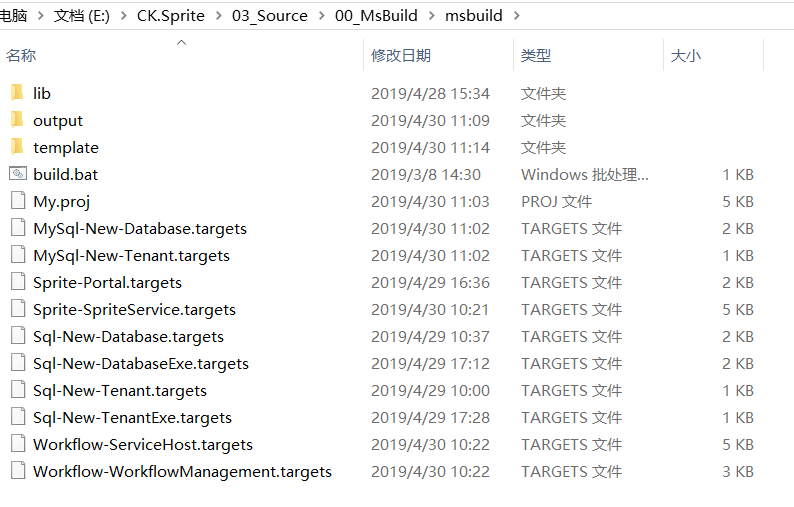
msbuild.bat为引导脚本,效果就是让用户选择启动哪个编译脚本,集成到jinkens的话,可以在jinkens里面选择,代码如下:
@echo off

echo "欢迎使用东宸科技自动化脚本"

echo "1.生成租户Sql脚本"

echo "2.初始化数据库Sql脚本"

echo "3.生成租户MySql脚本"

echo "4.初始化数据库MySql脚本"

echo "5.生成QA初始化Sql数据库"

echo "6.生成QA Sql租户"

echo "--------------------------"

echo "51.生成QA工作流服务"

echo "52.生成QA工作流管理工具"

echo "53.生成QA管理服务"

echo "54.生成QA Ng-Alain服务"

set /p selected=请选择:

IF "%selected%"=="1" Sql-New-Tenant.bat & goto end

IF "%selected%"=="2" Sql-New-Database.bat & goto end

IF "%selected%"=="3" MySql-New-Tenant.bat & goto end

IF "%selected%"=="4" MySql-New-Database.bat & goto end

IF "%selected%"=="5" QA-New-Database.bat & goto end

IF "%selected%"=="6" QA-New-TenantExe.bat & goto end

IF "%selected%"=="51" QA-Workflow-ServiceHost.bat & goto end

IF "%selected%"=="52" QA-Workflow-WorkflowManagement.bat & goto end

IF "%selected%"=="53" QA-Sprite-SpriteService.bat & goto end

IF "%selected%"=="54" QA-Sprite-Portal.bat & goto end

echo "自动化脚本已完成!"

:end

@echo on
00_MsBuild文件夹下其他文件为具体启动编辑脚本,主要是设置不同编译环境的参数以及第一个执行的编译target目标,比如Sql-New-Tenant.bat,代码如下:
@echo off

set /p tenantName=请输入英文标识名称:

set /p tenantDisplayName=请输入租户中文名称:

set /p tenantAdminUserName=请输入租户管理员UserName:

set /p yes="确认租户信息【英文标识名称:%tenantName%,租户中文名称:%tenantDisplayName%,租户管理员UserName:%tenantAdminUserName%】,是否继续(y/n):"

if not "%yes%"=="y" (

    echo 生成租户脚本已取消

    goto end

)

cd /d %~dp0msbuild

if not exist .\output\log\Sql\sql-new-tenant\ mkdir .\output\log\Sql\sql-new-tenant\

cmd /c "build.bat /l:FileLogger,Microsoft.Build.Engine;logfile=.\output\log\Sql\sql-new-tenant\sql-new-tenant.log /target:Sql-New-Tenant /property:TenancyName=%tenantName% /property:TenancyDisplayName=%tenantDisplayName% /property:AdminUserName=%tenantAdminUserName%"

@if %errorlevel% NEQ 0 (pause) else (if "%1%" NEQ "--batch" pause)

:end

@echo on
msbuild文件夹里面的内容,就是正真的编译逻辑。
build.bat为msbuild执行路径
My.proj为编译总架构,定义了一系列参数,包括输入输出目录、模版路径、引用的编译依赖的第三方库dll路径,还有就是加载所有项目的target,以及定义公共的一些帮助task,代码如下:
<?xml version="1.0" encoding="utf-8" ?>

<Project DefaultTargets="Build" xmlns="http://schemas.microsoft.com/developer/msbuild/2003" ToolsVersion="4.0">

  <!-- GENERAL -->

  <Target Name="Echo">

    <Message Text="Hello from $(MSBuildProjectDirectory)" />

  </Target>

  <PropertyGroup>

    <RootFolder>$(MSBuildProjectDirectory)\..\..</RootFolder>

    <ReleaseFolder >$(MSBuildProjectDirectory)\output\$(Environment)</ReleaseFolder>

    <Configuration Condition="'$(Configuration)' == ''">Release</Configuration>

    <Platform Condition="'$(Platform)' == ''">Any CPU</Platform>

    <Platform Condition="'$(Platform)' == 'MCD'">Any CPU</Platform>

    <Environment Condition="'$(Environment)' == ''">DEV</Environment>

    <VisualStudioVersion Condition="Exists('$(MSBuildExtensionsPath)\Microsoft\VisualStudio\v12.0\Web\Microsoft.Web.Publishing.Tasks.dll')">12.0</VisualStudioVersion>

    <VisualStudioVersion Condition="Exists('$(MSBuildExtensionsPath)\Microsoft\VisualStudio\v14.0\Web\Microsoft.Web.Publishing.Tasks.dll')">14.0</VisualStudioVersion>

    <ExtensionTasksPath>$(MSBuildProjectDirectory)\lib\</ExtensionTasksPath>

    <TemplatesPath>$(MSBuildProjectDirectory)\template\</TemplatesPath>

    <OfflineCmd>echo 1</OfflineCmd>

  </PropertyGroup>

  <!--工作流服务-->

  <Import Project="Workflow-ServiceHost.targets" />

  <!--工作流管理工具-->

  <Import Project="Workflow-WorkflowManagement.targets" />

  <!--.net core框架服务-->

  <Import Project="Sprite-SpriteService.targets" />

  <!--ng-alain Portal服务-->

  <Import Project="Sprite-Portal.targets" />

  <!--Sql Server新增租户脚本-->

  <Import Project="Sql-New-Tenant.targets" />

  <!--Sql Server新增数据库脚本-->

  <Import Project="Sql-New-Database.targets" />

  <!--Sql Server新增数据库表-->

  <Import Project="Sql-New-DatabaseExe.targets" />

  <!--Sql Server新增租户脚本-->

  <Import Project="Sql-New-TenantExe.targets" />

    <!--MySql新增租户脚本-->

  <Import Project="MySql-New-Tenant.targets" />

  <!--MySql新增数据库脚本-->

  <Import Project="MySql-New-Database.targets" />

  <!--Transform support-->

  <UsingTask TaskName="TransformXml" AssemblyFile="$(MSBuildExtensionsPath)\Microsoft\VisualStudio\v$(VisualStudioVersion)\Web\Microsoft.Web.Publishing.Tasks.dll" />

  <Target Name="Build-Web">

    <Message Text="Start building everything" />

    <Message Text="VisualStudioVersion:$(VisualStudioVersion)"/>

  </Target>

    <UsingTask TaskName="MSBuildReplaceFile" TaskFactory="CodeTaskFactory" AssemblyFile="$(MSBuildToolsPath)\Microsoft.Build.Tasks.v4.0.dll">

        <ParameterGroup>

            <TemplateFileFullName ParameterType="System.String" Required="true" />

            <DestinationFileFullName ParameterType="System.String" Required="true" />

            <ReplaceTags ParameterType="System.String" Required="true" />

            <ReplaceValues ParameterType="System.String" Required="true" />

        </ParameterGroup>

        <Task>

            <Reference Include="System.Core" />

            <Using Namespace="System" />

            <Using Namespace="System.IO" />

            <Using Namespace="System.Net" />

            <Using Namespace="System.Linq" />

            <Using Namespace="Microsoft.Build.Framework" />

            <Using Namespace="Microsoft.Build.Utilities" />

            <Code Type="Fragment" Language="cs">

                <![CDATA[

                    string strContent = File.ReadAllText(TemplateFileFullName, System.Text.Encoding.UTF8);

                    var strReplaceTags = ReplaceTags.Split(new char[] { ';' }, StringSplitOptions.RemoveEmptyEntries);

                    var strReplaceValues = ReplaceValues.Split(new char[] { ';' }, StringSplitOptions.RemoveEmptyEntries);

                    for(int i=0;i< strReplaceTags.Length;i++)

                    {

                    strContent = strContent.Replace(strReplaceTags[i], strReplaceValues[i]);

                    }

                    File.WriteAllText(DestinationFileFullName, strContent, System.Text.Encoding.UTF8);

                    return true;

            ]]>

            </Code>

        </Task>

    </UsingTask>

</Project>
新增租户编译脚本Sql-New-Tenant.targets和MySql-New-Tenant.targets,这个稍微简单一些,输入租户名称、租户显示名称、租户超级管理员名称,脚本读取模版文件,替换模版文件里面定义的内容标识,输出sql或者mysql脚本,脚本如下:
<?xml version="1.0" encoding="utf-8" ?>

<Project xmlns="http://schemas.microsoft.com/developer/msbuild/2003" ToolsVersion="4.0">

  <Target Name="MySql-New-Tenant" DependsOnTargets="Build-Web">

    <PropertyGroup>

      <ReleaseWebHost>$(ReleaseFolder)\mysql\mysql-new-tenant</ReleaseWebHost>

    </PropertyGroup>

    <!--Lets delete the old deployed files-->

    <RemoveDir Directories="$(ReleaseWebHost)" />

    <MakeDir Directories="$(ReleaseWebHost)" />

    <MSBuildReplaceFile ReplaceTags="#TenancyName#;#Name#;#AdminUser#"

        ReplaceValues="$(TenancyName);$(TenancyDisplayName);$(AdminUserName)"

        DestinationFileFullName="$(ReleaseWebHost)\sql-new-tenant_mysql.sql"

        TemplateFileFullName="$(TemplatesPath)\mysql-new-tenant.sql.template">

    </MSBuildReplaceFile>

  </Target>

</Project>
初始化数据库脚本Sql-New-Tenant.targets和MySql-New-Database.targets,主要用.net frameworkcore的migrations实现dotnet ef migrations script,代码如下:
<?xml version="1.0" encoding="utf-8" ?>

<Project xmlns="http://schemas.microsoft.com/developer/msbuild/2003" ToolsVersion="4.0">

  <Target Name="MySql-New-Database" DependsOnTargets="Build-Web">

    <PropertyGroup>

      <SpriteProjectRoot>$(RootFolder)\01_Framework\CK.Sprite.MigrationToolMysql</SpriteProjectRoot>

      <WorkflowProjectRoot>$(RootFolder)\03_Workflow\CK.Workflow.MigrationToolMysql</WorkflowProjectRoot>

      <ReleaseWebHost>$(ReleaseFolder)\mysql\mysql-new-database</ReleaseWebHost>

    </PropertyGroup>

    <!--Lets delete the old files-->

    <RemoveDir Directories="$(ReleaseWebHost)" />

    <MakeDir Directories="$(ReleaseWebHost)" />

    <PropertyGroup>

      <CmdSprite>

        dotnet ef migrations script --output "$(ReleaseWebHost)\authcenterscript_mysql.sql" -c AuthCenterDbContext

        dotnet ef migrations script --output "$(ReleaseWebHost)\commonscript_mysql.sql" -c CommonDbContext

        dotnet ef migrations script --output "$(ReleaseWebHost)\oaservicescript_mysql.sql" -c OAServiceDbContext

      </CmdSprite>

      <CmdWorkflow>

        dotnet ef migrations script --output "$(ReleaseWebHost)\workflow_mysql.sql" -c WorkflowDbContext

      </CmdWorkflow>

    </PropertyGroup>

    <Exec WorkingDirectory="$(SpriteProjectRoot)" Command="$(CmdSprite)" StdOutEncoding="UTF-8" StdErrEncoding="UTF-8" />

    <Exec WorkingDirectory="$(WorkflowProjectRoot)" Command="$(CmdWorkflow)" StdOutEncoding="UTF-8" StdErrEncoding="UTF-8" />

  </Target>

</Project>
流程引擎服务编译Workflow-ServiceHost.targets,核心思想:msbuild编译项目,根据不同的环境变量,替换默认配置文件内容,删除其他配置文件,配置文件严格按照标准格式来定义,如Web.config、Web.QA.config,如果编译传递的是QA环境变量,则用Web.QA.config内容替换Web.config指定内容,代码如下:
<?xml version="1.0" encoding="utf-8" ?>

<Project xmlns="http://schemas.microsoft.com/developer/msbuild/2003" ToolsVersion="4.0">

  <Target Name="Workflow-ServiceHost-BuildSolution" DependsOnTargets="Build-Web">

    <PropertyGroup>

      <WebProjectRoot>$(RootFolder)\03_Workflow\CK.Workflow.ServiceHost</WebProjectRoot>

      <WebProjectPathOfWebHost>$(WebProjectRoot)\CK.Workflow.ServiceHost.csproj</WebProjectPathOfWebHost>

      <ReleaseWebHost>$(ReleaseFolder)\workflow-servicehost</ReleaseWebHost>

      <WebPackageName>workflow-servicehost.zip</WebPackageName>

    </PropertyGroup>

    <!--Lets delete the old deployed files-->

    <RemoveDir Directories="$(ReleaseWebHost)" />

    <MakeDir Directories="$(ReleaseWebHost)" />

    <!--publish web host-->

    <MSBuild Projects="$(WebProjectPathOfWebHost)"

      Targets="ResolveReferences;Compile;_CopyWebApplication"

      Properties="

          Configuration=$(Configuration);

          WebProjectOutputDir=$(ReleaseWebHost);

          OutDir=$(ReleaseWebHost)\bin" />

    <!--Transform \Configuration\AppSettings\App.config-->

    <TransformXml Condition="Exists('$(WebProjectRoot)\Configuration\AppSettings\App.$(Environment).config')"

                  Source="$(WebProjectRoot)\Configuration\AppSettings\App.config"

                  Transform="$(WebProjectRoot)\Configuration\AppSettings\App.$(Environment).config"

                  Destination="$(ReleaseWebHost)\Configuration\AppSettings\App.config" />

    <!--Transform \log4net.config-->

    <TransformXml Condition="Exists('$(WebProjectRoot)\log4net.$(Environment).config')"

                  Source="$(WebProjectRoot)\log4net.config"

                  Transform="$(WebProjectRoot)\log4net.$(Environment).config"

                  Destination="$(ReleaseWebHost)\log4net.config" />

    <!--Transform \Configuration\Models\WorkflowForm.xml-->

    <TransformXml Condition="Exists('$(WebProjectRoot)\Configuration\Models\WorkflowForm.$(Environment).xml')"

                  Source="$(WebProjectRoot)\Configuration\Models\WorkflowForm.xml"

                  Transform="$(WebProjectRoot)\Configuration\Models\WorkflowForm.$(Environment).xml"

                  Destination="$(ReleaseWebHost)\Configuration\Models\WorkflowForm.xml" />

    <!--Transform \Configuration\XmlConfig\CoreConfiguration.xml-->

    <TransformXml Condition="Exists('$(WebProjectRoot)\Configuration\XmlConfig\CoreConfiguration.$(Environment).xml')"

                  Source="$(WebProjectRoot)\Configuration\XmlConfig\CoreConfiguration.xml"

                  Transform="$(WebProjectRoot)\Configuration\XmlConfig\CoreConfiguration.$(Environment).xml"

                  Destination="$(ReleaseWebHost)\Configuration\XmlConfig\CoreConfiguration.xml" />

    <!--Transform \Configuration\XmlConfig\SocketClientConfiguration.xml-->

    <TransformXml Condition="Exists('$(WebProjectRoot)\Configuration\XmlConfig\SocketClientConfiguration.$(Environment).xml')"

                  Source="$(WebProjectRoot)\Configuration\XmlConfig\SocketClientConfiguration.xml"

                  Transform="$(WebProjectRoot)\Configuration\XmlConfig\SocketClientConfiguration.$(Environment).xml"

                  Destination="$(ReleaseWebHost)\Configuration\XmlConfig\SocketClientConfiguration.xml" />

    <!--Transform \Configuration\XmlConfig\SocketServiceConfiguration.xml-->

    <TransformXml Condition="Exists('$(WebProjectRoot)\Configuration\XmlConfig\SocketServiceConfiguration.$(Environment).xml')"

                  Source="$(WebProjectRoot)\Configuration\XmlConfig\SocketServiceConfiguration.xml"

                  Transform="$(WebProjectRoot)\Configuration\XmlConfig\SocketServiceConfiguration.$(Environment).xml"

                  Destination="$(ReleaseWebHost)\Configuration\XmlConfig\SocketServiceConfiguration.xml" />

  </Target>

  <Target Name="Workflow-ServiceHost" DependsOnTargets="Workflow-ServiceHost-BuildSolution">

    <!--delete some config files-->

    <Delete Files="$(ReleaseWebHost)\Configuration\AppSettings\App.QA.config;"/>

    <Delete Files="$(ReleaseWebHost)\log4net.QA.config;"/>

    <Delete Files="$(ReleaseWebHost)\Configuration\Models\WorkflowForm.QA.xml;"/>

    <Delete Files="$(ReleaseWebHost)\Configuration\XmlConfig\CoreConfiguration.QA.xml;"/>

    <Delete Files="$(ReleaseWebHost)\Configuration\XmlConfig\SocketClientConfiguration.QA.xml;"/>

    <Delete Files="$(ReleaseWebHost)\Configuration\XmlConfig\SocketServiceConfiguration.QA.xml;"/>

    <Delete Files="$(ReleaseWebHost)\Configuration\AppSettings\App.PRD.config;"/>

    <Delete Files="$(ReleaseWebHost)\log4net.PRD.config;"/>

    <Delete Files="$(ReleaseWebHost)\Configuration\Models\WorkflowForm.PRD.xml;"/>

    <Delete Files="$(ReleaseWebHost)\Configuration\XmlConfig\CoreConfiguration.PRD.xml;"/>

    <Delete Files="$(ReleaseWebHost)\Configuration\XmlConfig\SocketClientConfiguration.PRD.xml;"/>

    <Delete Files="$(ReleaseWebHost)\Configuration\XmlConfig\SocketServiceConfiguration.PRD.xml;"/>

  </Target>

</Project>
其他项目的编译也是参照这样的方式实现
补充说明:对于发布到IIS,可以通过webdeploy实现,也是用脚本,把编译后的代码推送到IIS服务器,对于linux可以推送到docker容器,还有其他方式,比如把代码发送到git服务器,调用客户端接口,让客户端从git上拉取代码到本地等等。
企业级工作流解决方案(十四)--集成Abp和ng-alain--自动化脚本的更多相关文章
- 企业级工作流解决方案(十五)--集成Abp和ng-alain--Abp其他改造
配置功能增强 Abp定义了各种配置接口,但是没有定义这些配置数据从哪里来,但是管理配置数据对于一个应用程序来说,是必不可少的一件事情. .net的配置数据管理,一般放在Web.config文件或者Ap ...
- 企业级工作流解决方案(十)--集成Abp和ng-alain--权限系统
权限系统 应用系统离不开权限控制,权限中心不一定能抽象出所有的业务场景,这里定义的权限系统不一定能够满足所有的场景,但应该可以满足多数的业务需求. Abp的zero项目也定义了权限相关的表,但里面很多 ...
- 企业级工作流解决方案(十二)--集成Abp和ng-alain--用户身份认证与权限验证
多租户 如果系统需要支持多租户,那么最好事先定义好多租户的存储部署方式,Abp提供了几种方式,根据需要选择,每一个用户身份认证与权限验证都需要完全的隔离 这里设计的权限数据全部存储在缓存中,每个租户单 ...
- 企业级工作流解决方案(十三)--集成Abp和ng-alain--数据库读写分离
说到程序里面数据库管理,无非就是两件事情,一是数据库操作,对于数据库的操作,各种程序语言都有封装,也就是所谓的ORM框架,.net 方向一般用得比较多和就是.net framework和dapper, ...
- 企业级工作流解决方案(十一)--集成Abp和ng-alain--权限系统服务
权限系统主要定义为管理员增删改查权限数据,直接读取数据库,权限系统服务主要定义为供其他系统调用的权限验证接口,定义为两个不同的微服务. 权限系统有一个特点,数据变动比较小,数据量本身并不是很大,访问量 ...
- 企业级工作流解决方案(六)--微服务消息处理模型之与Abp集成
身份认证传递 对于Abp比较熟悉的朋友应该对他里面的用户身份认证比较熟悉,他是通过实现微软提供的权限认证方式实现的,用户登录身份信息存储在System.Security.Claims.ClaimsPr ...
- SpringCloud微服务实战——搭建企业级开发框架(十四):集成Sentinel高可用流量管理框架【限流】
Sentinel 是面向分布式服务架构的高可用流量防护组件,主要以流量为切入点,从限流.流量整形.熔断降级.系统负载保护.热点防护等多个维度来帮助开发者保障微服务的稳定性. Sentinel 具有 ...
- DDD领域模型系统的工作流(十四)
在自定义的Windows窗体中运行工作流:(把工作流的代码放入到文本框中) public partial class Form1 : Form { public Form1() { Initializ ...
- ABP源码分析三十四:ABP.Web.Mvc
ABP.Web.Mvc模块主要完成两个任务: 第一,通过自定义的AbpController抽象基类封装ABP核心模块中的功能,以便利的方式提供给我们创建controller使用. 第二,一些常见的基础 ...
随机推荐
- CTF-misc:老板,再来几道misc玩玩
[BJDCTF 2nd]最简单的misc-y1ng 得到一个图片,提示格式损坏,修补一下文件头 然后得到一张图片 直接python16进制转字符串 >>> string = &quo ...
- 【总结】mybatis分页(实现 + 原理)
1.mybatis pageHelper分页实现 (1)引入依赖 (2)配置pageHelper插件 <configuration> <!-- 引入 pageHelper插件 --& ...
- MONGODB03 - 分组计数_分组去重计数(基于 spring-data-mongodb)
前因 项目中有查询MongoDB单表统计相关功能,涉及到MongoDB数据聚合相关操作,其中在多字段分组去重计数相关操作API上资料较少,spring-data-mongodb相关的API介绍也不够直 ...
- python实现常见的设计模式
Pyhton实现常用的23种设计模式[详解] 关注公众号[轻松学编程],回复[设计模式],获取本文源代码. 在文章末尾可以扫码关注公众号. 一.概念 软件工程中,设计模式是指软件设计问题的推荐方案. ...
- XJOI 夏令营501-511测试11 游戏
Alice和Bob两个人正在玩一个游戏,游戏有很多种任务,难度为p的任务(p是正整数),有1/(2^p)的概率完成并得到2^(p-1)分,如果完成不了,得0分.一开始每人都是0分,从Alice开始轮流 ...
- 知识全聚集 .Net Core 技术突破 | 我用C#手把手教你玩微信自动化一
知识全聚集 .Net Core 技术突破 | 我用C#手把手教你玩微信自动化一 教程 01 | 模块化方案一 02 | 模块化方案二 03 | 简单说说工作单元 其他教程预览 分库分表项目实战教程 G ...
- 小规模DES手写加解密
1.加密 2.解密
- C# out参数的学习
out参数一直不是很会用,学习下记录下来 . 先来看一下out参数的使用场景 如果你在一个方法中 ,返回多个相同类型的值的时候,可以考虑返回一个数组.(举例:写一个方法,传入一个数组,返回数组的最大值 ...
- Nacos配置中心和服务的注册发现
在上一篇中,我们已经把Nacos的集群搭建好了,那么既然已经搭建好了,就要在咱们的项目中去使用.Nacos既可以做配置中心,也可以做注册中心.我们先来看看在项目中如何使用Nacos做配置中心. Nac ...
- Pytest学习(七) - skip、skipif的使用
前言 作为一个java党,我还是觉得pytest和testng很像,有时候真的会感觉到代码语言在某种程度上是相通的,那么今天来说说这两个知识点. skip和skipif,见名知意,就是跳过测试呗,直白 ...