
flask 源码专题(三):请求上下文和应用上下文入栈与出栈
1.请求上下文和应用上下文入栈
# 将ctx入栈,但是内部也将应用上下文入栈

 ctx.push()
def push(self):

    # 获取到的  top  == ctx

    top = _request_ctx_stack.top

    if top is not None and top.preserved:

        top.pop(top._preserved_exc)

    # Before we push the request context we have to ensure that there

    # is an application context.

    """

        _request_ctx_stack 和 _app_ctx_stack 都是 Local 类的实例

    """

    # 获取 应用上下文的栈顶元素,得到 app_ctx

    app_ctx = _app_ctx_stack.top

    if app_ctx is None or app_ctx.app != self.app:

        # self.app == Fask()

        # 得到 一个 AppContext类的实例对象,得到一个 应用上下文对象 app_ctx,此时 app_ctx拥有以下属性: app_ctx.app = app, app_ctx.g = app.app_ctx_globals_class()

        app_ctx = self.app.app_context()

        # 将 app_ctx 入栈,应用上下文入栈

        app_ctx.push()

        self._implicit_app_ctx_stack.append(app_ctx)

    else:

        self._implicit_app_ctx_stack.append(None)

    if hasattr(sys, 'exc_clear'):

        sys.exc_clear()

    # self 指的是 ctx,即将ctx入栈,即 _request_ctx_stack._local.stack = [ctx]。请求上下文入栈

    _request_ctx_stack.push(self)

    # 由于每次请求都会初始化创建你ctx,因此session都为None

    if self.session is None:

        # SecureCookieSessionInterface()

        # session_interface = SecureCookieSessionInterface(),即session_interface就是一个SecureCookieSessionInterface类的实例对象

        session_interface = self.app.session_interface

        # 第一次访问:生成一个 字典(容器) 返回至 self.session

        self.session = session_interface.open_session(

            self.app, self.request

        )

        if self.session is None:

            self.session = session_interface.make_null_session(self.app)
首先,应用上下文入栈,这里不多做解释说明,其执行流程与请求上下文相同,请参考下文对与请求上下文的入栈流程分析。
到_app_ctx_stack这个栈中取最后一个数据,如果未取到或者取到的不是当前的app,就调用app.app_context()方法,就是新实例一个上下文app_ctx对象,再执行app_ctx.push()方法 (在这再次强调,因为app_ctx是AppContext对象,就要先去AppContext类中找push方法),
class AppContext(object):

   def push(self):

        _app_ctx_stack.push(self)     #把新创建的app_ctx上下文app对象添加到了_app_ctx_stack这个栈中

        appcontext_pushed.send(self.app)   #在这里遇到了第一个信号,请求app上下文push时执行
其次,请求上下文入栈。执行 _request_ctx_stack.push(self) ,我们先看看 _request_ctx_stack 是什么。由 _request_ctx_stack = LocalStack()
可知 _request_ctx_stack 是 LocalStack 类实例对象,进入 LocalStack 的构造方法中
    def __init__(self):

        self._local = Local()
即在类实例化过程中,为 _request_ctx_stack 实例对象创建 _local 属性,该属性的值是 Local 类实例,进入其构造方法中,在该方法中为每一个 Local 类实例创建 __storage__ 和 __ident_func__ 属性:
class Local(object):

    __slots__ = ('__storage__', '__ident_func__')

    def __init__(self):

        object.__setattr__(self, '__storage__', {})

        object.__setattr__(self, '__ident_func__', get_ident)
至此,完成了对 _request_ctx_stack 实例对象创建的流程分析,但是需要注意的是,该实例对象并不是在每次请求之后才创建完成的,而是在flask项目启动之后就会被立即创建,该对象对于每次的请求都会调用该对象的push方法进行请求上下文的入栈,也就是说 _request_ctx_stack 是一个单例对象,该单例对象可以在任何的地方被调用,其他的单例对象还有:
"""

    注意:

        在项目启动之后,global里的代码就已经执行完毕,而且也只会执行一次,因此这里面的变量是针对所有请求所使用的,但是根据不同线程id用来存放各自的值

"""

#  生成 请求上下文栈对象,将请求上下文对象 ctx 保存到 _request_ctx_stack._local.stack = [ctx]中

_request_ctx_stack = LocalStack()

# 生成应用上下文栈对象,将应用上下文对象 app_ctx 保存到  _app_ctx_stack._local.stack = [app_ctx]中

_app_ctx_stack = LocalStack()

# current_app.__local = app

current_app = LocalProxy(_find_app)

# 获取ctx.request

request = LocalProxy(partial(_lookup_req_object, 'request'))

# 获取 ctx.session

session = LocalProxy(partial(_lookup_req_object, 'session'))

# 维护此次请求的一个全局变量,其实就是一个字典

g = LocalProxy(partial(_lookup_app_object, 'g'))
对于以上的单例对象,在项目启动之后被创建,在项目停止后被销毁,与请求是否进来无任何关系。现在我们知道了 _request_ctx_stack 的创建流程,我们返回之前对请求上下文的入栈操作 _request_ctx_stack.push(self) (self指的是ctx),进入push方法:
def push(self, obj):

    # obj == ctx

    """Pushes a new item to the stack"""

    rv = getattr(self._local, 'stack', None)

    if rv is None:

        self._local.stack = rv = []

    rv.append(obj)

    return rv
在上述流程中,首先使用反射获取 _request_ctx_stack._local.stack 的值,也就是获取请求栈的值。项目刚启动,在第一次请求进来之前,请求栈的为空,则代码继续向下执行将当前请求的ctx追加至请求栈中,并且返回请求栈的值。这里着重说一下入栈之前的流程和入栈之后的数据结构:执行 self._local.stack = rv = [] ,会调用 Local 类的 __setattr__ 方法
def __setattr__(self, name, value):

        ident = self.__ident_func__()

        storage = self.__storage__

        try:

            storage[ident][name] = valueexcept KeyError:

            storage[ident] = {name: value}
self.__ident_func__() 为获取当前此次请求的协程id或者线程id, self.__storage__ 为一个字典对象,在项目启动后的第一个请求进来之后会发生 storage[ident][name] = value 的异常错误,抛出异常被下面捕获,因此执行 storage[ident] = {name: value} (以此次协程id或线程id为key,该key的value为一个字典,在字典中存储一个键值对"stack":[ctx]),即此数据结构为:
_request_ctx_stack._local.stack={

        线程id或协程id: {

            'stack': [ctx]

        }

}
同时, self._local.stack = [ctx]。至此,完成请求上下文的入栈操作,应用上下文与请求上下文的入栈流程相同,这里不在赘述。至此完成了请求入栈的操作,我们需要知道在上述过程中使用到的四个类: RequestContext (请求上下文类,实例对象ctx中包含了request,Session两个属性)、
Request (对请求的元信息environ进行封装)、 LocalStack (使用该类实例对象 _request_ctx_stack ,维护请求上下文对象ctx的入栈和出栈操作,相当于请求上下文对象的管理者)、 Local (堆栈类,真正存放请求上下文的类),如果你还是对着几个类关系还是不明白,请看我为你准备的图:
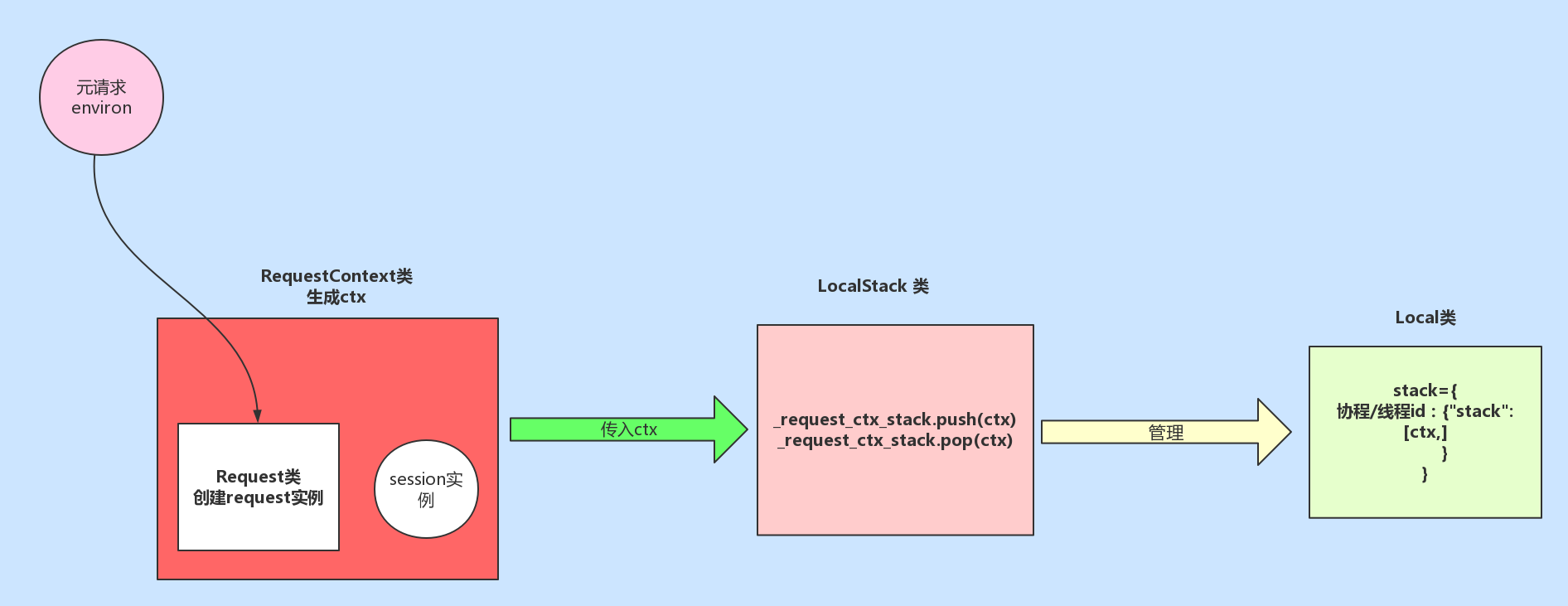
2. ctx.auto_pop(error) 函数,完成对请求上下文和应用上下文的出栈操作:
# 出栈,删除本次请求的相关信息

ctx.auto_pop(error)
def auto_pop(self, exc):

    if self.request.environ.get('flask._preserve_context') or \

       (exc is not None and self.app.preserve_context_on_exception):

        self.preserved = True

        self._preserved_exc = exc

    else:

        self.pop(exc)
def pop(self, exc=_sentinel):

    """Pops the request context and unbinds it by doing that.  This will

    also trigger the execution of functions registered by the

    :meth:`~flask.Flask.teardown_request` decorator.

    .. versionchanged:: 0.9

       Added the `exc` argument.

    """

    app_ctx = self._implicit_app_ctx_stack.pop()

    try:

        clear_request = False

        if not self._implicit_app_ctx_stack:

            self.preserved = False

            self._preserved_exc = None

            if exc is _sentinel:

                exc = sys.exc_info()[1]

            self.app.do_teardown_request(exc)

            # If this interpreter supports clearing the exception information

            # we do that now.  This will only go into effect on Python 2.x,

            # on 3.x it disappears automatically at the end of the exception

            # stack.

            if hasattr(sys, 'exc_clear'):

                sys.exc_clear()

            request_close = getattr(self.request, 'close', None)

            if request_close is not None:

                request_close()

            clear_request = True

    finally:

        # 请求上下文出栈

        rv = _request_ctx_stack.pop()

        # get rid of circular dependencies at the end of the request

        # so that we don't require the GC to be active.

        if clear_request:

            rv.request.environ['werkzeug.request'] = None

        # Get rid of the app as well if necessary.

        if app_ctx is not None:

            # 应用上下文出栈

            app_ctx.pop(exc)

        assert rv is self, 'Popped wrong request context.  ' \

            '(%r instead of %r)' % (rv, self)
def pop(self):

    """Removes the topmost item from the stack, will return the

    old value or `None` if the stack was already empty.

    """

    stack = getattr(self._local, 'stack', None)

    if stack is None:

        return None

    elif len(stack) == 1:

        release_local(self._local)

        return stack[-1]

    else:

        # 获取并删除列表中的第一个元素,同时返回该元素

        return stack.pop()
stack获取到的是请求栈或应用栈的列表,栈的长度为1,则进入 elif 控制语句中,首先执行 release_local(self._local) :
def release_local(local):

    local.__release_local__()
local=self._local ,即执行 Local 类的 __release_local__ 方法,进入该方法:
def __release_local__(self):

    # 将 self.__storage__ 所维护的字典中删除当前协程或线程id为key的元素

    self.__storage__.pop(self.__ident_func__(), None)
从上面的语句中可以很明显看出,要执行的操作就是将以当前协程或线程id为key的元素从字典 self.__storage__ 中删除,返回至pop函数中的elif控制语句,最终将列表中的最后一个元素返回。注意,最终 _request_ctx_stack._local 的请求栈和应用栈列表中至少会存在一个元素。
flask 源码专题(三):请求上下文和应用上下文入栈与出栈的更多相关文章
- flask 源码专题(二):请求上下文与全文上下文
源码解析 0. 请求入口 if __name__ == '__main__': app.run() def run(self, host=None, port=None, debug=None, lo ...
- flask 源码专题(五):SqlAlchemy 中操作数据库时session和scoped_session的区别
1原生session: from sqlalchemy.orm import sessionmaker from sqlalchemy import create_engine from sqlalc ...
- flask 源码专题(九):flask扩展点
1. 信号(源码) 信号,是在flask框架中为我们预留的钩子,让我们可以进行一些自定义操作. pip3 install blinker 2. 根据flask项目的请求流程来进行设置扩展点 中间件 # ...
- flask 源码专题(十一):LocalStack和Local对象实现栈的管理
目录 04 LocalStack和Local对象实现栈的管理 1.源码入口 1. flask源码关于local的实现 2. flask源码关于localstack的实现 3. 总结 04 LocalS ...
- flask 源码专题(六):session处理机制
前言 flask_session是flask框架实现session功能的一个插件,用来替代flask自带的session实现机制,flask默认的session信息保存在cookie中,不够安全和灵活 ...
- flask 源码专题(一):app.run()的背后
当我们用Flask写好一个app后, 运行app.run()表示监听指定的端口, 对收到的request运行app生成response并返回. 现在分析一下, 运行app.run()后具体发生了什么事 ...
- Python Web Flask源码解读(三)——模板渲染过程
关于我 一个有思想的程序猿,终身学习实践者,目前在一个创业团队任team lead,技术栈涉及Android.Python.Java和Go,这个也是我们团队的主要技术栈. Github:https:/ ...
- flask 源码专题(八):路由加载
1.示例代码 from flask import Flask app = Flask(__name__,static_url_path='/xx') @app.route('/index') def ...
- flask 源码专题(十):flash源码研究
flash源码 def flash(message, category="message"): flashes = session.get("_flashes" ...
随机推荐
- 关于前端JS走马灯(marquee)总结
方案一: <marquee width="360" scrolldelay="20" scrollamount="2" onclick ...
- @codefoces - 566E@ Restoring Map
目录 @description@ @solution@ @accepted code@ @details@ @description@ 对于一棵 n 个点的树,我们称两个点是相邻的当且仅当两个点的距离 ...
- 读懂操作系统之虚拟内存TLB与缓存(cache)关系篇(四)
前言 前面我们讲到通过TLB缓存页表加快地址翻译,通过上一节缓存原理的讲解为本节做铺垫引入TLB和缓存的关系,同时我们来完整梳理下从CPU产生虚拟地址最终映射为物理地址获取数据的整个过程是怎样的,若有 ...
- 从0到70%:Chrome上位揭秘!
最近的数据显示,Chrome在2020年4月的市场份额达到了70%左右,把微软的Edge和Firefox远远甩在身后,毫无疑问,Chrome赢得了第二次游览器之战,成为新一代王者. Chrome的第一 ...
- git&github&Jenkins完成可持续集成
1.安装git :想要安装Git首先要下载Git的安装包程序. Git安装包下载地址:https://git-scm.com/downloads/ 2.双击下载git安装包进入安装界面, 点击下一步, ...
- 浅谈RegExp 对象的方法
JavaScript RegExp 对象有 3 个方法:test().exec() 和 compile().(1) test() 方法用来检测一个字符串是否匹配某个正则表达式,如果匹配成功,返回 tr ...
- MFC_VC++_时间获取与保存列表控件内容到文件操作方法
MFC_VC++_时间获取与保存列表控件内容到excel文件操作方法 void CDataView::OnBnClickedBtnExporttoexcel() { CTime time = CTim ...
- 2.WebPack初始化
一.Package.json 在项目中输入: npm init 之后会提示你一步一步输入信息,我输入的信息如下: 生成的Package.json文件如下 我们也可以在初始时省略这些步骤,让脚本使用默认 ...
- 手把手教你使用Python生成图灵智能小伙伴,实现工作助手/闲聊功能
/1 前言/ 在家闲着,做个小项目,基于Python,实现一个语聊小机器人,分享给大家.项目整体比较简单,官方文档介绍的非常详细,可快速上手. /2 目标/ 将图灵机器人放到桌面,实现工作助手/陪聊功 ...
- 15.DRF-分页
Django rest framework(6)----分页 第一种分页 PageNumberPagination 基本使用 (1)urls.py urlpatterns = [ re_path('( ...