
ionic2中如何使用自动生成器
ionic generator是命令行的功能,ionic2自动帮我们创建应用程序,从而节省了大量的时间,并增加我们的速度来开发一个项目的关键部分。
- component
- directive
- page
- provider
一、创建页面:ionic g page [PageName]
ionic g page login

# Results:

√ Create app/pages/login/login.html

√ Create app/pages/login/login.scss

√ Create app/pages/login/login.ts
login.ts:

import {Component} from '@angular/core';

import {NavController} from 'ionic-angular';

@Component({

  templateUrl: 'build/pages/login/login.html',

})

export class LoginPage {

  constructor(public nav: NavController) {}

}
login.html:
<ion-header>

  <ion-navbar>

    <ion-title>

      login

    </ion-title>

  </ion-navbar>

</ion-header>

<ion-content padding class="login">

</ion-content>
二、创建组件:ionic g component [ComponentName]
ionic g component myComponent

# Results:

√ Create app/components/my-component/my-component.html

√ Create app/components/my-component/my-component.ts
my-component.ts:
import {Component} from '@angular/core';

@Component({

  selector: 'my-component',

  templateUrl: 'build/components/my-component/my-component.html'

})

export class MyComponent {

  text: string = "";

  constructor() {

    this.text = 'Hello World';

  }

}
ionic g directive myDirective

# Results:

√ Create app/components/my-directive/my-directive.ts
my-directive.ts:
import {Directive} from '@angular/core';

@Directive({

  selector: '[my-directive]' // Attribute selector

})

export class MyDirective {

  constructor() {

    console.log('Hello World');

  }

}
四、创建服务提供者:ionic g provider [ProviderName]
ionic g provider userService

# Results:

√ Create app/providers/user-service/user-service.ts
服务代码如下:
user-service.ts:
import {Injectable} from '@angular/core';

import {Http} from '@angular/http';

import 'rxjs/add/operator/map';

@Injectable()

export class UserService {

  data: any = null;

  constructor(public http: Http) { }

  load() { if (this.data) {

  }

  return new Promise(resolve => {

    this.http.get('path/to/data.json')

      .map(res => res.json())

      .subscribe(data => {

        this.data = data;

        resolve(this.data);

      });

    });

  }

}
五、创建管道pipe:ionic g pipe [PipeName]
ionic g pipe myPipe

# Results:

√ Create app/pipes/myPipe.ts
我们的管道的代码如下
myPipe.ts:
import {Injectable, Pipe} from '@angular/core';

@Pipe({

  name: 'my-pipe'

})

@Injectable()

export class MyPipe {

  transform(value: string, args: any[]) {

    value = value + ''; // make sure it's a string

    return value.toLowerCase();

  }

}
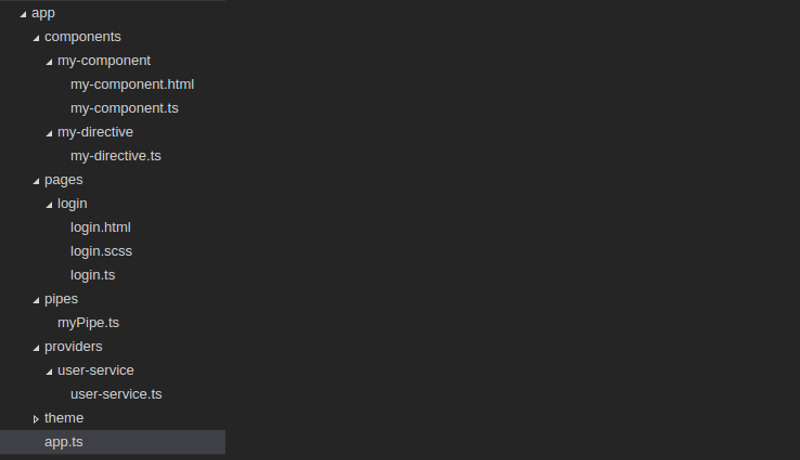
最后,我们生成的应用程序结构如下图:
ionic2中如何使用自动生成器的更多相关文章
- Ionic2系列——在Ionic2中使用ECharts
在群里看到有人问怎么在Ionic2中集成ECharts来显示图表.当时答应说写个blog,简单写下步骤. 在TypeScript中如果要使用第三方库,必须要有d.ts,也就是定义文件,没有这个文件的话 ...
- Python验证码6位自动生成器
Python验证码6位自动生成器
- Ionic2中集成腾讯Bugly之自定义插件
Ionic2混合开发,入坑系列:Ionic2中集成腾讯Bugly之自定义插件 1.编写Bugly.js代码 var exec = require('cordova/exec'); module.exp ...
- python is、==区别;with;gil;python中tuple和list的区别;Python 中的迭代器、生成器、装饰器
1. is 比较的是两个实例对象是不是完全相同,它们是不是同一个对象,占用的内存地址是否相同 == 比较的是两个对象的内容是否相等 2. with语句时用于对try except finally 的优 ...
- MyBatisPlus性能分析插件,条件构造器,代码自动生成器详解
性能分析插件 我们在平时的开发中,会遇到一些慢sql,测试,druid MP(MyBatisPlus)也提供性能分析插件,如果超过这个时间就停止 不过官方在3.2版本的时候取消了,原因如下 条件构造器 ...
- Mybatis-Plus03 代码自动生成器
先看完Mybatis-Plus01和Mybatis-Plus02再看Mybatis-Plus03 AutoGenerator 是 MyBatis-Plus 的代码生成器,通过 AutoGenerato ...
- Mybatis-plus<一> Springboot框架使用MybatisPlus代码自动生成器
Mybatis-plus<一> Springboot框架使用MybatisPlus代码自动生成器 Mybatis-plus官网: https://mp.baomidou.com/ Demo ...
- 掌握JavaScript中的迭代器和生成器,顺便了解一下async、await的原理
掌握JavaScript中的迭代器和生成器,顺便了解一下async.await的原理 前言 相信很多人对迭代器和生成器都不陌生,当提到async和await的原理时,大部分人可能都知道async.aw ...
- 专门为小白准备的入门级mybatis-plus-generator代码自动生成器,提高开发效率。值得收藏
引入依赖 <dependency> <groupId>com.baomidou</groupId> <artifactId>mybatis-plus-g ...
随机推荐
- Mysql主从同步(复制)(转)
文章转自:https://www.cnblogs.com/kylinlin/p/5258719.html 目录: mysql主从同步定义 主从同步机制 配置主从同步 配置主服务器 配置从服务器 使用主 ...
- (转)清除已运行过Rancher和K8S的主机上的环境数据
文章转自 https://blog.csdn.net/CSDN_duomaomao/article/details/77684571?locationNum=5&fps=1 本文命令主要是参考 ...
- IntelliJ IDEA2018.3 最新破解方法 无需改host
文章转自 https://blog.csdn.net/SmileLvCha/article/details/78936659 刚把idea升级到最新版,发现要重新激活,网上查了有改host的方法可行, ...
- android精品开源项目整理
转载地址:http://www.eoeandroid.com/thread-311366-1-1.html 前言:无论你是android的初学者,还有是Android开发了好多年的高手,可能都会有很多 ...
- linux中断源码分析 - 概述(一)
本文为原创,转载请注明:http://www.cnblogs.com/tolimit/ 关于中断和异常 一般在书中都会把中断和异常一起说明,因为它们具有相同的特点,同时也有不同的地方.在CPU里,中断 ...
- highcharts中数据列点击事件
Highcharts.chart('container', { xAxis: { categories: ['Jan', 'Feb', 'Mar', 'Apr', 'May', 'Jun', 'Jul ...
- TCP/IP协议--TCP协议概括和TCP连接的建立和终止
TCP提供一种面向连接的.可靠的字节流服务.面向连接指,发送和接收方在交换数据前必须建立一个TCP连接.顺便说下,一个TCP连接只有两方,因此广播和多播是不能应用于TCP的.字节流指,两个应用程序通过 ...
- LOJ2687 BOI2013 Vim 线头DP
传送门 多图警告!!! 一种很新奇的\(DP\),全网似乎只有一两篇题解-- 首先,序列中的一段\(e\)等价于在跳的过程中这一段\(e\)之后的一个字符必须要经过,并且在最后的答案中加上$2 \ti ...
- 一个比较变态的js传值,Query的bind、ajax闭包、上下文传值
var getIDNameList = function (list, selected, text, btn, actionUrl, defaultKey, deleteKey, keyName, ...
- Zabbix监控系统部署:源码安装
1. 概述1.1 基础环境2. 部署过程2.1 创建用户组2.2 下载源码解压编译安装2.2.1 下载源码解压2.2.2 YUM安装依赖环境2.2.3 编译安装最新版curl2.2.4 更新GNU构建 ...