
mybatis入门详解
一.mybatis-config.xml文件
<?xml version="1.0" encoding="UTF-8" ?>

<!DOCTYPE configuration

        PUBLIC "-//mybatis.org//DTD Config 3.0//EN"

        "http://mybatis.org/dtd/mybatis-3-config.dtd">

<!-- 根标签 -->

<configuration>

    <!--读取外部资源,通过方法参数传递的属性具有最高优先级,resource/url 属性中指定的配置文件次之,最低优先级的是 properties 属性中指定的属性。-->

    <properties resource="org/mybatis/example/config.properties">

        <property name="username" value="dev_user"/>

        <property name="password" value="F2Fa3!33TYyg"/>

    </properties>

    <!--settings设置-->

    <settings>

        <!--全局性地开启或关闭所有映射器配置文件中已配置的任何缓存-->

        <setting name="cacheEnabled" value="true"/>

        <!--延迟加载的全局开关。当开启时,所有关联对象都会延迟加载。 特定关联关系中可通过设置 fetchType 属性来覆盖该项的开关状态。-->

        <setting name="lazyLoadingEnabled" value="true"/>

        <setting name="multipleResultSetsEnabled" value="true"/>

        <setting name="useColumnLabel" value="true"/>

        <setting name="useGeneratedKeys" value="false"/>

        <setting name="autoMappingBehavior" value="PARTIAL"/>

        <setting name="autoMappingUnknownColumnBehavior" value="WARNING"/>

        <setting name="defaultExecutorType" value="SIMPLE"/>

        <setting name="defaultStatementTimeout" value="25"/>

        <setting name="defaultFetchSize" value="100"/>

        <setting name="safeRowBoundsEnabled" value="false"/>

        <!--是否开启驼峰命名自动映射,即从经典数据库列名 A_COLUMN 映射到经典 Java 属性名 aColumn-->

        <setting name="mapUnderscoreToCamelCase" value="false"/>

        <setting name="localCacheScope" value="SESSION"/>

        <setting name="jdbcTypeForNull" value="OTHER"/>

        <setting name="lazyLoadTriggerMethods" value="equals,clone,hashCode,toString"/>

    </settings>

    <!--类型别名-->

    <typeAliases>

        <!--type:实体类的全路径。alias:别名,通常首字母大写-->

        <!--<typeAlias type="com.zpc.mybatis.pojo.User" alias="User"/>-->

        <!--扫描包-->

        <package name="com.zpc.mybatis.pojo"/>

    </typeAliases>

    <!--插件(plugins)-->

    <plugins>

        <plugin interceptor="org.mybatis.example.ExamplePlugin">

            <property name="someProperty" value="100"/>

        </plugin>

    </plugins>

    <!-- 环境,可以配置多个,default:指定采用哪个环境 -->

    <environments default="development">

        <environment id="development">

            <transactionManager type="JDBC">

                <property name="..." value="..."/>

            </transactionManager>

            <dataSource type="POOLED">

                <property name="driver" value="${driver}"/>

                <property name="url" value="${url}"/>

                <property name="username" value="${username}"/>

                <property name="password" value="${password}"/>

            </dataSource>

        </environment>

    </environments>

    <!-- 使用相对于类路径的资源引用 -->

    <mappers>

        <mapper resource="org/mybatis/builder/AuthorMapper.xml"/>

        <mapper resource="org/mybatis/builder/BlogMapper.xml"/>

        <mapper resource="org/mybatis/builder/PostMapper.xml"/>

    </mappers>

</configuration>
二.Mapper XML文件详解
1.CRUD标签
select
select中的几个属性说明:
id属性:当前名称空间下的statement的唯一标识。必须。要求id和mapper接口中的方法的名字一致。
resultType:将结果集映射为java的对象类型。必须(和 resultMap 二选一)
parameterType:传入参数类型。可以省略
<select

  id="selectPerson"       //当前名称空间下的statement的唯一标识

  parameterType="int"      //将会传入这条语句的参数的类全限定名或别名(可以省略)

  parameterMap="deprecated"  //该参数已废弃

  resultType="hashmap"     //期望从这条语句中返回结果的类全限定名或别名

  resultMap="personResultMap" //对外部 resultMap 的命名引用

  flushCache="false"      //将其设置为 true 后,只要语句被调用,都会导致本地缓存和二级缓存被清空

  useCache="true"        //将其设置为 true 后,将会导致本条语句的结果被二级缓存缓存起来

  timeout="10"          //这个设置是在抛出异常之前,驱动程序等待数据库返回请求结果的秒数

  fetchSize="256"        //这是一个给驱动的建议值,尝试让驱动程序每次批量返回的结果行数等于这个设置值

  statementType="PREPARED"   //可选 STATEMENT,PREPARED 或 CALLABLE

  resultSetType="FORWARD_ONLY">
<select id="selectPerson" parameterType="int" resultType="User">

      SELECT * FROM PERSON WHERE ID = #{id}

</select>
insert, update 和 delete
insert 的几个属性说明:
id:唯一标识,随便写,在同一个命名空间下保持唯一,使用动态代理之后要求和方法名保持一致
parameterType:参数的类型,使用动态代理之后和方法的参数类型一致
useGeneratedKeys:开启主键回写
keyColumn:指定数据库的主键
keyProperty:主键对应的pojo属性名
标签内部:具体的sql语句。
<insert

  id="insertAuthor"

  parameterType="domain.blog.Author"  //将会传入这条语句的参数的类全限定名或别名

  flushCache="true"            //将其设置为 true 后,只要语句被调用,都会导致本地缓存和二级缓存被清空

  statementType="PREPARED"        //可选 STATEMENT,PREPARED 或 CALLABLE

  keyProperty=""              //(仅适用于 insert 和 update)指定能够唯一识别对象的属性

  keyColumn=""               //(仅适用于 insert 和 update)设置生成键值在表中的列名

  useGeneratedKeys=""           //(仅适用于 insert 和 update)这会令 MyBatis 使用 JDBC 的 getGeneratedKeys 方法来取出由数据库内部生成的主键(比如:像 MySQL 和 SQL Server 这样的关系型数据库管理系统的自动递增字段)

  timeout="20">
<insert id="insertAuthor">

  insert into Author (id,username,password,email,bio)

  values (#{id},#{username},#{password},#{email},#{bio})

</insert>
update的几个属性说明:
id属性:当前名称空间下的statement的唯一标识(必须属性);
parameterType:传入的参数类型,可以省略。
标签内部:具体的sql语句。
<update

  id="updateAuthor"

  parameterType="domain.blog.Author"

  flushCache="true"

  statementType="PREPARED"

  timeout="20">
<update id="updateAuthor">

  update Author set

    username = #{username},

    password = #{password},

    email = #{email},

    bio = #{bio}

  where id = #{id}

</update>
delete 的几个属性说明:
id属性:当前名称空间下的statement的唯一标识(必须属性);
parameterType:传入的参数类型,可以省略。
标签内部:具体的sql语句。
<delete

  id="deleteAuthor"

  parameterType="domain.blog.Author"

  flushCache="true"

  statementType="PREPARED"

  timeout="20">
<delete id="deleteAuthor">

  delete from Author where id = #{id}

</delete>
2.#{}和${}
通常在方法的参数列表上加上一个注释@Param(“xxxx”) 显式指定参数的名字,然后通过${“xxxx”}或#{“xxxx”}
sql语句动态生成的时候,使用${};
sql语句中某个参数进行占位的时候#{}
/**

 * #号

 * @param username1

 * @return

 */

User queryUserListByName1(@Param("username1") String username1);

/**

 * $号

 * @param username2

 * @return

 */

User queryUserListByName2(@Param("username2") String username2);

<select id="queryUserListByName1" resultType="com.zpc.mybatis.pojo.User">

    select * from tb_user WHERE user_name=#{username1}

</select>

<select id="queryUserListByName2" resultType="com.zpc.mybatis.pojo.User">

    select * from tb_user WHERE user_name='${username2}'//手动加了引号

</select>
3.resultMap
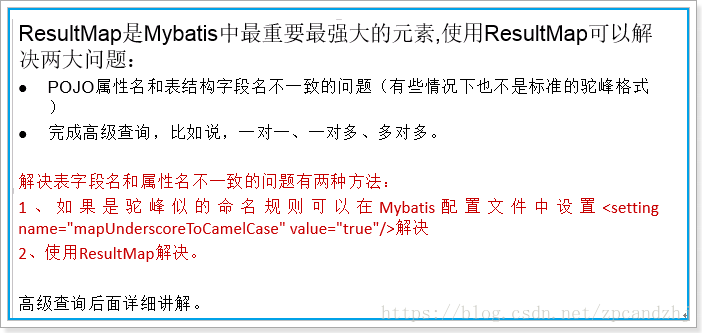
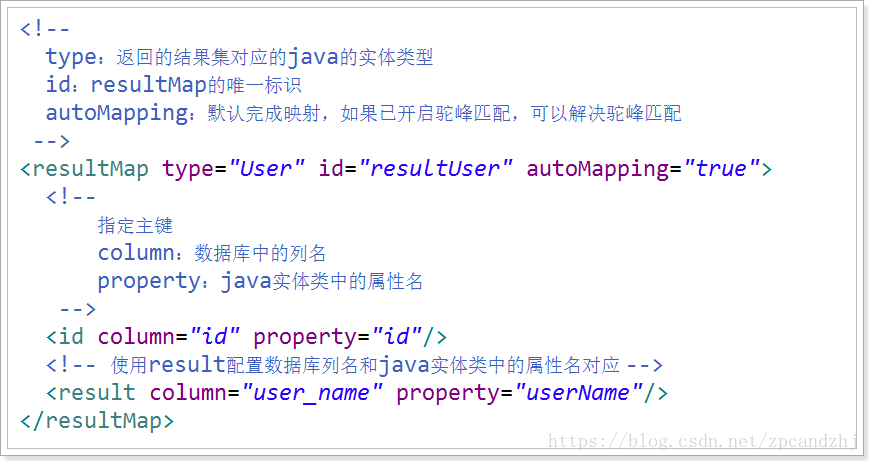
使用:

4.sql片段
例如在UserMapper.xml中定义如下片段:
<sql id="commonSql">

        id,

            user_name,

            password,

            name,

            age,

            sex,

            birthday,

            created,

            updated

</sql>
则可以在UserMapper.xml中使用它:
<select id="queryUserById" resultMap="userResultMap">

    select <include refid="commonSql"></include> from tb_user where id = #{id}

</select>

<select id="queryUsersLikeUserName" resultType="User">

    select <include refid="commonSql"></include> from tb_user where user_name like "%"#{userName}"%"

</select>
5.动态sql
if
使用动态 SQL 最常见情景是根据条件包含 where 子句的一部分。比如:
<select id="findActiveBlogWithTitleLike"

     resultType="Blog">

  SELECT * FROM BLOG

  WHERE state = ‘ACTIVE’

  <if test="title != null">

    AND title like #{title}

  </if>

</select>
choose、when、otherwise
它有点像 Java 中的 switch 语句
<select id="findActiveBlogLike"

     resultType="Blog">

  SELECT * FROM BLOG WHERE state = ‘ACTIVE’

  <choose>

    <when test="title != null">

      AND title like #{title}

    </when>

    <when test="author != null and author.name != null">

      AND author_name like #{author.name}

    </when>

    <otherwise>

      AND featured = 1

    </otherwise>

  </choose>

</select>
trim、where、set
<select id="findActiveBlogLike"

     resultType="Blog">

  SELECT * FROM BLOG

  <where>

    <if test="state != null">

         state = #{state}

    </if>

    <if test="title != null">

        AND title like #{title}

    </if>

    <if test="author != null and author.name != null">

        AND author_name like #{author.name}

    </if>

  </where>

</select>
where 元素只会在子元素返回任何内容的情况下才插入 “WHERE” 子句。而且,若子句的开头为 “AND” 或 “OR”,where 元素也会将它们去除。
如果 where 元素与你期望的不太一样,你也可以通过自定义 trim 元素来定制 where 元素的功能。比如,和 where 元素等价的自定义 trim 元素为:
<trim prefix="WHERE" prefixOverrides="AND |OR ">

  ...

</trim>
用于动态更新语句的类似解决方案叫做 set。set 元素可以用于动态包含需要更新的列,忽略其它不更新的列。比如:
<update id="updateAuthorIfNecessary">

  update Author

    <set>

      <if test="username != null">username=#{username},</if>

      <if test="password != null">password=#{password},</if>

      <if test="email != null">email=#{email},</if>

      <if test="bio != null">bio=#{bio}</if>

    </set>

  where id=#{id}

</update>
这个例子中,set 元素会动态地在行首插入 SET 关键字,并会删掉额外的逗号(这些逗号是在使用条件语句给列赋值时引入的)。
来看看与 set 元素等价的自定义 trim 元素吧:
<trim prefix="SET" suffixOverrides=",">

  ...

</trim>
foreach
动态 SQL 的另一个常见使用场景是对集合进行遍历(尤其是在构建 IN 条件语句的时候)。比如:
<select id="selectPostIn" resultType="domain.blog.Post">

  SELECT *

  FROM POST P

  WHERE ID in

  <foreach item="item" index="index" collection="list"

      open="(" separator="," close=")">

        #{item}

  </foreach>

</select>
6.高级查询
一对一查询(人和订单)
public class Order {

    private Integer id;

    private Long userId;

    private String orderNumber;

    private Date created;

    private Date updated;

    private User user;

}
<resultMap id="OrderUserResultMap" type="com.zpc.mybatis.pojo.Order" autoMapping="true">

     <id column="id" property="id"/>

     <!--association:完成子对象的映射-->

     <!--property:子对象在父对象中的属性名-->

     <!--javaType:子对象的java类型-->

     <!--autoMapping:完成子对象的自动映射,若开启驼峰,则按驼峰匹配-->

     <association property="user" javaType="com.zpc.mybatis.pojo.User" autoMapping="true">

         <id column="user_id" property="id"/>

     </association>

 </resultMap>

 <select id="queryOrderWithUserByOrderNumber" resultMap="OrderUserResultMap">

   select * from tb_order o left join tb_user u on o.user_id=u.id where o.order_number = #{number}

</select>
一对多查询(订单和订单详情)
public class Order {

    private Integer id;

    private Long userId;

    private String orderNumber;

    private Date created;

    private Date updated;

    private User user;

    private List<OrderDetail> detailList;

}
<resultMap id="OrderUserDetailResultMap" type="com.zpc.mybatis.pojo.Order" autoMapping="true">

    <id column="id" property="id"/>

    <!--collection:定义子对象集合映射-->

    <!--association:完成子对象的映射-->

    <!--property:子对象在父对象中的属性名-->

    <!--javaType:子对象的java类型-->

    <!--autoMapping:完成子对象的自动映射,若开启驼峰,则按驼峰匹配-->

    <association property="user" javaType="com.zpc.mybatis.pojo.User" autoMapping="true">

        <id column="user_id" property="id"/>

    </association>

    <collection property="detailList" javaType="List" ofType="com.zpc.mybatis.pojo.OrderDetail" autoMapping="true">

        <id column="id" property="id"/>

    </collection>

</resultMap>

 <select id="queryOrderWithUserAndDetailByOrderNumber" resultMap="OrderUserDetailResultMap">

   select * from tb_order o

   left join tb_user u on o.user_id=u.id

   left join tb_orderdetail od on o.id=od.order_id

   where o.order_number = #{number}

</select>
多对多查询(订单和商品)
<resultMap id="OrderUserDetailItemResultMap" type="com.zpc.mybatis.pojo.Order" autoMapping="true">

    <id column="id" property="id"/>

    <association property="user" javaType="com.zpc.mybatis.pojo.User" autoMapping="true">

        <id column="user_id" property="id"/>

    </association>

    <collection property="detailList" javaType="List" ofType="com.zpc.mybatis.pojo.OrderDetail" autoMapping="true">

        <id column="detail_id" property="id"/>

        <association property="item" javaType="com.zpc.mybatis.pojo.Item" autoMapping="true">

            <id column="item_id" property="id"/>

        </association>

    </collection>

</resultMap>

 <select id="queryOrderWithUserAndDetailItemByOrderNumber" resultMap="OrderUserDetailItemResultMap">

   select * ,od.id as detail_id from tb_order o

   left join tb_user u on o.user_id=u.id

   left join tb_orderdetail od on o.id=od.order_id

   left join tb_item i on od.item_id=i.id

   where o.order_number = #{number}

</select>
mybatis入门详解的更多相关文章
- Linq之旅:Linq入门详解(Linq to Objects)
示例代码下载:Linq之旅:Linq入门详解(Linq to Objects) 本博文详细介绍 .NET 3.5 中引入的重要功能:Language Integrated Query(LINQ,语言集 ...
- SQL注入攻防入门详解
=============安全性篇目录============== 本文转载 毕业开始从事winfrm到今年转到 web ,在码农届已经足足混了快接近3年了,但是对安全方面的知识依旧薄弱,事实上是没机 ...
- SQL注入攻防入门详解(2)
SQL注入攻防入门详解 =============安全性篇目录============== 毕业开始从事winfrm到今年转到 web ,在码农届已经足足混了快接近3年了,但是对安全方面的知识依旧薄弱 ...
- Quartz 入门详解
Quartz是OpenSymphony开源组织在Job scheduling领域又一个开源项目,它可以与J2EE与J2SE应用程序相结合也可以单独使用.Quartz可以用来创建简单或为运行十个,百个, ...
- Redis快速入门详解
Redis入门详解 Redis简介 Redis安装 Redis配置 Redis数据类型 Redis功能 持久化 主从复制 事务支持 发布订阅 管道 虚拟内存 Redis性能 Redis部署 Redis ...
- [转]SQL注入攻防入门详解
原文地址:http://www.cnblogs.com/heyuquan/archive/2012/10/31/2748577.html =============安全性篇目录============ ...
- [置顶]
xamarin android toolbar(踩坑完全入门详解)
网上关于toolbar的教程有很多,很多新手,在使用toolbar的时候踩坑实在太多了,不好好总结一下,实在浪费.如果你想学习toolbar,你肯定会去去搜索androd toolbar,既然你能看到 ...
- 转:JAVAWEB开发之权限管理(二)——shiro入门详解以及使用方法、shiro认证与shiro授权
原文地址:JAVAWEB开发之权限管理(二)——shiro入门详解以及使用方法.shiro认证与shiro授权 以下是部分内容,具体见原文. shiro介绍 什么是shiro shiro是Apache ...
- webpack入门详解
webpack入门详解(基于webpack 3.5.4 2017-8-22) webpack常用命令: webpack --display-error-details //执行打包 webpa ...
随机推荐
- 2020 将至,Tester 你过得还好么?
"昏天黑地地执行用例.跟踪 bug.与开发和产品争吵.工作被压在产品发布的最后阶段,因而要背负整个团队的压力,在 retro meeting 时承受着疯狂 diss......" ...
- 美团新零售招聘-高级测试开发(20k-50k/月)
内推邮箱:liuxinguang@meituan.com 地点:北京 职位级别:p2-2以上级别 15.5薪
- Python sys.path详解
如何将路径“永久"添加到sys.path? sys.path是python的搜索模块的路径集,是一个list ['', 'C:\\WINDOWS\\system32\\python26.zi ...
- sublime 安装Anaconda插件 配置python开发环境
我的sublime 3 python 3.6.6 安装Anaconda插件 由于Anaconda插件本身无法知道Python安装的路径,所以需要设置Python主程序的实际位置.选择Settings ...
- Mybatis笔记01-基本原理,配置文件,映射文件,以及调用过程
Mybatis基本原理 应用程序找Mybatis要数据 mybatis从数据库中找来数据 2.1 通过mybatis-config.xml 定位哪个数据库 2.2 通过Category.xml执行对应 ...
- 史上最全Beyond Compare中文文档.CHM (根据官网整理编辑)
截图如下: 下载地址: 链接:https://pan.baidu.com/s/1Ml98_biT1leXxGLr9fqI_w 提取码:p8jg
- Service Mesh - gRPC 本地联调远程服务
Description Service Mesh 架构下,服务间调用会通过服务名(Service Name)互相调用,比如在 Kubernetes .Docker Swarm 集群中,服务 IP 均由 ...
- 从String到==和hashcode
public static void main(String[] args) { String s1 = "ni"; String s2 = "hao"; St ...
- Linux系统简单文件操作命令
项目 内容 作业课程归属 班级课程链接 作业要求 作业要求链接 学号-姓名 17041419-刘金林 作业学习目标 1)学习Linux的基本操作命令:2)在终端上运用命令行去实现基本文件操作 1.查看 ...
- 使用java短信验证
package cn.geekss.util; import java.io.BufferedReader;import java.io.InputStreamReader;import java.i ...