
第九组 通信3班 063 OSPFv2与OSPFv3综合实验
实验目的
1. 掌握 OSPFv3(v2) 的配置方法
2. 掌握在帧中继环境下 OSPFv3 (v2)的配置方法
3. 掌握 OSPFv3(v2) NSSA 的配置方法
4. 掌握外部路由汇总的配置
5. 掌握区域间路由的汇总配置
OSPFv2
一、实验拓扑图
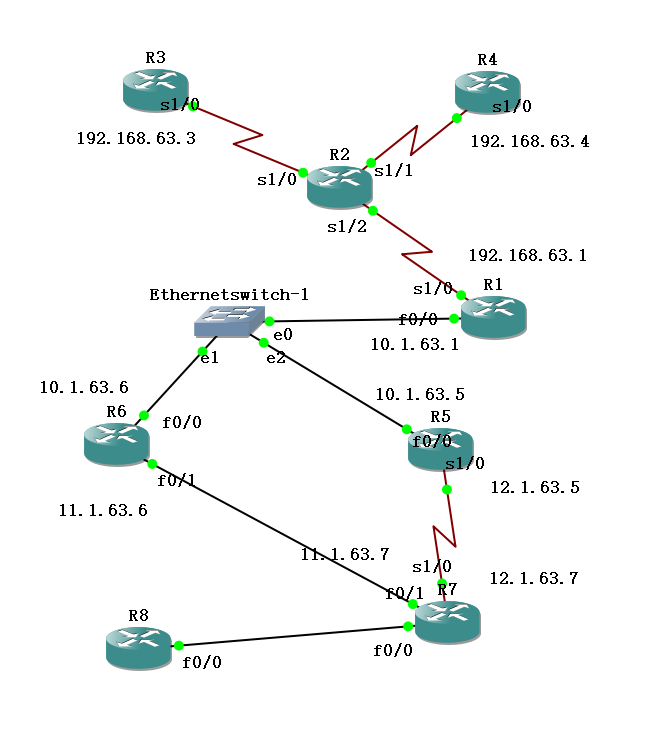
IPv4地址表
|
Device |
Interface |
IP Address |
|
R1 |
F 0/0 |
10.1.63.1 |
|
S 1/0 |
192.168.63.1 |
|
|
R3 |
S 1/0 |
192.168.63.3 |
|
R4 |
S 1/0 |
192.168.63.4 |
|
R5 |
F 0/0 |
10.1.63.5 |
|
S 1/0 |
12.1.63.5 |
|
|
R6 |
F 0/0 |
10.1.63.6 |
|
F 0/1 |
11.1.63.6 |
|
|
R7 |
F 0/1 |
11.1.63.7 |
|
S 1/0 |
12.1.63.7 |
步骤1:开启帧中继交换功能
R2(config)#frame-relay switching
步骤2:配置接口封装
R2(config)#int s 1/2
R2(config-if)#no shut
R2(config-if)#clock rate 128000
R2(config-if)#encapsulation frame-relay
R2(config)#int s 1/0
R2(config-if)#no shut
R2(config-if)#clock rate 128000
R2(config-if)#encapsulation frame-relay
R2(config)#int s 1/1
R2(config-if)#no shut
R2(config-if)#clock rate 128000
R2(config-if)#encapsulation frame-relay
(3) 步骤3:配置LMI类型
R2(config)#int s 1/2
R2(config-if)#frame-relay lmi-type cisco
R2(config-if)#frame-relay intf-type dce
R2(config)#int s 1/0
R2(config-if)#frame-relay lmi-type cisco
R2(config-if)#frame-relay intf-type dce
R2(config)#int s 1/1
R2(config-if)#frame-relay lmi-type cisco
R2(config-if)#frame-relay intf-type dce
(4) 步骤4:配置帧中继交换表
R2(config)#int s 1/2
R2(config-if)#frame-relay route 103 interface s 1/0 301
R2(config-if)#frame-relay route 104 interface s 1/1 401
R2(config)#int Serial 1/0
R2(config-if)#frame-relay route 301 interface Serial1/2 103
R2(config)#int Serial 1/1
R2(config-if)#frame-relay route 401 interface Serial1/2 104
此时“show frame-relay route”
检查帧中继交换机是否正常

(5)步骤5:配置R1、R3、R4,使得它们能够互相通信
R1(config)#int s 1/0
R1(config-if)#ip address 192.168..63.1 255.255.255.0
R1(config-if)#no shut
R1(config-if)#encapsulation frame-relay
R1(config-if)#frame-relay lmi-type cisco
R1(config-if)#no frame-relay inverse-arp //关闭自动映射
R1(config-if)#frame-relay map ip 192.168.63.3 103 broadcast
R1(config-if)#frame-relay map ip 192.168.63.4 104 broadcast
R3(config)#int s 1/0
R3(config-if)#ip address 192.168.63.3 255.255.255.0
R3(config-if)#no shut
R3(config-if)#encapsulation frame-relay
R3(config-if)#no frame-relay inverse-arp
R3(config-if)#frame-relay map ip 192.168.63.1 301 broadcast
R4(config)#int s 1/0
R4(config-if)#ip address 192.168.63.4 255.255.255.0
R4(config-if)#no shut
R4(config-if)#encapsulation frame-relay
R4(config-if)#no frame-relay inverse-arp
R4(config-if)#frame-relay map ip 192.168.63.1 401 broadcast
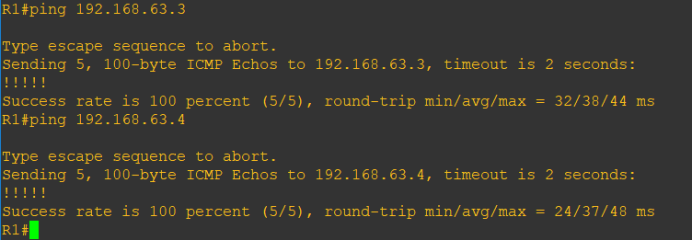
ping命令测试
R1 ping R3与R4
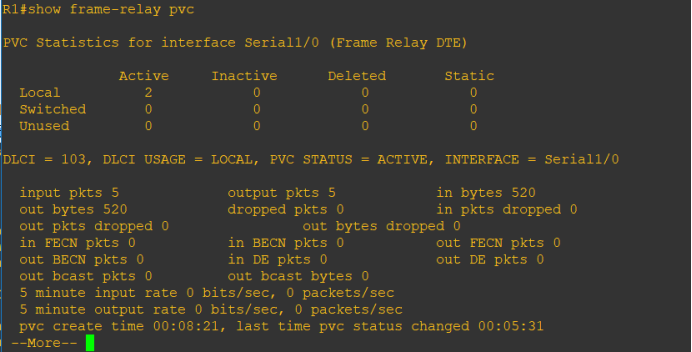
R1#show frame-relay PVC
存在两条本地连接
步骤6:开始配置ospf
先配置外部路由器ospf (R6、R1为例,R5.R7同理)
R6(config)#router ospf 1
R6(config-router)#router-id 6.6.6.6
R6 (config-router)#area 1 nssa――配置区域 1 为 NSSA 区域
R6(config)#interface loopback 0
R6(config-if)#ip add 6.6.6.6 255.255.255.255
R6(config)#int f 0/0
R6(config-if)#ip add 10.1.63.6 255.255.255.0
R6(config-if)#no shut
R6(config-if)#ip ospf 1 area 0
R6(config-if)#int f 0/1
R6(config-if)#ip add 11.1.63.6 255.255.255.0
R6(config-if)#no shut
R6(config-if)#ip ospf 1 area 1
R6(config-if)#ex
R6(config)#router ospf 1
R6(config-router)#network 6.6.6.6 0.0.0.0 area 0
R6(config-router)#network 10.1.63.0 0.0.0.255 area 0
R6(config-router)#network 11.1.63.0 0.0.0.255 area 1
R1(config)#router ospf 1
R1(config-router)#router-id 1.1.1.1
R1(config)#interface loopback 0
R1(config-if)#ip add 1.1.1.1 255.255.255.255
R1(config)#int f 0/0
R1(config-if)#ip add 10.1.63.1 255.255.255.0
R1(config-if)#no shut
R1(config-if)#ip ospf 1 area 0
R1(config-if)#int s 1/0
R1(config-if)#ip ospf 1 area 0
R1(config-if)#ex
R1(config)#router ospf 1
R1(config-router)#network 1.1.1.1 0.0.0.0 area 0
R1(config-router)#network 10.1.63.0 0.0.0.255 area 0
R1(config-router)#network 192.168.63.0 0.0.0.255 area 2
R1(config-router)#neighbor 192.168.63.3
R1(config-router)#neighbor 192.168.63.4
步骤7:配置帧中继中路由器的ospf (R3为例,R4同理)
R3(config)#router ospf 1
R3(config-router)#router-id 3.3.3.3
R3(config-router)#ex
R3(config)#int loopback 0
R3(config-if)#ip add 3.3.3.3 255.255.255.255
R3(config-if)#ip ospf 1 area 2
R3(config-if)#int s 1/0
R3(config-if)# ip ospf 1 area 2
R3(config-if)# ip ospf priority 0
R3(config)#router ospf 1
R3(config-router)#network 3.3.3.3 0.0.0.0 area 2
R3(config-router)#network 192.168.63.0 0.0.0.255 area 2
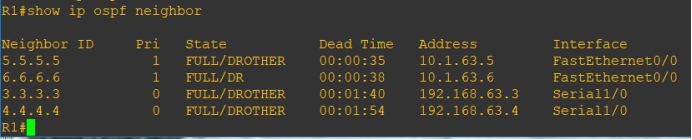
已完成OSPFv2配置,在R1上查ospf邻居关系
R1#show ipv6 ospf neighbor
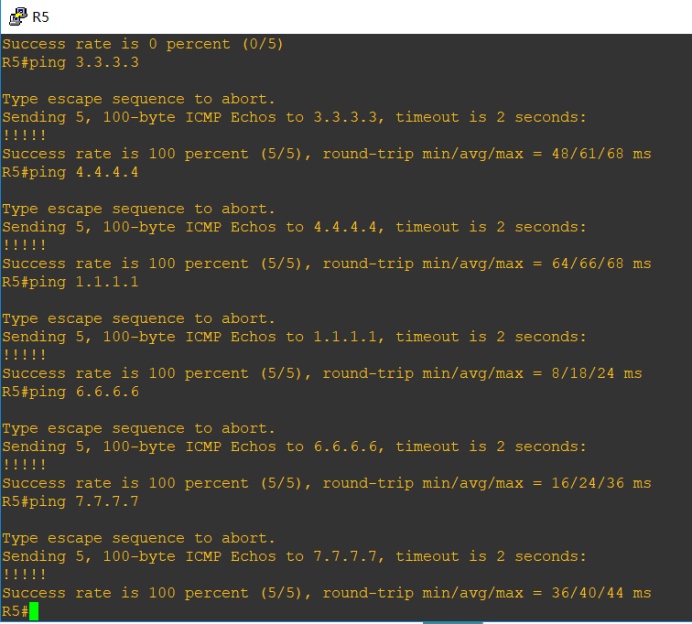
测试路由通断情况
在R5上测试得出结果如下(从内部到外部皆ping通,实验完成)
OSPFv3
一、实验拓扑图:
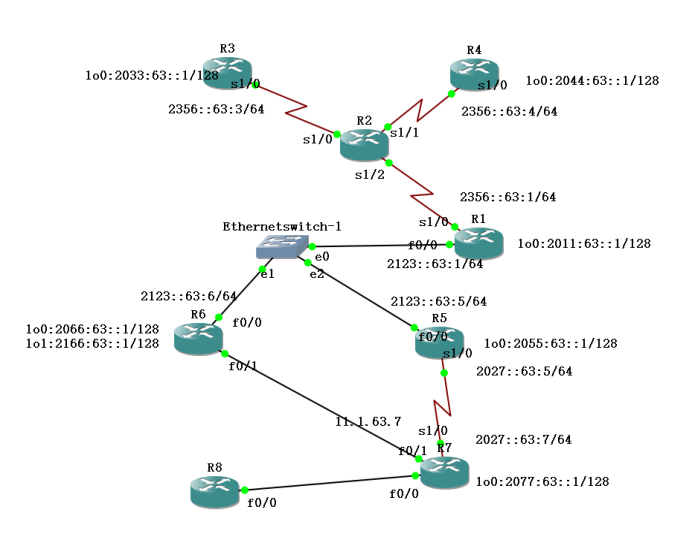
IPv6地址表
|
Device |
Interface |
IPv6 Address |
|
R1 |
F 0/0 |
2123::63:1/64 |
|
S 1/0.1 |
2356::63:1/64 |
|
|
Loopback 0 |
2011:63::1/128 |
|
|
R3 |
S 1/0.1 |
2356::63:3/64 |
|
Loopback 0 |
2033:63::1/128 |
|
|
R4 |
S 1/0.1 |
2356::63:4/64 |
|
Loopback 0 |
2044:63::1/128 |
|
|
R5 |
F 0/0 |
2123::63:5/64 |
|
S 1/0 |
2027::63:5/64 |
|
|
Loopback 0 |
2055:63::1/128 |
|
|
R6 |
F 0/0 |
2123::63:6/64 |
|
Loopback 0 |
2066:63::1/128 |
|
|
Loopback 1 |
2166:63::1/128 |
|
|
R7 |
S 1/0 |
2027::63:7/64 |
|
Loopback 0 |
2077:63::1/128 |
帧中继R2配置与ospfv2相同。
1.完成接口 IPv6 地址的配置,并且在路由上配置 loopback0
R1(config)#ipv6 unicast-routing ―――全局打开 IPv6 路由功能
R1config)#interface loopback 0
R1(config-if)#ipv6 enable
R1(config-if)#ipv6 address 2011:63::1/128―――配置 loopback0 接口地址
R1(config-if)#int f 0/0
R1(config-if)#ipv6 enable
R1(config-if)# ipv6 address 2123::63:1/64
R1(config-if)#no shut
R1(config-if)#int s 1/0
R1(config-if)#ipv6 enable
R1(config-if)# encapsulation frame-relay
R1(config-if)#no shut
R1(config)#interface serial 1/0.1 multipoint
R1(config-subif)#ipv6 address 2356::63:1/64
R1(config-subif)#frame-relay map ipv6 2356::63:3 103 broadcast
R1(config-subif)#frame-relay map ipv6 2356::63:4 104 broadcast
R1(config-subif)#frame-relay map ipv6 2356::63:1 104 broadcast
R1(config-subif)#frame-relay map ipv6 FE80::C804:1CFF:FE48:8 104 broadcast
R1(config-subif)#frame-relay map ipv6 FE80::C803:1CFF:FE48:8 103 broadcast
R3(config)#ipv6 unicast-routing
R3(config)#interface loopback 0
R3(config-if)#ipv6 address 2033:63::1/128
R3(config-if)#int s 1/0
R3(config-if)#ipv6 enable
R3(config-if)# encapsulation frame-relay
R3(config-if)#no shutdown
R3(config)#interface serial 1/0.1 multipoint
R3(config-subif)#ipv6 address 2356::63:3/64
R3(config-subif)#frame-relay map ipv6 2356::63:1 301 broadcast
R3(config-subif)#frame-relay map ipv6 2356::63:4 301 broadcast
R3(config-subif)#frame-relay map ipv6 2356::63:3 301 broadcast
R3(config-subif)#frame-relay map ipv6 FE80::C804:1CFF:FE48:8 304 broadcast
R3(config-subif)#frame-relay map ipv6 FE80::C801:1CFF:FE48:8 301 broadcast
R4(config)#ipv6 unicast-routing
R4(config)#interface loopback 0
R4(config-if)#ipv6 address 2044:63::1/128
R4(config-if)#int s 1/0
R4(config-if)#ipv6 enable
R4(config-if)# encapsulation frame-relay
R4(config-if)#no shutdown
R4(config)#interface serial 1/0.1 multipoint
R4(config-subif)#ipv6 address 2356::63:4/64
R4(config-subif)#frame-relay map ipv6 2356::63:1 401 broadcast
R4(config-subif)#frame-relay map ipv6 2356::63:4 401 broadcast
R4(config-subif)#frame-relay map ipv6 2356::63:3 401 broadcast
R4(config-subif)#frame-relay map ipv6 FE80::C803:1CFF:FE48:8 403 broadcast
R4(config-subif)#frame-relay map ipv6 FE80::C801:1CFF:FE48:8 401 broadcast
试R1上ping通 R3.R4

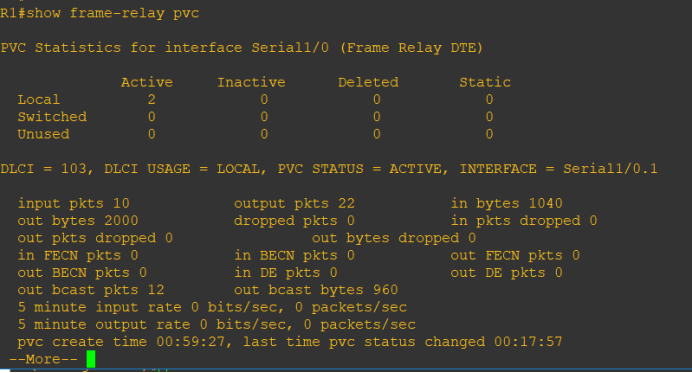
用show frame-relay pvc命令查看,帧中继配置完成
2. 按实验拓扑图标识的区域,完成 OSPFv3 的基本配置。区域 1 为 NSSA 区域。
R6(config)#ipv6 unicast-routing
R6(config)#ipv6 router ospf 1―――启动 OSPFv3 进程
R6(config-rtr)#router-id 6.6.6.6
R6(config-rtr)#area 1 nssa――配置区域 1 为 NSSA 区域
R6(config-rtr)#int f 0/0
R6(config-if)#ipv6 enable
R6(config-if)# ipv6 ospf 1 area 0
R6(config-if)#no shutdown
R6(config-if)#int loopback 0
R6(config-if)#ipv6 enable
R6(config-if)#ipv6 address 2066:63::1/128
R6(config-if)# ipv6 ospf 1 area 0
R6(config-if)#int f 0/1
R6(config-if)#ipv6 enable
R6(config-if)# ipv6 ospf 1 area 1
R6(config-if)#no shutdown
R5(config)#ipv6 unicast-routing
R5(config)#ipv6 router ospf 1―――启动 OSPFv3 进程
R5(config-rtr)#router-id 5.5.5.5
R5(config-rtr)#area 1 nssa――配置区域 1 为 NSSA 区域
R5(config-rtr)#int f 0/0
R5(config-if)#ipv6 enable
R5(config-if)# ipv6 ospf 1 area 0
R5(config-if)#no shutdown
R5(config-if)#int loopback 0
R5(config-if)#ipv6 enable
R5(config-if)#ipv6 address 2055:63::1/128
R5(config-if)# ipv6 ospf 1 area 0
R5(config-if)#int s 1/0
R5(config-if)#ipv6 enable
R5(config-if)# ipv6 ospf 1 area 1
R5(config-if)#no shutdown
R1(config)#ipv6 unicast-routing
R1(config)#ipv6 router ospf 1―――启动 OSPFv3 进程
R1(config-rtr)#router-id 1.1.1.1
R1(config-rtr)#int f 0/0
R1(config-if)#ipv6 enable
R1(config-if)# ipv6 ospf 1 area 0
R1(config-if)#no shutdown
R1(config-if)#int loopback 0
R1(config-if)#ipv6 enable
R1(config-if)#ipv6 address 2011:63::1/128
R1(config-if)# ipv6 ospf 1 area 0
R1(config-if)#int s 1/0.1
R1(config-subif)#ipv6 enable
R1(config-subif)# ipv6 ospf 1 area 2
R1(config-subif)#ipv6 ospf neighbor FE80::C803:1CFF:FE48:8
R1(config-subif)#ipv6 ospf neighbor FE80::C804:1CFF:FE48:8
R1(config-subif)# ipv6 address FE80::C801:1CFF:FE48:8 link-local
R3(config)#ipv6 router ospf 1
R3(config-rtr)#router-id 3.3.3.3
R3(config-rtr)#int loopback 0
R3(config-if)#ipv6 enable
R3(config-if)#ipv6 address 2033:63::1/128
R3(config-if)# ipv6 ospf 1 area 2
R3(config-if)#int s 1/0.1
R3(config-subif)#ipv6 enable
R3(config-subif)# ipv6 ospf 1 area 2
R3(config-subif)# ipv6 ospf priority 0
R3(config-subif)# ipv6 address FE80::C803:1CFF:FE48:8 link-local
R4config)#ipv6 router ospf 1
R4config-rtr)#router-id 4.4.4.4
R4config-rtr)#int loopback 0
R4config-if)#ipv6 enable
R4(config-if)#ipv6 address 2044:63::1/128
R4(config-if)# ipv6 ospf 1 area 2
R4(config-if)#int s 1/0.1
R4(config-subif)#ipv6 enable
R4(config-subif)# ipv6 ospf 1 area 2
R4(config-subif)# ipv6 ospf priority 0
R4(config-subif)# ipv6 address FE80::C804:1CFF:FE48:8 link-local
R7(config)#ipv6 unicast-routing
R7(config)#ipv6 router ospf 1―――启动 OSPFv3 进程
R7(config-rtr)#router-id 7.7.7.7
R7(config-rtr)#area 1 nssa――配置区域 1 为 NSSA 区域
R7(config-rtr)#int s 1/0
R7(config-if)#ipv6 enable
R7(config-if)# ipv6 ospf 1 area 1
R7(config-if)#no shutdown
R7(config-if)#int loopback 0
R7(config-if)#ipv6 enable
R7(config-if)#ipv6 address 2077:63::1/128
R7(config-if)# ipv6 ospf 1 area 1
R7(config-if)#int f 0/1
R7(config-if)#ipv6 enable
R7(config-if)# ipv6 ospf 1 area 1
R7(config-if)#no shutdown
3.检查 OSPFv3 的邻居关系
R1上检查,可以看到邻居的 Router-ID 都是用 IPv4 的地址格式标识
R1#show ipv6 ospf neighbor

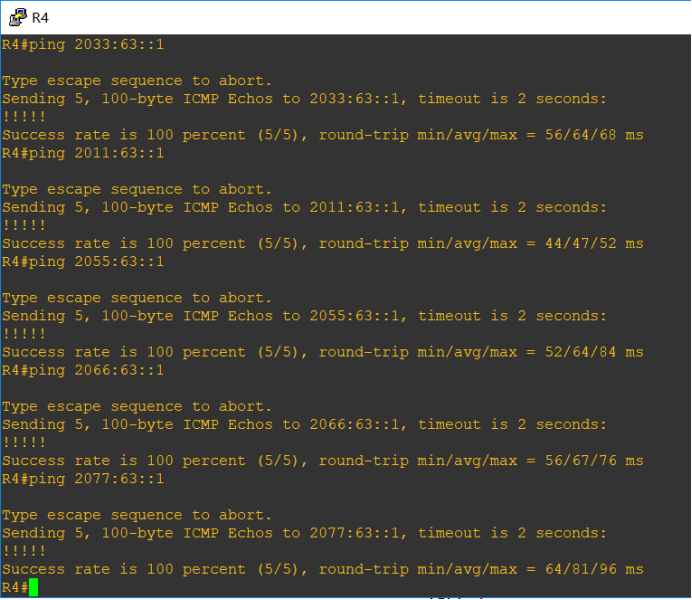
4.测试路由通断情况在R4测试,Ospfv3配置成功。
本实验步骤引入外部路由类型 5 和外部路由类型 7
1) 在 R6 上新增加一个 loopback1 接口,地址为 2166::1/128,然后重分布进入 OSPFv3
R6(config)#interface loopback 1
R6(config-if)#ipv6 address 2166:63::1/128
R6(config-if)#exit
R6(config)#ipv6 router ospf 1
R6(config-rtr)#redistribute connected
配置 R7 和 R8 的 RIPng,然后重分布 RIPng 到 OSPFv3
R8(config)#ipv6 router rip yeslab
R8(config-rtr)#exit
R8(config)#interface fastEthernet 0/0
R8(config-if)#ipv6 rip yeslab enable
R8(config-if)#exit
R7(config)#ipv6 router rip yeslab
R7(config-rtr)#exit
R7(config)#interface fastEthernet 0/0
R7(config-if)#ipv6 rip yeslab enable
R7(config-if)#exit
R7(config)#ipv6 router ospf 1
R7(config-rtr)#redistribute rip yeslab―――重分布 RIPng 到 OSPFv3
R7(config-rtr)#redistribute connected―――由于重分布 RIPng,不能把连接 R7 的接口网段重分布进入OSPFv3,因此重分布直连,把连接 R7的网段重分布到 OSPFv3
5.作业总结:
本次作业主要是完成ospfv3的配置,由于对ipv6动态路由的配置不是十分了解,所以通过先配置ipv4动态路由,完成ospfv2的配置加深认识动态路由协议,然后再完成ospfv3的配置。起初由于对配置命令不是很了解,卡在了帧中继的配置阶段,花费了很长的时间去克服,最终通过询问同学和网上查找资料,才完成了配置。在配置动态路由阶段,由于对区域的划分比较混乱,所以导致路由联通总是报错,经过长时间的差错和询问同学才修改过来,最终完成配置。经过此次作业,使我认识到要学好这门课必须多思考和多动手进行检验配置命令。
第九组 通信3班 063 OSPFv2与OSPFv3综合实验的更多相关文章
- 第三组 通信一班 030 OSPFv2、OSPFv3综合实验
一. 实验目的 掌握 OSPFv2. OSPFv3 的配置方法 掌握在帧中继环境下OSPFv2. OSPFv3 的配置方法 掌握 OSPFv2. OSPFv3 NSSA 的配置方法 ...
- 第九组 通信3班 063 自反ACL
一.拓扑图 R4为外网,R2和R3为内网. 二.地址表 Device Interface IP address R1 F 0/0 10.1.63.1 F 0/1 14.1.63.1 R2 F 0/0 ...
- 第三组 通信一班 030 IPv6 RIPng (PT)
实验拓扑 地址规划 设备 接口 IPV6 地址/掩码 PC0 / 2001:DB8:30:2:201:42FF:FE8A:7688/64 PC1 / 2001:DB8:30:1:230:A3FF:F ...
- OSPFV3综合实验 (第三组)
拓扑图 本次试验规划:拓扑分4个区域,其中区域2采用帧中继实现区域内互通的前提下配置OSPF.ospfv3.R7与R8之间配置rip实现互通,区域1作为nssa区域,实现路由注入.最终实现全局互通. ...
- 【MPI学习5】MPI并行程序设计模式:组通信MPI程序设计
相关章节:第13章组通信MPI程序设计. MPI组通信与点到点通信的一个重要区别就是:组通信需要特定组内所有成员参与,而点对点通信只涉及到发送方和接收方. 由于需要组内所有成员参与,因此也是一种比较复 ...
- JBoss 系列十七:使用JGroups构建块MessageDispatcher 构建群组通信应用
内容概要 本部分说明JGroups构建块接口MessageDispatcher,具体提供一个简单示例来说明如何使用JGroups构建块MessageDispatcher 构建群组通信应用 示例描述 构 ...
- JBoss 系列十八:使用JGroups构建块RpcDispatcher构建群组通信应用
内容概要 本部分说明JGroups构建块接口RpcDispatcher,具体提供一个简单示例来说明如何使用JGroups构建块RpcDispatcher构建群组通信应用. 示例描述 类似Message ...
- JBoss 系列十九:使用JGroups构建块RspFilter对群组通信返回消息进行过滤
内容概述 本部分说明JGroups构建块接口RspFilter,具体提供一个简单示例来说明如何使用JGroups构建块RspFilter对群组通信返回消息进行过滤. 示例描述 我们知道构建块基于通道之 ...
- 第13组_16通信3班_045_OSPFv3作业
IPv6 路由-OSPFv3 实验目的 1. 掌握 OSPFv3 的配置方法 2. 掌握在帧中继环境下 OSPFv3 的配置方法 3. 掌握 OSPFv3 NSSA 的配置方法 4. 学会查看 O ...
随机推荐
- 《程序员代码面试指南》第八章 数组和矩阵问题 数组的partition 调整
题目 数组的partition 调整 java代码 package com.lizhouwei.chapter8; /** * @Description: 数组的partition 调整 * @Aut ...
- IDEA编译less插件LESS CSS Compiler的安装
1.IDEA插件地址:LESS CSS Compiler 百度云盘下载地址 2.安装Node.js,下载 3.打开idea→settings→plugins 安装:“nodejs”插件,并按以下步骤进 ...
- 网站桌面端和手机端不同url的设置
你的网站在搜索引擎中表现怎样很大程度上依赖于你的你的网站对于不同设备上的设计. 下面介绍了怎样基于URL构造来优化你的网站对于搜索引擎的支持. 决定你网页的URL构造 Determine the UR ...
- Mybatis-Generator_学习_02_使用Mapper专用的MyBatis Generator插件
源码见:https://github.com/shirayner/tk-mybatis-generator 一.要点 二.具体实现 1.项目结构 2.配置 pm.xml <?xml versio ...
- (转)select、poll、epoll之间的区别总结[整理]
select,poll,epoll都是IO多路复用的机制.I/O多路复用就通过一种机制,可以监视多个描述符,一旦某个描述符就绪(一般是读就绪或者写就绪),能够通知程序进行相应的读写操作.但select ...
- PHP 正则表达示
PHP 正则表达示 php如何使用正则表达式 正则表达式基本元字符 #正则表达式示例 ^:匹配输入字符串开始的位置.如果设置了 RegExp 对象的 Multiline 属性,^ 还会与“\n”或“\ ...
- P2051 [AHOI2009]中国象棋[线性DP]
最近智商有点不在线.其实一直不在线. 题目 先是想用$f[i][j][k][0/1/2]$表示摆了i行时有j列空着,k列有了一个炮,且当下摆了0/1/2个的状态,转移方程写的出来但是极其繁琐.于是又设 ...
- mysql数据库---编码格式基本操作
1.查看数据库编码格式 mysql> show variables like 'character_set_database'; 2.查看数据表的编码格式 mysql> show crea ...
- C++之MutexLock和MutexLockGuard封装
noncopyable.h #ifndef __WD_NONCOPYABLE_H__ #define __WD_NONCOPYABLE_H__ namespace wd { class Noncopy ...
- printf函数指向串口的方法
简单地说:想在mdk 中用printf,需要同时重定义fputc函数和避免使用semihosting(半主机模式),标准库函数的默认输出设备是显示器,要实现在串口或LCD输出,必须重定义标准库函数里调 ...