
详解GaussDB(DWS) 资源监控
摘要:本文主要着重介绍资源池资源监控以及用户资源监控。
本文分享自华为云社区《GaussDB(DWS)资源监控之用户、队列资源监控》,作者: 一只菜菜鸟。
GaussDB(DWS)资源监控功能包含实例资源监控、内存资源监控、资源池资源监控、查询监控以及用户资源监控,本文主要着重介绍资源池资源监控以及用户资源监控;
多租户
用户是使用数据库系统以及执行业务的主要手段,在GaussDB(DWS)中将用户场景分为两种方案,分别是普通方案以及多租户方案;为了更好的使用GaussDB(DWS)的资源分组管理,建议依托多租户场景构造具体的使用情况;
多租户引入了两级用户机制,分别为组用户以及业务用户;两级用户分别关联不同的资源池以及存储空间;
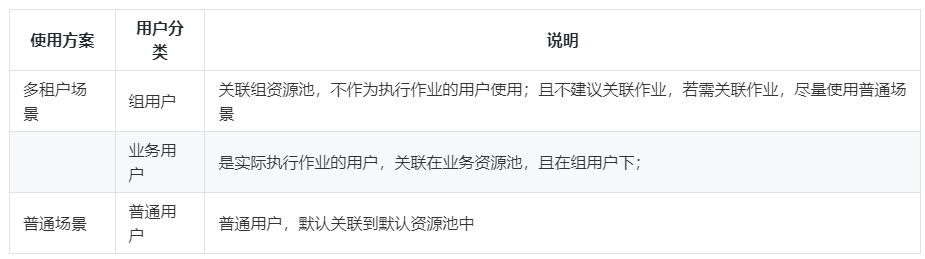
示例
1、创建组用户关联到组资源池
CREATE USER user_g RESOURCE POOL 'respool_g1' PASSWORD 'Gauss_234';
2、创建业务用户关联到业务资源池
CREATE USER user_1 RESOURCE POOL 'respool_g1' USER GROUP 'user_g' PASSWORD 'Gauss_234';
注:创建业务用户时,业务资源池(resource pool)和组用户(user group)为必选字段;
用户资源监控
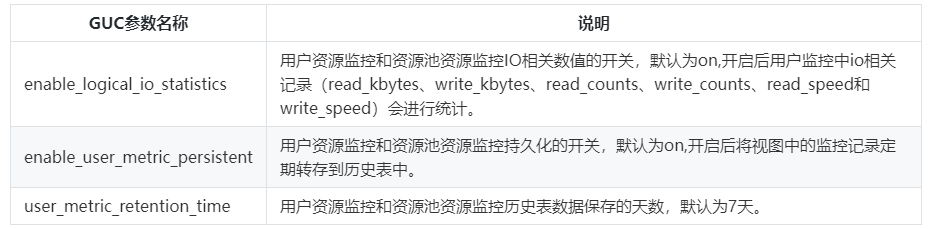
用户资源监控中记录所有用户使用资源(内存、CPU核数、存储空间、临时空间、算子落盘以及IO)的实时使用情况,也可以通过查询历史表访问用户资源的历史使用情况;
相关GUC参数:
相关视图/表:
实时视图为:pg_total_user_resource_info;
    username     | used_memory | total_memory | used_cpu | total_cpu | used_space | total_space | used_temp_space | total_temp_space | used_spill_space | total_spill_space | read_kbytes | write_kbytes | read_counts | write_counts | read_speed | write_speed

-----------------+-------------+--------------+----------+-----------+------------+-------------+-----------------+------------------+------------------+-------------------+-------------+--------------+-------------+--------------+------------+-------------

 perfadm | 0 | 0 | 0 | 0 | 0 | -1 | 0 | -1 | 0 | -1 | 0 | 0 | 0 | 0 | 0 | 0

 user_g1_job_2   | 0 | 1113 | 0 | 24 | 0 | -1 | 0 | -1 | 0 | -1 | 0 | 0 | 0 | 0 | 0 | 0

 user_grp_2      | 0 | 5574 | 0 | 24 | 0 | -1 | 0 | -1 | 0 | -1 | 0 | 0 | 0 | 0 | 0 | 0

 user_g1_job_1_2 | 0 | 1113 | 0 | 24 | 0 | -1 | 0 | -1 | 0 | -1 | 0 | 0 | 0 | 0 | 0 | 0

 user_2          | 0 | 27876 | 0 | 24 | 0 | -1 | 0 | -1 | 0 | -1 | 0 | 0 | 0 | 0 | 0 | 0

 user_grp_1      | 0 | 5574 | 0 | 24 | 0 | -1 | 0 | -1 | 0 | -1 | 0 | 0 | 0 | 0 | 0 | 0

 user_1          | 0 | 27876 | 0 | 24 | 0 | -1 | 0 | -1 | 0 | -1 | 0 | 0 | 0 | 0 | 0 | 0

 user_4          | 0 | 27876 | 0 | 24 | 0 | -1 | 0 | -1 | 0 | -1 | 0 | 0 | 0 | 0 | 0 | 0

 user_g1_job_1_1 | 0 | 1113 | 0 | 24 | 0 | -1 | 0 | -1 | 0 | -1 | 0 | 0 | 0 | 0 | 0 | 0

 user_g2_job_1   | 0 | 1113 | 0 | 24 | 0 | -1 | 0 | -1 | 0 | -1 | 0 | 0 | 0 | 0 | 0 | 0

 user_5          | 0 | 27876 | 0 | 24 | 0 | -1 | 0 | -1 | 0 | -1 | 0 | 0 | 0 | 0 | 0 | 0

 user_3          | 0 | 27876 | 0 | 24 | 0 | -1 | 0 | -1 | 0 | -1 | 0 | 0 | 0 | 0 | 0 | 0

 user_g2_job_2   | 0 | 1113 | 0 | 24 | 0 | -1 | 0 | -1 | 0 | -1 | 0 | 0 | 0 | 0 | 0 | 0

(13 rows)
历史视图为:gs_wlm_user_resource_history;
    username      |           timestamp           | used_memory | total_memory | used_cpu | total_cpu | used_space | total_space | used_temp_space | total_temp_space | used_spill_space | total_spill_space | read_kbytes | write_kbytes | read_counts | write_counts | read_speed | write_speed

-------------------+-------------------------------+-------------+--------------+----------+-----------+------------+-------------+-----------------+------------------+------------------+-------------------+-------------+--------------+-------------+--------------+------------+-------------

 perfadm | 2022-06-29 14:26:32.063948+08 | 0 | 0 | 0 | 0 | 0 | -1 | 0 | -1 | 0 | -1 | 0 | 0 | 0 | 0 | 0 | 0

 user_3            | 2022-06-29 14:26:32.063948+08 | 0 | 27876 | 0 | 24 | 0 | -1 | 0 | -1 | 0 | -1 | 0 | 0 | 0 | 0 | 0 | 0

 user_5            | 2022-06-29 14:26:32.063948+08 | 0 | 27876 | 0 | 24 | 0 | -1 | 0 | -1 | 0 | -1 | 0 | 0 | 0 | 0 | 0 | 0

 user_g2_job_1     | 2022-06-29 14:26:32.063948+08 | 0 | 1113 | 0 | 24 | 0 | -1 | 0 | -1 | 0 | -1 | 0 | 0 | 0 | 0 | 0 | 0

 user_g1_job_1_1   | 2022-06-29 14:26:32.063948+08 | 0 | 1113 | 0 | 24 | 0 | -1 | 0 | -1 | 0 | -1 | 0 | 0 | 0 | 0 | 0 | 0

 user_4            | 2022-06-29 14:26:32.063948+08 | 0 | 27876 | 0 | 24 | 0 | -1 | 0 | -1 | 0 | -1 | 0 | 0 | 0 | 0 | 0 | 0

 user_1            | 2022-06-29 14:26:32.063948+08 | 0 | 27876 | 0 | 24 | 0 | -1 | 0 | -1 | 0 | -1 | 0 | 0 | 0 | 0 | 0 | 0

 user_grp_1        | 2022-06-29 14:26:32.063948+08 | 0 | 5574 | 0 | 24 | 0 | -1 | 0 | -1 | 0 | -1 | 0 | 0 | 0 | 0 | 0 | 0

 user_2            | 2022-06-29 14:26:32.063948+08 | 0 | 27876 | 0 | 24 | 0 | -1 | 0 | -1 | 0 | -1 | 0 | 0 | 0 | 0 | 0 | 0

 user_g1_job_1_2   | 2022-06-29 14:26:32.063948+08 | 0 | 1113 | 0 | 24 | 0 | -1 | 0 | -1 | 0 | -1 | 0 | 0 | 0 | 0 | 0 | 0

 user_grp_2        | 2022-06-29 14:26:32.063948+08 | 0 | 5574 | 0 | 24 | 0 | -1 | 0 | -1 | 0 | -1 | 0 | 0 | 0 | 0 | 0 | 0

 user_g2_job_2     | 2022-06-29 14:26:32.063948+08 | 0 | 1113 | 0 | 24 | 0 | -1 | 0 | -1 | 0 | -1 | 0 | 0 | 0 | 0 | 0 | 0

 user_g1_job_2     | 2022-06-29 14:26:32.063948+08 | 0 | 1113 | 0 | 24 | 0 | -1 | 0 | -1 | 0 | -1 | 0 | 0 | 0 | 0 | 0 | 0

 user_1            | 2022-06-29 14:26:01.987779+08 | 0 | 27876 | 0 | 24 | 0 | -1 | 0 | -1 | 0 | -1 | 0 | 0 | 0 | 0 | 0 | 0

 user_g2_job_2     | 2022-06-29 14:26:01.987779+08 | 0 | 1113 | 0 | 24 | 0 | -1 | 0 | -1 | 0 | -1 | 0 | 0 | 0 | 0 | 0 | 0
资源池资源监控
多租户场景下,用户关联资源池执行业务,其消耗的资源汇总到其对应的资源池上,可以通过资源池资源监控视图,实时查看其相应数值,以及历史表记录的资源历史使用情况;
相关GUC参数
同用户资源监控相关GUC参数。
相关视图/表
资源池实时信息监控视图:GS_RESPOOL_RUNTIME_INFO
 nodegroup | rpname | ref_count | fast_run | fast_wait | slow_run | slow_wait

-----------+------------------+-----------+----------+-----------+----------+-----------

 lc1       | respool_grp_1    | 0 | 0 | 0 | 0 | 0

 lc1       | default_pool | 0 | 0 | 0 | 0 | 0

 lc1       | respool_g1_job_1 | 0 | 0 | 0 | 0 | 0

 lc1       | respool_g1_job_2 | 0 | 0 | 0 | 0 | 0

 lc1       | respool_grp_2    | 0 | 0 | 0 | 0 | 0

 lc1       | respool_g2_job_1 | 0 | 0 | 0 | 0 | 0

 lc1       | respool_g2_job_2 | 0 | 0 | 0 | 0 | 0

 lc1       | respool_1        | 0 | 0 | 0 | 0 | 0

 lc1       | respool_2        | 0 | 0 | 0 | 0 | 0

 lc2       | default_pool | 0 | 0 | 0 | 0 | 0

 lc1       | respool_3        | 0 | 0 | 0 | 0 | 0

(11 rows)
资源池实时资源监控视图:GS_RESPOOL_RESOURCE_INFO
 nodegroup | rpname | cgroup | ref_count | fast_run | fast_wait | fast_limit | slow_run | slow_wait | slow_limit | used_cpu | cpu_limit | used_mem | estimate_mem | mem_limit | read_kbytes | write_kbytes | read_counts | write_counts | read_speed | write_speed

-----------+------------------+---------------------+-----------+----------+-----------+------------+----------+-----------+------------+----------+-----------+----------+--------------+-----------+-------------+--------------+-------------+--------------+------------+-------------

 lc1       | respool_grp_1    | ClassG1             | 0 | 0 | 0 | -1 | 0 | 0 | 10 | 0 | 24 | 0 | 0 | 5574 | 0 | 0 | 0 | 0 | 0 | 0

 lc1       | default_pool | DefaultClass:Medium | 0 | 0 | 0 | -1 | 0 | 0 | -1 | 0 | 24 | 0 | 0 | 27876 | 0 | 0 | 0 | 0 | 0 | 0

 lc1       | respool_g1_job_1 | ClassG1:wg1_1       | 0 | 0 | 0 | -1 | 0 | 0 | 10 | 0 | 24 | 0 | 0 | 1113 | 0 | 0 | 0 | 0 | 0 | 0

 lc1       | respool_g1_job_2 | ClassG1:wg1_2       | 0 | 0 | 0 | -1 | 0 | 0 | 10 | 0 | 24 | 0 | 0 | 1113 | 0 | 0 | 0 | 0 | 0 | 0

 lc1       | respool_grp_2    | ClassG2             | 0 | 0 | 0 | -1 | 0 | 0 | 10 | 0 | 24 | 0 | 0 | 5574 | 0 | 0 | 0 | 0 | 0 | 0

 lc1       | respool_g2_job_1 | ClassG2:wg2_1       | 0 | 0 | 0 | -1 | 0 | 0 | 10 | 0 | 24 | 0 | 0 | 1113 | 0 | 0 | 0 | 0 | 0 | 0

 lc1       | respool_g2_job_2 | ClassG2:wg2_2       | 0 | 0 | 0 | -1 | 0 | 0 | 10 | 0 | 24 | 0 | 0 | 1113 | 0 | 0 | 0 | 0 | 0 | 0

 lc1       | respool_1        | ClassN1:wn1         | 0 | 0 | 0 | -1 | 0 | 0 | 10 | 0 | 24 | 0 | 0 | 27876 | 0 | 0 | 0 | 0 | 0 | 0

 lc1       | respool_2        | ClassN1:wn2         | 0 | 0 | 0 | -1 | 0 | 0 | 10 | 0 | 24 | 0 | 0 | 27876 | 0 | 0 | 0 | 0 | 0 | 0

 lc2       | default_pool | DefaultClass:Medium | 0 | 0 | 0 | -1 | 0 | 0 | -1 | 0 | 24 | 0 | 0 | 27876 | 0 | 0 | 0 | 0 | 0 | 0

 lc1       | respool_3        | ClassN2:wn3         | 0 | 0 | 0 | -1 | 0 | 0 | 10 | 0 | 24 | 0 | 0 | 27876 | 0 | 0 | 0 | 0 | 0 | 0

(11 rows)
资源池历史资源监控表:GS_RESPOOL_RESOURCE_HISTORY
           timestamp           | nodegroup | rpname | cgroup | ref_count | fast_run | fast_wait | fast_limit | slow_run | slow_wait | slow_limit | used_cpu | cpu_limit | used_mem | estimate_mem | mem_limit | read_kbytes | write_kbytes | read_counts | write_counts | read_speed | write_speed

-------------------------------+-----------+----------------------+---------------------+-----------+----------+-----------+------------+----------+-----------+------------+----------+-----------+----------+--------------+-----------+-------------+--------------+-------------+--------------+------------+-------------

 2022-06-29 14:35:02.262234+08 | lc1       | respool_grp_1        | ClassG1             | 0 | 0 | 0 | -1 | 0 | 0 | 10 | 0 | 24 | 0 | 0 | 5574 | 0 | 0 | 0 | 0 | 0 | 0

 2022-06-29 14:35:02.262234+08 | lc1       | respool_3            | ClassN2:wn3         | 0 | 0 | 0 | -1 | 0 | 0 | 10 | 0 | 24 | 0 | 0 | 27876 | 0 | 0 | 0 | 0 | 0 | 0

 2022-06-29 14:35:02.262234+08 | lc2       | default_pool | DefaultClass:Medium | 0 | 0 | 0 | -1 | 0 | 0 | -1 | 0 | 24 | 0 | 0 | 27876 | 0 | 0 | 0 | 0 | 0 | 0

 2022-06-29 14:35:02.262234+08 | lc1       | respool_2            | ClassN1:wn2         | 0 | 0 | 0 | -1 | 0 | 0 | 10 | 0 | 24 | 0 | 0 | 27876 | 0 | 0 | 0 | 0 | 0 | 0

 2022-06-29 14:35:02.262234+08 | lc1       | respool_1            | ClassN1:wn1         | 0 | 0 | 0 | -1 | 0 | 0 | 10 | 0 | 24 | 0 | 0 | 27876 | 0 | 0 | 0 | 0 | 0 | 0

 2022-06-29 14:35:02.262234+08 | lc1       | respool_g2_job_2     | ClassG2:wg2_2       | 0 | 0 | 0 | -1 | 0 | 0 | 10 | 0 | 24 | 0 | 0 | 1113 | 0 | 0 | 0 | 0 | 0 | 0

 2022-06-29 14:35:02.262234+08 | lc1       | respool_g2_job_1     | ClassG2:wg2_1       | 0 | 0 | 0 | -1 | 0 | 0 | 10 | 0 | 24 | 0 | 0 | 1113 | 0 | 0 | 0 | 0 | 0 | 0

 2022-06-29 14:35:02.262234+08 | lc1       | respool_grp_2        | ClassG2             | 0 | 0 | 0 | -1 | 0 | 0 | 10 | 0 | 24 | 0 | 0 | 5574 | 0 | 0 | 0 | 0 | 0 | 0

 2022-06-29 14:35:02.262234+08 | lc1       | respool_g1_job_2     | ClassG1:wg1_2       | 0 | 0 | 0 | -1 | 0 | 0 | 10 | 0 | 24 | 0 | 0 | 1113 | 0 | 0 | 0 | 0 | 0 | 0

 2022-06-29 14:35:02.262234+08 | lc1       | respool_g1_job_1     | ClassG1:wg1_1       | 0 | 0 | 0 | -1 | 0 | 0 | 10 | 0 | 24 | 0 | 0 | 1113 | 0 | 0 | 0 | 0 | 0 | 0

 2022-06-29 14:35:02.262234+08 | lc1       | default_pool | DefaultClass:Medium | 0 | 0 | 0 | -1 | 0 | 0 | -1 | 0 | 24 | 0 | 0 | 27876 | 0 | 0 | 0 | 0 | 0 | 0

 2022-06-29 14:34:31.517585+08 | lc1       | respool_g2_job_1     | ClassG2:wg2_1       | 0 |
详解GaussDB(DWS) 资源监控的更多相关文章
- 详解GaussDB(DWS) explain分布式执行计划
摘要:本文主要介绍如何详细解读GaussDB(DWS)产生的分布式执行计划,从计划中发现性能调优点. 前言 执行计划(又称解释计划)是数据库执行SQL语句的具体步骤,例如通过索引还是全表扫描访问表中的 ...
- 一文详解 Linux 系统常用监控工一文详解 Linux 系统常用监控工具(top,htop,iotop,iftop)具(top,htop,iotop,iftop)
一文详解 Linux 系统常用监控工具(top,htop,iotop,iftop) 概 述 本文主要记录一下 Linux 系统上一些常用的系统监控工具,非常好用.正所谓磨刀不误砍柴工,花点时间 ...
- 详解 Spotlight on MySQL监控MySQL服务器
前一章详解了Spotlight on Unix 监控Linux服务器 ,今天再来看看Spotlight on MySQL怎么监控MySQL服务器. 注:http://www.cnblogs.com/J ...
- 详解Supervisor进程守护监控
Supervisor在百度百科上给的定义是超级用户,监管员.Supervisor是一个进程管理工具,当进程中断的时候Supervisor能自动重新启动它.可以运行在各种类unix的机器上,superv ...
- 详解GaussDB bufferpool缓存策略,这次彻底懂了!
摘要:华为云GaussDB(for mysql)是华为云自主研发的最新一代云原生数据库,采用计算存储分离.日志即数据的架构设计.具备极致可靠.极致性价比.多为扩展.完全可信等诸多特性. 一 .Gaus ...
- 详解GaussDB(for MySQL)服务:复制策略与可用性分析
摘要:本文通过介绍GaussDB(for MySQL)读写路径,分析其可用性. 简介 数据持久性和服务可用性是数据库服务的关键特征. 在实践中,通常认为拥有 3 份数据副本,就足以保证持久性. 但是 ...
- 详解vue静态资源打包中的坑与解决方案
本文主要解决: 1.vue-cli默认配置打包后部署至特定路径下静态资源路径错误问题; 2.静态资源打包使用相对路径后css文件引入图片路径错误问题. 一.问题 vue-cli 脚手架生成的默认打包配 ...
- Kubernetes笔记(四):详解Namespace与资源限制ResourceQuota,LimitRange
前面我们对K8s的基本组件与概念有了个大致的印象,并且基于K8s实现了一个初步的CI/CD流程,但对里面涉及的各个对象(如Namespace, Pod, Deployment, Service, In ...
- 详解 Spotlight on Unix 监控Linux服务器
1.安装 Spotlight on Unix 下载地址:http://yunpan.cn/QNWyEEvNS4xc9 访问密码 1c7d 傻瓜安装 2.配置spotlight登陆用户,注意spotl ...
随机推荐
- 一些有趣的B+树优化实验
作为目前数据库引擎的两种主要数据结构,LSM-tree和B+-tree在业界已经有非常广泛的研究.相比B+-tree,LSM-tree牺牲一定的读性能以换取更小的写放大以及更低的存储成本,但这必须建立 ...
- markdowm使用学习
markdowm学习 标题(#/##/###/####) 三级标题 四级标题 字体(*/) hello world! hello world! hello world! hello world! he ...
- Linux文本搜索及截取操作
Linux文本搜索及截取操作 cat 查看 grep 搜索 awk 截取 查看dna-server.xml 文件的内容 [root@localhost servers]# cat cwag9002/w ...
- 【生成对抗网络学习 其三】BiGAN论文阅读笔记及其原理理解
参考资料: 1.https://github.com/dragen1860/TensorFlow-2.x-Tutorials 2.<Adversarial Feature Learning> ...
- markdown常用到的语法
一.标题 后加文字,几个#代表几级标题,最高为6 ,标准语法一般在#后跟个空格再写文字. 二.分割线 三个或者三个以上的 - 或者 * 三.图片 格式:  A ...
- java类的学习
什么是类: 类=属性+方法 属性来源于状态(以变量的形式存在):方法来源于动作: *属性对应的是数据,而数据只能存在变量中. 方法内的变量为局部变量:类体中的变量称为成员变量(也称为属性) java中 ...
- python小题目练习(五)
题目:Python实现快速排序 代码实现: """Author:mllContent:Python实现快速排序Date:2020-11-05""&qu ...
- HTML入门,基础知识
初识HTML HTML: 超文本标记语言 一.HTML的基本结构 根控制标记(头) 头控制标记(头) 标题 标题标记 头控制标记(尾) 网页显示区域(一般要实现的代码都在这里写) &l ...
- 业务可视化-让你的流程图"Run"起来
前言 最近在研究业务可视化的问题,在日常的工作中,流程图和代码往往是分开管理的. 一个被维护多次的系统,到最后流程图和代码是否匹配这个都很难说. 于是一直有一个想法,让程序直接读流程图,根据流程图的配 ...
- 全国30m精度二级分类土地利用数据
数据下载链接:数据下载链接 引言 全国土地利用数据产品是以Landsat TM/ETM/OLI遥感影像为主要数据源,经过影像融合.几何校正.图像增强与拼接等处理后,通过人机交互目视解译的方法,将全国 ...