
kubernetes实战(二十六):kubeadm 安装 高可用 k8s v1.16.x dashboard 2.x
1、基本配置
基本配置、内核升级、基本服务安装参考https://www.cnblogs.com/dukuan/p/10278637.html,或者参考《再也不踩坑的Kubernetes实战指南》第一章第一节
2、Kubernetes组件安装
所有节点安装Kubeadm、Kubectl、kubelet
yum install -y kubeadm-1.16.-.x86_64 kubectl-1.16.-.x86_64 kubelet-1.16.-.x86_64
所有节点启动Docker
[root@k8s-master01 ~]# systemctl enable --now docker

Created symlink from /etc/systemd/system/multi-user.target.wants/docker.service to /usr/lib/systemd/system/docker.service.

[root@k8s-master01 ~]# docker version

Client:

 Version:      17.09.-ce

 API version:  1.32

 Go version:   go1.8.3

 Git commit:   19e2cf6

 Built:        Thu Dec   ::

 OS/Arch:      linux/amd64

Server:

 Version:      17.09.-ce

 API version:  1.32 (minimum version 1.12)

 Go version:   go1.8.3

 Git commit:   19e2cf6

 Built:        Thu Dec   ::

 OS/Arch:      linux/amd64

 Experimental: false
更改pause镜像为阿里云仓库
DOCKER_CGROUPS=$(docker info | grep 'Cgroup' | cut -d' ' -f3)

cat >/etc/sysconfig/kubelet<<EOF

KUBELET_EXTRA_ARGS="--cgroup-driver=$DOCKER_CGROUPS --pod-infra-container-image=registry.cn-hangzhou.aliyuncs.com/google_containers/pause-amd64:3.1"

EOF
所有节点开启kubelet
[root@k8s-master01 ~]# systemctl daemon-reload

[root@k8s-master01 ~]# systemctl enable --now kubelet

Created symlink from /etc/systemd/system/multi-user.target.wants/kubelet.service to /usr/lib/systemd/system/kubelet.service.
3. 高可用组件安装
keepalived和haproxy安装参考《再也不踩坑的Kubernetes实战指南》1.1.4 小节
4. 集群初始化
创建kubeadm-config.yaml
apiVersion: kubeadm.k8s.io/v1beta1

kind: ClusterConfiguration

kubernetesVersion: v1.16.0

imageRepository: registry.cn-hangzhou.aliyuncs.com/google_containers

apiServer:

  certSANs:

  - 192.168.1.100

controlPlaneEndpoint: "192.168.1.100:16443"

networking:

  # This CIDR is a Calico default. Substitute or remove for your CNI provider.

  podSubnet: "172.168.0.0/16"
所有节点提前下载镜像
[root@k8s-master01 ~]# kubeadm config images pull --config /root/kubeadm-config.yaml

[config/images] Pulled registry.cn-hangzhou.aliyuncs.com/google_containers/kube-apiserver:v1.16.0

[config/images] Pulled registry.cn-hangzhou.aliyuncs.com/google_containers/kube-controller-manager:v1.16.0

[config/images] Pulled registry.cn-hangzhou.aliyuncs.com/google_containers/kube-scheduler:v1.16.0

[config/images] Pulled registry.cn-hangzhou.aliyuncs.com/google_containers/kube-proxy:v1.16.0

[config/images] Pulled registry.cn-hangzhou.aliyuncs.com/google_containers/pause:3.1

[config/images] Pulled registry.cn-hangzhou.aliyuncs.com/google_containers/etcd:3.3.-

[config/images] Pulled registry.cn-hangzhou.aliyuncs.com/google_containers/coredns:1.6.
初始化Master01
[root@k8s-master01 ~]# kubeadm init --config=kubeadm-config.yaml  --upload-certs

[init] Using Kubernetes version: v1.16.0

[preflight] Running pre-flight checks

    [WARNING IsDockerSystemdCheck]: detected "cgroupfs" as the Docker cgroup driver. The recommended driver is "systemd". Please follow the guide at https://kubernetes.io/docs/setup/cri/

[preflight] Pulling images required for setting up a Kubernetes cluster

[preflight] This might take a minute or two, depending on the speed of your internet connection

[preflight] You can also perform this action in beforehand using 'kubeadm config images pull'

[kubelet-start] Writing kubelet environment file with flags to file "/var/lib/kubelet/kubeadm-flags.env"

[kubelet-start] Writing kubelet configuration to file "/var/lib/kubelet/config.yaml"

[kubelet-start] Activating the kubelet service

[certs] Using certificateDir folder "/etc/kubernetes/pki"

[certs] Generating "ca" certificate and key

[certs] Generating "apiserver" certificate and key

[certs] apiserver serving cert is signed for DNS names [k8s-master01 kubernetes kubernetes.default kubernetes.default.svc kubernetes.default.svc.cluster.local] and IPs [10.96.0.1 192.168.1.11 192.168.1.100 192.168.1.100]

[certs] Generating "apiserver-kubelet-client" certificate and key

[certs] Generating "front-proxy-ca" certificate and key

[certs] Generating "front-proxy-client" certificate and key

[certs] Generating "etcd/ca" certificate and key

[certs] Generating "etcd/server" certificate and key

[certs] etcd/server serving cert is signed for DNS names [k8s-master01 localhost] and IPs [192.168.1.11 127.0.0.1 ::]

[certs] Generating "etcd/peer" certificate and key

[certs] etcd/peer serving cert is signed for DNS names [k8s-master01 localhost] and IPs [192.168.1.11 127.0.0.1 ::]

[certs] Generating "etcd/healthcheck-client" certificate and key

[certs] Generating "apiserver-etcd-client" certificate and key

[certs] Generating "sa" key and public key

[kubeconfig] Using kubeconfig folder "/etc/kubernetes"

[endpoint] WARNING: port specified in controlPlaneEndpoint overrides bindPort in the controlplane address

[kubeconfig] Writing "admin.conf" kubeconfig file

[endpoint] WARNING: port specified in controlPlaneEndpoint overrides bindPort in the controlplane address

[kubeconfig] Writing "kubelet.conf" kubeconfig file

[endpoint] WARNING: port specified in controlPlaneEndpoint overrides bindPort in the controlplane address

[kubeconfig] Writing "controller-manager.conf" kubeconfig file

[endpoint] WARNING: port specified in controlPlaneEndpoint overrides bindPort in the controlplane address

[kubeconfig] Writing "scheduler.conf" kubeconfig file

[control-plane] Using manifest folder "/etc/kubernetes/manifests"

[control-plane] Creating static Pod manifest for "kube-apiserver"

[control-plane] Creating static Pod manifest for "kube-controller-manager"

[control-plane] Creating static Pod manifest for "kube-scheduler"

[etcd] Creating static Pod manifest for local etcd in "/etc/kubernetes/manifests"

[wait-control-plane] Waiting for the kubelet to boot up the control plane as static Pods from directory "/etc/kubernetes/manifests". This can take up to 4m0s

[apiclient] All control plane components are healthy after 22.509922 seconds

[upload-config] Storing the configuration used in ConfigMap "kubeadm-config" in the "kube-system" Namespace

[kubelet] Creating a ConfigMap "kubelet-config-1.16" in namespace kube-system with the configuration for the kubelets in the cluster

[upload-certs] Storing the certificates in Secret "kubeadm-certs" in the "kube-system" Namespace

[upload-certs] Using certificate key:

2622065e9a49a691b81fd6b19538f6865b3805d5ec7134babbb93caee5eafc42

[mark-control-plane] Marking the node k8s-master01 as control-plane by adding the label "node-role.kubernetes.io/master=''"

[mark-control-plane] Marking the node k8s-master01 as control-plane by adding the taints [node-role.kubernetes.io/master:NoSchedule]

[bootstrap-token] Using token: kql9we.ow92oe5qx2r9ho66

[bootstrap-token] Configuring bootstrap tokens, cluster-info ConfigMap, RBAC Roles

[bootstrap-token] configured RBAC rules to allow Node Bootstrap tokens to post CSRs in order for nodes to get long term certificate credentials

[bootstrap-token] configured RBAC rules to allow the csrapprover controller automatically approve CSRs from a Node Bootstrap Token

[bootstrap-token] configured RBAC rules to allow certificate rotation for all node client certificates in the cluster

[bootstrap-token] Creating the "cluster-info" ConfigMap in the "kube-public" namespace

[addons] Applied essential addon: CoreDNS

[endpoint] WARNING: port specified in controlPlaneEndpoint overrides bindPort in the controlplane address

[addons] Applied essential addon: kube-proxy

Your Kubernetes control-plane has initialized successfully!

To start using your cluster, you need to run the following as a regular user:

  mkdir -p $HOME/.kube

  sudo cp -i /etc/kubernetes/admin.conf $HOME/.kube/config

  sudo chown $(id -u):$(id -g) $HOME/.kube/config

You should now deploy a pod network to the cluster.

Run "kubectl apply -f [podnetwork].yaml" with one of the options listed at:

  https://kubernetes.io/docs/concepts/cluster-administration/addons/

You can now join any number of the control-plane node running the following command on each as root:

  kubeadm join 192.168.1.100: --token kql9we.ow92oe5qx2r9ho66 \

    --discovery-token-ca-cert-hash sha256:4ad7e058f603ca389f4296e5953ddc50b907152277d89f26908240b0b4eee192 \

    --control-plane --certificate-key 2622065e9a49a691b81fd6b19538f6865b3805d5ec7134babbb93caee5eafc42

Please note that the certificate-key gives access to cluster sensitive data, keep it secret!

As a safeguard, uploaded-certs will be deleted in two hours; If necessary, you can use

"kubeadm init phase upload-certs --upload-certs" to reload certs afterward.

Then you can join any number of worker nodes by running the following on each as root:

kubeadm join 192.168.1.100: --token kql9we.ow92oe5qx2r9ho66 \

    --discovery-token-ca-cert-hash sha256:4ad7e058f603ca389f4296e5953ddc50b907152277d89f26908240b0b4eee192
Calico安装
POD_CIDR="172.168.0.0/16"

sed -i -e "s?192.168.0.0/16?$POD_CIDR?g" calico.yaml
calico.yaml
---
# Source: calico/templates/calico-config.yaml
# This ConfigMap is used to configure a self-hosted Calico installation.
kind: ConfigMap
apiVersion: v1
metadata:
name: calico-config
namespace: kube-system
data:
# Typha is disabled.
typha_service_name: "none"
# Configure the backend to use.
calico_backend: "bird" # Configure the MTU to use
veth_mtu: "" # The CNI network configuration to install on each node. The special
# values in this config will be automatically populated.
cni_network_config: |-
{
"name": "k8s-pod-network",
"cniVersion": "0.3.0",
"plugins": [
{
"type": "calico",
"log_level": "info",
"datastore_type": "kubernetes",
"nodename": "__KUBERNETES_NODE_NAME__",
"mtu": __CNI_MTU__,
"ipam": {
"type": "calico-ipam"
},
"policy": {
"type": "k8s"
},
"kubernetes": {
"kubeconfig": "__KUBECONFIG_FILEPATH__"
}
},
{
"type": "portmap",
"snat": true,
"capabilities": {"portMappings": true}
}
]
} ---
# Source: calico/templates/kdd-crds.yaml
apiVersion: apiextensions.k8s.io/v1beta1
kind: CustomResourceDefinition
metadata:
name: felixconfigurations.crd.projectcalico.org
spec:
scope: Cluster
group: crd.projectcalico.org
version: v1
names:
kind: FelixConfiguration
plural: felixconfigurations
singular: felixconfiguration
--- apiVersion: apiextensions.k8s.io/v1beta1
kind: CustomResourceDefinition
metadata:
name: ipamblocks.crd.projectcalico.org
spec:
scope: Cluster
group: crd.projectcalico.org
version: v1
names:
kind: IPAMBlock
plural: ipamblocks
singular: ipamblock --- apiVersion: apiextensions.k8s.io/v1beta1
kind: CustomResourceDefinition
metadata:
name: blockaffinities.crd.projectcalico.org
spec:
scope: Cluster
group: crd.projectcalico.org
version: v1
names:
kind: BlockAffinity
plural: blockaffinities
singular: blockaffinity --- apiVersion: apiextensions.k8s.io/v1beta1
kind: CustomResourceDefinition
metadata:
name: ipamhandles.crd.projectcalico.org
spec:
scope: Cluster
group: crd.projectcalico.org
version: v1
names:
kind: IPAMHandle
plural: ipamhandles
singular: ipamhandle --- apiVersion: apiextensions.k8s.io/v1beta1
kind: CustomResourceDefinition
metadata:
name: ipamconfigs.crd.projectcalico.org
spec:
scope: Cluster
group: crd.projectcalico.org
version: v1
names:
kind: IPAMConfig
plural: ipamconfigs
singular: ipamconfig --- apiVersion: apiextensions.k8s.io/v1beta1
kind: CustomResourceDefinition
metadata:
name: bgppeers.crd.projectcalico.org
spec:
scope: Cluster
group: crd.projectcalico.org
version: v1
names:
kind: BGPPeer
plural: bgppeers
singular: bgppeer --- apiVersion: apiextensions.k8s.io/v1beta1
kind: CustomResourceDefinition
metadata:
name: bgpconfigurations.crd.projectcalico.org
spec:
scope: Cluster
group: crd.projectcalico.org
version: v1
names:
kind: BGPConfiguration
plural: bgpconfigurations
singular: bgpconfiguration --- apiVersion: apiextensions.k8s.io/v1beta1
kind: CustomResourceDefinition
metadata:
name: ippools.crd.projectcalico.org
spec:
scope: Cluster
group: crd.projectcalico.org
version: v1
names:
kind: IPPool
plural: ippools
singular: ippool --- apiVersion: apiextensions.k8s.io/v1beta1
kind: CustomResourceDefinition
metadata:
name: hostendpoints.crd.projectcalico.org
spec:
scope: Cluster
group: crd.projectcalico.org
version: v1
names:
kind: HostEndpoint
plural: hostendpoints
singular: hostendpoint --- apiVersion: apiextensions.k8s.io/v1beta1
kind: CustomResourceDefinition
metadata:
name: clusterinformations.crd.projectcalico.org
spec:
scope: Cluster
group: crd.projectcalico.org
version: v1
names:
kind: ClusterInformation
plural: clusterinformations
singular: clusterinformation --- apiVersion: apiextensions.k8s.io/v1beta1
kind: CustomResourceDefinition
metadata:
name: globalnetworkpolicies.crd.projectcalico.org
spec:
scope: Cluster
group: crd.projectcalico.org
version: v1
names:
kind: GlobalNetworkPolicy
plural: globalnetworkpolicies
singular: globalnetworkpolicy --- apiVersion: apiextensions.k8s.io/v1beta1
kind: CustomResourceDefinition
metadata:
name: globalnetworksets.crd.projectcalico.org
spec:
scope: Cluster
group: crd.projectcalico.org
version: v1
names:
kind: GlobalNetworkSet
plural: globalnetworksets
singular: globalnetworkset --- apiVersion: apiextensions.k8s.io/v1beta1
kind: CustomResourceDefinition
metadata:
name: networkpolicies.crd.projectcalico.org
spec:
scope: Namespaced
group: crd.projectcalico.org
version: v1
names:
kind: NetworkPolicy
plural: networkpolicies
singular: networkpolicy --- apiVersion: apiextensions.k8s.io/v1beta1
kind: CustomResourceDefinition
metadata:
name: networksets.crd.projectcalico.org
spec:
scope: Namespaced
group: crd.projectcalico.org
version: v1
names:
kind: NetworkSet
plural: networksets
singular: networkset
---
# Source: calico/templates/rbac.yaml # Include a clusterrole for the kube-controllers component,
# and bind it to the calico-kube-controllers serviceaccount.
kind: ClusterRole
apiVersion: rbac.authorization.k8s.io/v1
metadata:
name: calico-kube-controllers
rules:
# Nodes are watched to monitor for deletions.
- apiGroups: [""]
resources:
- nodes
verbs:
- watch
- list
- get
# Pods are queried to check for existence.
- apiGroups: [""]
resources:
- pods
verbs:
- get
# IPAM resources are manipulated when nodes are deleted.
- apiGroups: ["crd.projectcalico.org"]
resources:
- ippools
verbs:
- list
- apiGroups: ["crd.projectcalico.org"]
resources:
- blockaffinities
- ipamblocks
- ipamhandles
verbs:
- get
- list
- create
- update
- delete
# Needs access to update clusterinformations.
- apiGroups: ["crd.projectcalico.org"]
resources:
- clusterinformations
verbs:
- get
- create
- update
---
kind: ClusterRoleBinding
apiVersion: rbac.authorization.k8s.io/v1
metadata:
name: calico-kube-controllers
roleRef:
apiGroup: rbac.authorization.k8s.io
kind: ClusterRole
name: calico-kube-controllers
subjects:
- kind: ServiceAccount
name: calico-kube-controllers
namespace: kube-system
---
# Include a clusterrole for the calico-node DaemonSet,
# and bind it to the calico-node serviceaccount.
kind: ClusterRole
apiVersion: rbac.authorization.k8s.io/v1
metadata:
name: calico-node
rules:
# The CNI plugin needs to get pods, nodes, and namespaces.
- apiGroups: [""]
resources:
- pods
- nodes
- namespaces
verbs:
- get
- apiGroups: [""]
resources:
- endpoints
- services
verbs:
# Used to discover service IPs for advertisement.
- watch
- list
# Used to discover Typhas.
- get
- apiGroups: [""]
resources:
- nodes/status
verbs:
# Needed for clearing NodeNetworkUnavailable flag.
- patch
# Calico stores some configuration information in node annotations.
- update
# Watch for changes to Kubernetes NetworkPolicies.
- apiGroups: ["networking.k8s.io"]
resources:
- networkpolicies
verbs:
- watch
- list
# Used by Calico for policy information.
- apiGroups: [""]
resources:
- pods
- namespaces
- serviceaccounts
verbs:
- list
- watch
# The CNI plugin patches pods/status.
- apiGroups: [""]
resources:
- pods/status
verbs:
- patch
# Calico monitors various CRDs for config.
- apiGroups: ["crd.projectcalico.org"]
resources:
- globalfelixconfigs
- felixconfigurations
- bgppeers
- globalbgpconfigs
- bgpconfigurations
- ippools
- ipamblocks
- globalnetworkpolicies
- globalnetworksets
- networkpolicies
- networksets
- clusterinformations
- hostendpoints
- blockaffinities
verbs:
- get
- list
- watch
# Calico must create and update some CRDs on startup.
- apiGroups: ["crd.projectcalico.org"]
resources:
- ippools
- felixconfigurations
- clusterinformations
verbs:
- create
- update
# Calico stores some configuration information on the node.
- apiGroups: [""]
resources:
- nodes
verbs:
- get
- list
- watch
# These permissions are only requried for upgrade from v2., and can
# be removed after upgrade or on fresh installations.
- apiGroups: ["crd.projectcalico.org"]
resources:
- bgpconfigurations
- bgppeers
verbs:
- create
- update
# These permissions are required for Calico CNI to perform IPAM allocations.
- apiGroups: ["crd.projectcalico.org"]
resources:
- blockaffinities
- ipamblocks
- ipamhandles
verbs:
- get
- list
- create
- update
- delete
- apiGroups: ["crd.projectcalico.org"]
resources:
- ipamconfigs
verbs:
- get
# Block affinities must also be watchable by confd for route aggregation.
- apiGroups: ["crd.projectcalico.org"]
resources:
- blockaffinities
verbs:
- watch
# The Calico IPAM migration needs to get daemonsets. These permissions can be
# removed if not upgrading from an installation using host-local IPAM.
- apiGroups: ["apps"]
resources:
- daemonsets
verbs:
- get
---
apiVersion: rbac.authorization.k8s.io/v1
kind: ClusterRoleBinding
metadata:
name: calico-node
roleRef:
apiGroup: rbac.authorization.k8s.io
kind: ClusterRole
name: calico-node
subjects:
- kind: ServiceAccount
name: calico-node
namespace: kube-system ---
# Source: calico/templates/calico-node.yaml
# This manifest installs the calico-node container, as well
# as the CNI plugins and network config on
# each master and worker node in a Kubernetes cluster.
kind: DaemonSet
apiVersion: apps/v1
metadata:
name: calico-node
namespace: kube-system
labels:
k8s-app: calico-node
spec:
selector:
matchLabels:
k8s-app: calico-node
updateStrategy:
type: RollingUpdate
rollingUpdate:
maxUnavailable:
template:
metadata:
labels:
k8s-app: calico-node
annotations:
# This, along with the CriticalAddonsOnly toleration below,
# marks the pod as a critical add-on, ensuring it gets
# priority scheduling and that its resources are reserved
# if it ever gets evicted.
scheduler.alpha.kubernetes.io/critical-pod: ''
spec:
nodeSelector:
beta.kubernetes.io/os: linux
hostNetwork: true
tolerations:
# Make sure calico-node gets scheduled on all nodes.
- effect: NoSchedule
operator: Exists
# Mark the pod as a critical add-on for rescheduling.
- key: CriticalAddonsOnly
operator: Exists
- effect: NoExecute
operator: Exists
serviceAccountName: calico-node
# Minimize downtime during a rolling upgrade or deletion; tell Kubernetes to do a "force
# deletion": https://kubernetes.io/docs/concepts/workloads/pods/pod/#termination-of-pods.
terminationGracePeriodSeconds:
priorityClassName: system-node-critical
initContainers:
# This container performs upgrade from host-local IPAM to calico-ipam.
# It can be deleted if this is a fresh installation, or if you have already
# upgraded to use calico-ipam.
- name: upgrade-ipam
image: calico/cni:v3.9.0
command: ["/opt/cni/bin/calico-ipam", "-upgrade"]
env:
- name: KUBERNETES_NODE_NAME
valueFrom:
fieldRef:
fieldPath: spec.nodeName
- name: CALICO_NETWORKING_BACKEND
valueFrom:
configMapKeyRef:
name: calico-config
key: calico_backend
volumeMounts:
- mountPath: /var/lib/cni/networks
name: host-local-net-dir
- mountPath: /host/opt/cni/bin
name: cni-bin-dir
# This container installs the CNI binaries
# and CNI network config file on each node.
- name: install-cni
image: calico/cni:v3.9.0
command: ["/install-cni.sh"]
env:
# Name of the CNI config file to create.
- name: CNI_CONF_NAME
value: "10-calico.conflist"
# The CNI network config to install on each node.
- name: CNI_NETWORK_CONFIG
valueFrom:
configMapKeyRef:
name: calico-config
key: cni_network_config
# Set the hostname based on the k8s node name.
- name: KUBERNETES_NODE_NAME
valueFrom:
fieldRef:
fieldPath: spec.nodeName
# CNI MTU Config variable
- name: CNI_MTU
valueFrom:
configMapKeyRef:
name: calico-config
key: veth_mtu
# Prevents the container from sleeping forever.
- name: SLEEP
value: "false"
volumeMounts:
- mountPath: /host/opt/cni/bin
name: cni-bin-dir
- mountPath: /host/etc/cni/net.d
name: cni-net-dir
# Adds a Flex Volume Driver that creates a per-pod Unix Domain Socket to allow Dikastes
# to communicate with Felix over the Policy Sync API.
- name: flexvol-driver
image: calico/pod2daemon-flexvol:v3.9.0
volumeMounts:
- name: flexvol-driver-host
mountPath: /host/driver
containers:
# Runs calico-node container on each Kubernetes node. This
# container programs network policy and routes on each
# host.
- name: calico-node
image: calico/node:v3.9.0
env:
# Use Kubernetes API as the backing datastore.
- name: DATASTORE_TYPE
value: "kubernetes"
# Wait for the datastore.
- name: WAIT_FOR_DATASTORE
value: "true"
# Set based on the k8s node name.
- name: NODENAME
valueFrom:
fieldRef:
fieldPath: spec.nodeName
# Choose the backend to use.
- name: CALICO_NETWORKING_BACKEND
valueFrom:
configMapKeyRef:
name: calico-config
key: calico_backend
# Cluster type to identify the deployment type
- name: CLUSTER_TYPE
value: "k8s,bgp"
# Auto-detect the BGP IP address.
- name: IP
value: "autodetect"
# Enable IPIP
- name: CALICO_IPV4POOL_IPIP
value: "Always"
# Set MTU for tunnel device used if ipip is enabled
- name: FELIX_IPINIPMTU
valueFrom:
configMapKeyRef:
name: calico-config
key: veth_mtu
# The default IPv4 pool to create on startup if none exists. Pod IPs will be
# chosen from this range. Changing this value after installation will have
# no effect. This should fall within `--cluster-cidr`.
- name: CALICO_IPV4POOL_CIDR
value: "172.168.0.0/16"
# Disable file logging so `kubectl logs` works.
- name: CALICO_DISABLE_FILE_LOGGING
value: "true"
# Set Felix endpoint to host default action to ACCEPT.
- name: FELIX_DEFAULTENDPOINTTOHOSTACTION
value: "ACCEPT"
# Disable IPv6 on Kubernetes.
- name: FELIX_IPV6SUPPORT
value: "false"
# Set Felix logging to "info"
- name: FELIX_LOGSEVERITYSCREEN
value: "info"
- name: FELIX_HEALTHENABLED
value: "true"
securityContext:
privileged: true
resources:
requests:
cpu: 250m
livenessProbe:
exec:
command:
- /bin/calico-node
- -felix-live
periodSeconds:
initialDelaySeconds:
failureThreshold:
readinessProbe:
exec:
command:
- /bin/calico-node
- -felix-ready
- -bird-ready
periodSeconds:
volumeMounts:
- mountPath: /lib/modules
name: lib-modules
readOnly: true
- mountPath: /run/xtables.lock
name: xtables-lock
readOnly: false
- mountPath: /var/run/calico
name: var-run-calico
readOnly: false
- mountPath: /var/lib/calico
name: var-lib-calico
readOnly: false
- name: policysync
mountPath: /var/run/nodeagent
volumes:
# Used by calico-node.
- name: lib-modules
hostPath:
path: /lib/modules
- name: var-run-calico
hostPath:
path: /var/run/calico
- name: var-lib-calico
hostPath:
path: /var/lib/calico
- name: xtables-lock
hostPath:
path: /run/xtables.lock
type: FileOrCreate
# Used to install CNI.
- name: cni-bin-dir
hostPath:
path: /opt/cni/bin
- name: cni-net-dir
hostPath:
path: /etc/cni/net.d
# Mount in the directory for host-local IPAM allocations. This is
# used when upgrading from host-local to calico-ipam, and can be removed
# if not using the upgrade-ipam init container.
- name: host-local-net-dir
hostPath:
path: /var/lib/cni/networks
# Used to create per-pod Unix Domain Sockets
- name: policysync
hostPath:
type: DirectoryOrCreate
path: /var/run/nodeagent
# Used to install Flex Volume Driver
- name: flexvol-driver-host
hostPath:
type: DirectoryOrCreate
path: /usr/libexec/kubernetes/kubelet-plugins/volume/exec/nodeagent~uds
--- apiVersion: v1
kind: ServiceAccount
metadata:
name: calico-node
namespace: kube-system ---
# Source: calico/templates/calico-kube-controllers.yaml # See https://github.com/projectcalico/kube-controllers
apiVersion: apps/v1
kind: Deployment
metadata:
name: calico-kube-controllers
namespace: kube-system
labels:
k8s-app: calico-kube-controllers
spec:
# The controllers can only have a single active instance.
replicas:
selector:
matchLabels:
k8s-app: calico-kube-controllers
strategy:
type: Recreate
template:
metadata:
name: calico-kube-controllers
namespace: kube-system
labels:
k8s-app: calico-kube-controllers
annotations:
scheduler.alpha.kubernetes.io/critical-pod: ''
spec:
nodeSelector:
beta.kubernetes.io/os: linux
tolerations:
# Mark the pod as a critical add-on for rescheduling.
- key: CriticalAddonsOnly
operator: Exists
- key: node-role.kubernetes.io/master
effect: NoSchedule
serviceAccountName: calico-kube-controllers
priorityClassName: system-cluster-critical
containers:
- name: calico-kube-controllers
image: calico/kube-controllers:v3.9.0
env:
# Choose which controllers to run.
- name: ENABLED_CONTROLLERS
value: node
- name: DATASTORE_TYPE
value: kubernetes
readinessProbe:
exec:
command:
- /usr/bin/check-status
- -r --- apiVersion: v1
kind: ServiceAccount
metadata:
name: calico-kube-controllers
namespace: kube-system
---
# Source: calico/templates/calico-etcd-secrets.yaml ---
# Source: calico/templates/calico-typha.yaml ---
# Source: calico/templates/configure-canal.yaml
安装calico
[root@k8s-master01 ~]# kubectl create -f calico.yaml

configmap/calico-config created

customresourcedefinition.apiextensions.k8s.io/felixconfigurations.crd.projectcalico.org created

customresourcedefinition.apiextensions.k8s.io/ipamblocks.crd.projectcalico.org created

customresourcedefinition.apiextensions.k8s.io/blockaffinities.crd.projectcalico.org created

customresourcedefinition.apiextensions.k8s.io/ipamhandles.crd.projectcalico.org created

customresourcedefinition.apiextensions.k8s.io/ipamconfigs.crd.projectcalico.org created

customresourcedefinition.apiextensions.k8s.io/bgppeers.crd.projectcalico.org created

customresourcedefinition.apiextensions.k8s.io/bgpconfigurations.crd.projectcalico.org created

customresourcedefinition.apiextensions.k8s.io/ippools.crd.projectcalico.org created

customresourcedefinition.apiextensions.k8s.io/hostendpoints.crd.projectcalico.org created

customresourcedefinition.apiextensions.k8s.io/clusterinformations.crd.projectcalico.org created

customresourcedefinition.apiextensions.k8s.io/globalnetworkpolicies.crd.projectcalico.org created

customresourcedefinition.apiextensions.k8s.io/globalnetworksets.crd.projectcalico.org created

customresourcedefinition.apiextensions.k8s.io/networkpolicies.crd.projectcalico.org created

customresourcedefinition.apiextensions.k8s.io/networksets.crd.projectcalico.org created

clusterrole.rbac.authorization.k8s.io/calico-kube-controllers created

clusterrolebinding.rbac.authorization.k8s.io/calico-kube-controllers created

clusterrole.rbac.authorization.k8s.io/calico-node created

clusterrolebinding.rbac.authorization.k8s.io/calico-node created

daemonset.apps/calico-node created

serviceaccount/calico-node created

deployment.apps/calico-kube-controllers created

serviceaccount/calico-kube-controllers created
查看状态
[root@k8s-master01 ~]# kubectl get po -n kube-system

NAME                                       READY   STATUS    RESTARTS   AGE

calico-kube-controllers-6895d4984b-wbqz6   /     Running             32s

calico-node-kqrq4                          /     Running             32s

coredns-67c766df46-cns2g                   /     Running             104s

coredns-67c766df46-qk8zl                   /     Running             104s

etcd-k8s-master01                          /     Running             55s

kube-apiserver-k8s-master01                /     Running             71s

kube-controller-manager-k8s-master01       /     Running             67s

kube-proxy-krgtl                           /     Running             104s

kube-scheduler-k8s-master01                /     Running             68s
5、 初始化其他Master节点
初始化Master02
[root@k8s-master02 ~]#   kubeadm join 192.168.1.100: --token kql9we.ow92oe5qx2r9ho66 \

>     --discovery-token-ca-cert-hash sha256:4ad7e058f603ca389f4296e5953ddc50b907152277d89f26908240b0b4eee192 \

>     --control-plane --certificate-key 2622065e9a49a691b81fd6b19538f6865b3805d5ec7134babbb93caee5eafc42

[preflight] Running pre-flight checks

    [WARNING IsDockerSystemdCheck]: detected "cgroupfs" as the Docker cgroup driver. The recommended driver is "systemd". Please follow the guide at https://kubernetes.io/docs/setup/cri/

[preflight] Reading configuration from the cluster...

[preflight] FYI: You can look at this config file with 'kubectl -n kube-system get cm kubeadm-config -oyaml'

[preflight] Running pre-flight checks before initializing the new control plane instance

[preflight] Pulling images required for setting up a Kubernetes cluster

[preflight] This might take a minute or two, depending on the speed of your internet connection

[preflight] You can also perform this action in beforehand using 'kubeadm config images pull'

[download-certs] Downloading the certificates in Secret "kubeadm-certs" in the "kube-system" Namespace

[certs] Using certificateDir folder "/etc/kubernetes/pki"

[certs] Generating "apiserver" certificate and key

[certs] apiserver serving cert is signed for DNS names [k8s-master02 kubernetes kubernetes.default kubernetes.default.svc kubernetes.default.svc.cluster.local] and IPs [10.96.0.1 192.168.1.12 192.168.1.100 192.168.1.100]

[certs] Generating "apiserver-kubelet-client" certificate and key

[certs] Generating "front-proxy-client" certificate and key

[certs] Generating "etcd/healthcheck-client" certificate and key

[certs] Generating "apiserver-etcd-client" certificate and key

[certs] Generating "etcd/server" certificate and key

[certs] etcd/server serving cert is signed for DNS names [k8s-master02 localhost] and IPs [192.168.1.12 127.0.0.1 ::]

[certs] Generating "etcd/peer" certificate and key

[certs] etcd/peer serving cert is signed for DNS names [k8s-master02 localhost] and IPs [192.168.1.12 127.0.0.1 ::]

[certs] Valid certificates and keys now exist in "/etc/kubernetes/pki"

[certs] Using the existing "sa" key

[kubeconfig] Generating kubeconfig files

[kubeconfig] Using kubeconfig folder "/etc/kubernetes"

[endpoint] WARNING: port specified in controlPlaneEndpoint overrides bindPort in the controlplane address

[kubeconfig] Writing "admin.conf" kubeconfig file

[kubeconfig] Writing "controller-manager.conf" kubeconfig file

[kubeconfig] Writing "scheduler.conf" kubeconfig file

[control-plane] Using manifest folder "/etc/kubernetes/manifests"

[control-plane] Creating static Pod manifest for "kube-apiserver"

[control-plane] Creating static Pod manifest for "kube-controller-manager"

[control-plane] Creating static Pod manifest for "kube-scheduler"

[check-etcd] Checking that the etcd cluster is healthy

[kubelet-start] Downloading configuration for the kubelet from the "kubelet-config-1.16" ConfigMap in the kube-system namespace

[kubelet-start] Writing kubelet configuration to file "/var/lib/kubelet/config.yaml"

[kubelet-start] Writing kubelet environment file with flags to file "/var/lib/kubelet/kubeadm-flags.env"

[kubelet-start] Activating the kubelet service

[kubelet-start] Waiting for the kubelet to perform the TLS Bootstrap...

[etcd] Announced new etcd member joining to the existing etcd cluster

[etcd] Creating static Pod manifest for "etcd"

[etcd] Waiting for the new etcd member to join the cluster. This can take up to 40s

[upload-config] Storing the configuration used in ConfigMap "kubeadm-config" in the "kube-system" Namespace

[mark-control-plane] Marking the node k8s-master02 as control-plane by adding the label "node-role.kubernetes.io/master=''"

[mark-control-plane] Marking the node k8s-master02 as control-plane by adding the taints [node-role.kubernetes.io/master:NoSchedule]

This node has joined the cluster and a new control plane instance was created:

* Certificate signing request was sent to apiserver and approval was received.

* The Kubelet was informed of the new secure connection details.

* Control plane (master) label and taint were applied to the new node.

* The Kubernetes control plane instances scaled up.

* A new etcd member was added to the local/stacked etcd cluster.

To start administering your cluster from this node, you need to run the following as a regular user:

    mkdir -p $HOME/.kube

    sudo cp -i /etc/kubernetes/admin.conf $HOME/.kube/config

    sudo chown $(id -u):$(id -g) $HOME/.kube/config

Run 'kubectl get nodes' to see this node join the cluster.
初始化Master03
[root@k8s-master03 ~]#   kubeadm join 192.168.1.100: --token kql9we.ow92oe5qx2r9ho66 \

>     --discovery-token-ca-cert-hash sha256:4ad7e058f603ca389f4296e5953ddc50b907152277d89f26908240b0b4eee192 \

>     --control-plane --certificate-key 2622065e9a49a691b81fd6b19538f6865b3805d5ec7134babbb93caee5eafc42

[preflight] Running pre-flight checks

    [WARNING IsDockerSystemdCheck]: detected "cgroupfs" as the Docker cgroup driver. The recommended driver is "systemd". Please follow the guide at https://kubernetes.io/docs/setup/cri/

[preflight] Reading configuration from the cluster...

[preflight] FYI: You can look at this config file with 'kubectl -n kube-system get cm kubeadm-config -oyaml'

[preflight] Running pre-flight checks before initializing the new control plane instance

[preflight] Pulling images required for setting up a Kubernetes cluster

[preflight] This might take a minute or two, depending on the speed of your internet connection

[preflight] You can also perform this action in beforehand using 'kubeadm config images pull'

[download-certs] Downloading the certificates in Secret "kubeadm-certs" in the "kube-system" Namespace

[certs] Using certificateDir folder "/etc/kubernetes/pki"

[certs] Generating "etcd/server" certificate and key

[certs] etcd/server serving cert is signed for DNS names [k8s-master03 localhost] and IPs [192.168.1.13 127.0.0.1 ::]

[certs] Generating "etcd/peer" certificate and key

[certs] etcd/peer serving cert is signed for DNS names [k8s-master03 localhost] and IPs [192.168.1.13 127.0.0.1 ::]

[certs] Generating "etcd/healthcheck-client" certificate and key

[certs] Generating "apiserver-etcd-client" certificate and key

[certs] Generating "apiserver-kubelet-client" certificate and key

[certs] Generating "apiserver" certificate and key

[certs] apiserver serving cert is signed for DNS names [k8s-master03 kubernetes kubernetes.default kubernetes.default.svc kubernetes.default.svc.cluster.local] and IPs [10.96.0.1 192.168.1.13 192.168.1.100 192.168.1.100]

[certs] Generating "front-proxy-client" certificate and key

[certs] Valid certificates and keys now exist in "/etc/kubernetes/pki"

[certs] Using the existing "sa" key

[kubeconfig] Generating kubeconfig files

[kubeconfig] Using kubeconfig folder "/etc/kubernetes"

[endpoint] WARNING: port specified in controlPlaneEndpoint overrides bindPort in the controlplane address

[kubeconfig] Writing "admin.conf" kubeconfig file

[kubeconfig] Writing "controller-manager.conf" kubeconfig file

[kubeconfig] Writing "scheduler.conf" kubeconfig file

[control-plane] Using manifest folder "/etc/kubernetes/manifests"

[control-plane] Creating static Pod manifest for "kube-apiserver"

[control-plane] Creating static Pod manifest for "kube-controller-manager"

[control-plane] Creating static Pod manifest for "kube-scheduler"

[check-etcd] Checking that the etcd cluster is healthy

[kubelet-start] Downloading configuration for the kubelet from the "kubelet-config-1.16" ConfigMap in the kube-system namespace

[kubelet-start] Writing kubelet configuration to file "/var/lib/kubelet/config.yaml"

[kubelet-start] Writing kubelet environment file with flags to file "/var/lib/kubelet/kubeadm-flags.env"

[kubelet-start] Activating the kubelet service

[kubelet-start] Waiting for the kubelet to perform the TLS Bootstrap...

[etcd] Announced new etcd member joining to the existing etcd cluster

[etcd] Creating static Pod manifest for "etcd"

[etcd] Waiting for the new etcd member to join the cluster. This can take up to 40s

{"level":"warn","ts":"2019-09-26T21:46:49.652+0800","caller":"clientv3/retry_interceptor.go:61","msg":"retrying of unary invoker failed","target":"passthrough:///https://192.168.1.13:2379","attempt":,"error":"rpc error: code = DeadlineExceeded desc = context deadline exceeded"}

[kubelet-check] Initial timeout of 40s passed.

[upload-config] Storing the configuration used in ConfigMap "kubeadm-config" in the "kube-system" Namespace

[mark-control-plane] Marking the node k8s-master03 as control-plane by adding the label "node-role.kubernetes.io/master=''"

[mark-control-plane] Marking the node k8s-master03 as control-plane by adding the taints [node-role.kubernetes.io/master:NoSchedule]

This node has joined the cluster and a new control plane instance was created:

* Certificate signing request was sent to apiserver and approval was received.

* The Kubelet was informed of the new secure connection details.

* Control plane (master) label and taint were applied to the new node.

* The Kubernetes control plane instances scaled up.

* A new etcd member was added to the local/stacked etcd cluster.

To start administering your cluster from this node, you need to run the following as a regular user:

    mkdir -p $HOME/.kube

    sudo cp -i /etc/kubernetes/admin.conf $HOME/.kube/config

    sudo chown $(id -u):$(id -g) $HOME/.kube/config

Run 'kubectl get nodes' to see this node join the cluster.
6、 初始化Node节点
初始化Node01
[root@k8s-node01 ~]# kubeadm join 192.168.1.100: --token kql9we.ow92oe5qx2r9ho66 \

>     --discovery-token-ca-cert-hash sha256:4ad7e058f603ca389f4296e5953ddc50b907152277d89f26908240b0b4eee192

[preflight] Running pre-flight checks

    [WARNING IsDockerSystemdCheck]: detected "cgroupfs" as the Docker cgroup driver. The recommended driver is "systemd". Please follow the guide at https://kubernetes.io/docs/setup/cri/

[preflight] Reading configuration from the cluster...

[preflight] FYI: You can look at this config file with 'kubectl -n kube-system get cm kubeadm-config -oyaml'

[kubelet-start] Downloading configuration for the kubelet from the "kubelet-config-1.16" ConfigMap in the kube-system namespace

[kubelet-start] Writing kubelet configuration to file "/var/lib/kubelet/config.yaml"

[kubelet-start] Writing kubelet environment file with flags to file "/var/lib/kubelet/kubeadm-flags.env"

[kubelet-start] Activating the kubelet service

[kubelet-start] Waiting for the kubelet to perform the TLS Bootstrap...

This node has joined the cluster:

* Certificate signing request was sent to apiserver and a response was received.

* The Kubelet was informed of the new secure connection details.

Run 'kubectl get nodes' on the control-plane to see this node join the cluster.
其他Node节点初始化类似
7、 查看状态
[root@k8s-master01 ~]# kubectl get po -n kube-system

NAME                                       READY   STATUS    RESTARTS   AGE

calico-kube-controllers-6895d4984b-wbqz6   /     Running             4m56s

calico-node-ct9vf                          /     Running             3m7s

calico-node-kqrq4                          /     Running             4m56s

calico-node-lkpgd                          /     Running             84s

calico-node-pmpqp                          /     Running             86s

calico-node-xshjx                          /     Running             118s

coredns-67c766df46-cns2g                   /     Running             6m8s

coredns-67c766df46-qk8zl                   /     Running             6m8s

etcd-k8s-master01                          /     Running             5m19s

etcd-k8s-master02                          /     Running             3m6s

etcd-k8s-master03                          /     Running             117s

kube-apiserver-k8s-master01                /     Running             5m35s

kube-apiserver-k8s-master02                /     Running             3m7s

kube-apiserver-k8s-master03                /     Running             63s

kube-controller-manager-k8s-master01       /     Running             5m31s

kube-controller-manager-k8s-master02       /     Running             3m7s

kube-controller-manager-k8s-master03       /     Running             60s

kube-proxy-8bgjc                           /     Running             84s

kube-proxy-gd585                           /     Running             86s

kube-proxy-krgtl                           /     Running             6m8s

kube-proxy-l9q42                           /     Running             118s

kube-proxy-wjltn                           /     Running             3m7s

kube-scheduler-k8s-master01                /     Running             5m32s

kube-scheduler-k8s-master02                /     Running             3m6s

kube-scheduler-k8s-master03                /     Running             54s
[root@k8s-master01 ~]# kubectl get svc

NAME         TYPE        CLUSTER-IP   EXTERNAL-IP   PORT(S)   AGE

kubernetes   ClusterIP   10.96.0.1    <none>        /TCP   55m

[root@k8s-master01 ~]# kubectl cluster-info

Kubernetes master is running at https://192.168.1.100:16443

KubeDNS is running at https://192.168.1.100:16443/api/v1/namespaces/kube-system/services/kube-dns:dns/proxy

To further debug and diagnose cluster problems, use 'kubectl cluster-info dump'.
8、部署dashboard 2.0
[root@k8s-master01 ~]# cat dashboard-2.0.yaml

# Copyright  The Kubernetes Authors.

#

# Licensed under the Apache License, Version 2.0 (the "License");

# you may not use this file except in compliance with the License.

# You may obtain a copy of the License at

#

#     http://www.apache.org/licenses/LICENSE-2.0

#

# Unless required by applicable law or agreed to in writing, software

# distributed under the License is distributed on an "AS IS" BASIS,

# WITHOUT WARRANTIES OR CONDITIONS OF ANY KIND, either express or implied.

# See the License for the specific language governing permissions and

# limitations under the License.

apiVersion: v1

kind: Namespace

metadata:

  name: kubernetes-dashboard

---

apiVersion: v1

kind: ServiceAccount

metadata:

  labels:

    k8s-app: kubernetes-dashboard

  name: kubernetes-dashboard

  namespace: kubernetes-dashboard

---

kind: Service

apiVersion: v1

metadata:

  labels:

    k8s-app: kubernetes-dashboard

  name: kubernetes-dashboard

  namespace: kubernetes-dashboard

spec:

  ports:

    - port:

      targetPort:

      nodePort:

  selector:

    k8s-app: kubernetes-dashboard

  type: NodePort

---

apiVersion: v1

kind: Secret

metadata:

  labels:

    k8s-app: kubernetes-dashboard

  name: kubernetes-dashboard-certs

  namespace: kubernetes-dashboard

type: Opaque

---

apiVersion: v1

kind: Secret

metadata:

  labels:

    k8s-app: kubernetes-dashboard

  name: kubernetes-dashboard-csrf

  namespace: kubernetes-dashboard

type: Opaque

data:

  csrf: ""

---

apiVersion: v1

kind: Secret

metadata:

  labels:

    k8s-app: kubernetes-dashboard

  name: kubernetes-dashboard-key-holder

  namespace: kubernetes-dashboard

type: Opaque

---

kind: ConfigMap

apiVersion: v1

metadata:

  labels:

    k8s-app: kubernetes-dashboard

  name: kubernetes-dashboard-settings

  namespace: kubernetes-dashboard

---

kind: Role

apiVersion: rbac.authorization.k8s.io/v1

metadata:

  labels:

    k8s-app: kubernetes-dashboard

  name: kubernetes-dashboard

  namespace: kubernetes-dashboard

rules:

  # Allow Dashboard to get, update and delete Dashboard exclusive secrets.

  - apiGroups: [""]

    resources: ["secrets"]

    resourceNames: ["kubernetes-dashboard-key-holder", "kubernetes-dashboard-certs", "kubernetes-dashboard-csrf"]

    verbs: ["get", "update", "delete"]

    # Allow Dashboard to get and update 'kubernetes-dashboard-settings' config map.

  - apiGroups: [""]

    resources: ["configmaps"]

    resourceNames: ["kubernetes-dashboard-settings"]

    verbs: ["get", "update"]

    # Allow Dashboard to get metrics.

  - apiGroups: [""]

    resources: ["services"]

    resourceNames: ["heapster", "dashboard-metrics-scraper"]

    verbs: ["proxy"]

  - apiGroups: [""]

    resources: ["services/proxy"]

    resourceNames: ["heapster", "http:heapster:", "https:heapster:", "dashboard-metrics-scraper", "http:dashboard-metrics-scraper"]

    verbs: ["get"]

---

kind: ClusterRole

apiVersion: rbac.authorization.k8s.io/v1

metadata:

  labels:

    k8s-app: kubernetes-dashboard

  name: kubernetes-dashboard

rules:

  # Allow Metrics Scraper to get metrics from the Metrics server

  - apiGroups: ["metrics.k8s.io"]

    resources: ["pods", "nodes"]

    verbs: ["get", "list", "watch"]

---

apiVersion: rbac.authorization.k8s.io/v1

kind: RoleBinding

metadata:

  labels:

    k8s-app: kubernetes-dashboard

  name: kubernetes-dashboard

  namespace: kubernetes-dashboard

roleRef:

  apiGroup: rbac.authorization.k8s.io

  kind: Role

  name: kubernetes-dashboard

subjects:

  - kind: ServiceAccount

    name: kubernetes-dashboard

    namespace: kubernetes-dashboard

---

apiVersion: rbac.authorization.k8s.io/v1

kind: ClusterRoleBinding

metadata:

  name: kubernetes-dashboard

  namespace: kubernetes-dashboard

roleRef:

  apiGroup: rbac.authorization.k8s.io

  kind: ClusterRole

  name: kubernetes-dashboard

subjects:

  - kind: ServiceAccount

    name: kubernetes-dashboard

    namespace: kubernetes-dashboard

---

kind: Deployment

apiVersion: apps/v1

metadata:

  labels:

    k8s-app: kubernetes-dashboard

  name: kubernetes-dashboard

  namespace: kubernetes-dashboard

spec:

  replicas:

  revisionHistoryLimit:

  selector:

    matchLabels:

      k8s-app: kubernetes-dashboard

  template:

    metadata:

      labels:

        k8s-app: kubernetes-dashboard

    spec:

      containers:

        - name: kubernetes-dashboard

          image: kubernetesui/dashboard:v2.0.0-beta4

          imagePullPolicy: Always

          ports:

            - containerPort:

              protocol: TCP

          args:

            - --auto-generate-certificates

            - --namespace=kubernetes-dashboard

            # Uncomment the following line to manually specify Kubernetes API server Host

            # If not specified, Dashboard will attempt to auto discover the API server and connect

            # to it. Uncomment only if the default does not work.

            # - --apiserver-host=http://my-address:port

          volumeMounts:

            - name: kubernetes-dashboard-certs

              mountPath: /certs

              # Create on-disk volume to store exec logs

            - mountPath: /tmp

              name: tmp-volume

          livenessProbe:

            httpGet:

              scheme: HTTPS

              path: /

              port:

            initialDelaySeconds:

            timeoutSeconds:

      volumes:

        - name: kubernetes-dashboard-certs

          secret:

            secretName: kubernetes-dashboard-certs

        - name: tmp-volume

          emptyDir: {}

      serviceAccountName: kubernetes-dashboard

      # Comment the following tolerations if Dashboard must not be deployed on master

      tolerations:

        - key: node-role.kubernetes.io/master

          effect: NoSchedule

---

kind: Service

apiVersion: v1

metadata:

  labels:

    k8s-app: dashboard-metrics-scraper

  name: dashboard-metrics-scraper

  namespace: kubernetes-dashboard

spec:

  ports:

    - port:

      targetPort:

  selector:

    k8s-app: dashboard-metrics-scraper

---

kind: Deployment

apiVersion: apps/v1

metadata:

  labels:

    k8s-app: dashboard-metrics-scraper

  name: dashboard-metrics-scraper

  namespace: kubernetes-dashboard

spec:

  replicas:

  revisionHistoryLimit:

  selector:

    matchLabels:

      k8s-app: dashboard-metrics-scraper

  template:

    metadata:

      labels:

        k8s-app: dashboard-metrics-scraper

    spec:

      containers:

        - name: dashboard-metrics-scraper

          image: kubernetesui/metrics-scraper:v1.0.1

          ports:

            - containerPort:

              protocol: TCP

          livenessProbe:

            httpGet:

              scheme: HTTP

              path: /

              port:

            initialDelaySeconds:

            timeoutSeconds:

          volumeMounts:

          - mountPath: /tmp

            name: tmp-volume

      serviceAccountName: kubernetes-dashboard

      # Comment the following tolerations if Dashboard must not be deployed on master

      tolerations:

        - key: node-role.kubernetes.io/master

          effect: NoSchedule

      volumes:

        - name: tmp-volume

          emptyDir: {}
dashboard-2.0.yaml
部署dashboard
[root@k8s-master01 ~]# kubectl create -f dashboard-2.0.yaml

namespace/kubernetes-dashboard created

serviceaccount/kubernetes-dashboard created

service/kubernetes-dashboard created

secret/kubernetes-dashboard-certs created

secret/kubernetes-dashboard-csrf created

secret/kubernetes-dashboard-key-holder created

configmap/kubernetes-dashboard-settings created

role.rbac.authorization.k8s.io/kubernetes-dashboard created

clusterrole.rbac.authorization.k8s.io/kubernetes-dashboard created

rolebinding.rbac.authorization.k8s.io/kubernetes-dashboard created

clusterrolebinding.rbac.authorization.k8s.io/kubernetes-dashboard created

deployment.apps/kubernetes-dashboard created

service/dashboard-metrics-scraper created

deployment.apps/dashboard-metrics-scraper created
创建管理员用户
[root@k8s-master01 manifests]# cat admin.yaml

apiVersion: v1

kind: ServiceAccount

metadata:

  name: admin-user

  namespace: kube-system

---

apiVersion: rbac.authorization.k8s.io/v1beta1

kind: ClusterRoleBinding

metadata:

  name: admin-user

  annotations:

    rbac.authorization.kubernetes.io/autoupdate: "true"

roleRef:

  apiGroup: rbac.authorization.k8s.io

  kind: ClusterRole

  name: cluster-admin

subjects:

- kind: ServiceAccount

  name: admin-user

  namespace: kube-system
创建用户及查看token
[root@k8s-master01 manifests]# kubectl create -f admin.yaml

serviceaccount/admin-user created

clusterrolebinding.rbac.authorization.k8s.io/admin-user created

[root@k8s-master01 manifests]# kubectl -n kube-system describe secret $(kubectl -n kube-system get secret | grep admin-user | awk '{print $1}')

Name:         admin-user-token-qhgwf

Namespace:    kube-system

Labels:       <none>

Annotations:  kubernetes.io/service-account.name: admin-user

              kubernetes.io/service-account.uid: 3f0c4328-0d2a--be75-a2019bb43865

Type:  kubernetes.io/service-account-token

Data

====

ca.crt:      bytes

namespace:   bytes

token:      eyJhbGciOiJSUzI1NiIsImtpZCI6InZRdWw4UGdWRkR0STVuTVVHY05XLVJyUGpfQlcxWE5HS2w3QW1mZEhWNGsifQ.eyJpc3MiOiJrdWJlcm5ldGVzL3NlcnZpY2VhY2NvdW50Iiwia3ViZXJuZXRlcy5pby9zZXJ2aWNlYWNjb3VudC9uYW1lc3BhY2UiOiJrdWJlLXN5c3RlbSIsImt1YmVybmV0ZXMuaW8vc2VydmljZWFjY291bnQvc2VjcmV0Lm5hbWUiOiJhZG1pbi11c2VyLXRva2VuLXFoZ3dmIiwia3ViZXJuZXRlcy5pby9zZXJ2aWNlYWNjb3VudC9zZXJ2aWNlLWFjY291bnQubmFtZSI6ImFkbWluLXVzZXIiLCJrdWJlcm5ldGVzLmlvL3NlcnZpY2VhY2NvdW50L3NlcnZpY2UtYWNjb3VudC51aWQiOiIzZjBjNDMyOC0wZDJhLTQyMTgtYmU3NS1hMjAxOWJiNDM4NjUiLCJzdWIiOiJzeXN0ZW06c2VydmljZWFjY291bnQ6a3ViZS1zeXN0ZW06YWRtaW4tdXNlciJ9.wkZgqXaGZaPdwWCiyVNnUMcKdJ_ULG4hNYVJvCa2yavBYT0Qp5J6ygCRcFZ-PPkwsW0EBk8u5WRwptyWp22_ta7dOl3QQj1FKJc5iaPXhYsfYDxOVRChTLzIFa3-c1lfTX3oVBh5kENehLs1iIBLfuVnfdz6067y-gcigmsZxnlPH8OLD4jeWIn42R7W4QjbKZzb4kQfLVupVJwNf3RrBkAIClC18VDU2fqL7k9ITWLBAWaVHRtkvBykkweEtYcLQMM2sXeqXwzsAr87y3BrjwyKBU3F6fdS0DIzqqKThBB7FZJPOW-5FELuc2A149KgPygvn_BObBOaOzpzh8x-dQ
查看dashboard端口
[root@k8s-master01 manifests]# kubectl get po,svc -n kubernetes-dashboard

NAME                                             READY   STATUS    RESTARTS   AGE

pod/dashboard-metrics-scraper-566cddb686-bmf7k   /     Running             38m

pod/kubernetes-dashboard-7b5bf5d559-twbfm        /     Running             38m

NAME                                TYPE        CLUSTER-IP       EXTERNAL-IP   PORT(S)         AGE

service/dashboard-metrics-scraper   ClusterIP   10.98.151.233    <none>        /TCP        38m

service/kubernetes-dashboard        NodePort    10.107.205.217   <none>        :/TCP   38m
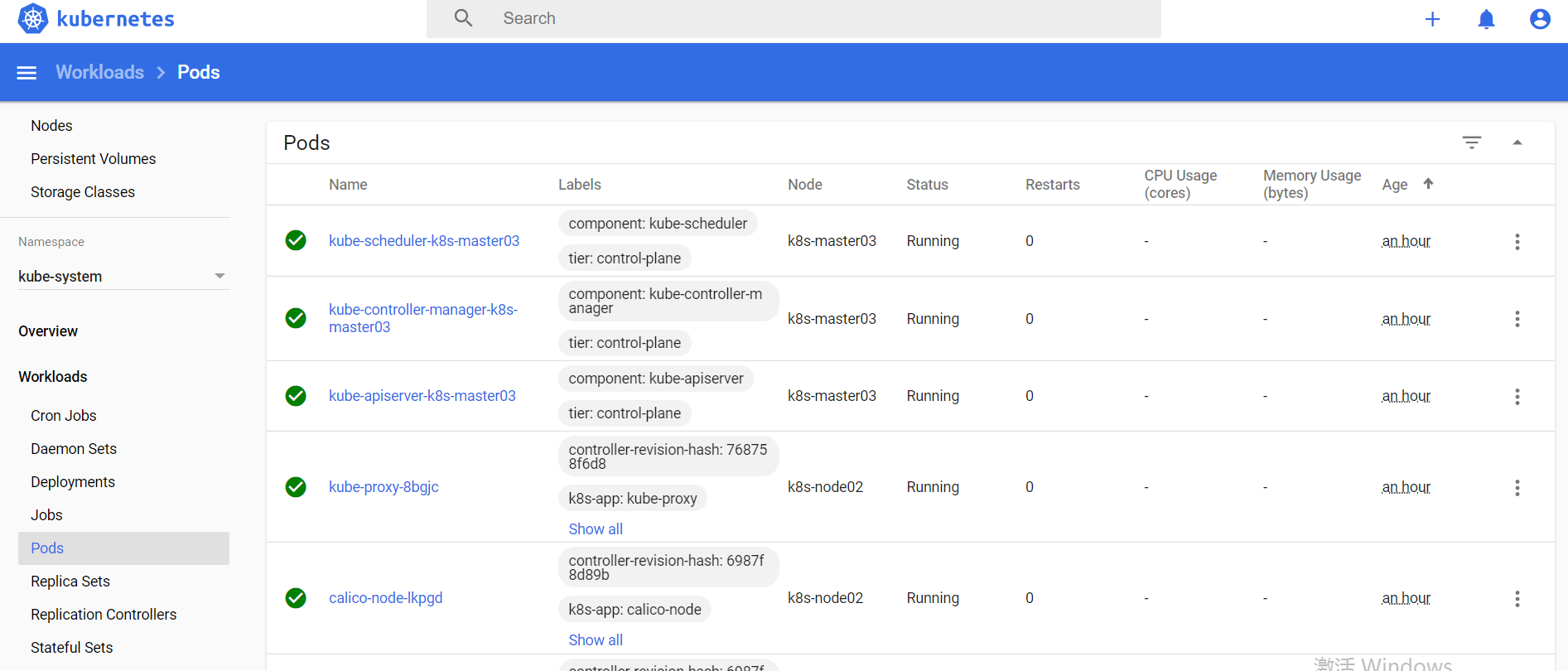
访问测试
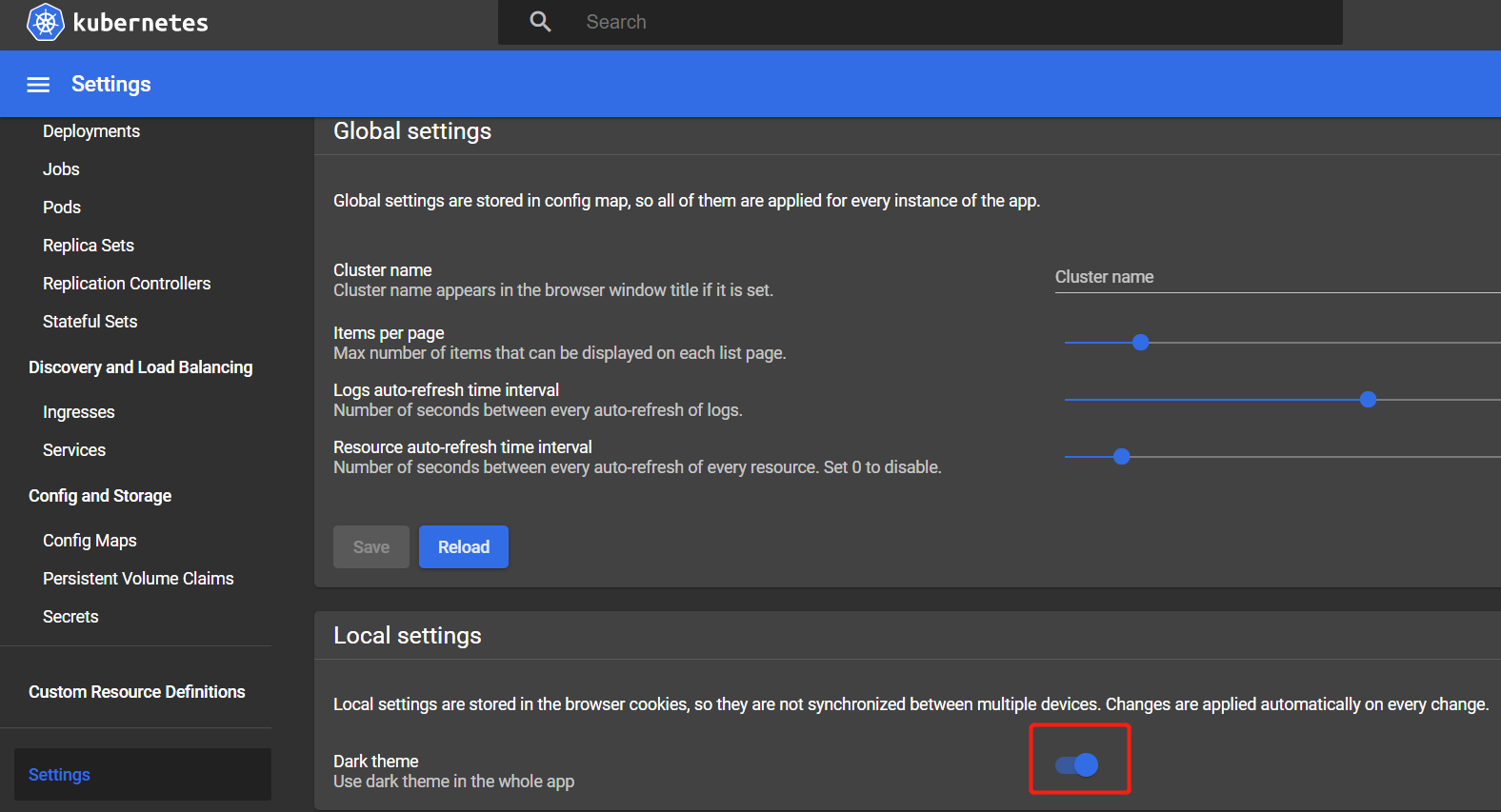
开启黑色主题
kubernetes实战(二十六):kubeadm 安装 高可用 k8s v1.16.x dashboard 2.x的更多相关文章
- kubernetes实战(二十五):kubeadm 安装 高可用 k8s v1.13.x
1.系统环境 使用kubeadm安装高可用k8s v.13.x较为简单,相比以往的版本省去了很多步骤. kubeadm安装高可用k8s v.11 和 v1.12 点我 主机信息 主机名 IP地址 说明 ...
- 使用kubeadm搭建高可用k8s v1.16.3集群
目录 1.部署环境说明 2.集群架构及部署准备工作 2.1.集群架构说明 2.2.修改hosts及hostname 2.3.其他准备 3.部署keepalived 3.1.安装 3.2.配置 3.3. ...
- kubernetes实战(二十八):Kubernetes一键式资源管理平台Ratel安装及使用
1. Ratel是什么? Ratel是一个Kubernetes资源平台,基于管理Kubernetes的资源开发,可以管理Kubernetes的Deployment.DaemonSet.Stateful ...
- 企业运维实践-还不会部署高可用的kubernetes集群?使用kubeadm方式安装高可用k8s集群v1.23.7
关注「WeiyiGeek」公众号 设为「特别关注」每天带你玩转网络安全运维.应用开发.物联网IOT学习! 希望各位看友[关注.点赞.评论.收藏.投币],助力每一个梦想. 文章目录: 0x00 前言简述 ...
- kubernetes实战(二十):k8s一键部署高可用Prometheus并实现邮件告警
1.基本概念 本次部署使用的是CoreOS的prometheus-operator. 本次部署包含监控etcd集群. 本次部署适用于二进制和kubeadm安装方式. 本次部署适用于k8s v1.10版 ...
- kubernetes实战(二十九):Kubernetes RBAC实现不同用户在不同Namespace的不同权限
1.基本说明 在生产环境使用k8s以后,大部分应用都实现了高可用,不仅降低了维护成本,也简化了很多应用的部署成本,但是同时也带来了诸多问题.比如开发可能需要查看自己的应用状态.连接信息.日志.执行命令 ...
- Kubeadm搭建高可用(k8s)Kubernetes v1.24.0集群
文章转载自:https://i4t.com/5451.html 背景 Kubernetes 1.24新特性 从kubelet中移除dockershim,自1.20版本被弃用之后,dockershim组 ...
- Kubeadm部署高可用K8S集群
一 基础环境 1.1 资源 节点名称 ip地址 VIP 192.168.12.150 master01 192.168.12.48 master02 192.168.12.242 master03 1 ...
- centos7使用kubeadm配置高可用k8s集群
CountingStars_ 关注 2018.08.12 09:06* 字数 464 阅读 88评论 0喜欢 0 简介 使用kubeadm配置多master节点,实现高可用. 安装 实验环境说明 实验 ...
随机推荐
- 关卡界面中个人信息随解锁关卡的移动(CocosCreator)
推荐阅读: 我的CSDN 我的博客园 QQ群:704621321 1.功能描述 在关卡很多的游戏里面,我们一般使用滑动来向玩家展示所有的关卡,为了清楚的让用户看到自己当前所在的关卡, ...
- Nginx介绍与反向代理
Nginx的产生 没有听过Nginx?那么一定听过它的"同行"Apache吧!Nginx同Apache一样都是一种WEB服务器.基于REST架构风格,以统一资源描述符(Unifor ...
- Leetcode之深度优先搜索(DFS)专题-695. 岛屿的最大面积(Max Area of Island)
Leetcode之深度优先搜索(DFS)专题-695. 岛屿的最大面积(Max Area of Island) 深度优先搜索的解题详细介绍,点击 给定一个包含了一些 0 和 1的非空二维数组 grid ...
- 2014 西安 The Problem Needs 3D Arrays
The Problem Needs 3D Arrays 题意:给你n个数, 然后1-n的数, 然后要求按顺序选出m个数, 求 逆序数/m 个数的 最大值是多少. 题解:裸的最大密度子图.逆序的2个数建 ...
- ZOJ -2112 Dynamic Rankings 主席树 待修改的区间第K大
Dynamic Rankings 带修改的区间第K大其实就是先和静态区间第K大的操作一样.先建立一颗主席树, 然后再在树状数组的每一个节点开线段树(其实也是主席树,共用节点), 每次修改的时候都按照树 ...
- 【github】论怎么去写一个高大上的ReadMe
前言 以前我时常觉得,自己写的ReadMe很单调乏味,但后来仔细研究一下后,发现有很多方式可以让ReadMe在简洁的基础上变得好看些,所以在这里和大家分享,如果大家有更好的想法,也非常欢迎在评论区留言 ...
- Java静态代码块、代码块及构造函数执行顺序
根据以下程序进行分析 定义一个父类 package sas.LearnJava; public class ExcuteOrderTest { { System.out.println("我 ...
- EasyUI总结(一)-- 入门
一.EasyUI下载 EasyUI官方下载地址:http://www.jeasyui.com/download/index.php,目前最新的版本是:jQuery EasyUI 1.4.1
- Java IO/输入与输出
File类 File类是IO包中唯一代表磁盘文件本身信息的类,而不是文件中的内容 File类定义了一些与平台无关的方法来操纵文件,例如,创建,删除文件和重命名文件 Java中的目录被当作一种特殊文件, ...
- FreeSql (三十二)Aop
FreeSql AOP 已有的功能介绍,未来为会根据用户需求不断增强. 审计 CRUD 马云说过,996是修福报.对于多数程序员来说,加班是好事...起码不是闲人,不会下岗. 当如果因为某个 sql ...