
drf源码分析系列---认证
认证的使用
from rest_framework.authentication import BaseAuthentication

from api import models

# 认证类

class TokenAuthentication(BaseAuthentication):

    def authenticate(self, request):

        token = request.query_params.get('token')

        user_object = models.UserInfo.objects.filter(token=token).first()

        if user_object:

            return (user_object, token)

        return (None, None)

# 认证类的应用

# 单独的视图认证应用

class OrderView(APIView):

    authentication_classes = [MyAuthentication, ]  #设置成空列表代表没有权限

    def get(self,request,*args,**kwargs):

        print(request.user)

        print(request.auth)

        return Response('order')

# 认证的全局应用

REST_FRAMEWORK = {

    "DEFAULT_AUTHENTICATION_CLASSES"=["api.views.auth.MyAuthentication",]

}
认证的源码分析
执行流程
1.请求进来执行dispatch方法中的initialize_request方法

    def initialize_request(self, request, *args, **kwargs):

        parser_context = self.get_parser_context(request)

        return Request(

            request,

            parsers=self.get_parsers(),

            authenticators=self.get_authenticators(),

            negotiator=self.get_content_negotiator(),

            parser_context=parser_context

        )

#会对request对象进行重新封装,把老的request封装成新的request

执行self.get_authenticators()

    def get_authenticators(self):

        return [auth() for auth in self.authentication_classes]  # 循环自定义的认证类,生成认证对象列表封装到request中

authentication_classes

settings中的认证配置

"DEFAULT_AUTHENTICATION_CLASSES":["api.views.auth.MyAuthentication]
2.执行inital

    def initial(self, request, *args, **kwargs):

		.......略过的代码

        version, scheme = self.determine_version(request, *args, **kwargs)

        request.version, request.versioning_scheme = version, scheme

        self.perform_authentication(request) #认证函数

        self.check_permissions(request)

        self.check_throttles(request)
3.执行perform_authentication(request)认证函数

    def perform_authentication(self, request):

        request.user# 调用request的user方法
4.

@property

    def user(self):

        if not hasattr(self, '_user'):

            with wrap_attributeerrors():

                self._authenticate()

        return self._user
5.执行_authenticate()方法

    def _authenticate(self):

        for authenticator in self.authenticators:

            try:

                user_auth_tuple = authenticator.authenticate(self) #每个认证对象(authenticator)中的authenticate方法,可以重写该方法进行定制,之前已经封装到request中了

            except exceptions.APIException:

                self._not_authenticated()

                raise

            if user_auth_tuple is not None:

                self._authenticator = authenticator

                self.user, self.auth = user_auth_tuple

                return

        self._not_authenticated()

#返回元祖(user,auth)代表认证成功

#抛出异常代表认证失败

#返回None继续下个认证
看张图吧!

.
.
.
.
.
.
.
.
.
.
.
.
.
.
.
.
.
.
.
.
.
.
.
.
正经点......
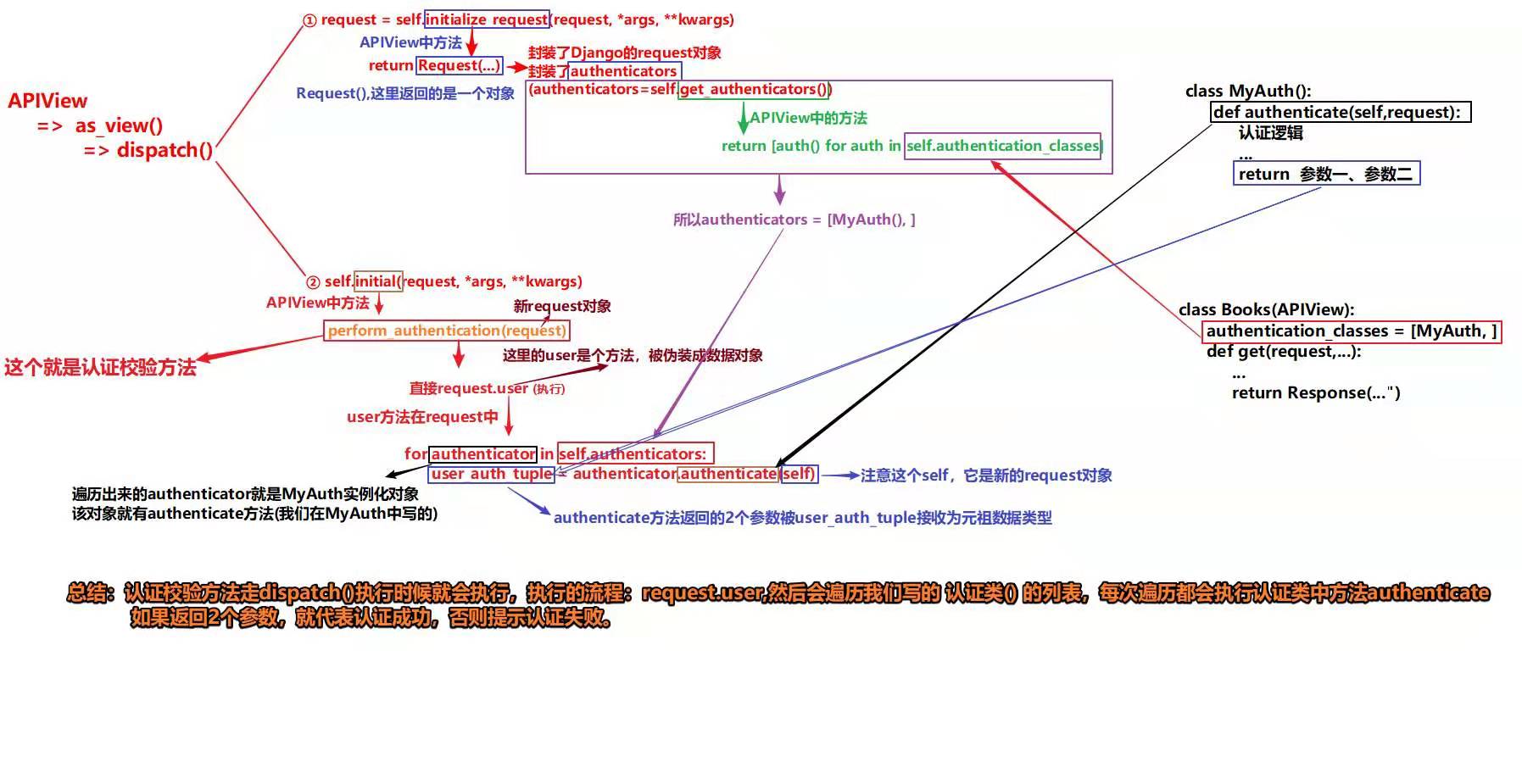
概括
1.请求进来时,先执行dispatch方法,对的request进行重新封装

2.执行get_authenticators(),循环authentication_classes得到这个认证类的对象,把对象也封装进去

3.执行initial中的perform_authentication(request),调用request.user,调用request的user方法(静态属性)

4.执行 _authenticate,循环authentication对象,调用authenticate方法返回元祖(user,auth)代表认证成功或者抛出异常代表认证失败或返回None继续下个认证
drf源码分析系列---认证的更多相关文章
- drf源码分析系列---节流(访问频率限制)
使用 from rest_framework.throttling import AnonRateThrottle from rest_framework.generics import ListAP ...
- drf源码分析系列---权限
权限的使用 全局使用 from rest_framework.permissions import BasePermission from rest_framework import exceptio ...
- drf源码分析系列---版本控制
版本的使用 第一步:写路由url(r'^api/(P<version>\w+)/user/$',views.UserView.as_view()), 第二步:写模块导入from rest_ ...
- MyCat源码分析系列之——前后端验证
更多MyCat源码分析,请戳MyCat源码分析系列 MyCat前端验证 MyCat的前端验证指的是应用连接MyCat时进行的用户验证过程,如使用MySQL客户端时,$ mysql -uroot -pr ...
- drf源码剖析系列(系列目录)
drf源码剖析系列(系列目录) 01 drf源码剖析之restful规范 02 drf源码剖析之快速了解drf 03 drf源码剖析之视图 04 drf源码剖析之版本 05 drf源码剖析之认证 06 ...
- jQuery源码分析系列
声明:本文为原创文章,如需转载,请注明来源并保留原文链接Aaron,谢谢! 版本截止到2013.8.24 jQuery官方发布最新的的2.0.3为准 附上每一章的源码注释分析 :https://git ...
- jQuery-1.9.1源码分析系列完毕目录整理
jQuery 1.9.1源码分析已经完毕.目录如下 jQuery-1.9.1源码分析系列(一)整体架构 jQuery-1.9.1源码分析系列(一)整体架构续 jQuery-1.9.1源码分析系列(二) ...
- MyCat源码分析系列之——结果合并
更多MyCat源码分析,请戳MyCat源码分析系列 结果合并 在SQL下发流程和前后端验证流程中介绍过,通过用户验证的后端连接绑定的NIOHandler是MySQLConnectionHandler实 ...
- MyCat源码分析系列之——SQL下发
更多MyCat源码分析,请戳MyCat源码分析系列 SQL下发 SQL下发指的是MyCat将解析并改造完成的SQL语句依次发送至相应的MySQL节点(datanode)的过程,该执行过程由NonBlo ...
随机推荐
- boost.asio新框架的设计概念总结
1.66版本,boost.asio库重新设计了框架,目前最新版为1.71.读了几天代码后,对框架中相关概念总结.因为是泛型编程的库,所以分析的概念层的设计. 可通过boost官方文档,strand的1 ...
- linux内核的tiny rcu, tree rcu
kernel中有两个rcu的实现,一个是tiny rcu,另一个是tree rcu.这两种rcu的前身都是classic rcu.如果要阅读classic rcu的实现代码,必须找kernel 2.6 ...
- vue跨域处理
本人对于vue跨域处理流程不是很清楚,特此理顺一遍. 1.在config中进行配置,该文件不是都存在,需要自己建: proxyTable,这个参数主要是一个地址映射表,你可以通过设置将复杂的url简化 ...
- 查看k8s中etcd数据
#查看etcd pod kubectl get pod -n kube-system | grep etcd #进入etcd pod kubectl exec -it -n kube-system e ...
- CentOS7中安装MariaDB
什么是mariaDB? 在线安装(慢的要命) RPM离线安装(CentOS7.X) 在线安装 打开官方网站 https://mariadb.org/ 点击Download,跳转到下一页面 继续点击Do ...
- 【集训Day4 动态规划】轮船问题
轮船问题(ship) [问题描述] 某国家被一条河划分为南北两部分,在南岸和北岸总共有N对城市,每一城市在对岸都有唯一的友好城市,任何两个城市都没有相同的友好城市.每一对友好城市都希望有一条航线来往, ...
- webpack4打包的一些坑
1.安装webPack看官方文档就可以了,主要是打包,我安装的是4+以上的 官网中文教程:https://www.webpackjs.com/guides/installation/ 2.我是在php ...
- ehcache监控
引入Maven依赖 <dependency> <groupId>org.terracotta.ehcachedx.com.javabi</groupId> < ...
- flex布局实现瀑布流排版
网上有很多有关js(jq)实现瀑布流和有关瀑布流的插件很多,例如:插件(Masonry,Wookmark等等).按照正常的逻辑思维,瀑布流的排版(item列表)一般都是 由左到右,上而下排序的结果,单 ...
- mybatis精讲(五)--映射器组件
目录 前言 标签 select insert|update|delete 参数 resultMap cache 自定义缓存 # 加入战队 微信公众号 前言 映射器之前我们已经提到了,是mybatis特 ...