
FastDFS集群-安装说明
一、简介
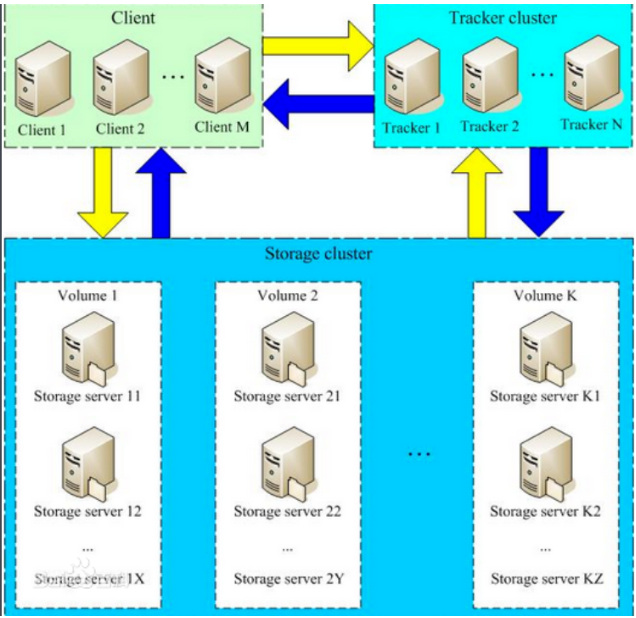
FastDFS服务端有两个角色:跟踪器(tracker)和存储节点(storage)。跟踪器主要做调度工作,在访问上起负载均衡的作用。
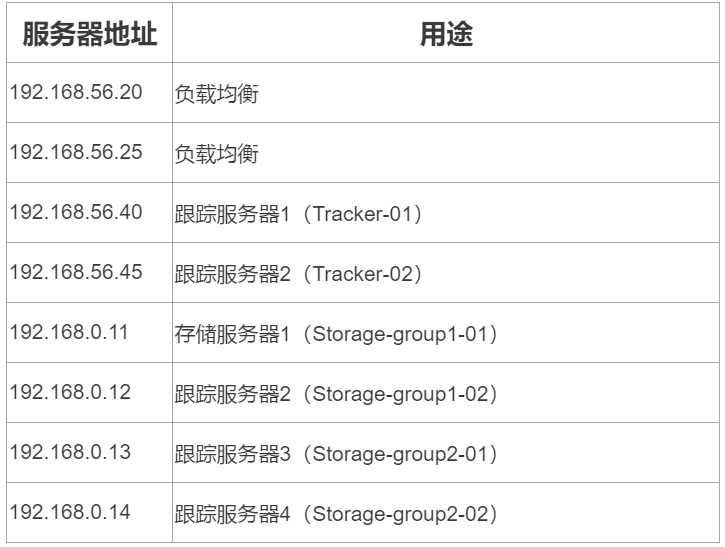
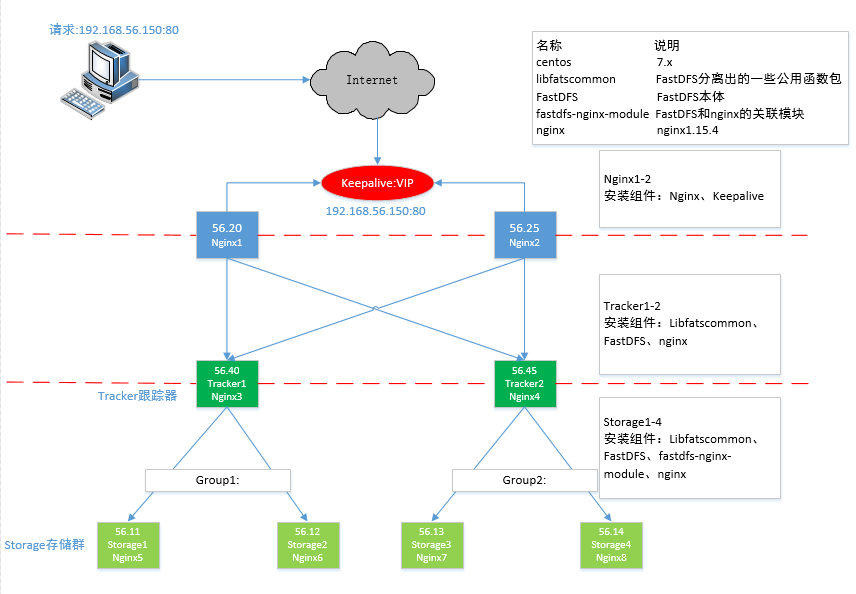
2.2、FastDFS系统结构图
|
说明
|
位置
|
|
所有安装包
|
/usr/local/src
|
|
数据存储位置
|
/home/dfs/
|
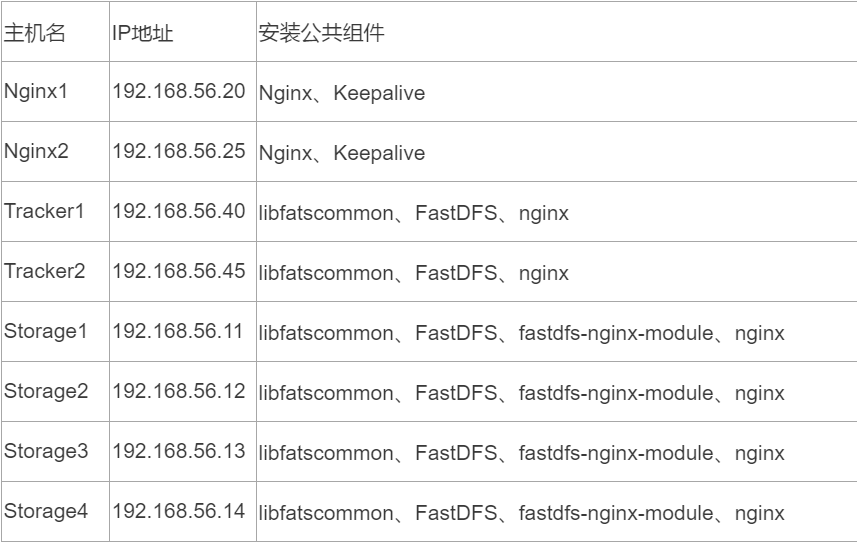
3.2、编译环境:
yum install git gcc gcc-c++ make automake autoconf libtool pcre pcre-devel zlib zlib-devel openssl-devel wget vim -y
4.1、修改tracker配置文件
vim /etc/fdfs/tracker.conf
# 修改的内容如下:
disabled=false # 启用配置文件
port=22122 # tracker服务器端口(默认22122)
base_path=/home/dfs # 存储日志和数据的根目录
store_lookup=0 # 轮询方式上传
4.2、启动tracker服务器
cp /usr/local/src/fastdfs/init.d/fdfs_storaged
chmod +x /etc/rc.d/init.d/fdfs_trackerd
/etc/init.d/fdfs_trackerd start
或者
systemctl start fdfs_trackerd
或者
fdfs_trackerd /etc/fdfs/tracker.conf start
初次启动,会在/data/fastdfs/tracker目录下生成logs、data两个目录。
drwxr-xr-x 2 root root 178 May 3 22:34 data
drwxr-xr-x 2 root root 26 May 2 18:57 logs
检查FastDFS Tracker Server是否启动成功:
ps aux | grep fdfs_trackerd
4.3、tracker server的关闭命令
/etc/init.d/fdfs_trackerd stop
或者
systemctl stop fdfs_trackerd
或者
fdfs_trackerd /etc/fdfs/tracker.conf stop
4.4、设置tracker server开机启动
chkconfig fdfs_trackerd on
配置文件准备:cp /etc/fdfs/storage.conf.sample /etc/fdfs/storage.conf
4.5、192.168.56.11、192.168.56.12修改storage配置文件
vim /etc/fdfs/storage.conf
# 修改的内容如下:
disabled=false # 启用配置文件
port=23000 # storage的端口号,同一个组的 storage 端口号必须相同
group_name=group1
base_path=/home/dfs # 存储日志和数据的根目录
store_path0=/home/dfs # 第一个存储目录
store_path_count=1 #存储路径个数,需要和store_path个数匹配
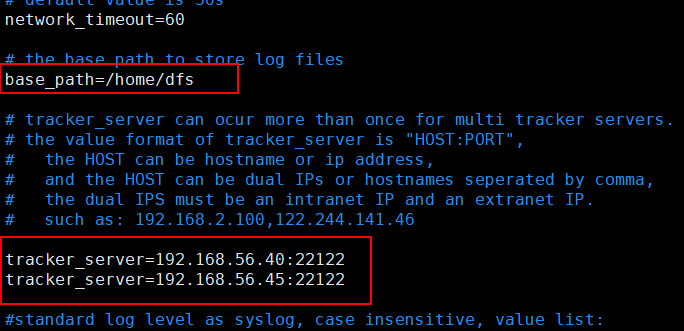
tracker_server=192.168.56.40:22122 # tracker服务器的IP地址和端口
tracker_server=192.168.56.45:22122 # 多个tracker直接添加多条配置
配置group_name
不同分组配置不同group_name,第一组为group1, 第二组为group2
4.6、192.168.56.13、192.168.56.14修改storage配置文件
vim /etc/fdfs/storage.conf
# 修改的内容如下:
disabled=false # 启用配置文件
port=23000 # storage的端口号,同一个组的 storage 端口号必须相同
group_name=group2
base_path=/home/dfs # 存储日志和数据的根目录
store_path0=/home/dfs # 第一个存储目录
store_path_count=1 #存储路径个数,需要和store_path个数匹配
tracker_server=192.168.56.40:22122 # tracker服务器的IP地址和端口
tracker_server=192.168.56.45:22122 # 多个tracker直接添加多条配置
4.7、启动storage服务器
/etc/init.d/fdfs_storaged start
或者
systemctl start fdfs_storaged
或者
fdfs_storaged /etc/fdfs/tracker.conf start
初次启动,会在/home/dfs目录下生成logs、data两个目录。
drwxr-xr-x 259 root root 8192 May 3 23:06 data
drwxr-xr-x 2 root root 26 May 2 19:12 logs
检查FastDFS Tracker Server是否启动成功:
ps aux | grep fdfs_storaged
所有 Storage 节点都启动之后,可以在任一 Storage 节点上使用如下命令查看集群信息:
/usr/bin/fdfs_monitor /etc/fdfs/storage.conf
部分截图信息
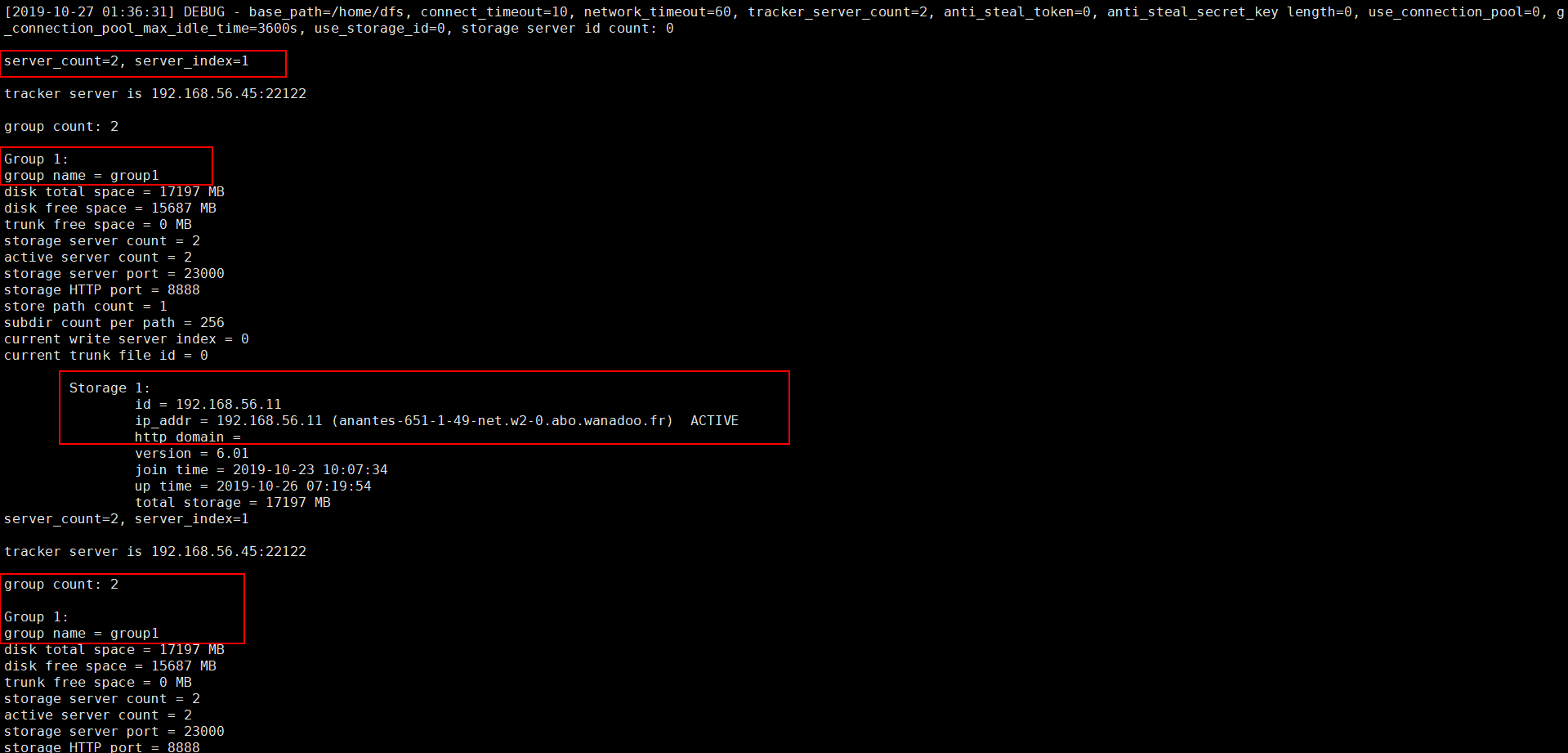


user nobody;

worker_processes 1;

events {

        worker_connections 1024;

        }

http {

        include mime.types;

        default_type application/octet-stream;

        sendfile on;

        keepalive_timeout 65;

server {

        listen 8888;

        server_name localhost;

        location ~/group[1-2]/M00

            {

                ngx_fastdfs_module;

            }

error_page 500 502 503 504 /50x.html;

location = /50x.html { root html;

            }

        }

    }
user root;

worker_processes 1;

events {

    worker_connections 1024;

    use epoll;

}

http {

    include mime.types;

    default_type application/octet-stream;

        sendfile on;

         tcp_nopush on;

        keepalive_timeout 65;

    upstream fdfs_group1 {

        server 192.168.56.11:8888 weight=1 max_fails=2 fail_timeout=30s;

        server 192.168.56.12:8888 weight=1 max_fails=2 fail_timeout=30s;

    }

    upstream fdfs_group2 {

        server 192.168.56.13:8888 weight=1 max_fails=2 fail_timeout=30s;

        server 192.168.56.14:8888 weight=1 max_fails=2 fail_timeout=30s;

    }

        server {

        listen 8000;

        server_name localhost;

        #charset koi8-r;

        #access_log logs/host.access.log main;

        #设置 group 的负载均衡参数

        location /group1/M00 {

            proxy_pass http://fdfs_group2;

        }

        location /group2/M00 {

            proxy_pass http://fdfs_group2;

        }

    }

}
7.3、启动Nginx
user root;

worker_processes 1;

events {

    worker_connections 1024;

    use epoll;

}

http {

    include mime.types;

    default_type application/octet-stream;

    log_format main '$remote_addr - $remote_user [$time_local] "$request" '

     '$status $body_bytes_sent "$http_referer" '

     '"$http_user_agent" "$http_x_forwarded_for"';

    access_log logs/access.log main;

    sendfile on;

    tcp_nopush on;

    #keepalive_timeout 0;

    keepalive_timeout 65;

    #gzip on;

    server_names_hash_bucket_size 128;

    client_header_buffer_size 32k;

    large_client_header_buffers 4 32k;

    client_max_body_size 300m;

    proxy_redirect off;

    proxy_set_header Host $http_host;

    proxy_set_header X-Real-IP $remote_addr;

    proxy_set_header X-Forwarded-For $proxy_add_x_forwarded_for;

    proxy_connect_timeout 90;

    proxy_send_timeout 90;

    proxy_read_timeout 90;

    proxy_buffer_size 16k;

    proxy_buffers 4 64k;

    proxy_busy_buffers_size 128k;

    proxy_temp_file_write_size 128k;

    proxy_cache_path /tmp/cache/nginx/proxy_cache levels=1:2 keys_zone=http-cache:200m max_size=1g inactive=30d;

    proxy_temp_path /tmp/cache/nginx/proxy_cache/tmp;

        upstream fdfs_group1 {

        server 192.168.56.40:8000 weight=1 max_fails=2 fail_timeout=30s;

        server 192.168.56.45:8000 weight=1 max_fails=2 fail_timeout=30s;

    }

    upstream fdfs_group2 {

        server 192.168.56.40:8000 weight=1 max_fails=2 fail_timeout=30s;

        server 192.168.56.45:8000 weight=1 max_fails=2 fail_timeout=30s;

    }

    server {

        listen 80;

        server_name localhost;

        #charset koi8-r;

        #access_log logs/host.access.log main;

        location /group1/M00 {

            proxy_next_upstream http_502 http_504 error timeout invalid_header;

            proxy_cache http-cache;

            proxy_cache_valid 200 304 12h;

            proxy_cache_key $uri$is_args$args;

            proxy_pass http://fdfs_group1;

            expires 30d;

        }

        location /group2/M00 {

            proxy_next_upstream http_502 http_504 error timeout invalid_header;

            proxy_cache http-cache;

            proxy_cache_valid 200 304 12h;

            proxy_cache_key $uri$is_args$args;

            proxy_pass http://fdfs_group2;

            expires 30d;

        }

        #error_page 404 /404.html;

        # redirect server error pages to the static page /50x.html

        #

        error_page 500 502 503 504 /50x.html;

            location = /50x.html {

            root html;

        }

    }

}


FastDFS集群-安装说明的更多相关文章
- FastDFS 集群 安装 配置
这篇文章介绍如何搭建FastDFS 集群 FastDFS是一个开源的轻量级分布式文件系统,它对文件进行管理,功能包括:文件存储.文件同步.文件访问(文件上传.文件下载)等,解决了大容量存储和负载均衡的 ...
- FastDFS集群安装
集群安装1.FastDFS安装 Tracker,nginx 192.168.56.113 192.168.56.114 storage group1 192.168.56.115 ...
- fastdfs集群安装过程_学习笔记
最终效果 初始化为6个节点 在/usr/local/software 目录下上传需要用到tar包,分别在各个节点上传 使用scp 将本地software目录复制到其他节点上 73.74为 tracke ...
- 集群 安装 配置FastDFS
FastDFS 集群 安装 配置 这篇文章介绍如何搭建FastDFS 集群 FastDFS是一个开源的轻量级分布式文件系统,它对文件进行管理,功能包括:文件存储.文件同步.文件访问(文件上传.文件下载 ...
- 一张图讲解最少机器搭建FastDFS高可用分布式集群安装说明
很幸运参与零售云快消平台的公有云搭建及孵化项目.零售云快消平台源于零售云家电3C平台私有项目,是与公司业务强耦合的.为了适用于全场景全品类平台,集团要求项目平台化,我们抢先并承担了此任务.并由我来主 ...
- Dubbo入门到精通学习笔记(十七):FastDFS集群的安装、FastDFS集群的配置
文章目录 FastDFS集群的安装 FastDFS 介绍(参考:http://www.oschina.net/p/fastdfs) FastDFS 上传文件交互过程: FastDFS 下载文件交互过程 ...
- Linux安装fastdfs集群部署
过程问题: make: gcc:命令未找到 解决: yum -y install gcc 一.环境和版本: Linux环境:CentOS 7.6 libfastcommon版本:1.0.39 Fast ...
- 19.fastDFS集群理解+搭建笔记
软件架构理解 1FastDFS介绍 1.1什么是FastDFS FastDFS是用c语言编写的一款开源的分布式文件系统.FastDFS为互联网量身定制,充分考虑了冗余备份.负载均衡.线性扩容等机制,并 ...
- FastDfs集群docker化部署
初识分布式文件系统FastDFS- 1.分布式与集群的区别 区别:集群是个物理形态,分布式是个工作方式.只要是一堆机器,就可以叫集群,他们是不是一起协作着干活,这个谁也不知道:一个程序或系统,只要运行 ...
随机推荐
- [Spark] 01 - What is Spark
大数据 云计算概念 课程:Spark编程基础(Python版) 大数据4V特性 Volumn, Variety, Velocity, Value. 思维方式 通过数据发现问题,再解决问题. 速度更重要 ...
- 记一次Burp Suite的使用实例
下载完的Bur是这样的,双击jar即可 最右边的键一直按,傻瓜式 先将要抓包的网页打开,此次以上传图片为例 第一步当然是先下载Burp Suite之后打开,查看设置代理地 ...
- spring boot 配置访问其他模块包中的mapper和xml
maven项目结构如下,这里只是简单测试demo,使用的springboot版本为2.1.3.RELEASE 1.comm模块主要是一些mybatis的mapper接口和对应的xml文件,以及数据库表 ...
- 阿里云centos6.9搭建fastDFS文件服务器
准备压缩包: 1.fastdfs-nginx-module_v1.16.tar.gz 2.FastDFS_v5.05.tar.gz 3.libfastcommonV1.0.7.tar.gz 4.ngi ...
- cp -rf 操作时依然会提示覆盖
在linux上经常会使用cp -rf命令,该命令就是强制覆盖指定目录下的文件,但有时使用该命令依然会提示是否覆盖,cp命令的参数有如下一些: 参数说明: -a:此选项通常在复制目录时使用,它保留链接. ...
- 夯实Java基础系列15:Java注解简介和最佳实践
Java注解简介 注解如同标签 Java 注解概述 什么是注解? 注解的用处 注解的原理 元注解 JDK里的注解 注解处理器实战 不同类型的注解 类注解 方法注解 参数注解 变量注解 Java注解相关 ...
- linux mint 19.2与Windows 10 双系统硬盘安装与卸载
安装linux mint 和win10双系统: 1.win10系统下如果没有空闲分区,请从容量较大的分区用partition manager在选中的较大的分区下,调整大小.此步骤最好在pe下的part ...
- 一道题考你对__autoreleasing和__block的理解
考虑下面的代码,有哪些问题,如何把他改成正确的形式? @interface TestObj : NSObject @end @implementation TestObj - (void)method ...
- (转) websocket 和 socket 剖析
Socket 与 WebSocket 本站文章除注明转载外,均为本站原创或者翻译. 本站文章欢迎各种形式的转载,但请18岁以上的转载者注明文章出处,尊重我的劳动,也尊重你的智商: 本站部分原创和翻译文 ...
- Spring Security 自定义登录认证(二)
一.前言 本篇文章将讲述Spring Security自定义登录认证校验用户名.密码,自定义密码加密方式,以及在前后端分离的情况下认证失败或成功处理返回json格式数据 温馨小提示:Spring Se ...