
扩展GroupBox控件
1、GroupBox的边框颜色可以自行设置;
2、GroupBox可以设置边框的为圆角;
3、设置GroupBox标题在控件中的位置。
4、设置GroupBox标题的字体和颜色。
具体实现步骤Panel扩展一样,直接看具体的代码,代码如下:
public class GroupBoxEx : GroupBox

    {

        private Font _titleFont = new Font("宋体", , FontStyle.Regular);

        private Color _titleColor = Color.Green;

        private Color _borderColor = Color.FromArgb(, , );

        private int _radius = ;

        private int _tiltePos =;

        private const int WM_ERASEBKGND = 0x0014;

        private const int WM_PAINT = 0xF;

        public GroupBoxEx()

            : base()

        {

        }

        [DefaultValue(typeof(Color), "23, 169, 254"), Description("控件边框颜色")]

        public Color BorderColor

        {

            get { return _borderColor; }

            set

            {

                _borderColor = value;

                base.Invalidate();

            }

        }

        [DefaultValue(typeof(Color), "Green"), Description("标题颜色")]

        public Color TitleColor

        {

            get { return _titleColor; }

            set

            {

                _titleColor = value;

                base.Invalidate();

            }

        }

        [DefaultValue(typeof(Font), ""), Description("标题字体设置")]

        public Font TitleFont

        {

            get { return _titleFont; }

            set

            {

                _titleFont = value;

                base.Invalidate();

            }

        }

        [DefaultValue(typeof(int), ""), Description("圆角弧度大小")]

        public int Radius

        {

            get { return _radius; }

            set

            {

                _radius = value;

                base.Invalidate();

            }

        }

        [DefaultValue(typeof(int), ""), Description("标题位置")]

        public int TiltePos

        {

            get { return _tiltePos; }

            set

            {

                _tiltePos = value;

                base.Invalidate();

            }

        }

        protected override void WndProc(ref Message m)

        {

            try

            {

                base.WndProc(ref m);

                if (m.Msg == WM_PAINT)

                {

                    if (this.Radius > )

                    {

                        using (Graphics g = Graphics.FromHwnd(this.Handle))

                        {

                            Rectangle r = new Rectangle();

                            r.Width = this.Width;

                            r.Height = this.Height;

                            DrawBorder(g, r, this.Radius);

                        }

                    }

                }

            }

            catch (Exception ex)

            {

                MessageBox.Show(ex.Message);

            }

        }

        private void DrawBorder(Graphics g, Rectangle rect, int radius)

        {

            rect.Width -= ;

            rect.Height -= ;

            using (Pen pen = new Pen(this.BorderColor))

            {

                g.Clear(this.BackColor);

                g.DrawString(this.Text, this.TitleFont, new SolidBrush(this.TitleColor), radius + this.TiltePos, );

                g.TextRenderingHint = System.Drawing.Text.TextRenderingHint.AntiAlias;

                GraphicsPath path = new GraphicsPath();

                float height = g.MeasureString(this.Text, this.TitleFont).Height / ;

                float width = g.MeasureString(this.Text, this.TitleFont).Width;

                path.AddArc(rect.X, rect.Y + height, radius, radius, , );//左上角弧线

                  path.AddLine(radius, rect.Y + height, radius + this.TiltePos, rect.Y + height);

                path.StartFigure();

                path.AddLine(radius + this.TiltePos + width, rect.Y + height, rect.Right - radius, rect.Y + height);

                path.AddArc(rect.Right - radius, rect.Y + height, radius, radius, , );//右上角弧线

                  path.AddArc(rect.Right - radius, rect.Bottom - radius, radius, radius, , );

                path.AddArc(rect.X, rect.Bottom - radius, radius, radius, , );

                path.StartFigure();

                path.AddArc(rect.X, rect.Y + height, radius, radius, -, -);//左上角弧线

                  path.AddArc(rect.X, rect.Bottom - radius, radius, radius, -, -);

                g.DrawPath(pen, path);

            }

        }

    }
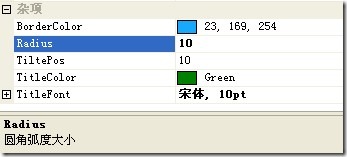
1、在扩展GroupBox控件中,为了实现上述需求,扩展了5个自定义属性,编码完成,编译之后,控件的属性多了以下项,如图所示:
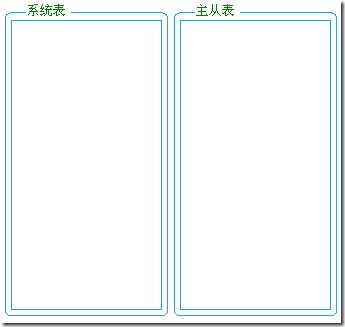
2、控件运行之后效果,如下:
PS:
1、如何给自定义控件属性设置默认值和功能提示?
在属性之前,添加此行代码:[DefaultValue(typeof(Color), "23, 169, 254"),Description("控件边框颜色")]
DefaultValue 属于System.ComponentModel.DefaultValueAttribute类中,设置属性的初始值。
Description 用于描述属性。
设置属性是否在控件属性框中显示,可在属性前加[Browsable(false)],这样就能隐藏属性在属性栏中的显示。
2、GraphicsPath类介绍
GraphicsPath类提供了一系列的绘制图形的方法,比如AddArc、AddLine等等,可以绘制各种曲线 。可以通过使用 CloseFigure() 方法显式闭合一个图形,通过StartFigure()方法创建一个新的图像。
(1)、GraphicsPath 对象存储一系列直线和贝塞尔样条。可以将多种类型的曲线(椭圆、弧形和基数样条)添加到路径,但在存储到路径之前,各种曲线都被转换为贝塞尔样条。
(2)、应用程序使用路径来绘制形状的轮廓、填充形状内部和创建剪辑区域。
(3)、路径可由任意数目的图形(子路径)组成。每一图形都是由一系列相互连接的直线和曲线或几何形状基元构成的。图形的起始点是相互连接的一系列直线和曲线中的第一点。终结点是该序列中的最后一点。
(4)、图形具有方向,方向描述在起始点和终结点之间绘制直线段和曲线段的方式。方向按将直线和曲线添加到图形的顺序定义,或者按几何形状基元定义。方向用来确定剪辑和填充的路径内部。
原文地址:http://www.itbobo.com/winfrom-groupbox.html
扩展GroupBox控件的更多相关文章
- 扩展GridView控件——为内容项添加拖放及分组功能
引言 相信大家对GridView都不陌生,是非常有用的控件,用于平铺有序的显示多个内容项.打开任何WinRT应用或者是微软合作商的网站,都会在APP中发现GridView的使用.“Tiles”提供了一 ...
- 验证控件插图扩展控件ValidatorCalloutExtender(用于扩展验证控件)和TextBoxWatermarkExtender
<asp:ScriptManager ID="ScriptManager1" runat="server"> </asp:ScriptMan ...
- Duilib实现GroupBox控件
转载:http://blog.csdn.net/asd313346541/article/details/47055113 原作者的源码上说:右边线和下边线显示不出来: 后来经过调试研究测试猜测应该是 ...
- winform groupbox控件放到窗体中间位置
1. 在Form中放一个控件,让其在启动时始终居中 int gLeft = this.Width / 2 - groupControl1.Width / 2; int gTop = this.Heig ...
- C#之菜单控件、主窗体打开子窗体、GroupBox控件使用
一.背景 一年前有学习过C#,但没有在项目中去实际做APP,重新捡起来应用到项目中.我同事本来做好一个CANOPEN设备管理的界面,由于近期搜索了别人的开发的界面,我觉得有很多东西要重新安排,以及我已 ...
- WinForm GroupBox控件重绘外观
private void groupBoxFun_Paint(PaintEventArgs e, GroupBox groupBox){ e.Graphics.Clear(groupBox.BackC ...
- 一个动态扩展表格控件列和行的 jQuery 插件
一个动态扩展表格控件列和行的 jQuery 插件 不过这并不影响使用鸭! 看这里:https://github.com/zhuwansu/table-ext.js 一个简单的示范 html <t ...
- 扩展 easyui 控件系列:为datagrid 增加过滤行
此功能还为真正完成,起到抛砖引玉的效果,发动大家的力量把这个功能完善起来,效果图如下: 基本上就是扩展了 datagrid.view 中的onAfterRender 这个事件,具体代码如下: $.ex ...
- MVC中使用HTML Helper类扩展HTML控件
文章摘自:http://www.cnblogs.com/zhangziqiu/archive/2009/03/18/1415005.html MVC在view页面,经常需要用到很多封装好的HTML控件 ...
随机推荐
- 使用C#调试Windows服务模板项目
Windows服务是非常强大的应用程序,可用于在backgorund中执行许多不同类型的任务.他们可以在不需要任何用户登录的情况下启动,并且可以使用除登录用户之外的其他用户帐户运行.但是,如果通过遵循 ...
- C++小游戏——井字棋
#include<cstdio> #include<windows.h> #include<ctime> int main() { srand(time(NULL) ...
- java多线程总结-同步容器与并发容器的对比与介绍
1 容器集简单介绍 java.util包下面的容器集主要有两种,一种是Collection接口下面的List和Set,一种是Map, 大致结构如下: Collection List LinkedLis ...
- Atlassian In Action-Jira之核心插件(三)
目录 BigPicture BigPicture特点介绍 管理员管理菜单 任务列表 任务管理 设置 最佳实践 Jira Misc Workflow Extensions 最佳实践 自动分配 自动化流程 ...
- Excel催化剂开源第13波-VSTO开发之DataGridView控件几个小坑
Excel催化剂内部大量使用了DataGridView,这其中有一些小坑,花了力气才解决的,在此给广大开发者作简单分享. 为何要使用DataGridView而不是其他控件如ListBox.ListVi ...
- 庖丁解牛Linux内核分析 0x00:《庖丁解牛》
庖丁解牛 吾生也有涯,而知也无涯 .以有涯随无涯,殆已!已而为知者,殆而已矣!为善无近名,为恶无近刑.缘督以为经,可以保身,可以全生,可以养亲,可以尽年. 庖丁为文惠君解牛,手之所触,肩之所倚,足之 ...
- [小米OJ] 3. 大数相减
题目链接 思路: 利用两个string保存相减的数,其他模拟即可. 参考了别人的一个处理减的步骤,很简洁好看. string substract(string str1, string str2) { ...
- 浅谈单点登陆(SSO)
背景 在企业发展初期,企业使用的系统很少,通常一个或者两个,每个系统都有自己的登录模块,运营人员每天用自己的账号登录,很方便. 但随着企业的发展,用到的系统随之增多,运营人员在操作不同的系统时,需要多 ...
- python课堂整理3---字符串魔法
字符串魔法 1.首字母大写功能 test = "alex" v = test.capitalize() print(v) 2.所有变小写(casefold更厉害,可以将很多未知的其 ...
- Webpack 下使用 web workers 及 基本原理 和 应用场景
_ 阅读目录 一:web workers的基本原理 二:web Workers 的基本用法 三:在webpack中配置 Web Workers 四:Web Worker的应用场景 回到顶部 一:web ...