
Android课程设计第六天欢迎界面(跳转)
注意:课程设计只为完成任务,不做细节描述~
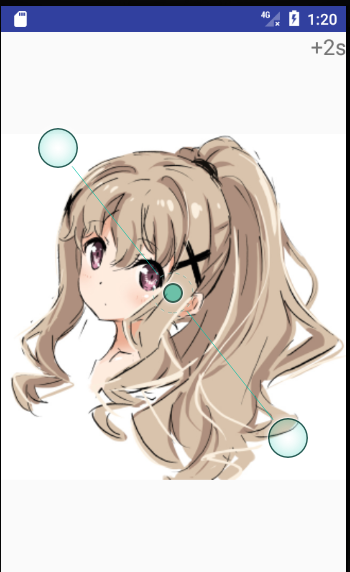
package com.example.myapplication;

import android.app.Activity;

import android.content.Intent;

import android.os.Bundle;

import android.os.Handler;

import android.view.View;

import android.widget.TextView;

/**

 * Created by 樱花落舞 on 2017/6/13.

 */

public class JumpActivity extends Activity {

    TextView textView;

    int time=3;

    Handler handler=new Handler();

    @Override

    protected void onCreate(Bundle savedInstanceState) {

        super.onCreate(savedInstanceState);

        setContentView(R.layout.jump);

        textView= (TextView) findViewById(R.id.textview);

        handler.postDelayed(runnable,1000);

    }

    Runnable runnable=new Runnable() {

        @Override

        public void run() {

            time--;

            handler.postDelayed(this,1000);

            textView.setText("+"+time+"s");

            if(time==0){

                Intent intent = new Intent(JumpActivity.this,TestActivity.class);

                startActivity(intent);

                finish();

            }else {

                textView.setOnClickListener(new View.OnClickListener() {

                    @Override

                    public void onClick(View v) {

                        Intent intent=new Intent(JumpActivity.this,TestActivity.class);

                        startActivity(intent);

                        //结束线程

                        handler.removeCallbacks(runnable);

                        finish();

                    }

                });

            }

        }

    };

}
package com.example.myapplication;

import android.content.Intent;

import android.support.v7.app.AppCompatActivity;

import android.os.Bundle;

public class MainActivity extends AppCompatActivity {

    @Override

    protected void onCreate(Bundle savedInstanceState) {

        super.onCreate(savedInstanceState);

        setContentView(R.layout.activity_main);

        intent.setClass(MainActivity.this,JumpActivity.class);

        startActivity(intent);

        MainActivity.this.finish();

    }

    Intent intent = new Intent();

}
package com.example.myapplication;

import android.app.Activity;

import android.os.Bundle;

import android.support.annotation.Nullable;

/**

 * Created by 樱花落舞 on 2017/6/13.

 */

public class TestActivity extends Activity {

    @Override

    protected void onCreate(@Nullable Bundle savedInstanceState) {

        super.onCreate(savedInstanceState);

        setContentView(R.layout.empty_activity);

    }

}
<?xml version="1.0" encoding="utf-8"?>

<RelativeLayout xmlns:android="http://schemas.android.com/apk/res/android"

    xmlns:app="http://schemas.android.com/apk/res-auto"

    xmlns:tools="http://schemas.android.com/tools"

    android:layout_width="match_parent"

    android:layout_height="match_parent"

    tools:context="com.example.myapplication.MainActivity"

    android:orientation="vertical">

    <ImageView

        android:layout_width="match_parent"

        android:layout_height="match_parent"

        android:src="@mipmap/bg"/>

    <TextView

        android:layout_width="wrap_content"

        android:layout_height="wrap_content"

        android:text="+3秒"

        android:id="@+id/text"

        android:textSize="20dp"

        android:layout_alignParentRight="true"/>

</RelativeLayout>
<?xml version="1.0" encoding="utf-8"?>

<RelativeLayout xmlns:android="http://schemas.android.com/apk/res/android"

    android:layout_width="match_parent" android:layout_height="match_parent">

   <TextView

       android:layout_width="wrap_content"

       android:layout_height="wrap_content"

       android:background="@mipmap/a"/>

</RelativeLayout>
<?xml version="1.0" encoding="utf-8"?>

<RelativeLayout xmlns:android="http://schemas.android.com/apk/res/android"

    android:layout_width="match_parent" android:layout_height="match_parent"

    android:orientation="vertical">

    <ImageView

        android:layout_width="match_parent"

        android:layout_height="match_parent"

        android:src="@mipmap/bg"/>

    <TextView

        android:layout_width="wrap_content"

        android:layout_height="wrap_content"

        android:id="@+id/textview"

        android:textSize="20sp"

        android:text="+3s"

        android:layout_alignParentRight="true"/>

</RelativeLayout>
<?xml version="1.0" encoding="utf-8"?>

<manifest xmlns:android="http://schemas.android.com/apk/res/android"

    package="com.example.myapplication">

    <application

        android:allowBackup="true"

        android:icon="@mipmap/ic_launcher"

        android:label="@string/app_name"

        android:roundIcon="@mipmap/ic_launcher_round"

        android:supportsRtl="true"

        android:theme="@style/AppTheme">

        <activity android:name=".MainActivity">

            <intent-filter>

                <action android:name="android.intent.action.MAIN" />

                <category android:name="android.intent.category.LAUNCHER" />

            </intent-filter>

        </activity>

        <activity android:name=".JumpActivity"

            android:label="@string/app_name"

        >

            <meta-data

                android:name="android.support.PARENT_ACTIVITY"

                android:value=".MainActivity"/>

        </activity>

        <activity android:name=".TestActivity"

            android:label="@string/app_name">

            <meta-data

                android:name="android.support.PARENT_ACTIVITY"

                android:value=".MainActivity"/>

        </activity>

    </application>

</manifest>
Android课程设计第六天欢迎界面(跳转)的更多相关文章
- Android课程设计第二天界面排版
注意:课程设计只为完成任务,不做细节描述~ 老师叫我们做一个这个样子,然后.. <?xml version="1.0" encoding="utf-8"? ...
- Android课程设计第五天欢迎界面(滑动)和图形选择
注意:课程设计只为完成任务,不做细节描述~ 滑动界面 package com.example.myapplication; import android.content.Intent; import ...
- Android课程设计——博学谷1.0
本文讲述了如何应用大三下学期智能移动终端开发技术课程所学知识,完成包含服务器端.客户端程序的应用——博学谷登录模块的开发,结合java语言基本知识,例如:字符串.列表.类.数据库读写等,设计.实现一个 ...
- java(课程设计之记事本界面部分代码公布)
代码:涉及记事本的一些界面......!! /* *java课程设计之记事本(coder @Gxjun) * 编写一个记事本程序 * 要求: * 用图形用户界面实现. * 能实现编辑.保存.另存为.查 ...
- Android课程设计第四天ListView运用
注意:课程设计只为完成任务,不做细节描述~ 效果图 <?xml version="1.0" encoding="utf-8"?> <Relat ...
- Android课程设计第三天帧动画区间动画
注意:课程设计只为完成任务,不做细节描述~ 点火是帧动画,发射是区间动画,于是 <?xml version="1.0" encoding="utf-8"? ...
- Android课程设计第一天Android Studio安装
注意:课程设计只为完成任务,不做细节描述~ 学校有一个Android的课设,所以顺便把Android Studio安装了上去. 实际上安装过程并不复杂,只有几个地方需要注意~ 安装包可以去http:/ ...
- java课程设计--WeTalk(201521123072秦贞一)
在线群聊系统 1,团队课程设计博客链接 http://www.cnblogs.com/slickghost/p/7018105.html 个人负责模块或任务说明 负责模块:界面设计与实现 2,自己的代 ...
- Android 手机卫士--设置界面&功能列表界面跳转逻辑处理
在<Android 手机卫士--md5加密过程>中已经实现了加密类,这里接着实现手机防盗功能 本文地址:http://www.cnblogs.com/wuyudong/p/5941959. ...
随机推荐
- 阿里云安装nginx 启动失败的原因。
阿里云编译安装nginx服务器后启动一直报下面错误. 百度了一圈,看到一个说要先关掉apache服务,感觉这个好像是对的,立马做了下面操作. 果然把nginx起了起来. 从这边才知道apache和ng ...
- rtsp 播放器
http://blog.csdn.net/niu_gao/article/details/7753672 /********************************************** ...
- C/C++ 操作符优先级
不能光转贴,有空要熟悉之后,要写点心得.现在发现 . 的优先级确实很高. C: Precedence Operator Description Associativity 1 ++ -- Suffix ...
- Ghost wenjian目录
SOAMANAGER打不开网页,需要配置ghost 文件, C:\Windows\System32\drivers\etc
- 静态代理、动态代理和cglib代理
转:https://www.cnblogs.com/cenyu/p/6289209.html 代理(Proxy)是一种设计模式,提供了对目标对象另外的访问方式;即通过代理对象访问目标对象.这样做的好处 ...
- react native 知识点总结(一)
一.关于react native 版本的升级 参照文档:http://reactnative.cn/docs/0.45/upgrading.html react-native -v 查看当前版本 ...
- HDU1241 Oil Deposits —— DFS求连通块
题目链接:http://acm.hdu.edu.cn/showproblem.php?pid=1241 Oil Deposits Time Limit: 2000/1000 MS (Java/Othe ...
- 基于Python 的简单推荐系统
def loadExData(): return[[1,1,1,0,0], [2,2,2,0,0], [1,1,1,0,0], [5,5,5,0,0], [1,1,0,2,2], [0,0,0,3,3 ...
- stringBuffer、StringBuilder、排序、Arrays、Jdk1.5新特性(java基础知识十三)
1.StringBuffer类的概述 * A:StringBuffer类概述 * 通过JDK提供的API,查看StringBuffer类的说明 * 1.线程安全的可变字符序列. * 2.可将字符串缓冲 ...
- Swift(二)控制流
要处理条件逻辑,使用 if 和 switch ,要处理循环逻辑,使用 for-in, for, while, 和 do-while .包着条件或者循环的括号可加可不加.处理逻辑体的花括弧是必须加的. ...