
自定义Jquery 下拉框
(function ($){

    'use strict';

    var g_id = 0;

    var g_open_id = [];

    $.fn.select3 = function () {

        var _id = g_id++;

        var _isShow = false;

        var _this = $(this);

        var _val = _this.children('option:selected').text();

        var _w = _this.css('width');

        var tpl = '<dl class="select2_wrap" style="width:'+_w+'"><dt class="open-dt" id="select2_title'+ _id +'" data-val=""><span>'+_val+'</span><i class="fa fa-sort-down"></i></dt>';

        _this.children('option').each(function (){

            tpl += '<dd style="display:none" data-val="'+ $(this).val() +'">' + $(this).text() + '</dd>';

        });

        tpl += '</dl>';

        _this.hide().before(tpl);

        _this.bind('change', function () {

            $('#select2_title').text($(this).val()).attr('data-val', $(this).val());

        });

        $('#select2_title'+_id).attr('data-val', $(this).val());

        $('#select2_title'+_id).siblings().click(function () {

            var text = $(this).text();

            var _val = $(this).attr('data-val');

            _this.val(_val);

            $('#select2_title'+_id).attr('data-val',$(this).attr('data-val')).children('span').text(text);

            $(this).parent('dl').children('dd').slideUp(200, function() {

                $(this).siblings('dt').css({'borderBottom':'1px solid #ccc', 'border-bottom-right-radius':'5px', 'border-bottom-left-radius':'5px'});

            });

            _this.change();

        });

        $('#select2_title'+_id).click(function() {

            $('dd').slideUp(100, function () {

                $('dt[role-page]').attr('style', '');

            });

            var _id = $(this).attr('id');

            g_open_id.push(_id);

            $.each(g_open_id, function(i) {

                if (g_open_id[i] != _id) {

                    $('#'+g_open_id[i]).siblings('dd').slideUp(200, function () {

                        $(this).siblings('dt').css({'borderBottom': '1px solid #ccc', 'border-bottom-right-radius': '5px', 'border-bottom-left-radius': '5px'});

                    });

                    delete g_open_id[i];

                }

            });

            _isShow  = $(this).siblings('dd').css('display') == 'none' ? false : true;

            if (!_isShow) {

                $(this).css({'borderBottom':'none', 'border-bottom-right-radius':'0', 'border-bottom-left-radius':'0'});

                $(this).siblings('dd').slideDown(300);

            }else{

                $(this).siblings('dd').slideUp(200, function () {

                    $(this).siblings('dt').css({'borderBottom': '1px solid #ccc', 'border-bottom-right-radius': '5px', 'border-bottom-left-radius': '5px'});

                });

            }

        });

        $(window).click(function(e){

            var pType = e.target.tagName;

            var className = e.target.className;

            if (pType == 'I' || pType == 'SPAN') {

                className = e.target.parentElement.className;

            }

            if (className == 'open-dt') {

                return;

            }

            $('dd').slideUp(100, function () {

                $('.select2_wrap').children('dt').css({'borderBottom': '1px solid #ccc', 'border-bottom-right-radius': '5px', 'border-bottom-left-radius': '5px'});

                $('dt[role-page]').attr('style', '');

            });

        });

    };

})(jQuery);
样式:
/* select3 style */

.select3-wrap{

    display: inline-flex;

    height: 30px;

    width: 100%;

}

.select2_wrap{

    height: 30px;

    line-height: 30px;

    margin:;

    padding:;

    text-align:left;

    display: inline-block;

    font-size: 12px;

    z-index:;

}

.select2_wrap dt{

    border:1px solid #ccc;

    border-radius: 5px;

    padding-left:10px;

    font-weight: normal;

    cursor:pointer;

    overflow: hidden;

}

.select2_wrap dt>i{

    float:right;

    margin-right: 10px;

    margin-top:3px;

}

.select2_wrap dd{

    padding-left:10px;

    background-color: #FFFFFF;

    border-left: 1px solid #ccc;

    border-right: 1px solid #ccc;

}

.select2_wrap dd:last-child{

    border-bottom:1px solid #ccc;

    border-bottom-left-radius: 5px;

    border-bottom-right-radius: 5px;

    height: 35px;

}

.select2_wrap dt, .select2_wrap dd{

    height:30px;

    line-height: 30px;

}

.select2_wrap dd:hover{

    background-color:#414C59;

    color:white;

    cursor:pointer;

}

.hide {

    display: none;

}
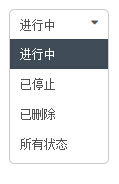
效果:

自定义Jquery 下拉框的更多相关文章
- jquery 下拉框 收藏
jquery 下拉框 Query获取Select选择的Text和Value: 语法解释: 1. $("#select_id").change(function(){//code. ...
- 带搜索框的jQuery下拉框插件
由于下拉框的条数有几十个,于是打算找一个可以搜索查找功能的下拉框,刚开始在网上看了几个,都是有浏览器兼容性问题,后来看到这个“带搜索框的jQuery下拉框美化插件 searchable”,看演示代码简 ...
- jQuery下拉框操作系列$("option:selected",this) &&(锋利的jQuery)
jQuery下拉框操作系列$("option:selected",this) &&(锋利的jQuery) <!DOCTYPE html> <ht ...
- Ajax jQuery下拉框联动案例
需求: 使用ajax和jQuery实现下拉框联动. 注意:需要加入jquery-2.1.1.min.js 前台 <!DOCTYPE html> <html> <head& ...
- 自定义SWT控件一之自定义单选下拉框
一.自定义下拉控件 自定义的下拉框,是自定义样式的,其中的下拉框使用的是独立的window,非复选框的下拉框双击单机其它区域或选择完之后,独立window构成的下拉框会自动消失. package co ...
- jQuery下拉框插件8种效果
jQuery自定义漂亮的下拉框插件8种效果 jquery美化选择器实例有:边框.下划线. 伸缩 .滑动. 覆盖. 旋转. 弹出层选择 .环形效果. 在线预览 <body class=" ...
- 自制Jquery下拉框插件
(function ($) { $.fn.select3 = function (option) { $(this).each(function () { var _this = $(this); v ...
- Android自定义spinner下拉框实现的实现
一:前言 本人参考博客:http://blog.csdn.net/jdsjlzx/article/details/41316417 最近在弄一个下拉框,发现Android自带的很难实现我的功能,于是去 ...
- jQuery下拉框扩展和美化插件Chosen
Chosen 是一个支持jquery的select下拉框美化插件,它能让丑陋的.很长的select选择框变的更好看.更方便.不仅如此,它更扩展了select,增加了自动筛选的功能.它可对列表进行分组, ...
随机推荐
- php连接数据库步骤
第一步:连接数据库 $link=@mysql_connect('localhost','root','root') or die('数据库连接失败!'); echo '连接成功!'; 这里数据库连接函 ...
- mack pro常用快捷键
fn + left / right / up / down 相当于 home/end/page up /page down delete 删除光标前一个字符 fn + delete 删除当前光标后一个 ...
- 洛谷P4316绿豆蛙的归宿——期望
题目:https://www.luogu.org/problemnew/show/P4316 期望水题,从终点向起点推,因为是DAG,所以拓扑序推过去即可. 代码如下: #include<ios ...
- bzoj1089严格n元树——DP+高精度
题目:https://www.lydsy.com/JudgeOnline/problem.php?id=1089 f[d]为深度小于等于d的树的个数: 从根节点出发,有n个子树,乘法原理可以得到 f[ ...
- 初学者遇到的PostgreSQL字符集问题的解决
当初学者在使用PostgreSQL数据库,输入中文时,会遇到“ERROR: invalid byte sequence for encoding "UTF8": 0xd6d0”的 ...
- 廖雪峰python3练习题一
数据类型和变量 题目: 答案: print(123) print(456.789) print('\'Hello,world\'') print('\'Hello,\\\'Adam\\\'\'') p ...
- ie7 ie8 使用border模拟圆
border-radius 属性ie8+才支持,ie7 ie8 下的圆角就可以使用border进行模拟:(移动端都支持) 我们平常使用border-style一般都是solid实线,其他常用的还有da ...
- Ubuntu16.04 : 用友善提供的4.5.1解压后,运行/opt/FriendlyARM/toolschain/4.5.1/bin/arm-linux-gcc -v出错
通过查阅百度和谷歌,以下解决方法: The problem has been solved, because I installed the amd64.iso linux system,so fir ...
- 关于数据库优化2——关于表的连接顺序,和where子句的前后顺序,是否会影响到sql的执行效率问题
有好多时候,我们常听别人说大表在前,小表在后,包括现在好多百度出来的靠前的答案都有说数据库是从右到左加载的,所以from语句最后关联的那张表会先被处理.如果三表交叉,就选择交叉表来作为基础表.等等一些 ...
- hdoj3714【三分】
手动插姿势: 三分法可以应用于凸函数或者凹函数的求极值. 三分讲解:http://blog.csdn.net/pi9nc/article/details/9666627 三分模板:http://www ...