
禅道开源版 Ldap认证插件开发
禅道开源版-Ldap插件开发
  背景

    由于开源版无法使用ldap认证,所以在此分享一下自己开发禅道的ldap开发过程,希望对你有所帮助。

  简单说一下这个插件的功能:

    1.跳过原有禅道认证,使用ldap认证

    2.每次登录刷新用户关键信息,如部门,邮箱,职位等(你也可以使用cron定时刷新禅道底层数据 用户表zt_user,部门表zt_dept,职位在zt_lang中,权限表zt_group,用户权限表zt_usergroup)

    3.ldap存在的员工,禅道不存在时,创建这个员工,给与默认权限。

    首先说一下为什么编写插件,而不是修改源码跳过禅道本身的验证。

    因为当禅道发布更新时,修改源码的地方将被覆盖,而插件并没有直接修改源码,而是替换掉原本禅道的逻辑。这是直接修改源码不具备的优势。
一、插件文件结构介绍
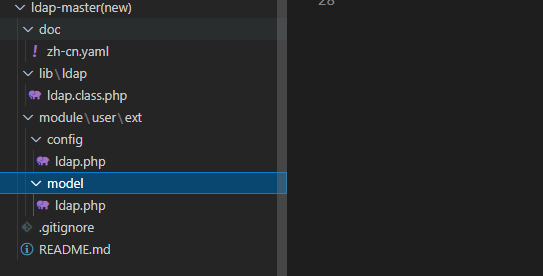
  如图所示

    zh-cn.yaml:插件信息,可以放一些介绍,安装介绍

    ldap.class.php:ldap相关操作,ldap连接、验证登录、查找用户、更新用户

    config/ldap.php:存放ldap相关配置,服务器地址、端口、ldap密码

    model/ldap.php: 覆盖原本禅道的逻辑,我的是/opt/zbox/app/zentao/module/user/model.php

                    你在此定义什么函数,在model.php中就会替换什么函数。

                    当然你也可以直接添加新的方法 public function fn(){}方式定义
二、代码介绍
1、ldap.class.php(位置:xxx/lib/ldap/ldap.class.php)实现ldap各种的业务逻辑
<?

function myLog($msg)

{

    global $config; // 引入的就是定义的config/ldap.php

    $logFilePath =  $config->ldap->ldap_log_filePath;

    file_put_contents($logFilePath, $msg . PHP_EOL, FILE_APPEND);

}

// 读配置文件

function getLdapConfig($key, $default = '')

{

    global $config;

    if (isset($config->ldap)) {

        return isset($config->ldap->$key) ? $config->ldap->$key : $default;

    } else {

        return '';

    }

}

/**

 * LDAP 登录验证s

 */

function my_ldap_login($uid, $password)

{

    global $config;

    try {

        $baseDn = $config->ldap->ldap_bind_dn; // 基础dn 可增加搜索条件,直接查询人员

        $uidFiled = $config->ldap->ldap_uid_field; // uid字段

        $user = "$uidFiled=$uid,$baseDn";

        $host = getLdapConfig('ldap_server');

        $port = getLdapConfig('ldap_port', '389');

        $version = getLdapConfig('ldap_version', 3);

        $referrals = getLdapConfig('ldap_referrals', 0);

        $conn = ldap_connect($host, $port); //不要写成ldap_connect($host.':'.$port)的形式

        if ($conn) {

            //设置参数

            ldap_set_option($conn, LDAP_OPT_PROTOCOL_VERSION, $version); //声明使用版本3

            ldap_set_option($conn, LDAP_OPT_REFERRALS, $referrals); // Binding to ldap server

            $bd = ldap_bind($conn, $user, $password);

            ldap_close($conn);

            return  $bd;

        } else {

            ldap_close($conn);

            return  false;

        }

    } catch (Exception $e) {

        ldap_close($conn);

        myLog("ldap连接失败");

        myLog($e->getMessage());

        return false;

    }

}

/**

 * LDAP 连接 host port 取得配置文件 传入参数没效

 */

function my_ldap_connect()

{

    try {

        $host = getLdapConfig('ldap_server');

        $port = getLdapConfig('ldap_port', '389');

        $user = getLdapConfig('ldap_root_dn', 'cn=xxx,dc=xxx,dc=xxx');

        $password = getLdapConfig('ldap_bind_passwd', '123456');

        $version = getLdapConfig('ldap_version', 3);

        $referrals = getLdapConfig('ldap_referrals', 0);

        $conn = ldap_connect($host, $port); //不要写成ldap_connect($host.':'.$port)的形式

        if ($conn) {

            //设置参数

            ldap_set_option($conn, LDAP_OPT_PROTOCOL_VERSION, $version); //声明使用版本3

            ldap_set_option($conn, LDAP_OPT_REFERRALS, $referrals); // Binding to ldap server

            $bd = ldap_bind($conn, $user, $password);

            return  $conn;

        } else {

            return  false;

        }

    } catch (Exception $e) {

        myLog("ldap连接失败");

        myLog($e->getMessage());

        return false;

    }

}

// 查询ldap用户

function queryLdapUser($account)

{

    global $config;

    $user_info = []; // 用户信息

    // 1.获取员工

    try {

        $baseDn = $config->ldap->ldap_bind_dn; // 基础dn 可增加搜索条件,直接查询人员

        $uidFiled = $config->ldap->ldap_uid_field; // uid字段

        $uid = $account; // 用户uid

        $user_info = []; // 用户信息

        // 连接ldap

        $conn = my_ldap_connect();

        $dn = "$uidFiled=$uid,$baseDn";

        // ===========读取===========

        $search_filter = "($uidFiled=$uid)"; //设置uid过滤

        // $justthese = array('dn', 'o'); //设置输出属性 , 不传查询所有

        $search_dn = $baseDn;

        $search_id = ldap_search($conn, $search_dn, $search_filter);

        $res = ldap_get_entries($conn, $search_id); //结果

        if (!!$res[0]) {

            $user_info = $res["0"];

        }

        // ===========读取===========

        ldap_close($conn);

        return $user_info;

    } catch (\Throwable $th) {

        ldap_close($conn);

        myLog('==========error=========');

        myLog(print_r($th, true));

        myLog('==========error=========');

    }

}
2、config/ldap.php(位置:xxx/module/user/ext/config)ldap配置
<?

$config->ldap->ldap_server                      = '111:111:111:111'; // ldap地址

$config->ldap->ldap_port                        = '389'; // ldap地址 port

$config->ldap->ldap_root_dn                     = 'cn=xx,dc=xxx,dc=xxx'; // admin路径

$config->ldap->ldap_bind_passwd                 = 'password'; //密码

$config->ldap->ldap_uid_field                   = 'uid'; // uid

$config->ldap->ldap_bind_dn                     = 'ou=xxx,dc=xxx,dc=xxx'; // 域

$config->ldap->ldap_version                     = 3; // 版本

$config->ldap->ldap_referrals                   = 0; // 开启referrals

$config->ldap->ldap_log_filePath                = '/home/pdf/wuhao.log'; // 日志地址
3、model/ldap.php(位置:xxx/module/user/ext/model)具体覆盖逻辑,登录需要覆盖的是 identify 函数
注意:
(1)有些函数加了public修饰,则需要用$this->fn才能访问到
(2)此处不能有<?,需要是干净的代码(PS:不信可以试试,哈哈)
function identify($account, $password)

{

    if (!$account or !$password) return false;

    //$shaPasswd = '{SHA}' . base64_encode(pack('H*', sha1($password)));

    // 1.admin 不进行ldap验证,直接验证密码。

    if ($account == "admin") {

        /* If the length of $password is 32 or 40, checking by the auth hash. */

        $record = $this->dao->select('*')->from(TABLE_USER)

            ->where('account')->eq($account)

            ->beginIF(strlen($password) < 32)->andWhere('password')->eq(md5($password))->fi()

            ->andWhere('deleted')->eq(0)

            ->fetch();

        return $record;

    }

    // 引入定义的ldap业务逻辑

    $this->app->loadClass('ldap', true);

    // 2.验证员工账号密码是否匹配

    $checkUser = my_ldap_login($account, $password);

    $record = ""; // 禅道查询的账号

    if ($checkUser) {

        // 员工

        $ldapUser = queryLdapUser($account);

        $ldapDep = $ldapUser["departmentnumber"]["0"];

        $ldapTitle = $ldapUser["title"]["0"];

        // 分类id

        $otherData = $this->getUserOtherData($ldapDep, $ldapTitle);

        // 用户信息

        $userInfo = [

            "dept" => $otherData["dept"], // 0

            "group" =>  $otherData["group"], // 权限2

            "role" =>  $otherData["role"],  // ""

            "commiter" =>  $otherData["commiter"],  // ""

            "realname" => $ldapUser["displayname"]["0"],

            "gender" => $ldapUser["sex"]["0"] == "男" ? "m" : "f",

            "email" => $ldapUser["mail"]["0"],

            "join" => date("Y-m-d H:i:s", $ldapUser["entrytime"]["0"]),

            "password" => md5($password),

            "account" => $account,

        ];

        // 3.查询是否存在此人

        $record = $this->dao->select('*')->from(TABLE_USER)

            ->where('account')->eq($account)

            // ->beginIF(strlen($password) < 32)->andWhere('password')->eq(md5($password))->fi()

            ->andWhere('deleted')->eq(0)

            ->fetch();

        if (!!$record) {

            // 4.存在,返回数据, 更新下用户数据

            $this->myUpdateUser($userInfo);

        } else {

            // 5.不存在此人,添加

            $this->myCreateUser($userInfo);

            // 6.添加后将此人信息回查

            $record = $this->dao->select('*')->from(TABLE_USER)

                ->where('account')->eq($account)

                // ->beginIF(strlen($password) < 32)->andWhere('password')->eq(md5($password))->fi()

                ->andWhere('deleted')->eq(0)

                ->fetch();

        }

    }

    $user = false;

    if ($record) {

        $passwordLength = strlen($password);

        if ($passwordLength < 32) {

            $user = $record;

        } elseif ($passwordLength == 32) {

            $hash = $this->session->rand ? md5($record->password . $this->session->rand) : $record->password;

            // $user = $password == $hash ? $record : '';

            $user = $record;

        } elseif ($passwordLength == 40) {

            $hash = sha1($record->account . $record->password . $record->last);

            $user = $password == $hash ? $record : '';

        }

        if (!$user and md5($password) == $record->password) $user = $record;

    }

    if ($user) {

        $ip   = $this->server->remote_addr;

        $last = $this->server->request_time;

        /* code for bug #2729. */

        if (defined('IN_USE')) $this->dao->update(TABLE_USER)->set('visits = visits + 1')->set('ip')->eq($ip)->set('last')->eq($last)->where('account')->eq($account)->exec();

        // 验证密码强度, 如果你需要可以放开

        // $user->lastTime       = $user->last;

        // $user->last           = date(DT_DATETIME1, $last);

        // $user->admin          = strpos($this->app->company->admins, ",{$user->account},") !== false;

        // $user->modifyPassword = ($user->visits == 0 and !empty($this->config->safe->modifyPasswordFirstLogin));

        // if ($user->modifyPassword) $user->modifyPasswordReason = 'modifyPasswordFirstLogin';

        // if (!$user->modifyPassword and !empty($this->config->safe->changeWeak)) {

        //     $user->modifyPassword = $this->loadModel('admin')->checkWeak($user);

        //     if ($user->modifyPassword) $user->modifyPasswordReason = 'weak';

        // }

        /* Create cycle todo in login. */

        // $todoList = $this->dao->select('*')->from(TABLE_TODO)->where('cycle')->eq(1)->andWhere('account')->eq($user->account)->fetchAll('id');

        // $this->loadModel('todo')->createByCycle($todoList);

    }

    return $user;

}

/**

*    修改为不检验登录次数

*/

function failPlus($account) {

    return 0;

}

/**

*    添加成员

*/

public function myCreateUser($userInfo) {

    $dept = $userInfo["dept"]; //

    $realname = $userInfo["realname"]; //

    $role = $userInfo["role"]; //

    $commiter = $userInfo["commiter"]; //

    $gender = $userInfo["gender"]; //

    $email = $userInfo["email"]; //

    $join = $userInfo["join"]; //

    $password = $userInfo["password"]; //

    $group = $userInfo["group"]; // 分组,无分组无法

    $account = $userInfo["account"]; // 用户名

    $user = fixer::input('post')

        ->remove('password')

        ->setDefault('join', $join)

        ->setDefault('password', $password)

        ->setDefault('dept', $dept)

        ->setDefault('realname', $realname)

        ->setDefault('role', $role)

        ->setDefault('commiter', $commiter)

        ->setDefault('gender', $gender)

        ->remove('group, password1, password2, verifyPassword, passwordStrength, newPassword, referer, verifyRand, keepLogin')

        ->get();

    $this->dao->insert(TABLE_USER)->data($user)

        ->autoCheck()

        ->batchCheck($this->config->user->create->requiredFields, 'notempty')

        ->check('account', 'unique')

        ->check('account', 'account')

        ->checkIF($email != '', 'email', 'email')

        ->exec();

    if (!dao::isError()) {

        $userID = $this->dao->lastInsertID();

        if ($userInfo["group"]) {

            // 角色

            $sql = "INSERT INTO zt_usergroup VALUES('$account', '".$userInfo["group"]."')";

            $row = $this->dbh->query($sql);

        }

        $this->computeUserView($user->account);

        $this->loadModel('action')->create('user', $userID, 'Created');

        $this->loadModel('mail');

        if ($this->config->mail->mta == 'sendcloud' and !empty($user->email)) $this->mail->syncSendCloud('sync', $user->email, $user->realname);

    }

    return $user;

}

/**

*    根据自己需求,改造一下

*/

public function getUserOtherData($ldapDep, $ldapTitle){

    return [

        "dept" => -1, // 部门,只能是数字

        "role" => "", // 职位

        "commiter" => "",

        "group" => 2, // 权限

    ];

}

/**

*   更新用户信息

*/

public function myUpdateUser($userInfo){

    $account = $userInfo["account"]; // 用户名

    $needUpdate = [

        $dept => $userInfo["dept"],

        $realname => $userInfo["realname"],

        $role => $userInfo["role"],

        $email => $userInfo["email"],

        $join => $userInfo["join"],

        $password => $userInfo["password"],

    ]; // 需要更新的字段

    // 不为null则更新

    $update = [];

    foreach ($needUpdate as $key => $value) {

        if(!is_null($value)){

            $update[] = "`$key` = '$value'";

        }

    }

    $update = implode(", ", $update);

    // 更新某些信息

    $sql = "UPDATE zt_user SET $update  WHERE account = '$account'";

    $this->dbh->exec($sql);

}
三、打包(压缩)
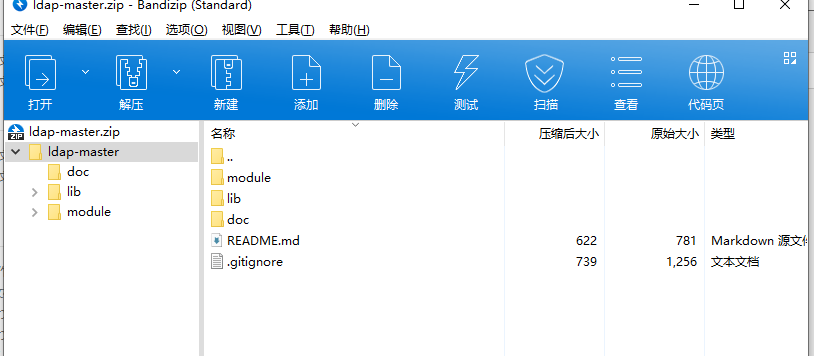
  如图所示

    需要打包(压缩)后仍然保留最外层文件夹,否则无法解析。
四、使用
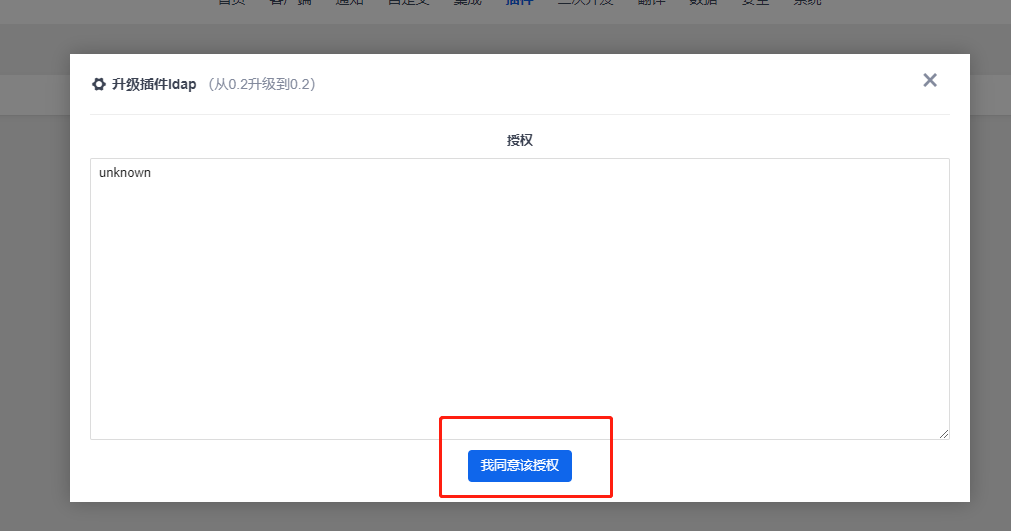
  如图所示

    1、使用admin进入管理后台,选择插件,再根据提示, touch /opt/zbox/app/zentao/www/ok.txt,创建文件夹。

    2、刷新后点击本地安装,上传打包后的文件,跟着提示走完

    3、点击授权,插件已经安装好了。

    4、修改 /opt/zbox/app/zentao/config/my.php 文件,添加$config->notMd5Pwd = true;




搞定!禅道开源版 Ldap认证插件开发的更多相关文章
- 远程访问禅道开源版数据库(基于docker)
navicat访问基于docker搭建的禅道的数据库,报错”2003 can't connect to MySQL server on '' (10061 'unknown error')“ 一.开启 ...
- 学习笔记——Ubuntu下使用Docker包部署禅道任务管理系统
写此文目的:利用搭建禅道环境联系Docker基本使用方法,加深对Docker容器的理解,Ubuntu下面才能原生运行Docker,因此选择了Ubuntu 1.下载禅道开源版 wget http://d ...
- 禅道在docker上部署与迁移
一.禅道部署 1.下载地址 禅道开源版: http://dl.cnezsoft.com/zentao/docker/docker_zentao.zip 数据库用户名: root,默认密码: 123 ...
- Linux部署禅道Steps&Q&A
1.查看Linux的位数: getconf LONG_BIT 结果:32/64 2. 禅道开源版安装包下载 Linux 64位 下载站点1: http://sourceforge.net/projec ...
- linux 安装禅道
1. 查看Linux服务器版本信息 # cat /etc/redhat-release CentOS Linux release 7.4.1708 (Core) 2. 禅道开源版安装包下载 # wge ...
- 将禅道部署到腾讯云linux 上
部署环境 :linux(腾讯云),用到了 xshell FileZilla 使用禅道集成环境lampp直接部署 1.首先下载 lampp j集成环境包.https://sourceforge.ne ...
- 禅道ZenTao在windows和Lniux下集成安装环境和一键安装方法整理
一共4种安装方法看官可以根据你自己的实际环境来选择一个都很简单 windows下用禅道官网的一键安装包方法(推荐): 为了简化大家在windows下面的安装,我们在xampp基础上做了禅道的windo ...
- 如何在Linux服务器上部署禅道
最近换了新的项目团队,由于新团队比较年轻化,没有实行正规的项目管理,于是我自告奋勇要为团队管理出一份力,帮助团队建立敏捷化的项目管理,经过多方考究和对比后,选择了目前较受欢迎的开源项目管理软件:禅道. ...
- 禅道——Linux服务器部署禅道
前言 2019年6月14日 22:01:24 看看时间我知道,我离猝死依然不远~ 禅道是什么 | 禅道是专业的研发项目管理软件 禅道的官网 | https://www.zentao.net/ 禅道开源 ...
随机推荐
- MySQL(四)——
MySQL官方对索引的定义:索引(Index)是帮助MySQL高效获取数据的数据结构.因此索引的本质就是数据结构.索引的目的在于提高查询效率,可类比字典.书籍的目录等这种形式. 可简单理解为" ...
- git跟踪忽略规则文件.gitignore
在使用Git的过程中,我们希望有的文件比如临时文件,编译的中间文件等不要被跟踪,也不需要提交到代码仓库,这时就要设置相应的忽略规则,来忽略这些文件的提交. 配置语法 以斜杠"/"开 ...
- Hive的分桶表
[分桶概述] Hive表分区的实质是分目录(将超大表的数据按指定标准细分到指定目录),且分区的字段不属于Hive表中存在的字段:分桶的实质是分文件(将超大文件的数据按指定标准细分到分桶文件),且分桶的 ...
- leetcode数组典型题目小结
数组与矩阵 数组与矩阵的基本知识: 1.数组:数组是在程序设计中,为了处理方便, 把具有相同类型的若干元素按有序的形式组织起来的一种形式. 首先,数组会利用索引来记录每个元素在数组中的位置,且在大多数 ...
- k8s资源管理(基础操作)
1. 基础 本文实操基于k8s 1.22.1 # 可以查看资源分配情况 kubectl describe node # 全局资源情况查看 kubectl api-resources 1.1 apply ...
- 前端框架VUE——安装及初始化
本篇文章适合,想要学习 vue,但对 vue 又没有接触过的同学阅读,是非常基础的内容.告诉大家使用 vue 时的安装方式,及如何创建实例,展示内容. 一.安装方式 vue 是一种前端框架,所以使用前 ...
- Tars | 第8篇 TarsJava Subset最终代码的执行流程与原理分析
目录 前言 1. SubsetConf配置项的结构 1.1 SubsetConf 1.2 RatioConfig 1.3 KeyConfig 1.4 KeyRoute 1.5 SubsetConf的结 ...
- Linux内核中断顶半部和底半部的理解
文章目录 中断上半部.下半部的概念 实现中断下半部的三种方法 软中断 软中断模版 tasklet tasklet函数模版 工作队列 工作队列函数模版 进程上下文和中断上下文 软中断和硬中断的区别 硬中 ...
- STM32CbueIDE 体验
STM32CbueIDE 体验 下载安装 官网下载链接:https://www.st.com/zh/development-tools/stm32cubeide.html. 软件启动时会令设置工作目录 ...
- php move_uploaded_file保存文件失败
move_uploaded_file保存失败后找错,先使用了try catch,但是没输出信息,才知道该函数在php中是警告属于error,不属于exeption,因此不能通过简单的if(!...)处 ...