
K8s 部署 Prometheus + Grafana
一、简介
1. Prometheus
- 一款开源的监控&报警&时间序列数据库的组合,起始是由 SoundCloud 公司开发的
- 基本原理是通过 HTTP 协议周期性抓取被监控组件的状态,这样做的好处是任意组件只要提供 HTTP 接口就可以接入监控系统,不需要任何 SDK 或者其他的集成过程。这样做非常适合虚拟化环境比如 VM 或者 Docker
- 输出被监控组件信息的 HTTP 接口被叫做 exporter 。目前互联网公司常用的组件大部分都有 exporter 可以直接使用,比如 Varnish、Haproxy、Nginx、MySQL、Linux 系统信息(包括磁盘、内存、CPU、网络等),具体支持的源看:https://github.com/prometheus
- 特点:
- 一个多维数据模型(时间序列由指标名称定义和设置键/值尺寸)
- 非常高效的存储,平均一个采样数据占 ~3.5bytes 左右,320 万的时间序列,每 30 秒采样,保持 60 天,消耗磁盘大概 228G
- 一种灵活的查询语言
- 不依赖分布式存储,单个服务器节点
- 时间集合通过 HTTP 上的 PULL 模型进行
- 通过中间网关支持推送时间
- 通过服务发现或静态配置发现目标
- 多种模式的图形和仪表板支持
2. Grafana
- 一个跨平台的开源的度量分析和可视化工具,可以通过将采集的数据查询然后可视化的展示,并及时通知
- 特点:
- 展示方式:快速灵活的客户端图表,面板插件有许多不同方式的可视化指标和日志,官方库中具有丰富的仪表盘插件,如热图、折线图、图表等多种展示方式
- 数据源:Graphite,InfluxDB,OpenTSDB,Prometheus,Elasticsearch,CloudWatch 和 KairosDB 等
- 通知提醒:以可视方式定义最重要指标的警报规则,Grafana 将不断计算并发送通知,在数据达到阈值时通过 Slack、PagerDuty 等获得通知
- 混合展示:在同一图表中混合使用不同的数据源,可以基于每个查询指定数据源,甚至自定义数据源
- 注释:使用来自不同数据源的丰富事件注释图表,将鼠标悬停在事件上会显示完整的事件元数据和标记
- 过滤器:Ad-hoc 过滤器允许动态创建新的键/值过滤器,这些过滤器会自动应用于使用该数据源的所有查询
3. 效果展示
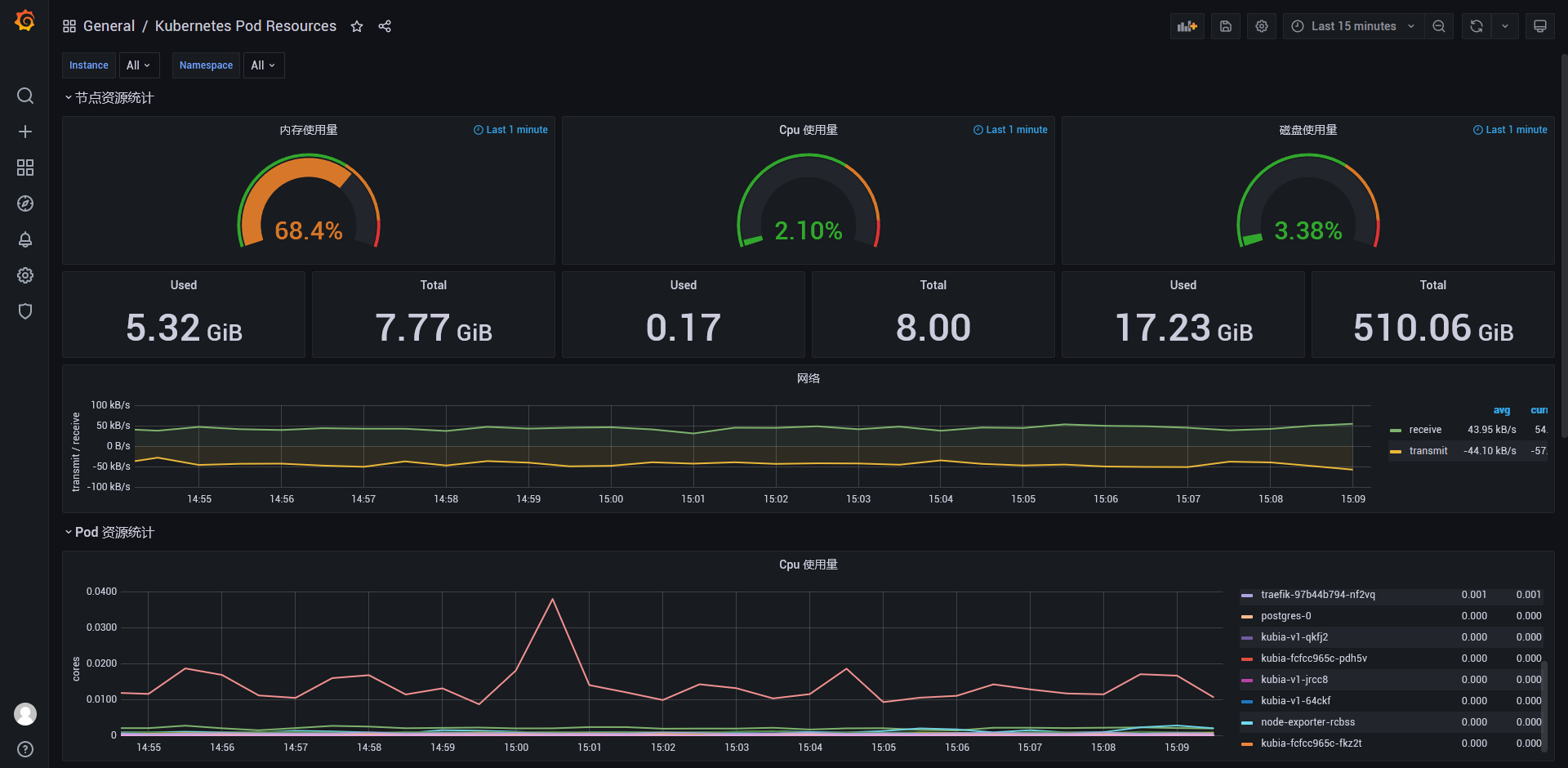
二、部署
$ kubectl create ns ns-monitor

$ kubectl create -f ...

$ kubectl get all -n ns-monitor

NAME                              READY   STATUS    RESTARTS   AGE

pod/node-exporter-rcbss           1/1     Running   0          4h41m

pod/grafana-5567c66c9d-49b5w      1/1     Running   0          4h25m

pod/prometheus-5ccc8db98f-lkwf5   1/1     Running   0          3h12m

NAME                            TYPE       CLUSTER-IP      EXTERNAL-IP   PORT(S)          AGE

service/node-exporter-service   NodePort   10.43.75.152    <none>        9100:31672/TCP   4h41m

service/grafana-service         NodePort   10.43.26.238    <none>        3000:32534/TCP   4h25m

service/prometheus-service      NodePort   10.43.174.110   <none>        9090:31396/TCP   3h12m
没有配置
nodePort,端口随机生成
1. node-exporter
- 用于采集 k8s 集群中各个节点的物理指标,如 Memory、CPU 等。可以直接在每个物理节点直接安装
kind: DaemonSet

apiVersion: apps/v1

metadata:

  labels:

    app: node-exporter

  name: node-exporter

  namespace: ns-monitor

spec:

  revisionHistoryLimit: 10

  selector:

    matchLabels:

      app: node-exporter

  template:

    metadata:

      labels:

        app: node-exporter

    spec:

      containers:

        - name: node-exporter

          image: prom/node-exporter:v0.16.0

          ports:

            - containerPort: 9100

              protocol: TCP

              name:	http

      hostNetwork: true  # 获得Node的物理指标信息

      hostPID: true  # 获得Node的物理指标信息

#      tolerations:  # Master节点

#        - effect: NoSchedule

#          operator: Exists

---

kind: Service

apiVersion: v1

metadata:

  labels:

    app: node-exporter

  name: node-exporter-service

  namespace: ns-monitor

spec:

  ports:

    - name:	http

      port: 9100

      nodePort: 31672

      protocol: TCP

  type: NodePort

  selector:

    app: node-exporter
http://192.168.11.210:31672/metrics
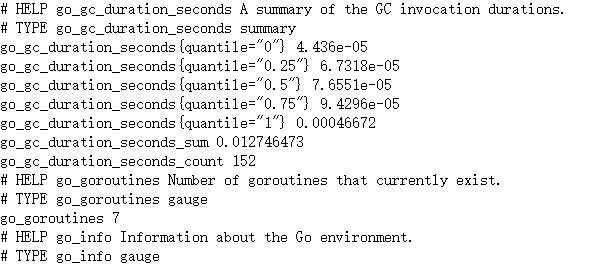
2. Prometheus
apiVersion: rbac.authorization.k8s.io/v1

kind: ClusterRole

metadata:

  name: prometheus

rules:

  - apiGroups: [""]  # "" indicates the core API group

    resources:

      - nodes

      - nodes/proxy

      - services

      - endpoints

      - pods

    verbs:

      - get

      - watch

      - list

  - apiGroups:

      - extensions

    resources:

      - ingresses

    verbs:

      - get

      - watch

      - list

  - nonResourceURLs: ["/metrics"]

    verbs:

      - get

---

apiVersion: v1

kind: ServiceAccount

metadata:

  name: prometheus

  namespace: ns-monitor

  labels:

    app: prometheus

---

apiVersion: rbac.authorization.k8s.io/v1

kind: ClusterRoleBinding

metadata:

  name: prometheus

subjects:

  - kind: ServiceAccount

    name: prometheus

    namespace: ns-monitor

roleRef:

  kind: ClusterRole

  name: prometheus

  apiGroup: rbac.authorization.k8s.io

---

apiVersion: v1

kind: ConfigMap

metadata:

  name: prometheus-conf

  namespace: ns-monitor

  labels:

    app: prometheus

data:

  prometheus.yml: |-

    # my global config

    global:

      scrape_interval:     15s  # Set the scrape interval to every 15 seconds. Default is every 1 minute.

      evaluation_interval: 15s  # Evaluate rules every 15 seconds. The default is every 1 minute.

      # scrape_timeout is set to the global default (10s).

    # Alertmanager configuration

    alerting:

      alertmanagers:

      - static_configs:

        - targets:

          # - alertmanager:9093

    # Load rules once and periodically evaluate them according to the global 'evaluation_interval'.

    rule_files:

      # - "first_rules.yml"

      # - "second_rules.yml"

    # A scrape configuration containing exactly one endpoint to scrape:

    # Here it's Prometheus itself.

    scrape_configs:

      # The job name is added as a label `job=<job_name>` to any timeseries scraped from this config.

      - job_name: 'prometheus'

        # metrics_path defaults to '/metrics'

        # scheme defaults to 'http'.

        static_configs:

          - targets: ['localhost:9090']

      - job_name: 'grafana'

        static_configs:

          - targets:

              - 'grafana-service.ns-monitor:3000'

      - job_name: 'kubernetes-apiservers'

        kubernetes_sd_configs:

        - role: endpoints

        # Default to scraping over https. If required, just disable this or change to

        # `http`.

        scheme: https

        # This TLS & bearer token file config is used to connect to the actual scrape

        # endpoints for cluster components. This is separate to discovery auth

        # configuration because discovery & scraping are two separate concerns in

        # Prometheus. The discovery auth config is automatic if Prometheus runs inside

        # the cluster. Otherwise, more config options have to be provided within the

        # <kubernetes_sd_config>.

        tls_config:

          ca_file: /var/run/secrets/kubernetes.io/serviceaccount/ca.crt

          # If your node certificates are self-signed or use a different CA to the

          # master CA, then disable certificate verification below. Note that

          # certificate verification is an integral part of a secure infrastructure

          # so this should only be disabled in a controlled environment. You can

          # disable certificate verification by uncommenting the line below.

          #

          # insecure_skip_verify: true

        bearer_token_file: /var/run/secrets/kubernetes.io/serviceaccount/token

        # Keep only the default/kubernetes service endpoints for the https port. This

        # will add targets for each API server which Kubernetes adds an endpoint to

        # the default/kubernetes service.

        relabel_configs:

        - source_labels: [__meta_kubernetes_namespace, __meta_kubernetes_service_name, __meta_kubernetes_endpoint_port_name]

          action: keep

          regex: default;kubernetes;https

      # Scrape config for nodes (kubelet).

      #

      # Rather than connecting directly to the node, the scrape is proxied though the

      # Kubernetes apiserver.  This means it will work if Prometheus is running out of

      # cluster, or can't connect to nodes for some other reason (e.g. because of

      # firewalling).

      - job_name: 'kubernetes-nodes'

        # Default to scraping over https. If required, just disable this or change to

        # `http`.

        scheme: https

        # This TLS & bearer token file config is used to connect to the actual scrape

        # endpoints for cluster components. This is separate to discovery auth

        # configuration because discovery & scraping are two separate concerns in

        # Prometheus. The discovery auth config is automatic if Prometheus runs inside

        # the cluster. Otherwise, more config options have to be provided within the

        # <kubernetes_sd_config>.

        tls_config:

          ca_file: /var/run/secrets/kubernetes.io/serviceaccount/ca.crt

        bearer_token_file: /var/run/secrets/kubernetes.io/serviceaccount/token

        kubernetes_sd_configs:

        - role: node

        relabel_configs:

        - action: labelmap

          regex: __meta_kubernetes_node_label_(.+)

        - target_label: __address__

          replacement: kubernetes.default.svc:443

        - source_labels: [__meta_kubernetes_node_name]

          regex: (.+)

          target_label: __metrics_path__

          replacement: /api/v1/nodes/${1}/proxy/metrics

      # Scrape config for Kubelet cAdvisor.

      #

      # This is required for Kubernetes 1.7.3 and later, where cAdvisor metrics

      # (those whose names begin with 'container_') have been removed from the

      # Kubelet metrics endpoint.  This job scrapes the cAdvisor endpoint to

      # retrieve those metrics.

      #

      # In Kubernetes 1.7.0-1.7.2, these metrics are only exposed on the cAdvisor

      # HTTP endpoint; use "replacement: /api/v1/nodes/${1}:4194/proxy/metrics"

      # in that case (and ensure cAdvisor's HTTP server hasn't been disabled with

      # the --cadvisor-port=0 Kubelet flag).

      #

      # This job is not necessary and should be removed in Kubernetes 1.6 and

      # earlier versions, or it will cause the metrics to be scraped twice.

      - job_name: 'kubernetes-cadvisor'

        # Default to scraping over https. If required, just disable this or change to

        # `http`.

        scheme: https

        # This TLS & bearer token file config is used to connect to the actual scrape

        # endpoints for cluster components. This is separate to discovery auth

        # configuration because discovery & scraping are two separate concerns in

        # Prometheus. The discovery auth config is automatic if Prometheus runs inside

        # the cluster. Otherwise, more config options have to be provided within the

        # <kubernetes_sd_config>.

        tls_config:

          ca_file: /var/run/secrets/kubernetes.io/serviceaccount/ca.crt

        bearer_token_file: /var/run/secrets/kubernetes.io/serviceaccount/token

        kubernetes_sd_configs:

        - role: node

        relabel_configs:

        - action: labelmap

          regex: __meta_kubernetes_node_label_(.+)

        - target_label: __address__

          replacement: kubernetes.default.svc:443

        - source_labels: [__meta_kubernetes_node_name]

          regex: (.+)

          target_label: __metrics_path__

          replacement: /api/v1/nodes/${1}/proxy/metrics/cadvisor

      # Scrape config for service endpoints.

      #

      # The relabeling allows the actual service scrape endpoint to be configured

      # via the following annotations:

      #

      # * `prometheus.io/scrape`: Only scrape services that have a value of `true`

      # * `prometheus.io/scheme`: If the metrics endpoint is secured then you will need

      # to set this to `https` & most likely set the `tls_config` of the scrape config.

      # * `prometheus.io/path`: If the metrics path is not `/metrics` override this.

      # * `prometheus.io/port`: If the metrics are exposed on a different port to the

      # service then set this appropriately.

      - job_name: 'kubernetes-service-endpoints'

        kubernetes_sd_configs:

        - role: endpoints

        relabel_configs:

        - source_labels: [__meta_kubernetes_service_annotation_prometheus_io_scrape]

          action: keep

          regex: true

        - source_labels: [__meta_kubernetes_service_annotation_prometheus_io_scheme]

          action: replace

          target_label: __scheme__

          regex: (https?)

        - source_labels: [__meta_kubernetes_service_annotation_prometheus_io_path]

          action: replace

          target_label: __metrics_path__

          regex: (.+)

        - source_labels: [__address__, __meta_kubernetes_service_annotation_prometheus_io_port]

          action: replace

          target_label: __address__

          regex: ([^:]+)(?::\d+)?;(\d+)

          replacement: $1:$2

        - action: labelmap

          regex: __meta_kubernetes_service_label_(.+)

        - source_labels: [__meta_kubernetes_namespace]

          action: replace

          target_label: kubernetes_namespace

        - source_labels: [__meta_kubernetes_service_name]

          action: replace

          target_label: kubernetes_name

      # Example scrape config for probing services via the Blackbox Exporter.

      #

      # The relabeling allows the actual service scrape endpoint to be configured

      # via the following annotations:

      #

      # * `prometheus.io/probe`: Only probe services that have a value of `true`

      - job_name: 'kubernetes-services'

        metrics_path: /probe

        params:

          module: [http_2xx]

        kubernetes_sd_configs:

        - role: service

        relabel_configs:

        - source_labels: [__meta_kubernetes_service_annotation_prometheus_io_probe]

          action: keep

          regex: true

        - source_labels: [__address__]

          target_label: __param_target

        - target_label: __address__

          replacement: blackbox-exporter.example.com:9115

        - source_labels: [__param_target]

          target_label: instance

        - action: labelmap

          regex: __meta_kubernetes_service_label_(.+)

        - source_labels: [__meta_kubernetes_namespace]

          target_label: kubernetes_namespace

        - source_labels: [__meta_kubernetes_service_name]

          target_label: kubernetes_name

      # Example scrape config for probing ingresses via the Blackbox Exporter.

      #

      # The relabeling allows the actual ingress scrape endpoint to be configured

      # via the following annotations:

      #

      # * `prometheus.io/probe`: Only probe services that have a value of `true`

      - job_name: 'kubernetes-ingresses'

        metrics_path: /probe

        params:

          module: [http_2xx]

        kubernetes_sd_configs:

          - role: ingress

        relabel_configs:

          - source_labels: [__meta_kubernetes_ingress_annotation_prometheus_io_probe]

            action: keep

            regex: true

          - source_labels: [__meta_kubernetes_ingress_scheme,__address__,__meta_kubernetes_ingress_path]

            regex: (.+);(.+);(.+)

            replacement: ${1}://${2}${3}

            target_label: __param_target

          - target_label: __address__

            replacement: blackbox-exporter.example.com:9115

          - source_labels: [__param_target]

            target_label: instance

          - action: labelmap

            regex: __meta_kubernetes_ingress_label_(.+)

          - source_labels: [__meta_kubernetes_namespace]

            target_label: kubernetes_namespace

          - source_labels: [__meta_kubernetes_ingress_name]

            target_label: kubernetes_name

      # Example scrape config for pods

      #

      # The relabeling allows the actual pod scrape endpoint to be configured via the

      # following annotations:

      #

      # * `prometheus.io/scrape`: Only scrape pods that have a value of `true`

      # * `prometheus.io/path`: If the metrics path is not `/metrics` override this.

      # * `prometheus.io/port`: Scrape the pod on the indicated port instead of the

      # pod's declared ports (default is a port-free target if none are declared).

      - job_name: 'kubernetes-pods'

        kubernetes_sd_configs:

        - role: pod

        relabel_configs:

        - source_labels: [__meta_kubernetes_pod_annotation_prometheus_io_scrape]

          action: keep

          regex: true

        - source_labels: [__meta_kubernetes_pod_annotation_prometheus_io_path]

          action: replace

          target_label: __metrics_path__

          regex: (.+)

        - source_labels: [__address__, __meta_kubernetes_pod_annotation_prometheus_io_port]

          action: replace

          regex: ([^:]+)(?::\d+)?;(\d+)

          replacement: $1:$2

          target_label: __address__

        - action: labelmap

          regex: __meta_kubernetes_pod_label_(.+)

        - source_labels: [__meta_kubernetes_namespace]

          action: replace

          target_label: kubernetes_namespace

        - source_labels: [__meta_kubernetes_pod_name]

          action: replace

          target_label: kubernetes_pod_name

---

apiVersion: v1

kind: ConfigMap

metadata:

  name: prometheus-rules

  namespace: ns-monitor

  labels:

    app: prometheus

data:

  cpu-usage.rule: |

    groups:

      - name: NodeCPUUsage

        rules:

          - alert: NodeCPUUsage

            expr: (100 - (avg by (instance) (irate(node_cpu{name="node-exporter",mode="idle"}[5m])) * 100)) > 75

            for: 2m

            labels:

              severity: "page"

            annotations:

              summary: "{{$labels.instance}}: High CPU usage detected"

              description: "{{$labels.instance}}: CPU usage is above 75% (current value is: {{ $value }})"

---

apiVersion: v1

kind: PersistentVolume

metadata:

  name: "prometheus-data-pv"

  labels:

    name: prometheus-data-pv

    release: stable

spec:

  capacity:

    storage: 5Gi

  accessModes:

    - ReadWriteOnce

  persistentVolumeReclaimPolicy: Recycle

  nfs:

    path: /nfs/prometheus/data

    server: 192.168.11.210

---

apiVersion: v1

kind: PersistentVolumeClaim

metadata:

  name: prometheus-data-pvc

  namespace: ns-monitor

spec:

  accessModes:

    - ReadWriteOnce

  resources:

    requests:

      storage: 5Gi

  selector:

    matchLabels:

      name: prometheus-data-pv

      release: stable

---

kind: Deployment

apiVersion: apps/v1

metadata:

  labels:

    app: prometheus

  name: prometheus

  namespace: ns-monitor

spec:

  replicas: 1

  revisionHistoryLimit: 10

  selector:

    matchLabels:

      app: prometheus

  template:

    metadata:

      labels:

        app: prometheus

    spec:

      serviceAccountName: prometheus

      securityContext:

        runAsUser: 0

      containers:

        - name: prometheus

          image: prom/prometheus:latest

          imagePullPolicy: IfNotPresent

          volumeMounts:

            - mountPath: /prometheus

              name: prometheus-data-volume

            - mountPath: /etc/prometheus/prometheus.yml

              name: prometheus-conf-volume

              subPath: prometheus.yml

            - mountPath: /etc/prometheus/rules

              name: prometheus-rules-volume

          ports:

            - containerPort: 9090

              protocol: TCP

      volumes:

        - name: prometheus-data-volume

          persistentVolumeClaim:

            claimName: prometheus-data-pvc

        - name: prometheus-conf-volume

          configMap:

            name: prometheus-conf

        - name: prometheus-rules-volume

          configMap:

            name: prometheus-rules

      tolerations:

        - key: node-role.kubernetes.io/master

          effect: NoSchedule

---

kind: Service

apiVersion: v1

metadata:

  annotations:

    prometheus.io/scrape: 'true'

  labels:

    app: prometheus

  name: prometheus-service

  namespace: ns-monitor

spec:

  ports:

    - port: 9090

      targetPort: 9090

  selector:

    app: prometheus

  type: NodePort
http://192.168.11.210:31396/targets
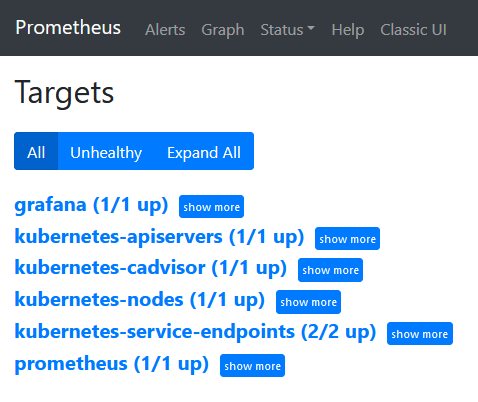
3. Grafana
apiVersion: v1

kind: PersistentVolume

metadata:

  name: "grafana-data-pv"

  labels:

    name: grafana-data-pv

    release: stable

spec:

  capacity:

    storage: 5Gi

  accessModes:

    - ReadWriteOnce

  persistentVolumeReclaimPolicy: Recycle

  nfs:

    path: /nfs/grafana/data

    server: 192.168.11.210

---

apiVersion: v1

kind: PersistentVolumeClaim

metadata:

  name: grafana-data-pvc

  namespace: ns-monitor

spec:

  accessModes:

    - ReadWriteOnce

  resources:

    requests:

      storage: 5Gi

  selector:

    matchLabels:

      name: grafana-data-pv

      release: stable

---

kind: Deployment

apiVersion: apps/v1

metadata:

  labels:

    app: grafana

  name: grafana

  namespace: ns-monitor

spec:

  replicas: 1

  revisionHistoryLimit: 10

  selector:

    matchLabels:

      app: grafana

  template:

    metadata:

      labels:

        app: grafana

    spec:

      securityContext:

        runAsUser: 0

      containers:

        - name: grafana

          image: grafana/grafana:latest

          imagePullPolicy: IfNotPresent

          env:

            - name: GF_AUTH_BASIC_ENABLED

              value: "true"

            - name: GF_AUTH_ANONYMOUS_ENABLED

              value: "false"

          readinessProbe:

            httpGet:

              path: /login

              port: 3000

          volumeMounts:

            - mountPath: /var/lib/grafana

              name: grafana-data-volume

          ports:

            - containerPort: 3000

              protocol: TCP

      volumes:

        - name: grafana-data-volume

          persistentVolumeClaim:

            claimName: grafana-data-pvc

---

kind: Service

apiVersion: v1

metadata:

  labels:

    app: grafana

  name: grafana-service

  namespace: ns-monitor

spec:

  ports:

    - port: 3000

      targetPort: 3000

  selector:

    app: grafana

  type: NodePort
配置数据源
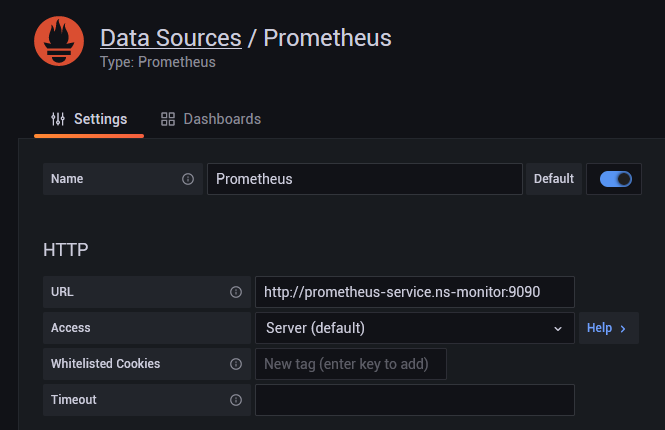
Import dashboard from file(非必须)
https://files.cnblogs.com/files/lb477/Kubernetes-Pod-Resources.json
参考:https://www.jianshu.com/p/ac8853927528
K8s 部署 Prometheus + Grafana的更多相关文章
- k8s实战之部署Prometheus+Grafana可视化监控告警平台
写在前面 之前部署web网站的时候,架构图中有一环节是监控部分,并且搭建一套有效的监控平台对于运维来说非常之重要,只有这样才能更有效率的保证我们的服务器和服务的稳定运行,常见的开源监控软件有好几种,如 ...
- k8b部署prometheus+grafana
来源: https://juejin.im/post/5c36054251882525a50bbdf0 https://github.com/redhatxl/k8s-prometheus-grafa ...
- 部署Prometheus+Grafana监控
Prometheus 1.不是很友好,各种配置都手写 2.对docker和k8s监控有成熟解决方案 Prometheus(普罗米修斯) 是一个最初在SoudCloud上构建的监控系统,开源项目,拥有非 ...
- kubenetes部署prometheus+grafana
文章目录 环境介绍 创建node-exporter 创建Prometheus 创建Grafana 测试 环境介绍 # 关于k8s的集群部署,可以查看我其他博客 [root@master ~]# cat ...
- k8s部署prometheus
https://www.kancloud.cn/huyipow/prometheus/527092 https://songjiayang.gitbooks.io/prometheus/content ...
- Rancher2.x 一键式部署 Prometheus + Grafana 监控 Kubernetes 集群
目录 1.Prometheus & Grafana 介绍 2.环境.软件准备 3.Rancher 2.x 应用商店 4.一键式部署 Prometheus 5.验证 Prometheus + G ...
- 群晖-使用docker套件部署Prometheus+Grafana
Docker 部署 Prometheus 说明: 先在群辉管理界面安装好docker套件,修改一下镜像源(更快一点) 所需容器如下 Prometheus Server(普罗米修斯监控主服务器 ) No ...
- Kubernetes部署Prometheus+Grafana(非存储持久化方式部署)
1.在master节点处新建一个文件夹,用于保存下载prometheus+granfana的yaml文件 mkdir /root/prometheus cd /root/prometheus git ...
- 【Linux】【Services】【SaaS】Docker+kubernetes(12. 部署prometheus/grafana/Influxdb实现监控)
1.简介 1.1. 官方网站: promethos:https://prometheus.io/ grafana:https://grafana.com/ 1.2. 架构图 2. 环境 2.1. 机器 ...
随机推荐
- base64stego 还不懂base64的隐写,详解15行代码带你领略
网上写了好多关于xctf MISC新手篇的base64Stego隐写的教程,但大都不太清楚,基本上都是讲了一段隐写原理,直接上代码了.但是代码是这道题的关键,代码讲了如何解码这个隐写的完整流程,这次我 ...
- J2SE基础题
J2SE基础 八种基本数据类型的大小,以及他们的封装类.(有的也说是9中基本数据类型,包括了void) 基本类型 大小(字节) 默认值 封装类 byte 1 (byte)0 Byte short 2 ...
- 获取显卡硬件信息lspci -vnn | grep VGA -A 12
lspci -vnn | grep VGA -A 12 lshw -C display lshw -c video | grep configuration glxinfo | grep OpenGL ...
- xl release 安装
前提,该版本需要jdk-1.8以上(包括1.8),内存大于等于2G,磁盘最小空间2G,操作系统windows或者unix-family xl release是一个端到端的管道编排工具. 下载XL-re ...
- 小白菜Windows10系统安装Linux(ubuntu)虚拟机超详细教程(全)
注:本文"( )"中的内容可忽略 1.下载VMware(威睿 计算机虚拟化软件) 官方下载地址 默认为最新版15.1.0,我们选择立即下载 (找一个比较大的盘不要是 ...
- 一、MegaCli命令介绍
一.MegaCli命令介绍 MegaCli是一款管理维护硬件RAID软件,可以用来查看raid信息等MegaCli 的Media Error Count: 0 Other Error Count: 0 ...
- Lua的string库函数列表
基本函数 函数 描述 示例 结果 len 计算字符串长度 string.len("abcd") 4 rep 返回字符串s的n个拷贝 string.rep("abcd&qu ...
- 浅析PriorityBlockingQueue优先级队列原理
介绍 当你看本文时,需要具备以下知识点 二叉树.完全二叉树.二叉堆.二叉树的表示方法 如果上述内容不懂也没关系可以先看概念. PriorityBlockingQueue是一个无界的基于数组的优先级阻塞 ...
- Jmeter- 笔记9 - CLI(无图形界面)
使用CLI模式,减少资源占用 用GUI调试好脚本 在jmeter的bin文件夹运行cmd,然后输入命令:jmeter -n -t [jmx file] -l [results file] -e -o ...
- noip模拟5[string·matrix·big·所驼门王的宝藏]
怎么说呢这一场考得还算可以呢 拿了120pts,主要是最后一个题灵光开窍,想起来是tarjan,然后勉勉强强拿了40pts,本来是可以拿满分的,害 没事考完了就要反思 这场考试我心态超好,从第一个题开 ...